1. Танилцуулга
Худалдан авалт хийсэнд баярлалааasing the Sharp HT-SB140MT 2.0 150W Soundbar. This soundbar is designed to enhance your audio experience, providing clear and powerful sound for your television, music, and other media. With its sleek design and versatile connectivity options, including Bluetooth, HDMI ARC/CEC, Optical, and Auxiliary inputs, it integrates seamlessly into any home entertainment setup. This manual provides essential information for safe and effective use, including setup, operation, maintenance, and troubleshooting.
2. Аюулгүй байдлын мэдээлэл
- Эрчим хүчний эх үүсвэр: Эрчим хүчний хангамжийн хэмжээг баталгаажуулна ууtage matches the requirements specified on the soundbar. Use only the provided power cable.
- Агааржуулалт: Do not block any ventilation openings. Maintain adequate space around the soundbar for proper airflow.
- Ус ба чийг: Do not expose the soundbar to dripping or splashing water. Do not place objects filled with liquids, such as vases, on the apparatus.
- Дулаан: Do not place the soundbar near heat sources such as radiators, heat registers, stoves, or other apparatus (including ampөргөгч) дулаан үүсгэдэг.
- Цэвэрлэгээ: Unplug the soundbar from the power outlet before cleaning. Use a dry, soft cloth for cleaning. Do not use liquid cleaners or aerosol cleaners.
- Үйлчилгээ: Энэ бүтээгдэхүүнд өөрөө үйлчлэх гэж бүү оролдоорой. Бүх засвар үйлчилгээг мэргэшсэн үйлчилгээний ажилтнуудад хандаарай.
- Батерей: The remote control uses a CR2 battery. Ensure correct polarity when inserting batteries. Do not mix old and new batteries.
3. Багцын агуулга
Бүх зүйл багцад байгаа эсэхийг шалгана уу:
- Sharp HT-SB140MT Soundbar
- Алсын удирдлага
- Цахилгаан кабель
- Хэрэглэгчийн гарын авлага (энэ баримт бичиг)
4. Бүтээгдэхүүн дууссанview

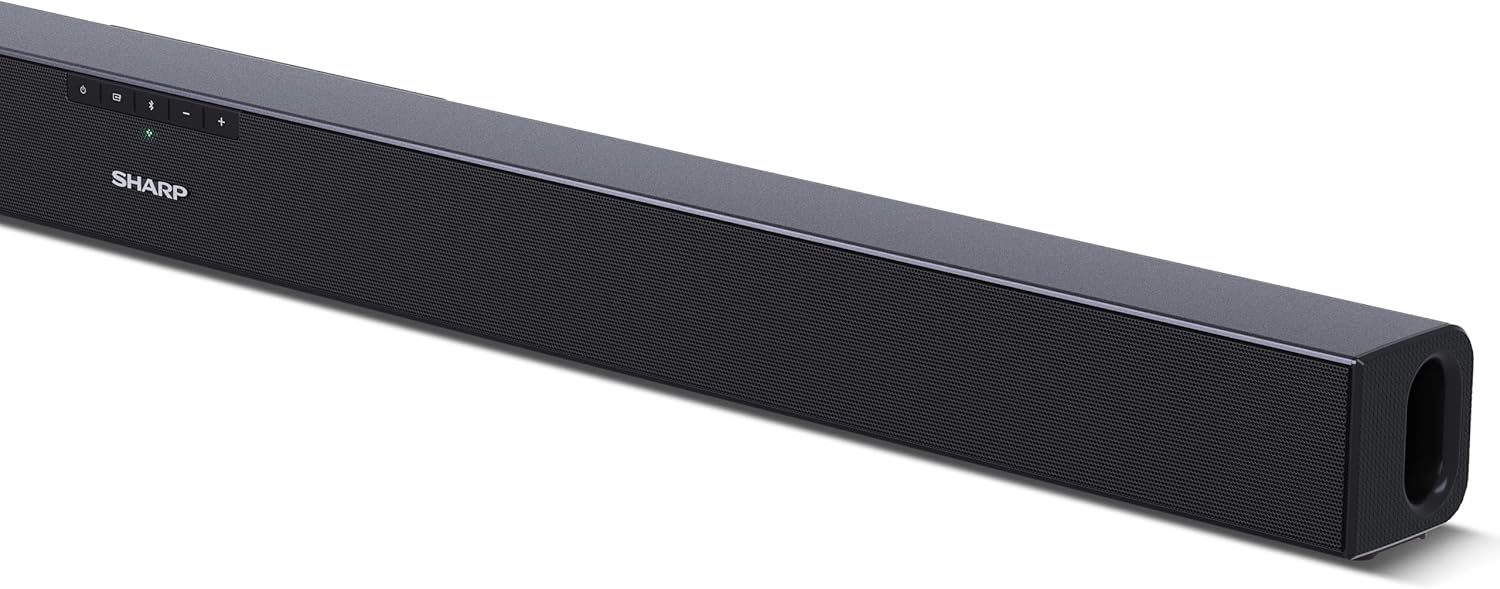
Зураг 4.1: Урд View
The front of the soundbar features the Sharp logo and LED indicators for source selection and status. Control buttons for power, input, and volume are located on the top panel.
Зураг 4.2: Ар талд View (Холболтууд)
The rear panel provides all necessary connection ports: HDMI ARC, Optical (S/PDIF), and Auxiliary (3.5mm) input, along with the power input.

Зураг 4.3: Алсын удирдлага
The included remote control allows for convenient operation of the soundbar, including power, input selection, volume, bass, and treble adjustments.
5. Тохиргоо
5.1 Байршил
The Sharp HT-SB140MT Soundbar can be placed on a flat surface, such as a TV stand, or wall-mounted. Its slim profile of 6 cm allows it to fit easily under most TV screens without obstructing the view.

Figure 5.1: Soundbar Placement
The soundbar is ideally positioned directly in front of your television for optimal sound projection.
5.2 ТВ-ээ холбох
Дараах холболтын аргуудын аль нэгийг сонгоно уу.
- HDMI ARC/CEC (Санал болгож байна): Connect an HDMI cable (not included) from the HDMI ARC port on your TV to the HDMI ARC port on the soundbar. This allows your TV remote to control the soundbar's volume and power. Ensure HDMI ARC/CEC is enabled in your TV's settings.
- Digital Optical Audio (S/PDIF): Connect an optical cable (not included) from the Optical Out port on your TV to the OPTICAL IN port on the soundbar. Select the Optical input on the soundbar.
- Туслах (AUX): Connect a 3.5mm audio cable (not included) from the headphone jack or AUX Out port on your TV to the AUX IN port on the soundbar. Select the AUX input on the soundbar.
5.3 Эрчим хүчний холболт
After connecting the audio cable, plug the power cable into the soundbar's power input and then into a wall outlet (220-240V / 50Hz).
6. Ашиглалтын заавар
6.1 Асаах/унтраах
Төхөөрөмжийг асаах эсвэл унтраахын тулд дууны самбар эсвэл алсын удирдлага дээрх асаах товчийг дарна уу.
6.2 Эх сурвалж сонгох
Press the Input button on the soundbar or the remote control repeatedly to cycle through the available input sources: HDMI ARC, Optical, AUX, and Bluetooth. The LED indicator on the soundbar will change to reflect the selected source.
6.3 Дууны тохируулга
Use the Volume Up (+) and Volume Down (-) buttons on the soundbar or the remote control to adjust the sound level.
6.4 Bluetooth холболт
Bluetooth төхөөрөмжийг холбохын тулд:
- Select Bluetooth input on the soundbar. The Bluetooth LED indicator will flash, indicating pairing mode.
- Ухаалаг төхөөрөмж дээрээ (ухаалаг утас, таблет гэх мэт) Bluetooth-г асаагаад боломжтой төхөөрөмжүүдийг хайгаарай.
- Select "SHARP HT-SB140MT" from the list of devices.
- Once connected, the Bluetooth LED indicator will stop flashing and remain solid. You can now stream audio wirelessly to the soundbar.
6.5 Sound Modes (Equalizer)
The soundbar features an equalizer with different sound modes to optimize audio for various content types. Use the EQ button on the remote control to cycle through these modes (e.g., Movie, Music, News). You can also adjust Bass and Treble levels using dedicated buttons on the remote.
7. Засвар үйлчилгээ
7.1 Цэвэрлэгээ
To clean the soundbar, unplug it from the power outlet. Use a soft, dry, lint-free cloth to wipe down the surfaces. Do not use abrasive cleaners, waxes, or solvents as they may damage the finish.
7.2 Хадгалалт
If you plan to store the soundbar for an extended period, disconnect it from the power supply and store it in a cool, dry place, away from direct sunlight and extreme temperatures.
8. Алдаа засах
Хэрэв та өөрийн soundbar-тай холбоотой асуудалтай тулгарвал дараах нийтлэг асуудал, шийдлүүдийг үзнэ үү.
| Асуудал | Боломжит шалтгаан | Шийдэл |
|---|---|---|
| Дууны самбараас дуу алга. | Soundbar is off or muted. Буруу оролтын эх үүсвэр сонгосон. Кабелиуд зөв холбогдоогүй байна. TV audio output settings are incorrect. | Ensure the soundbar is powered on and not muted. Select the correct input source (HDMI ARC, Optical, AUX). Check all cable connections (HDMI, Optical, AUX). Verify your TV's audio output settings are set to external speakers or the correct digital output. |
| Bluetooth төхөөрөмж холбогдож чадахгүй байна. | Soundbar is not in pairing mode. Төхөөрөмж хүрээнээс гадуур байна. Бусад төхөөрөмжүүдийн хөндлөнгийн оролцоо. | Ensure the soundbar is in Bluetooth input mode and the LED is flashing. Move your Bluetooth device closer to the soundbar (within 10 meters). Ойролцоох бусад Bluetooth төхөөрөмжийг унтраана уу. Хослуулалтыг салгаад дахин хослуулахыг оролдоно уу. |
| Алсын удирдлага ажиллахгүй байна. | Battery is low or inserted incorrectly. Алсын удирдлага болон дууны самбарын хоорондох бөглөрөл. Remote control is faulty. | Replace the CR2 battery and ensure correct polarity. Remove any obstructions between the remote and the soundbar's sensor. Асуудал хэвээр байвал хэрэглэгчийн дэмжлэгтэй холбогдоно уу. |
9. Техникийн үзүүлэлтүүд
| Загварын нэр | HT-SB140(MT) |
| Чанга яригчийн төрөл | Дууны самбар |
| Хүрээлэн буй орчны дууны сувгийн тохиргоо | 2.0 |
| Чанга яригчийн хамгийн их гаралтын чадал | 150 ватт |
| Давтамжийн хариу үйлдэл | 60 Гц |
| Холболтын технологи | Bluetooth, HDMI ARC/CEC, Digital Optical Audio (S/PDIF), 3.5mm Auxiliary (AUX) |
| Утасгүй холбооны технологи | Bluetooth |
| Хамгийн их хүрээ (Bluetooth) | 10 метр |
| Хяналтын арга | Алсын удирдлага |
| Эрчим хүчний эх үүсвэр | AC (Mains) |
| Оролтын хэмжээtage | 220-240 вольт |
| Өнгө | Хар |
| Материал | Хуванцар, металл |
| Суурилуулах төрөл | Ханын тавиур, ширээний тавцан |
| Бүтээгдэхүүний хэмжээ (L x W x H) | 95 x 6 x 6 см |
| Зүйлийн жин | 1.5 кг |
| Оруулсан бүрэлдэхүүн хэсгүүд | Алсын удирдлага |
| Батерей шаардлагатай | 1 CR2 зай |
| Усны хамгаалалттай | Үгүй |
| Сэлбэг хэрэгслийн бэлэн байдал | 5 жил |
| Програм хангамжийн шинэчлэлт хүртэл баталгаатай | Мэдээлэл байхгүй |
10. Баталгаат хугацаа ба дэмжлэг
The Sharp HT-SB140MT Soundbar comes with a Limited Warranty. Please refer to the warranty card included in your package for specific terms and conditions. Spare parts are available for up to 5 years from the date of purchase.
For technical support, service, or warranty claims, please contact Sharp customer service through their official website or the contact information provided in your product documentation. When contacting support, please have your product model number (HT-SB140(MT)) and purchase details ready.


