Танилцуулга
This manual provides comprehensive instructions for the setup, operation, maintenance, and troubleshooting of your Thomson Universal 2-in-1 Zapper Remote Control ROC Z107. Please read this manual carefully before using the device to ensure optimal performance and longevity.
Бүтээгдэхүүн дууссанview
The Thomson ROC Z107 is a universal remote control designed to operate two devices, typically a Television (TV) and a Set-Top Box (STB). It features large buttons for ease of use and includes a learning function for expanded compatibility.
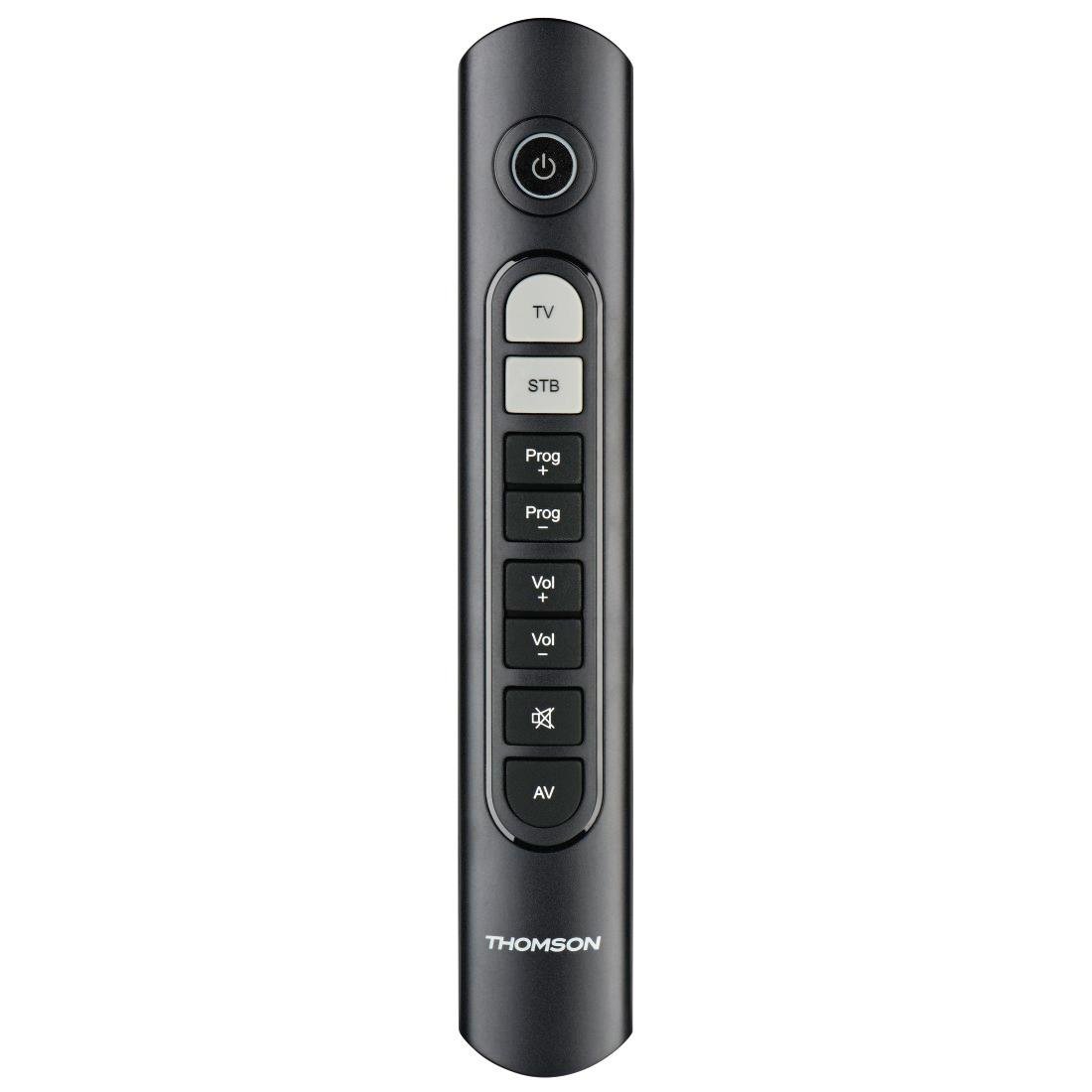
Image: Thomson Universal 2-in-1 Zapper Remote Control ROC Z107. This image displays the remote control from a slightly angled top-down perspective, highlighting its ergonomic design and the layout of its primary buttons.
Тохиргоо
1. Зай суурилуулах
- Алсын удирдлагын арын хэсэгт байрлах зай тасалгааны тагийг онгойлгоно уу.
- Insert two AAA batteries, ensuring correct polarity (+ and -). Two AAA batteries are included with your purchase.
- Зайны тасалгааны тагийг сайтар хаа.
2. Initial Programming (Pre-programmed Devices)
The remote control is pre-programmed for many popular brands such as LG, Sony, Samsung, Sharp, and Philips. For these brands, the remote may function immediately after battery installation without further setup. Test the remote with your TV and STB.
3. Learning Function (For Unlisted or Specific Functions)
If your device is not immediately compatible or if you wish to add specific functions from your original remote, use the learning function:
- Place the Thomson remote and your original remote control head-to-head, approximately 2-5 cm apart.
- Press and hold the desired device button (TV or STB) on the Thomson remote until the indicator light blinks.
- Press the button on the Thomson remote that you wish to program. The indicator light will blink slowly.
- Press the corresponding button on your original remote control. The indicator light on the Thomson remote will blink rapidly to confirm successful learning.
- Repeat for other buttons as needed.
- Press the device button (TV or STB) again to exit learning mode.
4. Master Volume and Program Selection
This feature allows you to designate which device (TV or STB) controls the volume and program channels, regardless of which device mode the remote is currently in. Refer to the full user manual for specific steps on setting up master control functions.
Ашиглалтын заавар
The Thomson ROC Z107 remote control features a simplified button layout for essential functions.

Image: Close-up of Thomson ROC Z107 remote control buttons. This image provides a detailed view of the remote's buttons, including Power, TV, STB, Program Up/Down, Volume Up/Down, Mute, and AV input selection.
- Асаах товч (⏻): Turns the selected device (TV or STB) on or off.
- ТВ товчлуур: Selects the Television control mode.
- STB Button: Selects the Set-Top Box control mode.
- Prog + / Prog - Buttons: Changes the program/channel up or down.
- Vol + / Vol - Buttons: Дууны хэмжээг ихэсгэх буюу багасгах.
- Дууг хаах товчлуур (🔇): Дууны дууг хаадаг эсвэл нээдэг.
- AV Button: Switches the input source on the TV (e.g., HDMI 1, HDMI 2, AV).
Засвар үйлчилгээ
Зай солих
When the remote control's performance degrades or the indicator light does not respond, it is time to replace the batteries. Follow the battery installation steps outlined in the Setup section.
Цэвэрлэгээ
Алсын удирдлагыг цэвэрлэхийн тулд зөөлөн, хуурай даавуу ашиглаарай. Шингэн цэвэрлэгч эсвэл зүлгүүрийн материал бүү ашиглаарай, учир нь эдгээр нь алсын удирдлагын гадаргуу эсвэл дотор эд ангиудыг гэмтээж болзошгүй.
Алдааг олж засварлах
- Алсын удирдлага хариу өгөхгүй байна:
- Батерейг зөв оруулсан, дуусаагүй эсэхийг шалгана уу. Шаардлагатай бол солино.
- Алсын удирдлага болон төхөөрөмжийн IR хүлээн авагчийн хооронд ямар ч саад бэрхшээл байхгүй эсэхийг шалгаарай.
- Verify that the remote is in the correct device mode (TV or STB).
- Тодорхой функцууд ажиллахгүй байна:
- If a specific button does not work, it may not be programmed for your device or the device may not support that function. Use the learning function to program the button from your original remote.
- Some older devices may have limited compatibility with universal remotes.
- Remote range is limited:
- Батерейнууд шинэхэн байгаа эсэхийг шалгаарай.
- The maximum operating range is 10 meters. Operating beyond this distance may result in unreliable performance.
Үзүүлэлтүүд
| Брэнд | Томсон |
| Загварын нэр | ROC Z107 |
| Загварын дугаар | 00132672 |
| Материал | Хуванцар |
| Өнгө | Хар |
| Халдаах | Infrared (IR Wireless) |
| Дэмжигдсэн төхөөрөмжүүдийн тоо | 2 (TV, STB) |
| Тохиромжтой захын төхөөрөмжүүд | Television, DTH, Set-Top Box |
| Эрчим хүчний эх үүсвэр | 2 x AAA батерей (дагсан) |
| Хамгийн их хүрээ | 10 метр |
| Бүтээгдэхүүний хэмжээс | 31.5 x 15.5 x 4 см |
| Зүйлийн жин | 170 грамм |
| Товчлуурын тоо | 9 |
Баталгаат хугацаа
This product is covered by a manufacturer's warranty. Please refer to the warranty card included in the product packaging or contact Thomson customer support for detailed warranty information and terms.
Дэмжлэг
For further assistance, technical support, or inquiries regarding your Thomson Universal 2-in-1 Zapper Remote Control ROC Z107, please visit the official Thomson webсайт руу орж үзэх эсвэл тэдний харилцагчийн үйлчилгээний хэлтэстэй холбогдоно уу. Холбоо барих мэдээллийг ихэвчлэн бүтээгдэхүүний сав баглаа боодол эсвэл брэндийн албан ёсны онлайн байршлаас олж болно.


