1. Танилцуулга
This manual provides detailed instructions for the installation, operation, and maintenance of your Thomson SB260IBT 2.1 Channel Soundbar. Please read this manual thoroughly before using the product and retain it for future reference.
1.1 Аюулгүй байдлын мэдээлэл
- Эрчим хүчний хангамжийн хэмжээг баталгаажуулна ууtage нь бүтээгдэхүүний шошгон дээр заасан шаардлагад нийцэж байна.
- Do not expose the soundbar or subwoofer to rain, moisture, or extreme temperatures.
- Төхөөрөмжийг дулааны эх үүсвэрийн ойролцоо эсвэл нарны шууд тусгалд байрлуулахаас зайлсхий.
- Хэт халалтаас урьдчилан сэргийлэхийн тулд төхөөрөмжийн эргэн тойронд агааржуулалтыг сайтар хангана.
- c-г нээж болохгүйasing; бүх үйлчилгээг мэргэшсэн боловсон хүчинд шилжүүлэх.
- Төхөөрөмжийг зөвхөн зөөлөн, хуурай даавуугаар цэвэрлэ.
2. Багцын агуулга
Бүх зүйл багцад байгаа эсэхийг шалгана уу:
- Thomson SB260IBT Soundbar
- Сабвуфер
- Алсын удирдлага
- Цахилгаан кабель
- Audio Cables (e.g., Optical, AUX - may vary by region)
- Хэрэглэгчийн гарын авлага
3. Бүтээгдэхүүн дууссанview
3.1 Дууны самбар ба сабвуфер

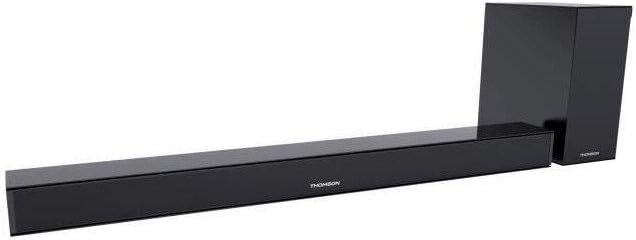
This image displays the Thomson SB260IBT soundbar unit alongside its accompanying subwoofer. The soundbar is a long, slender black unit, and the subwoofer is a compact black cube, both designed to complement modern home entertainment systems.
3.2 Хяналтын самбар ба портууд
This image shows a close-up of the soundbar's side panel, revealing various control buttons and input/output ports. These include buttons for power, mode selection, volume control, and ports such as USB, SD card slot, and auxiliary input.
3.2.1 Урд самбар
- LED үзүүлэлт: Одоогийн горим эсвэл статусыг харуулна.
- IR хүлээн авагч: Алсын удирдлагын дохионы хувьд.
3.2.2 Арын самбар
- Эрчим хүчний оролт: Хувьсах гүйдлийн тэжээлийн кабельд холбогддог.
- ОПТИК оролт: For digital audio connection from a TV or other device.
- AUX оролт: Аналог аудио холболтын хувьд 3.5 мм кабель ашиглана уу.
3.2.3 Хажуугийн самбар
- USB порт: Аудио тоглуулах зориулалттай fileUSB дискнээс.
- SD картны үүр: Аудио тоглуулах зориулалттай fileSD картаас.
- Хяналтын товчлуурууд: Power, Mode, Volume Up/Down.
3.2.4 Алсын удирдлага
The remote control provides full functionality for power, input selection, volume adjustment, and playback controls.
4. Тохиргоо
4.1 Байршил
Place the soundbar on a stable, flat surface directly in front of your television. Position the subwoofer on the floor near the soundbar for optimal bass response. Ensure adequate ventilation around both units.
4.2 Цахилгаан тэжээлд холбогдох
- Connect the power cable to the soundbar's power input.
- Цахилгааны кабелийн нөгөө үзүүрийг ханын залгуурт холбоно уу.
- Connect the subwoofer to its power source (if separate).
4.3 Аудио холболт
4.3.1 Оптик холболт
For high-quality digital audio, connect an optical cable from your TV's optical output to the soundbar's OPTICAL input. Select 'Optical' mode on the soundbar.
4.3.2 AUX холболт
Use a 3.5mm audio cable to connect your device's audio output (e.g., smartphone, MP3 player) to the soundbar's AUX input. Select 'AUX' mode on the soundbar.
4.3.3 Bluetooth холболт
For wireless audio, select 'Bluetooth' mode on the soundbar. Refer to section 5.4 for detailed pairing instructions.
5. Ашиглалтын заавар
5.1 Асаах/унтраах
дээр дарна уу Хүч төхөөрөмжийг асаах, унтраахын тулд дууны самбар эсвэл алсын удирдлага дээрх товчлуурыг дарна уу.
5.2 Оролтын сонголт
дээр дарна уу Горим button on the soundbar or remote control to cycle through available input sources: Bluetooth, Optical, AUX, USB, SD Card. The LED indicator will show the selected mode.
5.3 Дууны хяналт
-г ашиглана уу Эзлэхүүн + болон Эзлэхүүн - buttons on the soundbar or remote control to adjust the master volume level.
5.4 Bluetooth холболт
- Дууны самбарыг асаагаад товчийг дарна уу Горим button to select Bluetooth mode. The LED indicator will flash, indicating it is in pairing mode.
- Bluetooth-ийг идэвхжүүлсэн төхөөрөмж дээрээ (жишээ нь, ухаалаг утас, таблет) Bluetooth-г идэвхжүүлж, боломжтой төхөөрөмжүүдийг хайж олоорой.
- Select "SB260IBT" from the list of found devices to pair.
- Once successfully paired, the soundbar's LED indicator will stop flashing and remain solid. You can now play audio from your device through the soundbar.
5.5 USB/SD карт тоглуулах
Insert a USB drive or SD card (containing compatible audio files) into the corresponding port on the soundbar's side panel. The soundbar will automatically switch to USB/SD mode and begin playback. Use the remote control for playback functions such as Play/Pause, Next Track, and Previous Track.
6. Засвар үйлчилгээ
6.1 Цэвэрлэгээ
Disconnect the soundbar from the power supply before cleaning. Use a soft, dry cloth to gently wipe the surfaces. Do not use liquid cleaners, abrasive materials, or chemical solvents, as these may damage the finish.
6.2 Хадгалалт
If storing the unit for an extended period, disconnect it from power and store it in a cool, dry place, away from direct sunlight and extreme temperatures. It is recommended to keep the original packaging for storage.
7. Алдаа засах
| Асуудал | Шийдэл |
|---|---|
| Хүч чадалгүй | Check if the power cable is securely connected to the soundbar and the wall outlet. Ensure the wall outlet is functional. |
| Дуу байхгүй | Ensure the correct input source (e.g., Optical, AUX, Bluetooth) is selected. Check all audio cable connections. Increase the volume on both the soundbar and the connected device. |
| Bluetooth Disconnection or Failure to Pair | Ensure the device is within the Bluetooth operating range (approximately 10 meters). Turn off and on Bluetooth on your device, then try re-pairing. Ensure no other devices are actively connected to the soundbar. |
| Алсын удирдлага ажиллахгүй байна | Check the battery in the remote control and replace if necessary. Ensure there are no obstacles between the remote control and the soundbar's IR receiver. |
8. Техникийн үзүүлэлтүүд
- Загварын нэр: SB260IBT
- Брэнд: Томсон
- Сувгийн тохиргоо: 2.1 суваг
- Хамгийн их гаралтын чадал: 200 ватт
- Холболтын технологи: Bluetooth, Wired/Wireless
- Оролтын төрөл: Multiple (Optical, AUX, USB, SD Card)
- Эрчим хүчний эх үүсвэр: Утастай цахилгаан
- Хяналтын арга: Via App, Remote Control, On-unit Buttons
- Онцлог шинж чанарууд: Bluetooth
- Зөвлөмж болгож буй хэрэглээ: For Computers, Gaming Consoles, Music Players, Smartphones or Tablets, Televisions
- Бүтээгдэхүүний хэмжээ: 100 x 15 x 7 см (Soundbar)
- Бүтээгдэхүүний жин: Approximately 3 kg (Soundbar and Subwoofer combined)
- Нэгжийн тоо: 2 (Soundbar and Subwoofer)
- Усанд тэсвэртэй: Үгүй
- Суурилуулах төрөл: Ширээний тавцан
9. Баталгаат хугацаа ба дэмжлэг
9.1 Баталгаат хугацааны мэдээлэл
This product comes with a limited warranty. Please refer to the warranty card included in your package for specific terms and conditions, including the warranty period and coverage details. Retain your proof of purchase for warranty claims.
9.2 Хэрэглэгчийн дэмжлэг
For technical assistance, troubleshooting, or service inquiries, please contact Thomson customer support. Contact details can typically be found on the manufacturer's official website or in your product documentation. Please have your model number (SB260IBT) and purchase information ready when contacting support.


