1. Танилцуулга
This document provides comprehensive instructions for the setup, operation, and maintenance of your Raspberry Pi 3 Model B+ Motherboard. The Raspberry Pi 3 Model B+ is a versatile single-board computer designed for a wide range of applications, from educational projects to home automation and server tasks.
Төхөөрөмжөө хамгийн сайн гүйцэтгэл, удаан эдэлгээтэй байлгахын тулд ашиглахаасаа өмнө энэхүү гарын авлагыг сайтар уншина уу.
2. Бүтээгдэхүүн дууссанview
The Raspberry Pi 3 Model B+ features enhanced processing power and connectivity options compared to previous models. Key features include:
- Процессор: 1.4GHz 64-bit quad-core ARMv8 CPU (Broadcom BCM2837B0)
- RAM: 1 GB LPDDR2 SDRAM
- Утасгүй холболт: Dual-band 2.4GHz and 5GHz IEEE 802.11.b/g/n/ac Wireless LAN, Bluetooth 4.2/BLE
- Ethernet: Faster Gigabit Ethernet (via USB 2.0 bridge, max 300 Mbps)
- Ethernet дээрх хүч (PoE): Capability via a separate PoE HAT (Power over Ethernet Hardware Attached on Top)
- GPIO: 40-pin GPIO header for interfacing with external hardware
- Видео ба аудио: Full-size HDMI port, DSI display port, 3.5mm audio/video jack, CSI camera port
- USB: 4 USB 2.0 порт
- Хадгалах: Micro SD card slot for operating system and data storage
- Эрчим хүчний оролт: Micro USB power input (5.1V / 2.5A recommended)
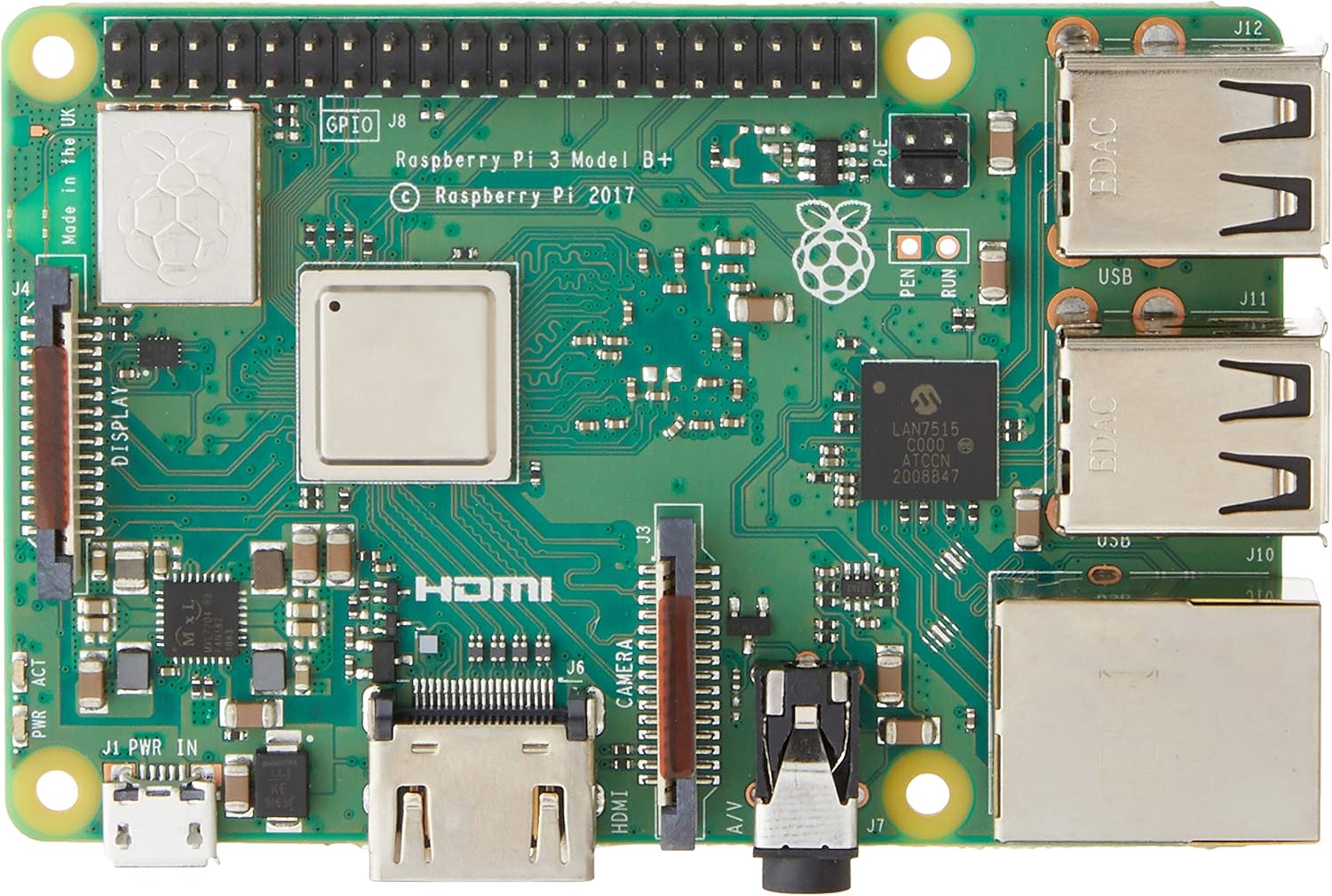
Зураг 2.1: Дээд тал view of the Raspberry Pi 3 Model B+ Motherboard, showing the processor, RAM, GPIO pins, HDMI, USB ports, and Ethernet port.

Зураг 2.2: Доод талд view of the Raspberry Pi 3 Model B+ Motherboard, highlighting the Micro SD card slot and various components.

Зураг 2.3: Хажуу тал view of the Raspberry Pi 3 Model B+ Motherboard, detailing the Ethernet port and four USB ports.

Зураг 2.4: Өнцөг view of the Raspberry Pi 3 Model B+ Motherboard, showcasing the various input/output ports including HDMI, Micro USB, and audio jack.
3. Тохиргоо
3.1 Шаардлагатай бүрэлдэхүүн хэсгүүд (багтаагүй)
- Эрчим хүчний хангамж: 2.5A Micro USB Power Supply (recommended for stable operation).
- Хадгалах: Class 10 Micro SD Card (minimum 8GB, pre-loaded with Pi 3 B+ compatible software).
- Оролтын төхөөрөмжүүд (заавал биш): USB or Bluetooth keyboard/mouse.
- Дэлгэц (заавал биш): HDMI or DSI compatible display.
3.2 Анхны тохиргооны алхамууд
- Микро SD карт бэлтгэх: Download a compatible operating system image (e.g., Raspberry Pi OS) from the official Raspberry Pi website. Use an imaging tool (like Raspberry Pi Imager) to write the OS image to your Class 10 Micro SD card.
- Micro SD карт оруулах: Gently insert the prepared Micro SD card into the card slot on the underside of the Raspberry Pi board.
- Дагалдах төхөөрөмжүүдийг холбох:
- Connect your HDMI display to the HDMI port on the Raspberry Pi.
- Connect your USB keyboard and mouse to the available USB ports.
- (Optional) Connect an Ethernet cable to the Ethernet port for wired network access.
- Эрчим хүч хэрэглэх: Connect the 2.5A Micro USB power supply to the Micro USB power port on the Raspberry Pi. The device will automatically power on and begin booting.
- Эхний ачаалах: Follow the on-screen instructions to complete the initial setup of the operating system, including setting up Wi-Fi, language, and user accounts.
4. Ажиллаж байгаа
4.1 Үндсэн үйл ажиллагаа
Once the operating system is installed and configured, your Raspberry Pi is ready for use. You can interact with it via the connected keyboard, mouse, and display, similar to a traditional desktop computer. The Raspberry Pi OS provides a graphical user interface (GUI) for ease of use.
4.2 Software Installation and Updates
Software can be installed via the graphical "Add/Remove Software" utility or through the command line using `apt` commands (e.g., `sudo apt update`, `sudo apt install [package_name]`). Regular updates are recommended to ensure system stability and security.
4.3 GPIO Usage
The 40-pin GPIO header allows for advanced projects involving physical computing. You can connect various sensors, actuators, and other electronic components to control them programmatically using languages like Python.
Refer to the official Raspberry Pi documentation for detailed guides on GPIO programming and hardware interfacing.
5. Засвар үйлчилгээ
- Програм хангамжийн шинэчлэлтүүд: Regularly update your operating system and installed software packages to receive the latest features, bug fixes, and security patches. This can typically be done via the terminal using `sudo apt update` followed by `sudo apt upgrade`.
- Эрчим хүчний менежмент: Always use a stable and sufficient power supply (5.1V / 2.5A) to prevent unexpected shutdowns or data corruption. Avoid disconnecting power without properly shutting down the operating system first.
- SD картын арчилгаа: Micro SD cards can wear out over time. Regularly back up your data and consider using high-quality, durable cards. Avoid frequent power cuts to minimize the risk of SD card corruption.
- Физик орчин: Keep the Raspberry Pi in a cool, dry, and well-ventilated area. Avoid exposing it to extreme temperatures, humidity, or dust. Consider using a protective case.
6. Алдаа засах
- Асаах/Тэжээх боломжгүй:
- Ensure the power supply is correctly connected and meets the 5.1V / 2.5A specification.
- Check the Micro SD card for proper insertion and ensure it has a valid operating system image.
- Look for the red power LED (PWR) to be steadily lit and the green activity LED (ACT) to flash during boot.
- Дэлгэцийн асуудлууд:
- Verify the HDMI cable is securely connected to both the Raspberry Pi and the display.
- Дэлгэцээ зөв оролтын эх үүсвэрт тохируулсан эсэхийг шалгаарай.
- Сүлжээний холболтын асуудлууд:
- For wired Ethernet, check the cable connection and router status.
- For Wi-Fi, ensure the correct network name (SSID) and password are entered in the OS settings.
- Restart your router and the Raspberry Pi.
- Захын төхөөрөмж хариу өгөхгүй байна:
- Try connecting USB devices to different USB ports.
- For Bluetooth devices, ensure they are in pairing mode and correctly configured in the OS.
7. Техникийн үзүүлэлтүүд
| Онцлог | Тодорхойлолт |
|---|---|
| Процессор | 1.4 GHz Broadcom BCM2837B0, Cortex-A53 (ARMv8) 64-bit SoC |
| RAM | 1 ГБ LPDDR2 SDRAM |
| Утасгүй LAN | Dual-band 2.4GHz and 5GHz IEEE 802.11.b/g/n/ac |
| Bluetooth | Bluetooth 4.2, Bluetooth бага эрчим хүч (BLE) |
| Ethernet | Гигабит Ethernet (USB 2.0-ээр, дээд тал нь 300 Mbps) |
| USB портууд | 4 x USB 2.0 порт |
| GPIO | 40 зүүтэй GPIO толгой хэсэг |
| Видео гаралт | Full-size HDMI, DSI display port |
| Камерын интерфейс | CSI camera port |
| Аудио гаралт | 3.5mm 4-pole stereo audio and composite video port |
| Хадгалах | Үйлдлийн систем болон өгөгдлийн санг ачаалах зориулалттай Micro SD порт |
| Эрчим хүчний оролт | 5.1V / 2.5A DC via Micro USB connector |
| Хэмжээ | 4.33 x 2.76 x 1.18 инч |
| Жин | 2.82 унц |
| Үйлдлийн систем | Линукс (жишээ нь, Raspberry Pi үйлдлийн систем) |
8. Баталгаат хугацаа ба дэмжлэг
Баталгаат хугацаа болон техникийн дэмжлэг авахыг хүсвэл албан ёсны Raspberry Pi-ээс лавлана уу webсайт эсвэл худалдагчтайгаа холбогдоно уу. Аливаа баталгаат нэхэмжлэлийн хувьд худалдан авалтаа нотлох баримтаа хадгалаарай.
Албан ёсны Raspberry Pi Webсайт: www.raspberrypi.org


