1. Танилцуулга
This manual provides detailed instructions for the installation, configuration, operation, and maintenance of the Logicbus Z109REG2-H Universal Converter. The Z109REG2-H is designed to manage and convert various analog input signals (mA, V, PT100, Pt1000, Pt500, Ni100, TCs, Ohm) into standard mA/V output signals, ensuring reliable data integrity through 3-way galvanic isolation.
2. Аюулгүй байдлын мэдээлэл
Please read and understand all safety instructions before installing or operating the device. Failure to follow these instructions may result in equipment damage, personal injury, or death.
- Суурилуулалт, засвар үйлчилгээг зөвхөн мэргэшсэн ажилтан гүйцэтгэнэ.
- Цахилгаан холболт хийхээсээ өмнө цахилгаан тэжээлийг салгасан эсэхээ шалгаарай.
- Verify correct wiring according to the connection diagrams to prevent damage.
- Do not operate the device in environments exceeding its specified operating conditions.
- Төхөөрөмжийг чийг, тоос шороо, хэт өндөр температураас хамгаална.
3. Бүтээгдэхүүн дууссанview
The Z109REG2-H is a compact, DIN-rail mountable universal converter. It features clearly labeled terminal blocks for inputs, outputs, and power, along with status indicators on the front panel.
3.1. Front Panel and Connections
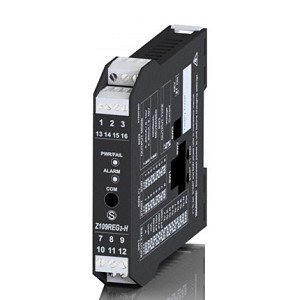
Зураг 1: Урд view of the Logicbus Z109REG2-H Universal Converter. This image displays the device's compact black housing, designed for DIN rail mounting. Visible on the front are two sets of screw terminals, labeled 1-3 and 13-16 at the top, and 7-9 and 10-12 at the bottom. Between these terminals, three LED indicators are present: 'PWR/TAL' (Power/Talk), 'ALARM', and 'COM' (Communication). The model number 'Z109REG-H' is also clearly printed on the lower half of the device's front face.
Урд самбар нь дараахь зүйлийг агуулна.
- Терминал блокууд: Numbered 1-3, 13-16 (top) and 7-9, 10-12 (bottom) for various input, output, and power connections.
- PWR/TAL LED: Indicates power status and communication activity.
- СЭРҮҮЛЛЭГИЙН LED: Illuminates when an alarm condition is detected.
- COM LED: Харилцааны төлөвийг илтгэнэ.
- Загварын дугаар: Z109REG-H, identifying the device.
4. Тохиргоо
4.1. Холбох
The Z109REG2-H is designed for DIN rail mounting. Securely attach the device to a standard DIN rail in a suitable enclosure, ensuring adequate ventilation and clearance for wiring.
4.2. утас
Refer to the specific wiring diagrams provided with your product documentation for detailed connection instructions. General wiring principles are as follows:
- Эрчим хүчний хангамж: Connect the 85-265 V AC/DC power supply to the designated terminals. Ensure the power source matches the device's requirements.
- Оролтын дохио: Connect your analog sensor (e.g., current, voltage, thermocouple, RTD, potentiometer) to the universal input terminals. The device supports 2-wire sensor powering (20 Vdc stabilized, 20mA max with short-circuit protection).
- Гаралтын дохио: Connect the standard mA/V output signals to your receiving device (e.g., PLC, DCS).
- Digital Contact: The relay (SPST) output can be configured as an ALARM or STROBE contact. Connect as required for your application.
4.3. Тохиргоо
The Z109REG2-H offers multiple configuration methods:
- DIP унтраалга: Basic configuration for input type, START-END scale, output mode (zero elevation, scale inversion), and output voltage type (mA or V) can be set using the internal DIP-switches. Consult the product datasheet for switch settings.
- Компьютерийн програм хангамж: For advanced configuration, connect the device to a PC. The software allows programming of beginning and end scale, additional input types, square root extraction, filter settings, burn-out detection, and relay output parameters.
- Handheld Device: A compatible handheld device can also be used for field configuration.
5. Ашиглалтын заавар
Once properly installed and configured, the Z109REG2-H operates automatically.
- Асаах: Apply power to the device. The PWR/TAL LED should illuminate, indicating normal operation.
- Хяналт: Observe the ALARM LED for any fault conditions or out-of-scale readings. The COM LED indicates communication activity during configuration or data exchange.
- STROBE Input: If configured, the STROBE input can be used to activate the analog output on a PLC command, providing multiplexing capabilities.
6. Засвар үйлчилгээ
The Z109REG2-H is designed for minimal maintenance. Regular checks include:
- Цэвэрлэгээ: Keep the device clean and free from dust. Use a soft, dry cloth for cleaning. Do not use abrasive cleaners or solvents.
- Холболтын бүрэн бүтэн байдал: Бүх утсан холболтыг битүүмжлэл, зэврэлтээс хамгаалах шинж тэмдгийг үе үе шалгана.
- Байгаль орчны нөхцөл: Ашиглалтын орчин нь тогтоосон температур, чийгшлийн хязгаарт байгаа эсэхийг шалгаарай.
7. Алдаа засах
Хэрэв төхөөрөмж хүлээгдэж буй шиг ажиллахгүй байвал дараах алдааг олж засварлах алхмуудыг авч үзнэ үү.
- No Power (PWR/TAL LED off): Verify the power supply connections and voltage. Check for blown fuses in the power circuit.
- Incorrect Output Reading:
- Check input sensor wiring and functionality.
- Verify DIP-switch settings for input type and scale.
- Confirm PC software configuration parameters (scale, filter, burn-out).
- Ensure the output receiving device is correctly configured and calibrated.
- ALARM LED On: This indicates an out-of-scale condition or a setting error. Review input signal range and configuration settings.
- Communication Issues (COM LED): Ensure correct communication cable connection and PC software settings.
Хэрэв асуудал хэвээр байвал техникийн дэмжлэгтэй холбоо барина уу.
8. Техникийн үзүүлэлтүүд
| Онцлог | Тодорхойлолт |
|---|---|
| Загвар | Z109REG2-H |
| Оролтын төрлүүд | Ботьtage, Current, Thermocouples, Thermoresistances (PT100, Pt1000, Pt500, Ni100), Potentiometer, Rheostat |
| Гаралтын төрлүүд | Isolated Analog Output (Voltage ба одоогийн) |
| Эрчим хүчний хангамж | 85-265 В хувьсах гүйдэл |
| Sensor Power (2-wire) | 20 Vdc stabilized, 20mA max with short-circuit protection |
| Тохиргоо | DIP-switches, PC software, Handheld device |
| Галваник тусгаарлалт | 3-way (Power supply // Input // Output) |
| Insulation (Supply to Output/Input) | 3750 Vac |
| Insulation (Output to Input) | 1500 Vac |
| Digital Contact | Relay (SPST), programmable as ALARM or STROBE |
| Хэмжээ | 5 x 1 x 4 инч (ойролцоогоор 127 x 25.4 x 101.6 мм) |
| Жин | 7.05 унц (ойролцоогоор 200 грамм) |
| Үйлдвэрлэгч | Сенека |
9. Баталгаат хугацааны мэдээлэл
Warranty terms and conditions for the Logicbus Z109REG2-H Universal Converter are provided by the manufacturer, Seneca, or your authorized reseller. Please refer to the documentation included with your purchase or contact your supplier for specific warranty details and duration.
10. Техникийн дэмжлэг
For technical assistance, troubleshooting beyond the scope of this manual, or inquiries regarding product functionality, please contact your Logicbus supplier or the manufacturer, Seneca. Have your product model number (Z109REG2-H) and any relevant error messages or symptoms ready when contacting support.


