1. Танилцуулга
The Aputure Amaran AL-F7 is a compact and versatile LED video light designed for various photographic and videographic applications. It features 256 high-CRI LED lights, offering a strong output and a wide color temperature range. The AL-F7 provides precise brightness and color temperature controls, multiple charging options, and a lightweight, portable design.
This manual provides detailed instructions for the safe and effective use of your Amaran AL-F7 LED video light. Please read it thoroughly before operation and retain it for future reference.
2. Аюулгүй байдлын мэдээлэл
Бүтээгдэхүүнд гэмтэл учруулах, өөртөө болон бусдад гэмтэл учруулахаас сэргийлэхийн тулд дараах үндсэн аюулгүй байдлын урьдчилан сэргийлэх арга хэмжээг үргэлж дагаж мөрдөөрэй.
- Do not disassemble or modify the product. Unauthorized modifications may cause damage or malfunction.
- Keep the product away from water and other liquids. Do not operate with wet hands.
- Do not block the ventilation openings. Overheating can damage the device.
- Avoid direct eye exposure to the LED light. The light is very bright and can cause temporary vision impairment.
- Use only recommended power sources and accessories.
- Хүүхдийн гар хүрэхгүй газар хадгална.
3. Багцын агуулга
Доор жагсаасан бүх зүйл таны багцад байгаа эсэхийг шалгана уу.
- Amaran AL-F7 LED Video Light
- Hot-shoe mounting ball head
- Канвас цүнх
- USB Type-C charging cable (may vary by region)
- Хэрэглэгчийн гарын авлага
4. Бүтээгдэхүүн дууссанview
Familiarize yourself with the components and controls of your Amaran AL-F7.
4.1 Front Panel (LED Array)
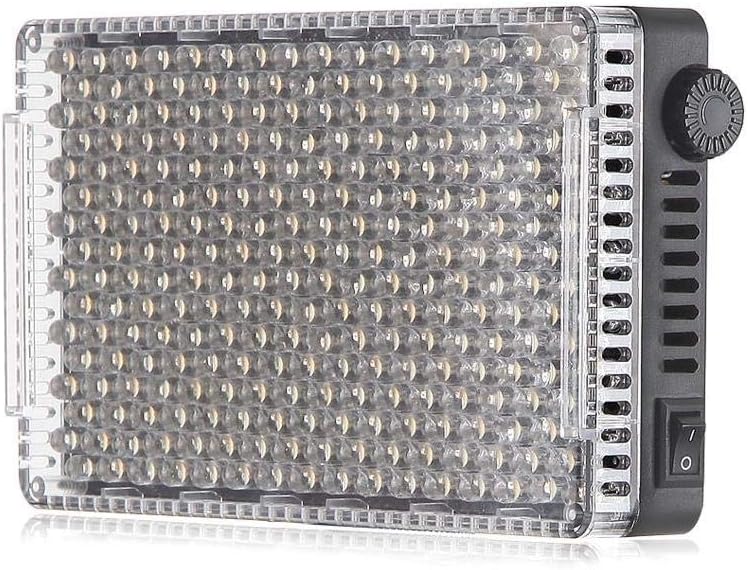
Зураг 1: Урд view of the AL-F7 LED panel, displaying the light-emitting diodes.
4.2 Rear Panel (Display and Battery Mount)

Figure 2: Rear panel of the AL-F7, featuring the LCD screen, battery mount, and control interface.
- LCD дэлгэц: Shows brightness percentage, color temperature (CT), and battery status.
- Хянах товчлуур: Used to adjust brightness and color temperature. Press to switch between modes.
- Зайны хавтан: Compatible with Sony NP-F series batteries for portable power.
4.3 Side Panels (Controls and Ports)

Зураг 3: Хажуу тал view showing the power switch and control dial.

Зураг 4: Хажуу тал view displaying the D-Tap input, 1/4" mounting point, and USB Type-C port.
- Эрчим хүч солих: Төхөөрөмжийг асаах эсвэл унтраах боломжтой.
- D-Tap Input: For external power supply (e.g., V-mount battery).
- USB Type-C порт: For charging and powering the unit.
- 1/4" Screw Threads: Located on three sides for versatile mounting options.
5. Тохиргоо
5.1 Powering the AL-F7
The Amaran AL-F7 can be powered using one of three methods:
- Sony NP-F Series Battery: Attach a compatible NP-F battery to the battery plate on the rear of the unit.
- USB Type-C: Connect a USB Type-C cable from a power bank or USB power adapter to the USB-C port on the side.
- D-Tap: Connect a D-Tap cable from a compatible power source (e.g., V-mount battery) to the D-Tap input.
Ensure the power source provides sufficient voltagтогтвортой ажиллахын тулд e ба гүйдэл.
5.2 Mounting the AL-F7
The AL-F7 features 1/4" screw threads on three sides for flexible mounting. Use the included hot-shoe mounting ball head to attach the light to a camera's hot shoe or a light stand with a 1/4" screw.
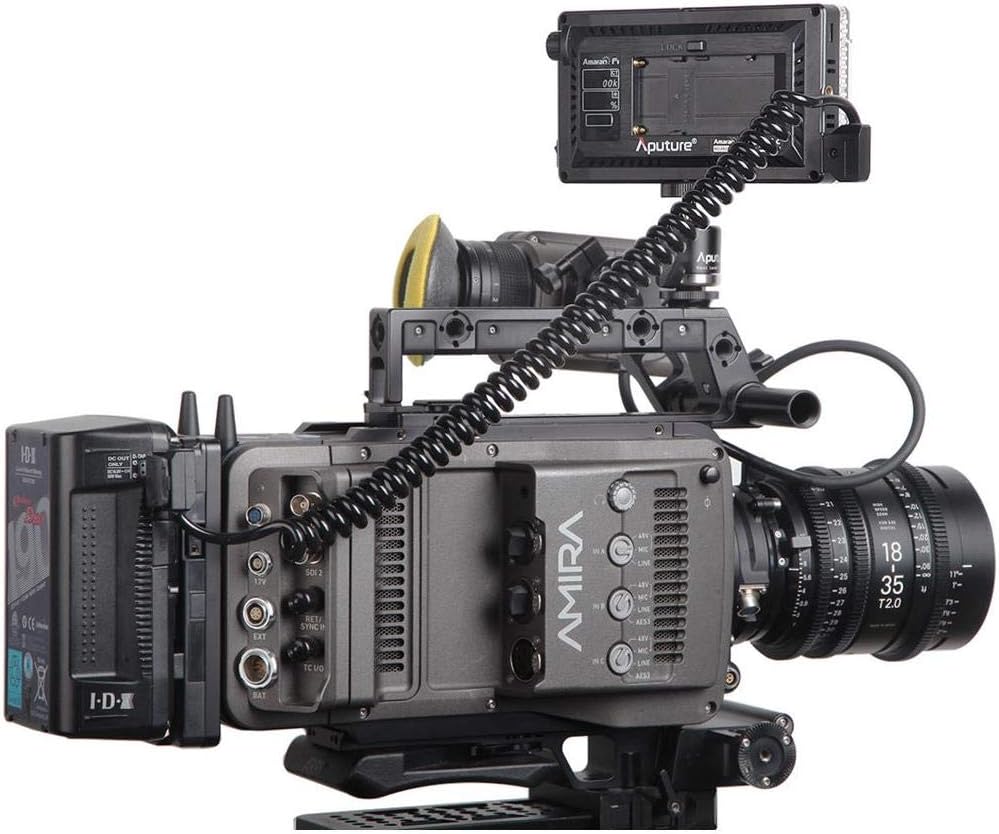
Figure 5: AL-F7 mounted on a camera rig, demonstrating a typical setup.
- Screw the hot-shoe mounting ball head into one of the 1/4" threads on the AL-F7.
- Secure the ball head to your camera's hot shoe or a light stand.
- Adjust the angle of the light using the ball head.
6. Ажиллаж байгаа
6.1 Асаах/унтраах
Locate the power switch on the side of the unit. Flip the switch to the 'ON' position to power on the light. Flip it to 'OFF' to power off.
6.2 Гэрэлт байдлыг тохируулах
After powering on, the LCD display will show the current brightness percentage. Rotate the control dial to adjust the brightness from 1% to 100%. The AL-F7 offers stepless control for fine-tuning.
6.3 Өнгөний температурыг тохируулах
To switch to color temperature adjustment mode, press the control dial. The display will show the current color temperature in Kelvin (K). Rotate the control dial to adjust the color temperature within the range of 3200K to 9500K. Press the dial again to switch back to brightness adjustment.
The AL-F7's maximum output is achieved at approximately 5500K, which corresponds to daylight balanced light.
6.4 Санах ойн функц
The AL-F7 features a built-in memory function that automatically stores the last brightness and color temperature settings used. When the light is powered on again, it will recall these settings.
7. Засвар үйлчилгээ
- Цэвэрлэгээ: Гэрлийг цэвэрлэхийн тулд зөөлөн, хуурай даавуу ашиглаарай. Хүчтэй химийн бодис эсвэл зүлгүүрийн материал бүү хэрэглээрэй.
- Хадгалах: Store the light in a cool, dry place, away from direct sunlight and extreme temperatures. Use the provided canvas bag for protection during transport and storage.
- Батерейны арчилгаа: If using NP-F batteries, follow the manufacturer's guidelines for charging and storage to prolong battery life.
8. Алдаа засах
| Асуудал | Боломжит шалтгаан | Шийдэл |
|---|---|---|
| Гэрэл асахгүй байна | No power supply; battery depleted; power switch off | Ensure power switch is ON. Connect to a power source (USB-C, D-Tap) or replace/charge NP-F battery. |
| Гэрэл гэнэт анивчих эсвэл бүдгэрч байна | Low battery; unstable power connection; overheating | Charge or replace battery. Check power cable connections. Ensure adequate ventilation. |
| Cannot adjust brightness/color temperature | Control dial malfunction; incorrect mode selected | Press the control dial to switch between brightness and color temperature modes. If issue persists, contact support. |
9. Техникийн үзүүлэлтүүд
| Онцлог | Дэлгэрэнгүй |
|---|---|
| Загварын дугаар | AL-F7 |
| Бүтээгдэхүүний хэмжээс | 6.69 x 2.76 x 1.57 инч (170 x 70 x 40 мм) |
| Зүйлийн жин | 9.2 унц (260 гр) |
| Өнгөний температурын хүрээ | 3200К - 9500К |
| Гэрэлтүүлгийн хяналт | 1% - 100% алхамгүй |
| Эрчим хүчний оролт | D-Tap, USB Type-C, Sony NP-F series battery |
| Холболтын технологи | USB |
| Суурилуулалт | 1/4" screw thread (3 sides) |
| Батерей шаардлагатай | 1 Lithium Polymer (NP-F type, not included) |
10. Баталгаат хугацаа ба дэмжлэг
Aputure products are covered by a limited warranty. For detailed warranty information, please refer to the warranty card included with your product or visit the official Aputure webсайт. Худалдан авалтын баримтаа баталгаат нэхэмжлэлд зориулж худалдан авалтын баталгаа болгон хадгална уу.
For technical support, service, or inquiries, please contact Aputure customer service through their official website or authorized distributors. Do not attempt to repair the unit yourself, as this may void your warranty.


