1. Танилцуулга
The GameMax Expedition is a compact Micro ATX PC gaming case designed for efficient cooling and component compatibility. This manual provides instructions for the proper installation, operation, and maintenance of your PC case.

Figure 1.1: GameMax Expedition MATX PC Gaming Case, White.
2. Аюулгүй байдлын мэдээлэл
- Суурилуулах эсвэл засвар үйлчилгээ хийхээс өмнө бүх эд ангиудын цахилгааныг үргэлж салгаж байгаарай.
- Бүрэлдэхүүн хэсгүүдэд цахилгаан гүйдэл (ESD) гэмтэхээс сэргийлэхийн тулд эсрэг статик бугуйн оосор зүү.
- Явах эд ангийн дотор талын хурц ирмэгүүдээс болгоомжил.
- Жижиг эд анги, боолтыг хүүхдүүдээс хол байлга.
- Ensure proper ventilation around the case during operation.
3. Багцын агуулга
Бүх зүйл багцад байгаа эсэхийг шалгана уу:
- GameMax Expedition MATX PC Gaming Case
- Дагалдах хэрэгсэл (эрэг, тулгуур, кабель зангиа)
- 1 x 120mm Blue LED Fan (pre-installed at rear)
- Хэрэглэгчийн гарын авлага (энэ баримт бичиг)
4. Бүтээгдэхүүний онцлог
- Micro Gaming Chassis: Compact design optimized for gaming components.
- I/O портууд: 1 x USB 3.0, 2 x USB 2.0, and HD Audio ports located on the top panel.
- Хөргөх: Includes 1 x 120mm Blue LED fan. Supports additional fans for enhanced airflow.
- Хажуугийн цонх: Full side window panel allows visibility of internal components.
- Magnetic Dust Filter: Removable dust filter on the top panel for easy cleaning and improved system longevity.
- GPU Bracket: Integrated bracket provides support for graphics cards, preventing sag and accommodating larger cards.
5. Бүрэлдэхүүн хэсэг дууссанview
5.1 Гадаад Views

Figure 5.1: Front panel design with air intake and included 120mm fan illustration.

Figure 5.2: Top I/O panel featuring USB 3.0, USB 2.0, and audio ports.
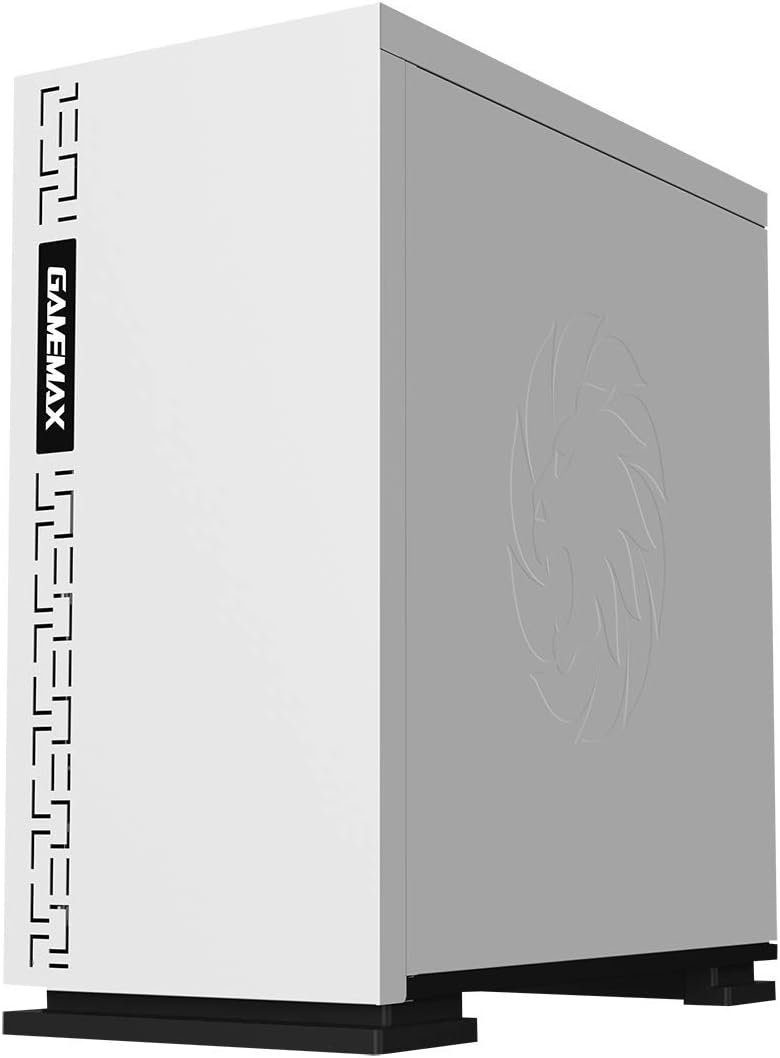
Зураг 5.3: Дээд тал view showing the magnetic dust filter for fan ventilation.
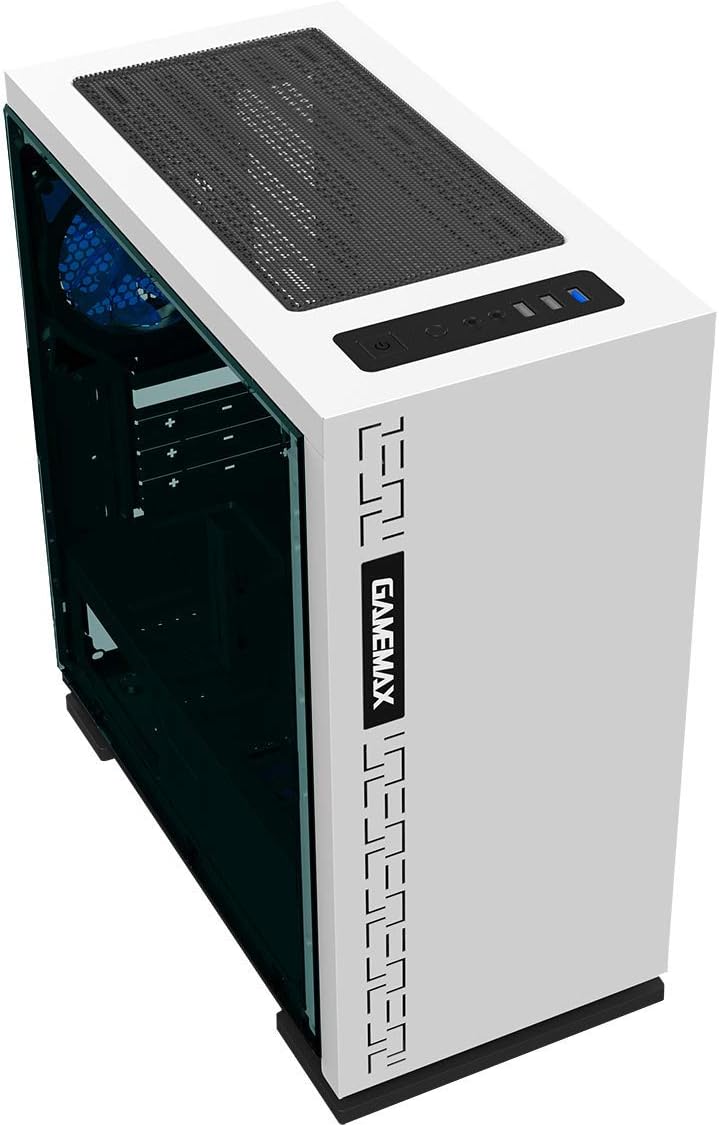
Зураг 5.4: Ар талд view displaying expansion slots and the pre-installed 120mm fan.
5.2 Internal Layout

Зураг 5.5: Дотоод view with the side panel removed, showing the motherboard tray and cable routing options.

Figure 5.6: Illustration of fan and radiator mounting points within the chassis.
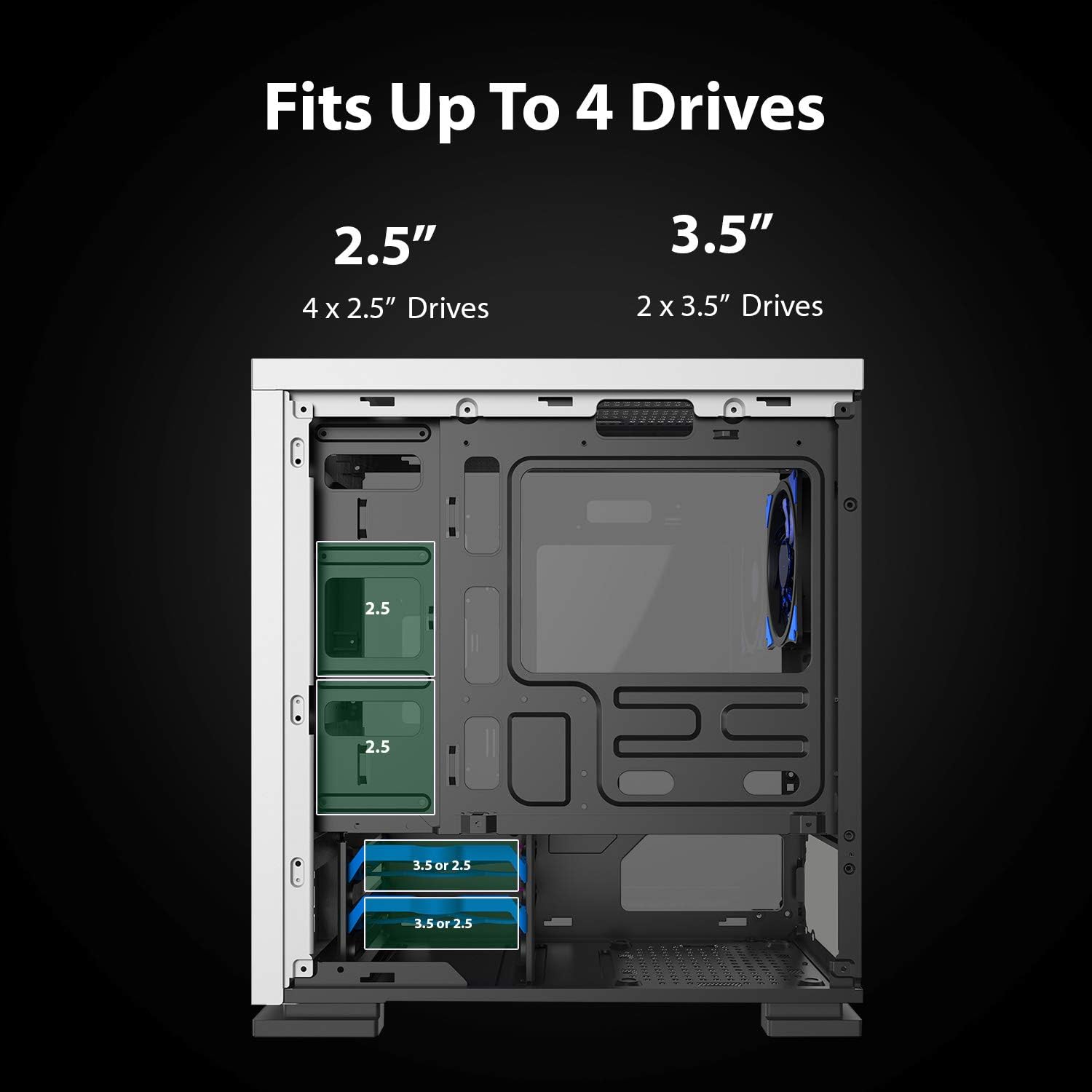
Figure 5.7: Drive bay locations supporting 2.5" and 3.5" storage devices.
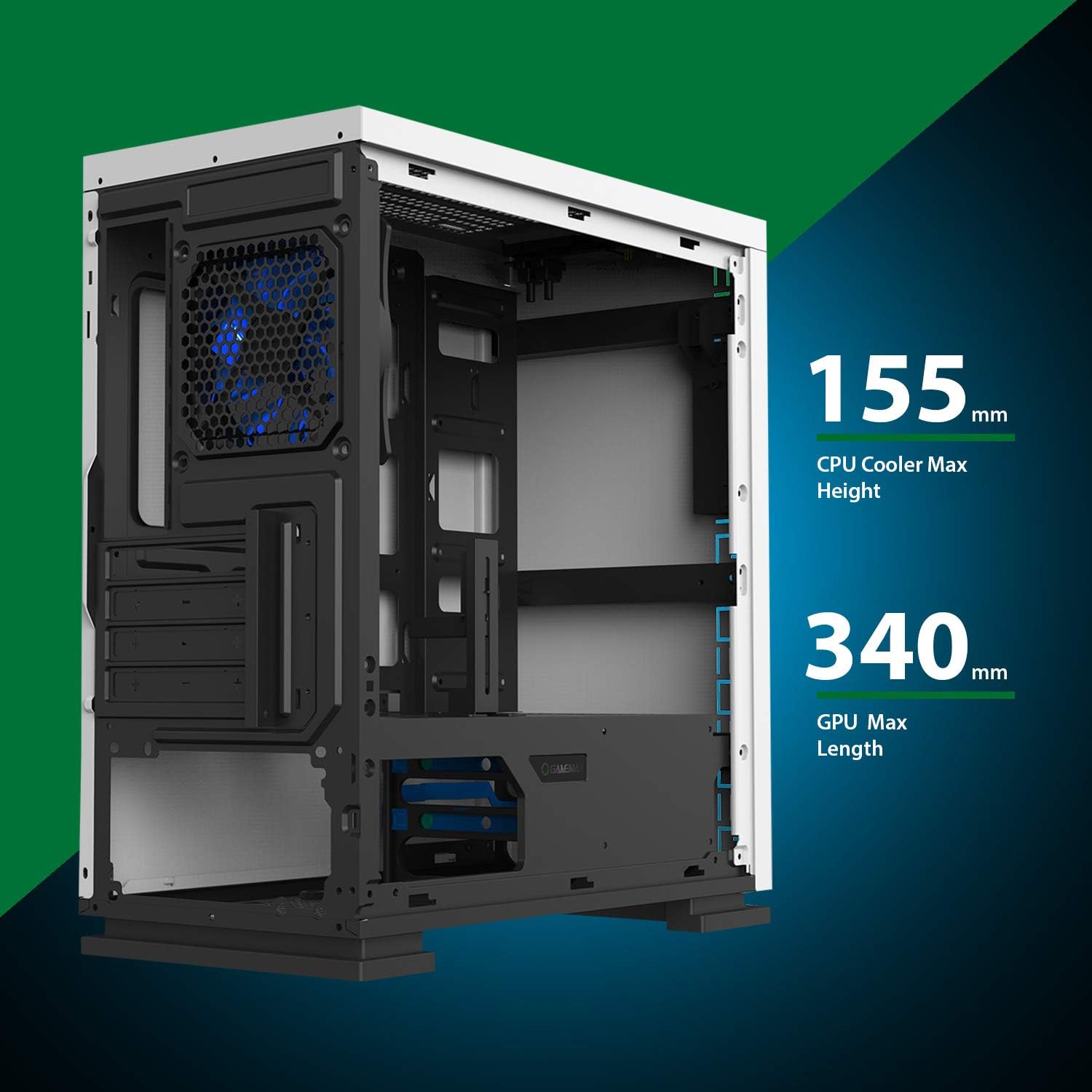
Figure 5.8: Maximum clearance for CPU coolers (155mm) and GPUs (340mm).
6. Тохиргоо ба суурилуулалт
6.1 Бэлтгэл ажил
- Unpack the chassis and remove all packaging materials.
- Хажуугийн хавтанг арын хэсэгт эрхий хурууны боолтыг тайлж ав.
- Gather necessary tools: Phillips head screwdriver, cable ties.
6.2 Эх хавтангийн суурилуулалт
- Install the I/O shield into the rear opening of the chassis.
- Align the motherboard with the pre-installed standoffs. Ensure the standoffs match your Micro ATX motherboard's mounting holes.
- Эх хавтанг нийлүүлсэн эрэг ашиглан бэхлээрэй.
6.3 Цахилгаан хангамжийн суурилуулалт
- Place the power supply unit (PSU) into the dedicated compartment at the bottom rear of the case.
- Align the PSU with the screw holes on the rear of the chassis.
- Secure the PSU with the provided screws.
6.4 Хадгалах хөтч суурилуулах
- 2.5 инчийн хөтчүүд: Mount 2.5" SSDs/HDDs to the dedicated mounting points on the motherboard tray or within the drive cage using the provided screws.
- 3.5 инчийн хөтчүүд: Install 3.5" HDDs into the drive cage located beneath the PSU shroud. Slide the drive into the tray and secure it.
6.5 Expansion Card (GPU) Installation
- Явах эд ангийн ар талаас шаардлагатай тэлэлтийн үүрний тагийг ав.
- Insert your graphics card or other expansion card into the appropriate PCIe slot on the motherboard.
- Secure the card with a screw.
- Utilize the adjustable GPU bracket to provide additional support for heavier graphics cards.
6.6 Fan and Cooling Installation
- The case comes with one 120mm Blue LED fan pre-installed at the rear.
- Additional 120mm fans can be installed at the top and front positions as needed.
- Ensure fans are oriented correctly for optimal airflow (intake or exhaust).
6.7 Front Panel Connector Installation
Connect the front panel cables (USB 3.0, USB 2.0, HD Audio, Power SW, Reset SW, Power LED, HDD LED) to their corresponding headers on your motherboard. Refer to your motherboard manual for exact pin layouts.
7. Ажиллаж байгаа
Once all components are installed and cables are connected, replace the side panels. Connect your monitor, keyboard, mouse, and power cable. Press the power button on the top panel to start your system. The pre-installed LED fan will illuminate upon power-on.
8. Засвар үйлчилгээ
- Тоосны шүүлтүүр цэвэрлэх: Regularly remove and clean the magnetic dust filter located on the top panel to maintain optimal airflow and prevent dust buildup inside the case.
- Ерөнхий цэвэрлэгээ: Зөөлөн ашиглах, damp cloth to clean the exterior surfaces of the case. Avoid abrasive cleaners.
- Дотоод тоос зайлуулах: Periodically use compressed air to clear dust from internal components and fans. Ensure the system is powered off and unplugged before performing internal cleaning.
9. Алдаа засах
- Систем асахгүй байна: Check all power connections, including the PSU to the wall outlet, PSU to motherboard, and front panel power switch cable to the motherboard.
- Фэнүүд эргэхгүй байна: Verify fan cables are securely connected to the motherboard or fan controller.
- USB портууд ажиллахгүй байна: Урд талын самбарын USB кабель нь эх хавтангийн USB холбогчтой зөв холбогдсон эсэхийг шалгаарай.
- Дэлгэцийн гаралт байхгүй: Confirm the graphics card is properly seated and connected to power, and the monitor cable is connected to the graphics card, not the motherboard's integrated graphics port (unless using integrated graphics).
10. Техникийн үзүүлэлтүүд
| Онцлог | Тодорхойлолт |
|---|---|
| Загварын нэр | GMX EXPEDITION |
| Брэнд | GAMEMAX |
| Кейсийн төрөл | Micro Tower (MATX) |
| Эх хавтангийн нийцтэй байдал | Микро ATX |
| Өнгө | Expedition White |
| Материал | Поликарбонат (PC) |
| Бүтээгдэхүүний хэмжээ (LxWxH) | 14.96 x 7.4 x 13.78 инч (380 x 188 x 350 мм) |
| Зүйлийн жин | 8.58 фунт (3.9 кг) |
| USB 3.0 портууд | 1 |
| USB 2.0 портууд | 2 |
| Хөргөх арга | Агаар, Ус |
| Сэнс багтсан | 1 x 120mm Blue LED (Rear) |
| CPU хөргөгчийн хамгийн их өндөр | 155 мм |
| GPU-ийн хамгийн их урт | 340 мм |
11. Баталгаат хугацаа ба дэмжлэг
For warranty information and technical support, please visit the official GameMax webсайт эсвэл орон нутгийн жижиглэн худалдаалагчтай холбоо барина уу.
Албан ёсны Webсайт: gamemaxpc.com


