Бүтээгдэхүүн дууссанview
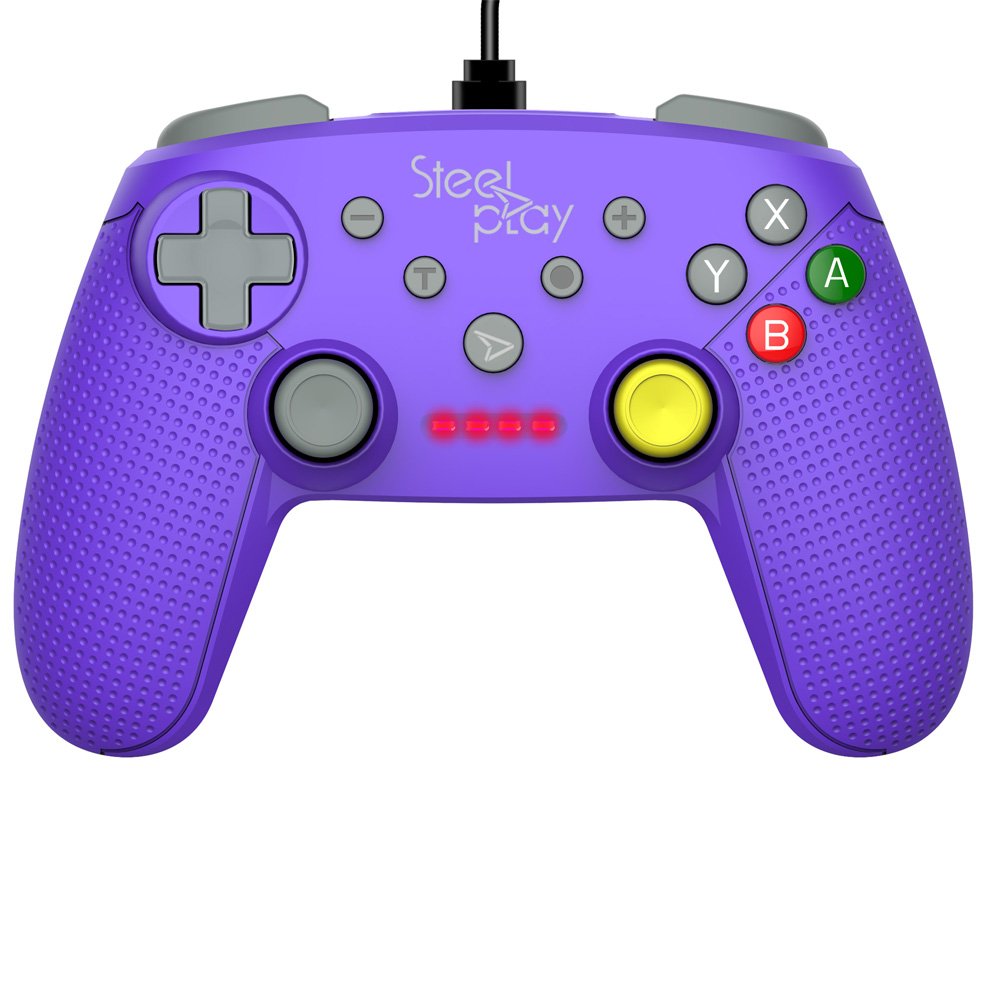
The Steelplay Wired Controller GCUBE (model ECO0622) is designed for use with the Nintendo Switch console, providing a reliable wired connection for uninterrupted gameplay. This controller features a comfortable ergonomic grip, a 2.5-meter USB cable, and includes advanced functionalities such as a gyro sensor, dual vibration feedback, and a turbo function button.
Тохируулах заавар
- Хянагчийг холбоно уу: Insert the USB connector of the Steelplay Wired Controller GCUBE into an available USB port on your Nintendo Switch dock.
- Power On the Console: Ensure your Nintendo Switch console is powered on and connected to your TV or in handheld mode with the dock.
- Автомат таних: The console should automatically detect the controller. The player indicator lights on the controller will illuminate to show its assigned player number.
- Begin Gameplay: You can now use your Steelplay Wired Controller GCUBE for gaming.
Хянагчийг ажиллуулах
The Steelplay Wired Controller GCUBE features a standard layout for intuitive gameplay.
Товчлуурын функцууд:
- Зүүн/Баруун аналог саваа: Хөдөлгөөн болон камерыг хянах зориулалттай.
- D-Pad (Чиглүүлэгч дэвсгэр): Нарийвчлалтай чиглэлтэй оролтын хувьд.
- A/B/X/Y товчлуурууд: Action buttons, typically used for jumping, attacking, interacting, etc.
- L/R Buttons (Shoulder Buttons): Often used for quick actions or menu navigation.
- ZL/ZR Buttons (Trigger Buttons): Analog or digital triggers for specific in-game actions.
- Хасах (-) товчлуур: Typically opens in-game menus or performs specific actions.
- Нэмэх (+) товчлуур: Typically pauses the game or opens system menus.
- Нүүр хуудас товч: Nintendo Switch-н НҮҮР ХУУДАС цэс рүү буцна.
- Capture товчлуур: Takes screenshots of your gameplay.
Онцлог шинж чанарууд:
- Gyro Function: The controller includes a built-in gyro sensor for motion control in compatible games. This allows for intuitive aiming or steering by tilting the controller.
- Хос чичиргээний санал хүсэлт: Experience enhanced immersion with haptic feedback that responds to in-game events.
- Турбо функц: The turbo function allows for rapid, repeated input of a button press. To activate, press and hold the Турбо button, then press the desired action button (e.g., A, B, X, Y, L, R, ZL, ZR). To deactivate, repeat the process.
Засвар үйлчилгээ
Proper care ensures the longevity and optimal performance of your controller.
- Цэвэрлэгээ: Удирдлагыг арчихын тулд зөөлөн, хуурай даавуу ашиглаарай. Зөрүүд бохирдлыг бага зэрэг арчинаampАлчуурыг усаар норгоно. Хүчтэй химийн бодис, уусгагч эсвэл зүлгүүрийн цэвэрлэгч хэрэглэхээс зайлсхий.
- Хадгалах: Удирдагчийг нарны шууд тусгал, хэт температураас хол, сэрүүн, хуурай газар хадгална.
- Кабель арчилгаа: Avoid bending or twisting the USB cable excessively. Do not pull the cable to disconnect the controller; always grasp the plug.
- Шингэнээс зайлсхийх: Дотоод гэмтлээс урьдчилан сэргийлэхийн тулд хянагчийг шингэнээс хол байлга.
Алдааг олж засварлах
- Хянагч хариу өгөхгүй байна:
- Ensure the USB cable is securely connected to both the controller and the Nintendo Switch dock.
- Try connecting the controller to a different USB port on the dock.
- Nintendo Switch консолоо дахин ачаална уу.
- Товчлуур эсвэл Жойстик зөв ажиллахгүй байна:
- Товчлуур эсвэл удирдлагын товчлуурын эргэн тойронд ямар нэгэн физик саад тотгор эсвэл хог хаягдал байгаа эсэхийг шалгана уу.
- Ensure the controller's firmware is up to date. Firmware updates may be necessary and typically require connection to a PC. Refer to the Steelplay official website for specific instructions and update tools.
- Чичиргээ ажиллахгүй байна:
- Verify that vibration is enabled in your Nintendo Switch system settings and within the game you are playing.
- Ensure the controller is securely connected.
Үзүүлэлтүүд
| Онцлог | Дэлгэрэнгүй |
|---|---|
| Загварын дугаар | ЭКО0622 |
| Тохиромжтой байдал | Nintendo Switch |
| Холболт | Утастай (USB) |
| Кабелийн урт | 2.5 метр |
| Хэмжээ | 17.2 x 7 x 20.3 см |
| Жин | 360 гр |
| Онцлог шинж чанарууд | Gyro Function, Dual Vibration Feedback, Turbo Function Button, Rubberized Grip Surface, Ergonomic Grip |
Баталгаат хугацааны мэдээлэл
For detailed warranty information regarding your Steelplay Wired Controller GCUBE, please refer to the warranty card included with your product or visit the official Steelplay webсайт. Баталгаат хугацаа, нөхцөл нь бүс нутаг болон жижиглэн худалдаалагчаас хамаарч өөр өөр байж болно.
Хэрэглэгчийн дэмжлэг
If you encounter any issues or have questions not covered in this manual, please contact Steelplay customer support. Contact information can typically be found on the official Steelplay webсайт эсвэл бүтээгдэхүүний сав баглаа боодол дээр.


