1. Танилцуулга
This manual provides essential instructions for the safe and effective operation of the Mustool MT866 Digital True RMS Clamp Meter. The MT866 is a versatile instrument designed for measuring AC/DC voltage, AC/DC current, frequency, temperature, capacitance, resistance, and continuity. It also features a live wire check function and non-contact voltage detection for enhanced safety. Please read this manual thoroughly before using the device.
2. Аюулгүй байдлын мэдээлэл
Always adhere to the following safety precautions to prevent personal injury or damage to the meter:
- Do not exceed the maximum input limits for any measurement function.
- Маш болгоомжтой байгаарай when working with live circuits. High voltagэсүүд аюултай байж болно.
- Ensure the test leads are in good condition, without any damage to the insulation.
- Do not operate the meter if it appears damaged or if the battery cover is not properly closed.
- Always disconnect the test leads from the circuit before changing the function dial.
- Use the correct function and range хэмжилт бүрийн хувьд.
- Keep fingers behind the finger guards on the test probes during measurements.
- Avoid using the meter in wet environments or in the presence of explosive gases or dust.
- The meter is rated for CAT III 600V and CAT II 600V. Do not use it for measurements exceeding these categories.
3. Бүтээгдэхүүн дууссанview
The Mustool MT866 is a compact and feature-rich clamp meter. Familiarize yourself with its components:
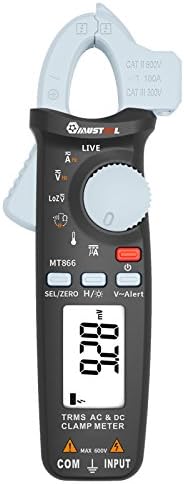
Зураг 1: Урд View of the Mustool MT866 Clamp Тоолуур. This image displays the main components including the clamp jaw, LCD display, function dial, and control buttons.
3.1 дугаартай. Бүрэлдэхүүн хэсгүүд
- Clamp Эрүү: Холбоо барихгүй хувьсах/тогтмол гүйдлийн хэмжилтэд ашигладаг.
- Clamp Суллах хөшүүрэг: Кл-г нээнэamp эрүү.
- Холбоо барихгүй ботьtage (NCV) мэдрэгч: Хувьсах гүйдлийг илрүүлдэгtage шууд холбоогүй.
- LCD дэлгэц: Хэмжилтийн заалт, нэгж, функцийн үзүүлэлтүүдийг харуулна.
- Функцийн залгах: Selects the desired measurement mode.
- SEL/ZERO Button: Selects sub-functions or zeros the DC current reading.
- H/💡 Button: Activates Data Hold or backlight.
- V~Alert Button: Activates the V~ alert function for live wire detection.
- Input Terminals (COM, INPUT): Vol-ийн туршилтын утсыг холбоходtage, эсэргүүцэл, багтаамж, давтамж, температурын хэмжилт.
- Back Hook: For convenient hanging of the meter.
3.2. Дэлгэцийн үзүүлэлтүүд
- AC/DC: Indicates Alternating Current or Direct Current.
- V: Вольт (Ботьtage).
- A: Amperes (Current).
- Ω: Ohms (Resistance).
- F: Farads (Capacitance).
- Гц: Hertz (Frequency).
- °C/°F: Degrees Celsius/Fahrenheit (Temperature).
- ШУУД: Live wire detection indicator.
- LOZ: Бага эсэргүүцэлтэй хэмжээtage хэмжилтийн горим.
- H: Data Hold activated.
- Battery Symbol: Батарей бага үзүүлэлт.
4. Тохиргоо
4.1. Зай суурилуулах
The Mustool MT866 requires batteries for operation (not included in the package). To install or replace batteries:
- Ensure the meter is turned off and all test leads are disconnected.
- Тоолуурын арын хэсэгт зайны тасалгааны тагийг олоорой.
- Хадгалах эрэг(үүд)-ийг тайлж, тагийг ав.
- Insert new batteries, observing the correct polarity (+ and -).
- Батерейны тагийг буцааж тавиад эрэг шургаар бэхлэнэ үү.
4.2. Туршилтын утсыг холбох
Ихэнх хэмжилтийн хувьд (ботьtage, resistance, capacitance, etc.), test leads are required.

Figure 2: Mustool MT866 with Test Leads. The black test lead is connected to the COM terminal, and the red test lead is connected to the INPUT terminal.
- -г холбоно уу хар туршилтын хар тугалга руу COM (нийтлэг) оролтын терминал.
- -г холбоно уу улаан туршилтын утас руу ОРОЛТ терминал.
- Хэмжилт хийхээсээ өмнө холболтууд найдвартай байгаа эсэхийг шалгаарай.
5. Ашиглалтын заавар
Turn the function dial to the desired measurement mode. Use the SEL/ZERO button to switch between sub-functions (e.g., AC/DC, Resistance/Continuity/Diode).
5.1. AC/DC Voltage Хэмжилт (V)
- Функцийн товчлуурыг эргүүлнэ үү V байр суурь.
- -г ашиглана уу SEL/ZERO button to select AC (V~) or DC (V=) voltage.
- Туршилтын утсыг туршигдаж буй хэлхээ эсвэл эд ангитай зэрэгцээ холбоно.
- боть уншина ууtagДэлгэц дээрх e утга.
5.2. Low Impedance Voltage (LOZ) Хэмжилт
- Функцийн товчлуурыг эргүүлнэ үү ЛОЗ байр суурь.
- This mode automatically detects AC or DC voltage with a low input impedance, which can help drain ghost voltages and provide more accurate readings in certain applications.
- Connect the test leads in parallel to the circuit.
5.3. AC/DC Current Measurement (A) - Clamp
- Функцийн товчлуурыг эргүүлнэ үү A байр суурь.
- -г ашиглана уу SEL/ZERO button to select AC (A~) or DC (A=) current.
- cl дээр дарна ууamp суллах хөшүүргийг нээхamp эрүү.
- Хэлхээний зөвхөн нэг дамжуулагчийг хэлхээний дотор байрлуулнаamp эрүү.
- For DC current, press SEL/ZERO to zero the reading before measurement if necessary.
- Дэлгэц дээрх одоогийн утгыг уншина уу.
5.4. Resistance (Ω), Continuity, Diode Test
- Функцийн товчлуурыг эргүүлнэ үү Ω байр суурь.
- -г ашиглана уу SEL/ZERO button to cycle between Resistance, Continuity, and Diode Test modes.
- Эсэргүүцэл: Connect test leads across the component. Ensure the circuit is de-energized.
- Тасралтгүй байдал: If resistance is below approximately 30Ω, the buzzer will sound.
- Диодын туршилт: Connect the red lead to the anode and black lead to the cathode. The display shows the forward voltage уналт. Хэлхээ тасарсан эсэхийг шалгахын тулд утсыг эргүүлнэ үү.
5.5. Capacitance (µF) Measurement
- Функцийн товчлуурыг эргүүлнэ үү µF байр суурь.
- Discharge the capacitor completely before connecting the test leads.
- Туршилтын утсыг конденсаторын терминалуудаар холбоно уу.
- Дэлгэц дээрх багтаамжийн утгыг уншина уу.
5.6. Frequency (Hz) Measurement
- Frequency can be measured from the jaw (when in AC current mode) or from the input terminals (when in AC voltage горим).
- When in ACV or ACA mode, press the SEL/ZERO button to cycle to the frequency measurement.
- Туршилтын утас эсвэл холбогчийг холбоно ууamp the conductor as appropriate for the primary measurement.
5.7. Temperature (°C/°F) Measurement

Figure 3: Mustool MT866 with Temperature Probe. The temperature probe is connected to the input terminals for temperature measurements.
- Функцийн товчлуурыг эргүүлнэ үү TEMP байр суурь.
- Connect the temperature test probe to the input terminals (red to INPUT, black to COM).
- Температур хэмжигчний үзүүрийг температурыг хэмжих объектын дээр эсвэл ойролцоо байрлуулна.
- Read the temperature on the display. Use SEL/ZERO Цельсийн болон Фаренгейтийн хооронд шилжих.
5.8. Live Wire Check (LIVE)
- Функцийн товчлуурыг эргүүлнэ үү ШУУД байр суурь.
- Insert the red test lead into the live wire socket. The display will show "LIVE" and an alarm will sound if a live wire is detected.
5.9. Холбоо барихгүй ботьtage (V~Alert) Detection
- дээр дарна уу V~ Анхааруулга NCV горимыг идэвхжүүлэхийн тулд товчлуурыг дарна уу.
- Move the top of the meter (where the NCV sensor is located) close to a conductor or outlet.
- Хэрэв AC voltage is detected, the meter will beep and the LED indicator will flash, with the intensity increasing ботьtage хүч нэмэгдэнэ.
5.10. µA HVAC Flame Rod Test
- Функцийн товчлуурыг эргүүлнэ үү µА байр суурь.
- This function is specifically designed for measuring microamperes in HVAC flame rod applications (0-200.0µA).
- Connect the test leads in series with the flame rod circuit.
5.11. Data Hold (H) and Backlight (💡)
- дээр дарна уу H/💡 button briefly to activate Data Hold, freezing the current reading on the display. Press again to release.
- -г удаан дар H/💡 арын гэрлийг асаах, унтраах товчлуур.
6. Засвар үйлчилгээ
6.1. Цэвэрлэгээ
- Тоолуурыг зараар арчихamp даавуу, зөөлөн угаалгын нунтаг. Зүлгүүр, уусгагчийг бүү ашигла.
- Хэрэглэхийн өмнө тоолуур бүрэн хуурай байгаа эсэхийг шалгаарай.
6.2. Зай солих
When the battery symbol appears on the display, replace the batteries as described in Section 4.1. Prompt battery replacement ensures accurate readings and proper device function.
6.3. Хадгалах
- Хэрэв тоолуурыг удаан хугацаагаар ашиглахгүй бол гоожихоос сэргийлж батерейг нь салгаж авна уу.
- Тоолуурыг сэрүүн, хуурай газар, нарны шууд тусгал болон хэт өндөр температураас хол хадгална уу.
7. Алдаа засах
| Асуудал | Боломжит шалтгаан | Шийдэл |
|---|---|---|
| Дэлгэц байхгүй эсвэл бүдэг харагдаж байна | Батерей бага эсвэл үхсэн; зайны буруу суурилуулалт. | Батерейг солих; батерейны туйлшралыг шалгах. |
| "OL" эсвэл "OVER" гэж гарч ирнэ | Хэмжилт нь сонгосон мужаас хэтэрсэн байна. | Select a higher range or check if the input is too high for the meter. |
| Буруу уншилтууд | Poor test lead connection; incorrect function/range selected; external interference. | Ensure firm connections; select appropriate function/range; move away from strong electromagnetic fields. |
| Тасралтгүй дохио байхгүй | Circuit resistance too high; continuity mode not selected. | Ensure resistance is below 30Ω; press SEL/ZERO to select continuity mode. |
8. Техникийн үзүүлэлтүүд
The following are the general specifications for the Mustool MT866 Digital True RMS Clamp Тоолуур:
- Max. Display: 6000 тоо
- AC Current (ACA): 6A/60A/100A (±2.5%+5)
- Тогтмол гүйдэл (DCA): 6A/60A/100A (±2.5%+5)
- AC ботьtage (ACV): 6V/60V/600V (±1%+3)
- DC ботьtage (DCV): 6V/60V/600V (±1%+3)
- Бага эсэргүүцэл Voltage (LoZ ACV-DCV Auto Scan): 600.0V / 300kΩ input impedance
- Эсэргүүцэл (OHM): 600Ω/6KΩ/60KΩ/600KΩ/6MΩ/60MΩ (±1%+3)
- Багтаамж: 600.0µF/6000µF (±4%+3)
- Давтамж (Гц): 60Hz/1000Hz (from jaw or input terminals)
- Температур: -20 ~ 500 ° C / -4 ~ 932 ° F
- µA HVAC Flame Rod Test: 0 ~ 200.0 мкА
- Тасралтгүй байдлын дуугаралт: 30Ω-ээс бага
- Загвар: Дижитал
- Хэмжилтийн төрөл: Мультиметр
- Аюулгүй байдлын үнэлгээ: CAT III 600V, CAT II 600V
9. Багцын агуулга
The Mustool MT866 package typically includes the following items:
- 1 x Mustool MT866 Digital True RMS Clamp Meter (Batteries are not included)
- 1 x Pair Test Probe (Red and Black)
- 1 x 1M (Length) Temperature Test Probe
- 1 x English User Manual (This document)
10. Баталгаат хугацаа ба дэмжлэг
Баталгаат мэдээлэл, техникийн дэмжлэг эсвэл үйлчилгээний лавлагаа авахыг хүсвэл худалдан авалт хийхдээ өгсөн баримт бичигт хандах эсвэл худалдагчтайгаа холбоо барина уу. Худалдан авалтын баримтаа худалдан авалтын баталгаа болгон хадгалаарай.