1. Танилцуулга
The Aligator T100 is a GSM mobile phone designed in a classic desk phone style, offering convenient operation with large buttons and essential mobile phone functions. It serves as an excellent replacement for a fixed-line phone, providing the independence and flexibility of a mobile device. Its high-performance antenna ensures reliable reception even in areas with weak GSM signals.
2. Аюулгүй байдлын мэдээлэл
- Батерейны анхааруулга: Use only the original battery provided with the device. Using non-original batteries may cause damage to the phone or lead to battery explosion.
- Төхөөрөмжийг ус, чийгээс хол байлга.
- Do not attempt to disassemble or repair the phone yourself. Refer to qualified service personnel for any repairs.
- Утсаа хэт өндөр температурт байлгахаас зайлсхий.
3. Багцын агуулга
Бүх зүйл багцад байгаа эсэхийг шалгана уу:
- Aligator T100 GSM Mobile Phone unit
- Ороомогтой утастай гар утас
- High-performance external antenna
- Цэнэглэгч
- Li-ion 800 mAh battery
- User manual (English, German, Czech, Slovak)

Figure 3.1: Contents of the Aligator T100 package.
4. Бүтээгдэхүүн дууссанview
The Aligator T100 features a robust design with a clear monochrome graphic display and a user-friendly keypad. Key components include the main unit, handset, and an external antenna for enhanced signal reception.

Зураг 4.1: Урд view of the Aligator T100.
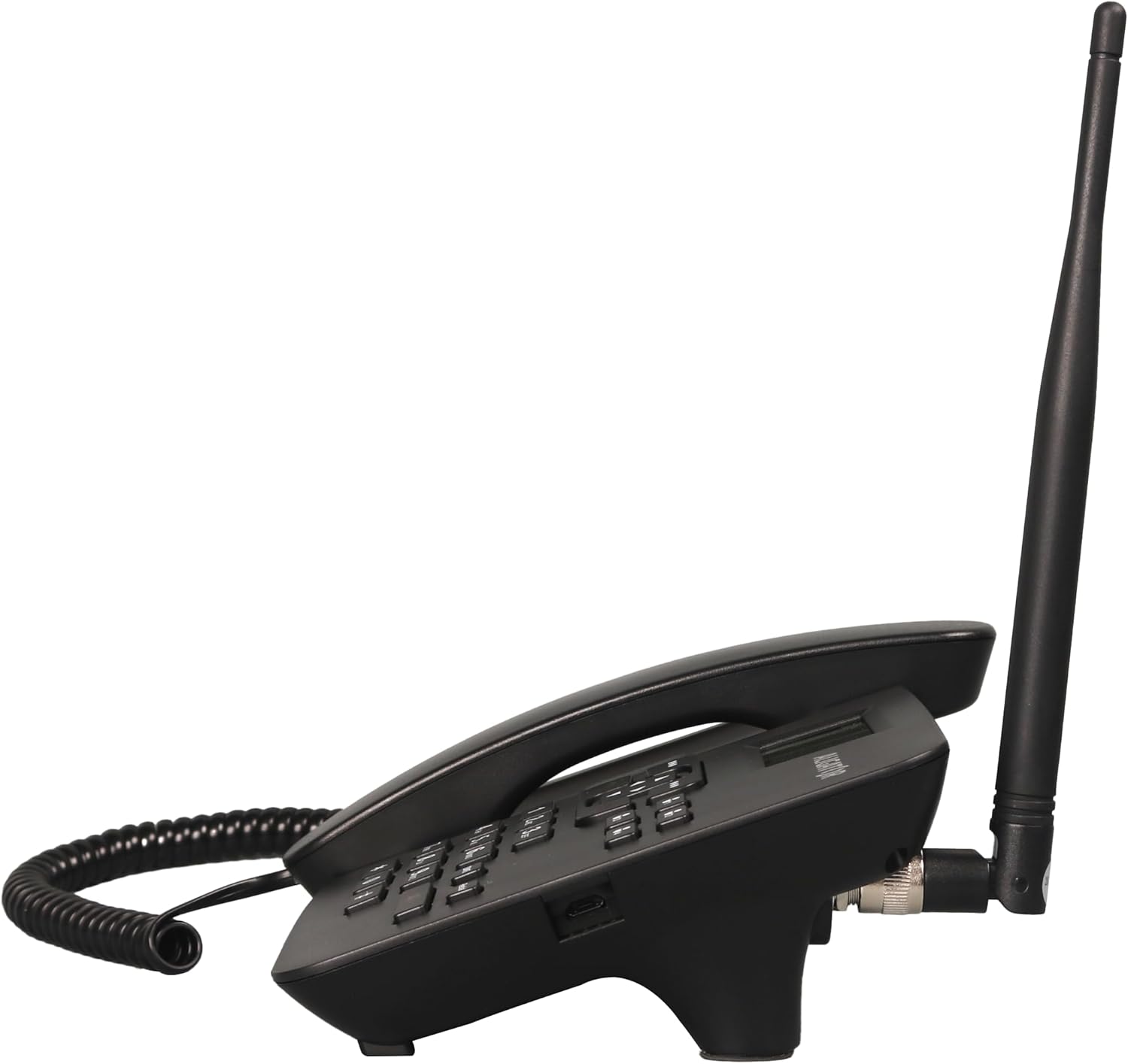
Зураг 4.2: Хажуу тал view showing the antenna connection.

Зураг 4.3: Буцах view of the Aligator T100.
4.1 Товчлуур ба дэлгэц
The keypad features large, easy-to-read buttons. The monochrome graphic display (128 x 64 points, 53 x 25 mm) has a green background illumination for clear visibility.

Figure 4.4: Close-up of the display and keypad.
5. Тохиргоо
5.1 Батерей суурилуулах
- Remove the battery compartment cover on the back of the phone.
- Insert the provided Li-ion 800 mAh battery, ensuring the contacts align correctly.
- Зайны тасалгааны тагийг солих.
5.2 SIM карт суурилуулах
- Батерейг нь салгасны дараа SIM картны үүрийг олоорой.
- Insert your GSM SIM card into the designated slot, ensuring proper orientation as indicated by the diagram near the slot.
- Зай болон зайны тагийг дахин суулгана уу.
5.3 Антенны хавсралт
- Locate the TNC-Female connector on the side/back of the phone unit.
- Screw the high-performance external antenna onto this connector until it is securely fastened.
5.4 Анхны цэнэглэлт ба асаалттай
- Connect the mains charger to the phone's charging port and plug it into a power outlet.
- Allow the phone to charge fully before first use. The display will indicate charging status.
- To power on, press and hold the power button (if available) or simply ensure the battery is inserted and the phone is connected to power.
6. Ашиглалтын заавар
6.1 Дуудлага хийх, хүлээн авах
- Дуудлага хийх: Lift the handset. You will hear a classic dial tone. Dial the phone number using the keypad. The call will be initiated automatically after a short delay or upon pressing the call button.
- Дуудлага хүлээн авах: When the phone rings, simply lift the handset to answer the call.
- Дуудлага дуусгах: Place the handset back onto the cradle to end the call.
6.2 Using the Keypad and Navigation
The keypad includes standard numeric keys (0-9, *, #) and dedicated function buttons. Use the navigation buttons (up, down, left, right) to navigate through menus on the display.

Figure 6.1: Display and navigation controls.
6.3 Speed Dial / Quick Dial
The Aligator T100 features four quick dial buttons (labeled 1-4) for frequently called numbers. You can program these buttons to dial a contact directly.
- Programming Quick Dial: Refer to the phone's menu for
Холбогдох баримт бичиг - T100

ALIGATOR S6700 ахлах хэрэглэгчийн гарын авлага
ALIGATOR S6700 Senior гар утасны хэрэглэгчийн гарын авлага нь тохиргоо, DUAL SIM болон SOS Locator, Android үйлдлийн систем, холболт, аюулгүй байдал, экологийн устгал зэргийг багтаасан.
Aligator Watch Pro X хэрэглэгчийн гарын авлага, гарын авлага
Aligator Watch Pro X ухаалаг цагны хэрэглэгчийн иж бүрэн гарын авлага нь тохиргоо, онцлог, холболт, мэдэгдэл, цагны нүүр, утасны интеграцчлал, алдааг олж засварлах зэргийг багтаасан болно.
Návod k použití chytrých hodinek ALIGATOR Watch Amoled Pro AW14
Kompletní návod k použití chytrých hodinek ALIGATOR Watch Amoled Pro AW14. Zjistěte, jak ovládat hodinky, připojit je k telefonu, využívat funkce a řešit problémy.
ALIGATOR A930 GPS Senior 4G: Návod k použití
ALIGATOR A930 GPS Senior 4G, GPS болон SOS-ийг ашиглах боломжтой.
Aligator Watch Lady Smartwatch хэрэглэгчийн гарын авлага, гарын авлага
Aligator Watch Lady ухаалаг цагны тохиргоо, онцлог, холболт, алдааг олж засварлах, аюулгүй байдлын талаарх мэдээллийг багтаасан хэрэглэгчийн дэлгэрэнгүй гарын авлага.
Aligator Watch GPS хэрэглэгчийн гарын авлага, гарын авлага
Aligator Watch GPS ухаалаг цагны хэрэглэгчийн иж бүрэн гарын авлага нь тохиргоо, онцлог, хослуулах, өгөгдөл хянах, тохиргоо, алдааг олж засварлах, аюулгүй байдлын мэдээллийг багтаасан болно.