1. Оршил ба түүнээс дээшview
The Quanta QTLBC95BT is a versatile wireless barcode reader designed for efficient data capture. It offers dual connectivity options: USB wireless and Bluetooth, providing flexibility for various scanning environments. This manual provides essential information for setting up, operating, and maintaining your device.
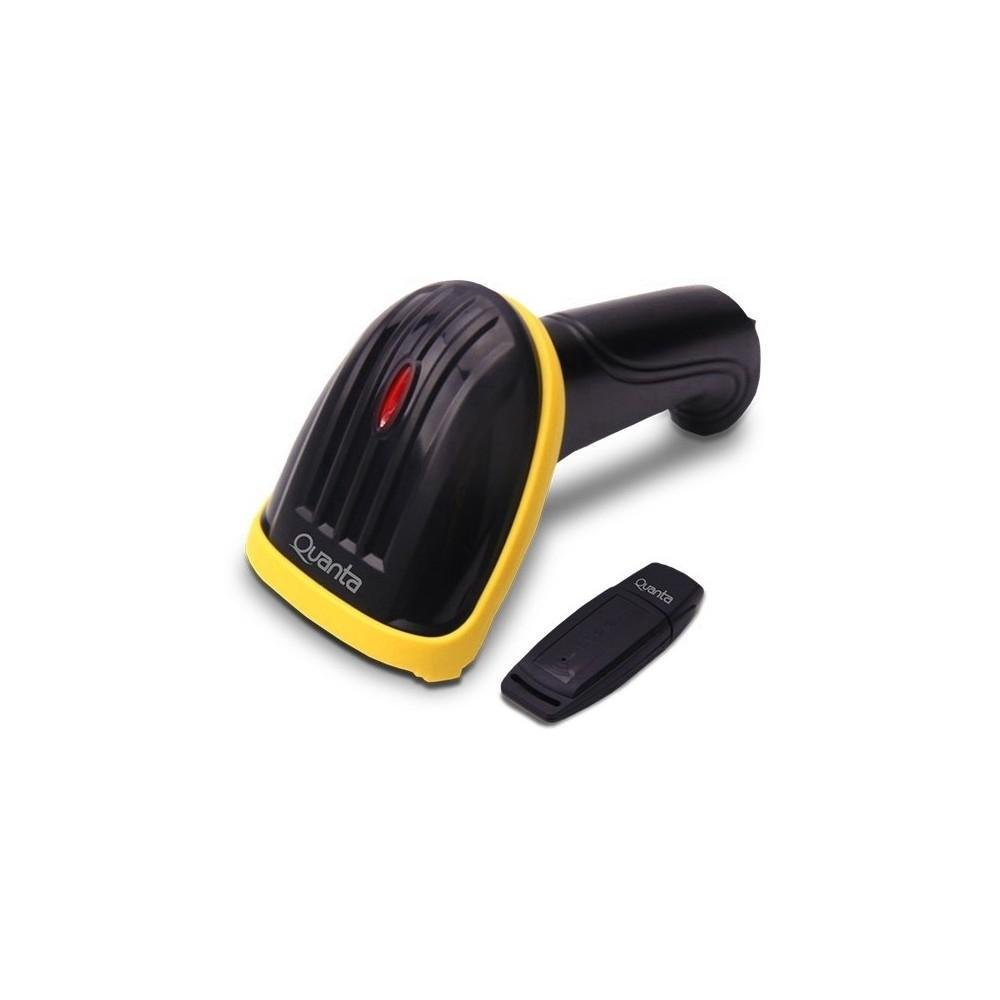
Image showing the black and yellow Quanta QTLBC95BT barcode reader and its compact black USB wireless adapter.
2. Багцын агуулга
Бүх зүйл багцад байгаа эсэхийг шалгана уу:
- 1 x Quanta QTLBC95BT Barcode Reader
- 1 x USB Wireless Adapter
- 1 x Charger (Bivolt 110V/220V)
- 1 x USB Cable (for charging and wired connection)
3. Тохиргоо
3.1. Төхөөрөмжийг цэнэглэж байна
- Connect the charger to the barcode reader's charging port.
- Plug the charger into a standard electrical outlet (110V/220V, 50Hz/60Hz).
- The device features a 3.7V Li-Ion 750 mAh rechargeable battery. Allow sufficient time for a full charge before first use.
3.2. Connecting via USB Wireless Adapter
- Insert the USB wireless adapter into an available USB port on your computer or host device.
- Turn on the barcode reader. It should automatically pair with the adapter.
- A successful connection is typically indicated by an audible beep or a change in the indicator light status on the scanner.
- The wireless transmission range for the USB adapter is approximately 30 meters.
3.3. Bluetooth-ээр холбогдож байна
- Ensure your host device (computer, tablet, smartphone) has Bluetooth enabled.
- Turn on the barcode reader.
- Initiate the pairing mode on the barcode reader (refer to specific instructions if a dedicated pairing button or sequence exists, otherwise it may automatically enter pairing mode).
- On your host device, search for new Bluetooth devices and select "Quanta QTLBC95BT" (or similar name) from the list.
- Хослолыг баталгаажуулна уу.
- The Bluetooth transmission range is approximately 10 meters.
4. Ашиглалтын заавар
4.1. Бар кодыг сканнердах
- Ensure the device is powered on and successfully connected to your host device.
- Point the scanner's window at the barcode you wish to read.
- Press the trigger button. A red scanning line will emit from the device.
- Position the scanner approximately 25 cm (10 inches) from the barcode for optimal reading.
- The scanner is bidirectional and has a decoding speed of 200 scans per second.
- Upon successful scan, the device will typically emit an audible beep, and the data will be transmitted to your connected device.
4.2. Auto-Sensor Mode
The scanner features an auto-sensor mode with an interval time of 0.3 seconds. In this mode, the scanner can automatically detect and read barcodes without requiring a trigger press, which is useful for hands-free operation.
5. Засвар үйлчилгээ
5.1. Цэвэрлэгээ
- Use a soft, dry cloth to clean the exterior of the barcode reader.
- For the scanning window, use a lint-free cloth lightly dampЗөөлөн, үрэлтгүй цэвэрлэгчээр цэвэрлэнэ. Хүчтэй химийн бодисоос зайлсхий.
- Цэвэрлэхийн өмнө төхөөрөмжийг унтраасан эсэхийг шалгаарай.
5.2. Зайны арчилгаа
- Зайны ашиглалтын хугацааг уртасгахын тулд зайгаа ойр ойрхон бүрэн цэнэггүй болгохоос зайлсхий.
- Төхөөрөмжийг удаан хугацаагаар ашиглаагүй бол сэрүүн, хуурай газар хадгална.
6. Алдаа засах
6.1. Device Not Scanning
- Төхөөрөмж асаалттай, бүрэн цэнэглэгдсэн эсэхийг шалгаарай.
- Verify that the scanner is properly connected to your host device (USB adapter or Bluetooth).
- Check if the barcode is damaged or unreadable.
- Сканнер болон бар код хоорондын зай, өнцгийг тохируулна уу.
6.2. No Data Transmission
- Confirm the connection status (USB or Bluetooth). Re-pair if necessary.
- Ensure the host device's input method is active and ready to receive data.
- Check the operating range (30m for USB wireless, 10m for Bluetooth).
6.3. Батерейг цэнэглэхгүй байна
- Verify that the charger is correctly connected to both the scanner and the power outlet.
- Цахилгааны залгуур ажиллаж байгаа эсэхийг шалгаарай.
- Try using a different USB cable or charger if available.
7. Техникийн үзүүлэлтүүд
| Онцлог | Дэлгэрэнгүй |
|---|---|
| Брэнд | Кванта |
| Загварын дугаар | QTLBC95BT |
| Холболтын технологи | Bluetooth, USB Wireless, USB Cable |
| Эрчим хүчний эх үүсвэр | Зайгаар ажилладаг, цахилгаан утастай |
| Зайны төрөл | DC 3.7V Li-Ion 750 mAh Rechargeable |
| Оролтын хэмжээtage | 110V/220V - 60Hz/50Hz (Bivolt) |
| Сканнерийн төрөл | Хоёр чиглэлтэй |
| Auto-Sensor Interval | 0.3 секунд |
| Decoding Speed | 200 скан / секунд |
| Optimal Scanning Distance | 25 см |
| USB Wireless Transmission Range | 30 метр хүртэл |
| Bluetooth дамжуулах хүрээ | 10 метр хүртэл |
| Өнгө | Хар |
| Багцын хэмжээ | 18 x 11 x 8 см |
| Багцын жин | 350 гр |
8. Баталгаат хугацаа ба дэмжлэг
For warranty information or technical support, please refer to the documentation provided with your purchase or contact Quanta customer service directly. Contact details can typically be found on the manufacturer's official webсайт.