1. Танилцуулга
This manual provides essential information for the setup, operation, and maintenance of your Microsoft Xbox One X Project Scorpio Edition Console (Model 1787). The Xbox One X is designed to deliver an immersive 4K gaming experience with enhanced performance. This particular unit is a renewed product, ensuring functionality and quality.
Please read these instructions carefully before using your console to ensure proper functionality and to maximize your gaming experience.
2. Багцын агуулга
Upon unboxing your renewed Xbox One X Project Scorpio Edition, verify that all the following items are included:
- Xbox One X Project Scorpio Edition 1TB Console
- Project Scorpio Edition Wireless Controller
- Xbox One X Vertical Stand
- HDMI cable (4K capable)
- AC цахилгаан кабель
- 1 month Game Pass subscription trial (may vary with renewed products)
- 14-day Xbox Live Gold trial (may vary with renewed products)

3. Тохиргоо
3.1. Console Placement
Place the Xbox One X console on a stable, flat surface. Ensure adequate ventilation around the console to prevent overheating. Do not block any vents. The included vertical stand can be used for upright placement.
3.2. Консолыг холбох
- Эрчим хүчний холболт: Connect the AC power cable to the console's power port and then to a wall outlet.
- HDMI холболт: HDMI кабелийн нэг үзүүрийг холбоно уу HDMI OUT to TV port on the console and the other end to an HDMI input on your television or monitor. For 4K resolution, ensure your display supports 4K and use the provided 4K-capable HDMI cable.
- Интернет холболт (заавал биш): For wired internet, connect an Ethernet cable from your router or modem to the Ethernet port on the console. For wireless internet, you will configure this during the initial setup process.

3.3. Консолын анхны тохиргоо
After connecting the console, power it on by pressing the Xbox button on the front of the console or on the controller. Follow the on-screen prompts to complete the initial setup, which typically includes:
- Хэл болон бүс нутгийн сонголт.
- Network configuration (wired or wireless).
- System updates (may take some time).
- Xbox profile sign-in or creation.
Note: As a renewed product, the console may contain residual data from a previous owner. It is recommended to perform a factory reset during initial setup if prompted, or manually through the system settings, to ensure a clean slate.
4. Ашиглалтын заавар
4.1. Connecting the Wireless Controller
Your Project Scorpio Edition Wireless Controller is pre-paired with the console. If it needs to be re-paired or you are connecting a new controller:
- Insert fresh batteries into the controller.
- Press and hold the Xbox button on the controller to turn it on.
- Press the Pair button on the console (small circular button usually near the front USB port).
- Within 20 seconds, press and hold the Pair button on the controller (small circular button on the top edge, near the USB port). The Xbox button on the controller will flash rapidly, then remain solid when connected.

4.2. Үндсэн навигаци
Use the left thumbstick or D-pad on your controller to navigate the Xbox dashboard. The A button confirms selections, and the B button goes back. The Xbox button opens the Guide menu for quick access to friends, messages, settings, and more.
4.3. Playing Games and Media
- Диск тоглоомууд: Insert a game disc into the disc drive on the front of the console. The game will automatically begin installation or launch.
- Дижитал тоглоомууд: Download games from the Microsoft Store or access them via Xbox Game Pass. Installed digital games can be found in your 'My games & apps' library.
- 4K Blu-ray: The Xbox One X includes a 4K Blu-ray player. Insert a 4K Blu-ray disc to watch movies in ultra-high definition.
5. Засвар үйлчилгээ
5.1. Cleaning the Console
Regularly clean the exterior of your console with a soft, dry, lint-free cloth. Do not use abrasive cleaners or solvents. Ensure vents are free from dust and debris to maintain optimal airflow.
5.2. Програм хангамжийн шинэчлэлтүүд
The Xbox One X periodically receives system software updates. Ensure your console is connected to the internet to download and install these updates, which provide new features, performance improvements, and security enhancements.
6. Алдаа засах
This section addresses common issues you might encounter with your Xbox One X console.
- Console Does Not Power On:
- Verify the power cable is securely connected to both the console and a working wall outlet.
- Өөр цахилгаан залгуураар оролдоно уу.
- Видео гаралт байхгүй:
- Ensure the HDMI cable is firmly connected to both the console (HDMI OUT) and your TV.
- Таны телевизор зөв HDMI оролтын эх үүсвэрт тохируулагдсан эсэхийг шалгана уу.
- Try a different HDMI cable or TV input.
- Хянагч холбогдоогүй байна:
- Ensure batteries are charged or replaced.
- Attempt to re-pair the controller as described in Section 4.1.
- Сүлжээний холболтын асуудлууд:
- Утастай холболтын хувьд Ethernet кабель болон чиглүүлэгчийн төлөвийг шалгана уу.
- For wireless connections, verify Wi-Fi password and router functionality.
- Restart your router/modem and console.
- Previous Owner Data Present (Renewed Console):
- руу шилжих Settings > System > Console info > Reset console. Choose "Reset and remove everything" to wipe all user data and settings. This will return the console to factory defaults.
For further assistance, refer to the official Microsoft Xbox support webсайт.
7. Техникийн үзүүлэлтүүд
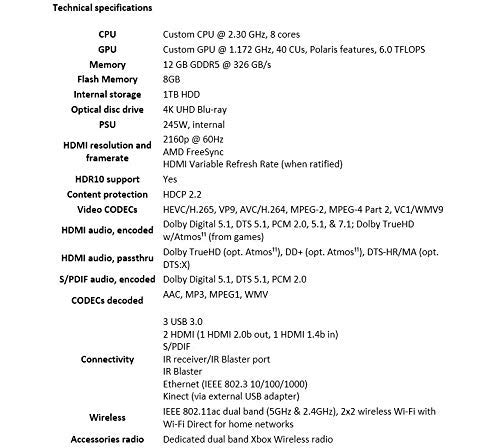
The Microsoft Xbox One X Project Scorpio Edition (Model 1787) features advanced hardware for high-performance gaming:
| Онцлог | Дэлгэрэнгүй |
|---|---|
| Загварын дугаар | Xbox One X-cr (1787) |
| CPU | Custom CPU @ 2.30 GHz, 8 cores |
| GPU | Custom GPU @ 1.172 GHz, 40 CUs, Polaris features, 6.0 TFLOPS |
| Санах ой | 12 GB GDDR5 @ 326 GB/s |
| Флэш санах ой | 8 ГБ |
| Дотоод санах ой | 1TB хатуу диск |
| Оптик диск хөтлөгч | 4K UHD Blu-ray |
| PSU | 245W, internal |
| HDMI Resolution & Framerate | 2160p @ 60Hz, AMD FreeSync, HDMI Variable Refresh Rate (when ratified) |
| HDR10 дэмжлэг | Тиймээ |
| Агуулга хамгаалах | HDCP 2.2 |
| Видео CODEC | HEVC/H.265, VP9, AVC/H.264, MPEG-2, MPEG-4 Part 2, VC1/WMV9 |
| HDMI Audio, Encoded | Dolby Digital 5.1, DTS 5.1, PCM 2.0, 5.1, & 7.1; Dolby TrueHD w/Atmos (from games) |
| HDMI Audio, Passthrough | Dolby TrueHD (opt. Atmos), DD+ (opt. Atmos), DTS-HR/MA (opt. DTS:X) |
| S/PDIF Audio, Encoded | Dolby Digital 5.1, DTS 5.1, PCM 2.0 |
| CODECs Decoded | AAC, MP3, MPEG1, WMV |
| Холболт | 3 USB 3.0, 2 HDMI (1 HDMI 2.0b out, 1 HDMI 1.4b in), S/PDIF, IR receiver/IR Blaster port, Ethernet (IEEE 802.3 10/100/1000), Kinect (via external USB adapter) |
| Утасгүй | IEEE 802.11ac dual band (5GHz & 2.4GHz), 2x2 wireless Wi-Fi with Wi-Fi Direct for home networks |
| Accessories Radio | Dedicated dual band Xbox Wireless radio |
| Бүтээгдэхүүний хэмжээс | 18.46 x 12.17 x 5 инч |
| Зүйлийн жин | 10 фунт |
8. Баталгаат хугацаа ба дэмжлэг
As a renewed product, your Xbox One X Project Scorpio Edition console is typically covered by a specific warranty provided by the seller or refurbisher. The product listing indicates a 90 хоногийн буцаах бодлого for refund or replacement.
For technical support, software issues, or further information regarding your Xbox One X, please visit the official Microsoft Xbox Support website or contact their customer service. Keep your purchase receipt and any warranty information provided with your renewed console for reference.
Онлайн нөөцүүд:


