Танилцуулга
Welcome to your new Kindle (10th Gen) e-reader. This device is designed specifically for reading, offering a comfortable and distraction-free experience. It features a 6-inch glare-free display with a built-in adjustable front light, allowing you to read comfortably in various lighting conditions, from bright sunlight to complete darkness.
Your Kindle holds thousands of books, making it easy to carry your entire library with you wherever you go. It supports various content formats and offers features like highlighting, dictionary lookup, and text size adjustment without leaving the page.

Зураг 1: Урд ба хойд view of the Kindle (10th Gen) device, showcasing түүний авсаархан загвар.
Тохиргоо
1. Charging Your Kindle
Before first use, fully charge your Kindle. Connect the included USB 2.0 charging cable to the Kindle's charging port and the other end to a computer's USB port or a 5W USB power adapter (not included). A full charge typically takes approximately 4 hours.
2. Асаах/унтраах
To power on your Kindle, press and hold the power button located on the bottom edge of the device for a few seconds until the screen activates. To turn off the screen (sleep mode), briefly press the power button. To fully power off, press and hold the power button until a power dialog appears, then select 'Power Off'.
3. Wi-Fi-д холбогдож байна
Upon first startup, your Kindle will guide you through the setup process, including connecting to a Wi-Fi network. Select your desired network from the list and enter the password if prompted. Your Kindle supports 802.11b, 802.11g, or 802.11n standard Wi-Fi networks with WEP, WPA, and WPA2 security.
4. Төхөөрөмжөө бүртгүүлж байна
Follow the on-screen prompts to register your Kindle to your Amazon account. Registration is necessary to access the Kindle Store, download content, and sync your reading progress across devices.

Зураг 2: A hand holding the Kindle (10th Gen), demonstrating the built-in front light illuminating the display for comfortable reading.
Kindle-ээ ажиллуулж байна
1. Унших туршлага
Your Kindle features a 167 ppi glare-free display that reads like real paper, even in direct sunlight. The adjustable front light allows you to customize the brightness for optimal reading in any environment.

Зураг 3: The Kindle (10th Gen) displayed outdoors, highlighting its glare-free screen that allows for comfortable reading even in direct sunlight.
2. Navigating Books
To turn pages, tap the right side of the screen to go forward or the left side to go back. You can also swipe across the screen. To access reading options, such as font size, dictionary, or table of contents, tap the top portion of the screen.
3. Accessing the Kindle Store
From the home screen, tap the 'Store' icon to browse and purchase new books, magazines, and other content. Your purchases will automatically download to your device when connected to Wi-Fi.
4. Supported Content Formats
Your Kindle natively supports Kindle Format 8 (AZW3), Kindle (AZW), TXT, PDF, unprotected MOBI, and PRC. Through conversion, it also supports PDF, DOCX, DOC, HTML, EPUB, TXT, RTF, JPEG, GIF, PNG, and BMP. Audible audio format (AAX) is supported for playback via Bluetooth audio.
5. Хүртээмжтэй байдлын онцлогууд
The Kindle (10th Gen) includes VoiceView screen reader, available over Bluetooth audio, which provides spoken feedback to navigate your device and read books with text-to-speech (English only). You can also adjust font size, font face, line spacing, and margins to suit your reading preferences.
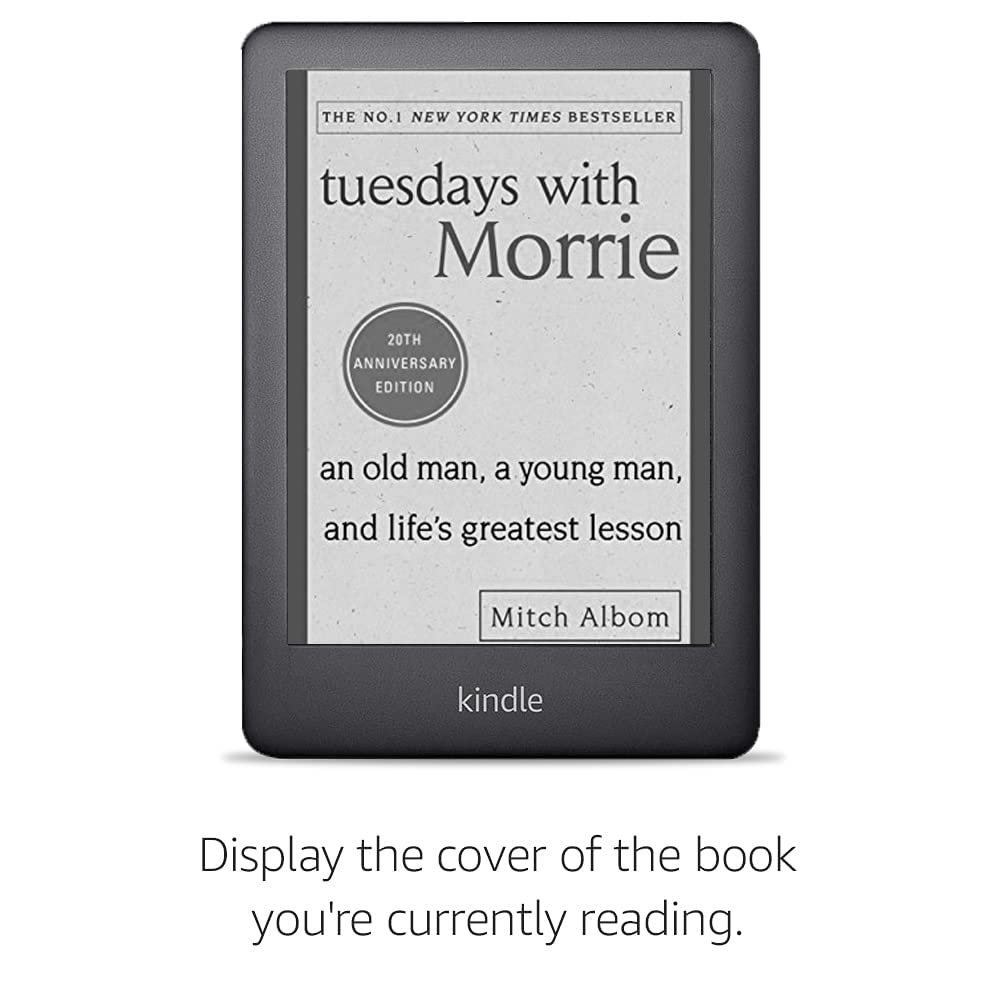
Зураг 4: The Kindle (10th Gen) displaying the cover of the book currently being read on its lock screen, a customizable feature.
Засвар үйлчилгээ
1. Төхөөрөмжөө цэвэрлэж байна
To clean your Kindle, use a soft, lint-free cloth. Do not use abrasive cleaners, solvents, or aerosol sprays directly on the device. If necessary, slightly dampдаавуугаар усаар.
2. Зайны арчилгаа
A single charge can last up to four weeks, based on a half hour of reading per day with wireless off and the light setting at 13. Battery life will vary based on light settings and wireless usage. For optimal battery life, avoid exposing your Kindle to extreme temperatures.

Зураг 5: Two Kindle devices on a charging pad, illustrating the long battery life with one device showing 21% charge and another fully charged.
3. Програм хангамжийн шинэчлэлтүүд
Your Kindle will periodically check for and download software updates automatically when connected to Wi-Fi. Ensure your device is charged and connected to Wi-Fi for updates to install smoothly.
4. Хадгалалтын менежмент
Your Kindle comes with 8 GB of on-device storage, capable of holding thousands of books. Additionally, you receive free cloud storage for all Amazon content, allowing you to access your library from any compatible device.
Алдааг олж засварлах
Төхөөрөмж хариу өгөхгүй байна
If your Kindle becomes unresponsive or hangs, especially on the lock screen, you can perform a force reboot. Press and hold the power button for approximately 40 seconds until the device restarts. Release the button once the Kindle logo appears.
Wi-Fi холболтын асуудал
If you are experiencing issues connecting to Wi-Fi, ensure your network password is correct. Try restarting your Wi-Fi router and then attempting to reconnect your Kindle. If the problem persists, try forgetting the network on your Kindle and re-adding it.
Content Not Downloading
Verify that your Kindle is connected to a stable Wi-Fi network. Check your Amazon account for any payment issues or content restrictions. You can also try syncing your Kindle manually from the settings menu.
Үзүүлэлтүүд
| Онцлог | Дэлгэрэнгүй |
|---|---|
| Дэлгэц | Amazon's 6 inch display, 167 ppi, optimized font technology, 16-level gray scale. |
| Хэмжээ | 160 x 113 x 8.7 мм |
| Жин | 174 g (Actual size and weight may vary by configuration and manufacturing process) |
| Төхөөрөмж дээрх хадгалах сан | 8 ГБ багтаамжтай, мянга мянган ном багтаах боломжтой. |
| Үүл хадгалах сан | Амазоны бүх контентод зориулсан үнэгүй үүл хадгалах газар |
| Зайны ашиглалт | Up to four weeks (based on 30 mins reading/day, wireless off, light setting 13) |
| Цэнэглэх хугацаа | Approximately 4 hours via USB cable from computer or 5W USB adapter |
| Wi-Fi холболт | 802.11b, 802.11g, or 802.11n standard with WEP, WPA and WPA2 security |
| Агуулгын форматыг дэмждэг | Kindle Format 8 (AZW3), Kindle (AZW), TXT, PDF, хамгаалалтгүй MOBI, БНХАУ; PDF, DOCX, DOC, HTML, EPUB, TXT, RTF, JPEG, GIF, PNG, BMP хөрвүүлэх замаар; Дуут аудио формат (AAX). |
| Хайрцагт багтсан | Kindle, USB 2.0 charging cable and Quick Start Guide. |
| Үе үе | All-new Kindle 10th Generation - 2019 release. |
Баталгаат болон дэмжлэг
Баталгаат хугацааны мэдээлэл
Your Kindle (10th Gen) comes with a 1-year limited warranty and service. For detailed terms and conditions, please refer to the official Amazon Kindle warranty documentation.
Үйлдвэрлэгч ба импортлогчийн дэлгэрэнгүй мэдээлэл
Үйлдвэрлэгч: HENGYANG FUTAIHONG PRECISION INDUSTRIAL CO., LTD, Building E and Affiliated Buildings, No. 35 Baisha Industrial Venture, Baisha Industrial Zone, Yanfeng District, Hengyang City, Hunan Province, P.R. CHINA
Импортлогч: Amazon Wholesale (India) Private Limited. Block E, Unit No. 1401-1421, International Trade Tower, Nehru Place, New Delhi- 110019
Нэмэлт баримт бичиг
Further information and detailed guides are available through the Kindle User Guide accessible on your device (Settings > Kindle User guide) or on the official Amazon support webсайт.


