1. Танилцуулга
Thank you for choosing the Petlibro Automatic Pet Feeder. This device is designed to provide consistent and timely meals for your pet, ensuring they are fed according to a set schedule, even when you are away. Please read this manual thoroughly before use to ensure proper operation and maintenance of your feeder.
2. Аюулгүй байдлын чухал мэдээлэл
Бүтээгдэхүүнийг гэмтээх, гэмтээхгүйн тулд дараах аюулгүй байдлын арга хэмжээг дагаж мөрдөнө үү.
- Read all instructions carefully before operating the feeder.
- Ашиглаагүй эсвэл угсрах явцад тэжээгчийг хүүхэд, гэрийн тэжээвэр амьтнаас хол байлга.
- Үндсэн төхөөрөмжийг ус болон бусад шингэнд дүрж болохгүй.
- Use only dry pet food with a diameter between 5-15mm. Do not use wet, canned, or moist food.
- Тэжээгчийг тогтвортой, тэгш гадаргуу дээр байрлуулсан эсэхийг шалгаарай.
- Unplug the feeder before cleaning or performing any maintenance.
- Do not attempt to repair or modify the feeder yourself. Contact customer support for assistance.
- Орон нутгийн дүрэм журмын дагуу зайгаа хариуцлагатайгаар устгана уу.
3. Багцын агуулга
Бүх зүйл байгаа эсэхийг шалгахын тулд багцын агуулгыг шалгана уу:
- Petlibro Automatic Pet Feeder Main Unit
- Хоолны аяга
- USB-C Power Adapter and Cable
- Чийг шингээгч уут (урьдчилан суурилуулсан эсвэл тусад нь)
- Хэрэглэгчийн гарын авлага
4. Бүтээгдэхүүн дууссанview
Familiarize yourself with the different parts of your Petlibro Automatic Pet Feeder:
- Food Tank: Stores dry pet food.
- Таг: Covers the food tank to keep food fresh.
- Хяналтын самбар: Buttons and display for setting schedules and manual feeding.
- Food Outlet: Where food dispenses into the bowl.
- Хоолны аяга: Гэрийн тэжээвэр амьтдаа идэж болох салдаг аяга.
- Цахилгаан порт (USB-C): Цахилгаан адаптерт холбогдоно.
- Зайны тасалгаа: Holds backup batteries (not included).
5. Тохиргоо
Follow these steps to set up your Petlibro Automatic Pet Feeder:
5.1 Угсралт
- Баглаа задлах: Сав баглаа боодолоос бүх бүрэлдэхүүн хэсгүүдийг болгоомжтой арилгана.
- Install Food Bowl: Place the food bowl securely at the base of the feeder.
- Install Food Tank: Align the food tank with the base and twist to lock it into place.
- Хатаах уут оруулах: If not pre-installed, open the desiccant compartment (usually under the lid) and insert the desiccant bag to keep food fresh. Replace every 15-30 days.

Image: Step-by-step assembly guide for the Petlibro Automatic Pet Feeder. It shows how to twist open the lid, take out the food bowl, put the desiccant bag into its compartment, install the food tank, put the lid back on, and finally install the food bowl.
5.2 Цахилгаан хангамж
The feeder can be powered by a USB-C adapter or backup batteries.
- Үндсэн хүч: Connect the USB-C power adapter to the feeder's power port and plug it into a wall outlet.
- Батерейны нөөцлөлт (заавал биш): Таны хүч чадлын төлөөtages, install 3 D-cell batteries (not included) into the battery compartment at the bottom of the feeder. This ensures continuous operation.
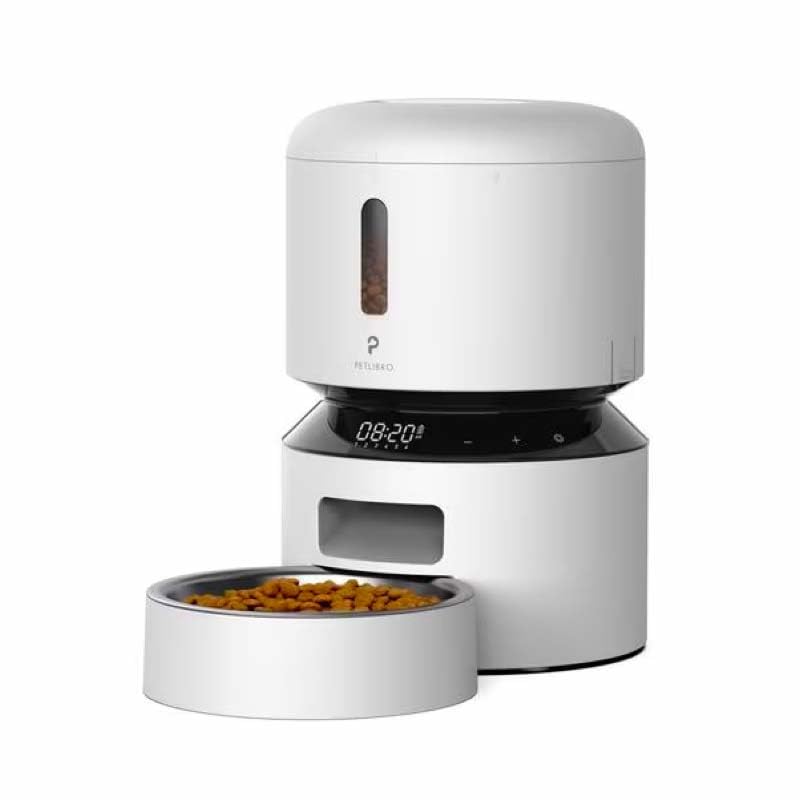
Image: Diagram illustrating the dual power supply system of the Petlibro Automatic Pet Feeder. It shows the USB-C adapter connected for primary power and the battery compartment for backup power. A note indicates that batteries are not included.
6. Ашиглалтын заавар
Once assembled and powered, you can begin programming your feeder.
6.1 Хүнсний савыг дүүргэх
- Хүнсний савны тагийг нээнэ үү.
- Pour dry pet food into the tank. Ensure the food is within the recommended size (5-15mm diameter).
- Close the lid securely to maintain freshness.
6.2 Setting Meal Schedules and Portions
The feeder allows you to schedule up to 6 meals per day, with 1 to 50 portions per meal.

Image: A cat eating from the Petlibro Automatic Pet Feeder, illustrating the feeder's function. Text overlays indicate "Portion: 1-50" and "Meals: 1-6", highlighting the customizable feeding schedule.
- Одоогийн цагийг тохируулах: Use the control panel buttons (e.g., "SET", "UP", "DOWN") to set the current time.
- Хоолны хөтөлбөрийн цаг: Press the "MEAL" button to enter meal programming mode. Select the desired meal number (e.g., Meal 1) and set the feeding time.
- Set Portions: For each programmed meal, set the number of portions (1-50) using the "PORTION" or "UP/DOWN" buttons.
- Repeat for all meals: Program up to 6 meals as needed.
- Тохиргоог хадгалах: Ensure all settings are saved according to the feeder's specific interface (usually by pressing "SET" or waiting for auto-save).
6.3 Гараар хооллох
To dispense food instantly, press the manual feed button (often labeled "FEED" or a paw icon) on the control panel. Each press typically dispenses one portion.
7. Засвар үйлчилгээ, цэвэрлэгээ
Тогтмол цэвэрлэгээ нь эрүүл ахуйг хангаж, тэжээгчийн ашиглалтын хугацааг уртасгадаг.
- Салгах: Always unplug the feeder from the power outlet before cleaning.
- Дизассембл хийх: Remove the food bowl and food tank.
- Цэвэр бүрэлдэхүүн хэсгүүд: Wash the food bowl and food tank with mild soap and water. Rinse thoroughly and dry completely before reassembling.
- Үндсэн нэгжийг арчих: Үндсэн нэгжийг зөөлөн арчиж, damp даавуу. Үндсэн төхөөрөмжийг усанд дүрж болохгүй.
- Replace Desiccant: Replace the desiccant bag every 15-30 days to maintain food freshness.
- Дахин угсрах: Ensure all parts are dry before reassembling the feeder.
8. Алдаа засах
If you encounter issues with your feeder, refer to the following common problems and solutions:
| Асуудал | Боломжит шалтгаан | Шийдэл |
|---|---|---|
| Тэжээгч асахгүй байна. | No power connection; batteries depleted or incorrectly installed. | Check power adapter connection; replace batteries or ensure correct polarity. |
| Хоол хүнс тараахгүй байна. | Food tank empty; food jammed; dispenser blocked; incorrect schedule settings. | Refill food tank; clear any food jams; check dispenser for blockages; verify meal schedule and portion settings. |
| Food dispenses too much/too little. | Incorrect portion settings. | Adjust portion settings for each meal. |
| Дэлгэц ажиллахгүй байна. | Эрчим хүчний асуудал; дэлгэцийн эвдрэл. | Check power supply; if problem persists, contact customer support. |
9. Техникийн үзүүлэлтүүд
| Онцлог | Дэлгэрэнгүй |
|---|---|
| Бүтээгдэхүүний нэр | Petlibro Automatic Pet Feeder |
| Загвар | 3л автомат тэжээгч |
| Хүчин чадал | 3 литр |
| Материал | Food-grade ABS plastic |
| Эрчим хүчний хангамж | USB-C adapter (5V/1A); 3 x D-cell batteries (backup, not included) |
| Өдрийн хоол | Up to 6 meals |
| Хоолны порц | 1-50 portions (approx. 5-10g per portion, depending on food density) |
| Recommended Food Size | 5-15 мм хуурай овьёос |
| Өнгө | Цагаан |
10. Баталгаат хугацаа ба дэмжлэг
Your Petlibro Automatic Pet Feeder comes with a standard manufacturer's warranty. For detailed warranty information, please refer to the warranty card included in your package or visit the official Petlibro webсайт.
If you have any questions, require technical support, or need assistance with your product, please contact Petlibro customer service. Contact details can typically be found on the product packaging, the official website, or by searching for "Petlibro customer support" online.


