1. Бүтээгдэхүүн дууссанview
The Philips SENSEO Switch HD6592/61 is a versatile 2-in-1 coffee machine designed to brew both single-serve pod coffee and a full pot of filter coffee. This manual provides instructions for safe and efficient use of your appliance.

Image 1.1: The Philips SENSEO Switch coffee machine, showcasing its dual functionality for both pod and filter coffee preparation.
Гол онцлогууд:
- Хос шар айраг исгэх систем: Prepare single cups of SENSEO pod coffee or a full pot of filter coffee.
- Автомат унтрах: The machine automatically turns off after a period of inactivity to save energy.
- Easy Water Tank Filling: The water tank features a clear level indication for precise and convenient filling.
- Дусал зогсоох систем: Allows you to pause brewing and pour a cup of filter coffee before the full cycle is complete.
- Аяга таваг угаагч машинд аюулгүй эд анги: The jug and filter holder are designed for easy cleaning in a dishwasher.
2. Аюулгүй байдлын мэдээлэл
Read this instruction manual carefully before using the appliance and save it for future reference. Always follow basic safety precautions when using electrical appliances to reduce the risk of fire, electric shock, and personal injury.
- Боть байгаа эсэхийг баталгаажуулна ууtagТөхөөрөмж дээр заасан e нь таны орон нутгийн сүлжээний эзлэхүүнтэй тохирч байнаtage холбохоос өмнө.
- Төхөөрөмж, залгуур, цахилгааны утсыг ус болон бусад шингэнд дүрж болохгүй.
- Төхөөрөмжийг хүүхдэд хүрэхгүй газар хадгална уу.
- Хэрэв залгуур, цахилгааны утас эсвэл төхөөрөмж өөрөө гэмтсэн бол төхөөрөмжийг ажиллуулж болохгүй.
- Place the appliance on a stable, flat, heat-resistant surface, away from hot surfaces or open flames.
- Төхөөрөмжийг цэвэрлэхийн өмнө эсвэл ашиглаагүй үедээ үргэлж цахилгааны залгуураас салга.
- Төхөөрөмжийн гэрийг нээж болохгүй. Засварыг зөвхөн эрх бүхий үйлчилгээний ажилтнууд хийх ёстой.
3. Тохиргоо
3.1 Сав баглаа боодол, эхний цэвэрлэгээ
- Кофены машинаас бүх савлагааны материалыг зайлуул.
- Wash the removable parts (water reservoir, jug, filter holder, drip tray) with warm water and a mild detergent. Rinse thoroughly and dry.
- Машины гадна талыг зараар арчихamp даавуу.
3.2 Эхний хэрэглээ (Угаах цикл)
Before brewing coffee for the first time, perform a rinsing cycle to clean the internal system.
- Усны савыг MAX үзүүлэлт хүртэл цэвэр хүйтэн усаар дүүргэнэ.
- Place the empty jug (for filter coffee) or a cup (for pod coffee) on the drip tray.
- Close the lid of the pod holder (without a pod) or ensure the filter holder is empty and correctly placed.
- Машиныг асаахын тулд цахилгаан товчийг дарна уу.
- Press the button for filter coffee or the 2-cup button for pod coffee to start a brewing cycle with only water.
- Repeat this process once or twice until the water reservoir is empty.

Зураг 3.1: Ар талд view of the coffee machine, showing the transparent water reservoir with level indicators and the filter coffee carafe in position.

Image 3.2: The coffee machine with the filter coffee section open, illustrating how to access the filter holder and water inlet for filter coffee brewing.
4. Ашиглалтын заавар
4.1 Brewing SENSEO Pod Coffee
- Ensure the water reservoir is filled with fresh cold water.
- Open the lid of the pod holder.
- Place one or two SENSEO coffee pods in the appropriate pod holder. For one cup, use the 1-cup pod holder; for two cups, use the 2-cup pod holder. Ensure the pod is centered.
- Тагийг нь товших чимээ гартал сайтар таглана.
- Place one or two cups on the drip tray.
- Press the 1-cup or 2-cup button to start brewing. The machine will automatically stop when the coffee is ready.

Image 4.1: The SENSEO Switch machine actively brewing two cups of pod coffee, demonstrating the pod coffee function.

Image 4.2: A close-up of the machine brewing a single cup of SENSEO pod coffee, highlighting the single-serve capability.
4.2 Brewing Filter Coffee
- Ensure the water reservoir is filled with fresh cold water up to the desired number of cups for filter coffee.
- Open the filter coffee section.
- Place a paper filter (size 1x4 or similar) into the filter holder.
- Add the desired amount of ground filter coffee into the paper filter.
- Close the filter coffee section and ensure the thermal jug is correctly placed on the heating plate.
- Press the filter coffee button to start brewing. The machine will brew the coffee and keep it warm in the thermal jug.
- The drip stop system allows you to remove the jug temporarily to pour a cup before brewing is complete.

Image 4.3: The SENSEO Switch machine configured for filter coffee, featuring the thermal carafe and filter holder.
4.3 Intensity Select
The machine features an Intensity Select function, allowing you to choose between a regular or a strong coffee. Refer to the control panel for specific buttons related to intensity selection.

Зураг 4.4: Толгойн дээгүүр view of the control panel, showing the power button, 1-cup and 2-cup buttons for pod coffee, the filter coffee button, and the Intensity Select option.

Image 4.5: A hand interacting with the control panel, demonstrating the ease of selecting brewing options.
5. Засвар үйлчилгээ
5.1 Цэвэрлэгээ
Тогтмол цэвэрлэгээ нь таны кофены машины ашиглалтын хугацааг уртасгаж, оновчтой ажиллагааг хангана.
- Өдөр тутмын цэвэрлэгээ: After each use, empty and rinse the water reservoir, drip tray, and pod holder. Wipe the exterior with a damp даавуу.
- Аяга таваг угаагч машинд аюулгүй эд анги: The jug and filter holder can be safely cleaned in the dishwasher.
- Под эзэмшигч: Remove the pod holder and rinse it under running water. Use a small brush if necessary to remove any coffee residue.
- Дуслын тавиур: Дуслын тавиур болон торыг тогтмол хоослон цэвэрлэж байгаарай.
5.2 Хатаах
Descaling is crucial to prevent limescale buildup, which can affect brewing performance and taste. The frequency of descaling depends on water hardness and usage.
- Use a descaling solution specifically designed for coffee machines. Follow the instructions provided with the descaling agent.
- Typically, the process involves filling the water reservoir with the descaling solution and running several brewing cycles without coffee.
- After descaling, rinse the machine thoroughly by running several cycles with fresh water to remove any descaling residue.
6. Алдаа засах
If you encounter issues with your Philips SENSEO Switch coffee machine, consult the following common troubleshooting steps:
- Машин асахгүй байна: Цахилгааны утсыг ажиллаж байгаа цахилгааны залгуурт найдвартай залгасан эсэхийг шалгана уу.
- Кофе исгэж чадахгүй байна: Ensure the water reservoir is filled, the pod holder/filter holder is correctly placed, and the lid is closed properly.
- Coffee tastes weak: Check if you are using the correct amount of coffee (pods or ground coffee) and if the Intensity Select setting is appropriate. Descaling might also be necessary.
- Ус гоожиж байна: Ensure all removable parts are correctly assembled and seated. Check for any cracks or damage to the water reservoir or other components.
- Limescale indicator light is on: Засвар үйлчилгээ хэсэгт тайлбарласны дагуу масштабыг арилгах циклийг гүйцэтгэнэ.
Хэрэв эдгээр шийдлүүдийг туршиж үзсэний дараа асуудал хэвээр байвал Philips хэрэглэгчийн дэмжлэгтэй холбогдож нэмэлт тусламж авна уу.
7. Техникийн үзүүлэлтүүд
Detailed technical specifications for the Philips SENSEO Switch HD6592/61 coffee machine:
| Тодорхойлолт | Үнэ цэнэ |
|---|---|
| Брэнд | ФИЛИПС |
| Загварын дугаар | HD6592/61 |
| Өнгө | Хар |
| Бүтээгдэхүүний хэмжээ (L x W x H) | 28 x 15 x 40 см |
| Зүйлийн жин | 2.4 кг |
| Хүчин чадал | 1 литр |
| Хүч | 1450 ватт |
| Ботьtage | 145 вольт |
| Материал | Зэвэрдэггүй ган |
| Онцлог шинж чанар | Thermal (for carafe) |
| Кофе чанагч төрөл | Electric filter coffee maker |
| Загвар | Senseo Switch |
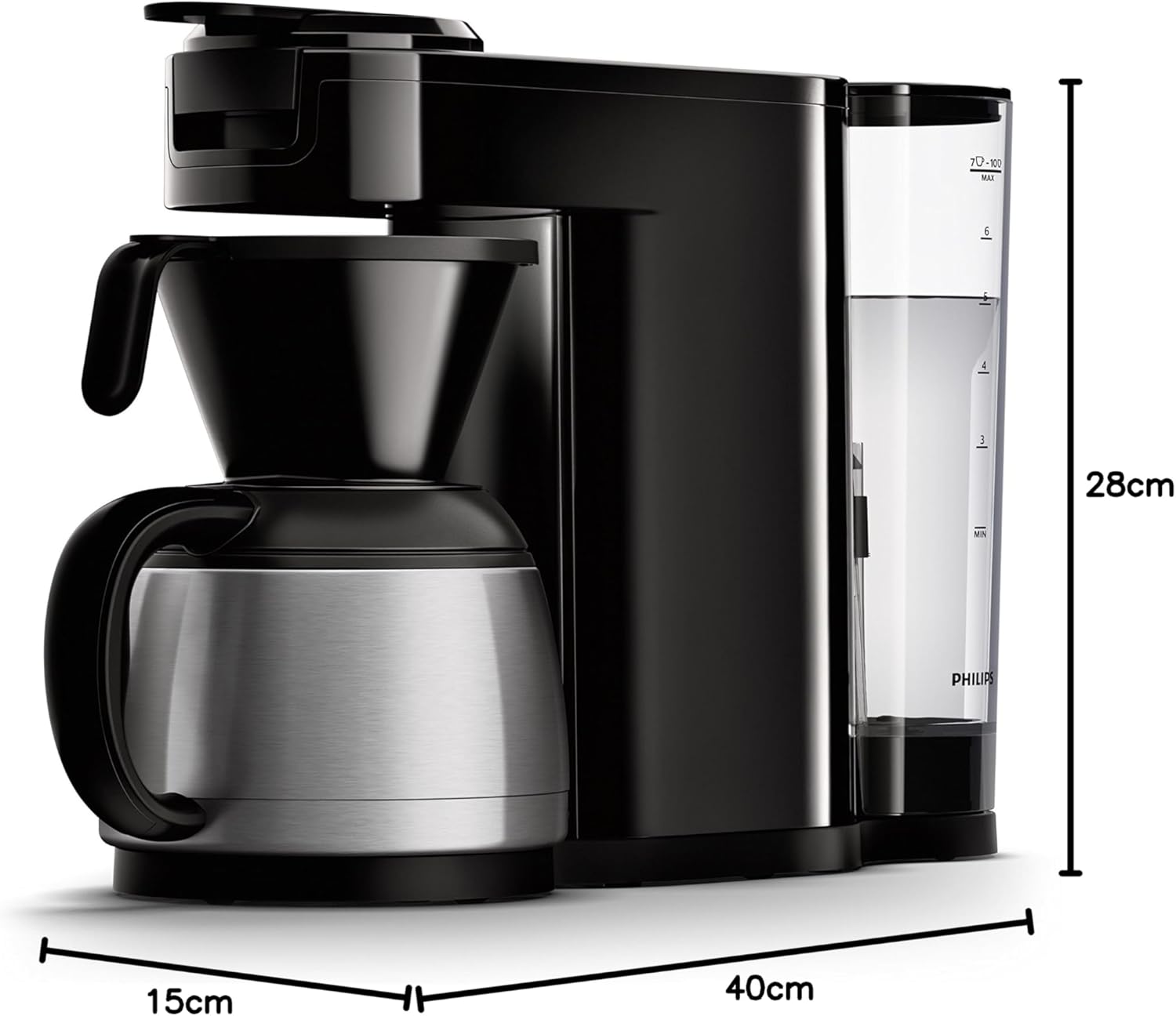
Image 7.1: Diagram illustrating the dimensions of the Philips SENSEO Switch coffee machine.
8. Баталгаат хугацаа ба дэмжлэг
This Philips appliance comes with a standard manufacturer's warranty. Please refer to the warranty card included in your product packaging for specific terms and conditions, including warranty period and coverage.
For technical support, service, or to register your product, please visit the official Philips webсайт эсвэл харилцагчийн үйлчилгээний хэлтэстэй холбогдоно уу. Баталгаат нэхэмжлэл гаргахын тулд худалдан авалтаа нотлох баримтаа хадгалаарай.
Та албан ёсны Philips-ээс дэлгэрэнгүй мэдээлэл болон дэмжлэг авах боломжтой. webсайт: www.philips.com