Танилцуулга
This manual provides comprehensive instructions for the installation, operation, and maintenance of your Kaadas K7-5 Push-Pull Keyless Smart Lock. Please read this manual thoroughly before using the product to ensure proper function and safety. Keep this manual for future reference.
Бүтээгдэхүүн дууссанview болон онцлог
The Kaadas K7-5 is an advanced keyless smart lock designed for convenience and security. It offers multiple access methods and intelligent features.
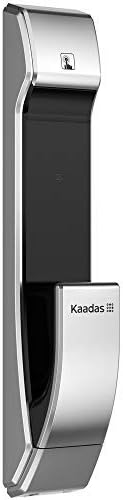
Зураг: хажуу тал view of the Kaadas K7-5 Smart Lock, showcasing түүний гоёмсог дизайн.
Гол онцлогууд:
- Push-Pull Operation: One-step intuitive door opening experience.
- Автомат түгжих: Ensures the door is locked automatically after closing.
- Олон хандалтын аргууд: Fingerprint, Password, RFID Card, and Mechanical Key.
- Sweden FPC Fingerprint Sensor: Provides accurate and swift recognition (less than 1 second).
- Fake PIN Code Feature: Allows adding random numbers before and after the real password to prevent exposure.
- Давхар баталгаажуулалт: Strengthens security by requiring two authentication methods (e.g., password + fingerprint/card).
- In-Home Security (Double-locking): Prevents unexpected unlocking attempts from outside when activated.
- Safe Handle Function: Locks the indoor handle to prevent unauthorized opening from inside, useful for child safety or peephole security.
- Unlock Records Query: Allows checking who unlocked the door and when.
- Яаралтай тэжээлийн нөөц: Use a 5V power bank via Micro USB in case of battery discharge.
- Батерей багатай анхааруулга: Voice sound and LED light alert for battery replacement.
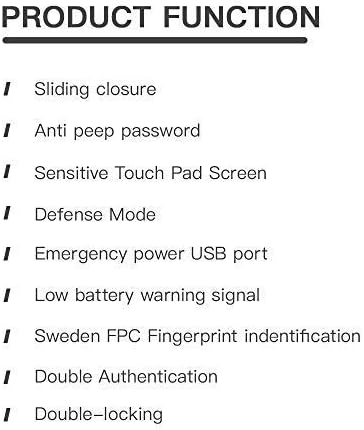
Image: A list detailing key product functions such as sliding closure, anti-peep password, sensitive touch pad, defense mode, emergency power USB port, low battery warning, Sweden FPC fingerprint identification, double authentication, and double-locking.
Тохиргоо ба суурилуулалт
The Kaadas K7-5 smart lock requires precise installation for optimal performance and security. It is highly recommended to have this lock installed by a qualified professional.
Суурилуулалтын ерөнхий анхаарах зүйлс:
- Ensure your door thickness is compatible (typically 38-60mm).
- The lock is designed for universal installation, suitable for various door opening directions.
- Refer to the detailed installation template and hardware provided with your lock.

Image: An exploded diagram showing all components of the Kaadas K7-5 Smart Lock, including the front and back panels, mortise, and various screws and pins for assembly.
Ашиглалтын заавар
The Kaadas K7-5 offers multiple ways to unlock your door. Ensure the lock is properly powered with 8 AA alkaline batteries (DC 6V).
1. Хурууны хээгээр түгжээ тайлах
Place your registered finger on the FPC fingerprint sensor. The lock will recognize your fingerprint in less than 1 second and unlock.
2. Unlocking with Password
Enter your registered password on the touch pad. The lock supports 6-12 digit passwords. Press the confirmation key to unlock.
- Fake PIN Code: To prevent others from guessing your password, you can enter random numbers before or after your actual password. For example, if your password is "123456", you can enter "987123456321" where "123456" is embedded within other numbers.
3. Unlocking with RFID Card
Present your registered RFID card to the card reader area on the lock. The lock will verify the card and unlock.
4. Unlocking with Mechanical Key
In case of emergency or battery failure, use the provided mechanical key to manually unlock the door.
5. Автомат түгжих
After the door closes, the lock will automatically engage the mortise to secure the door. This eliminates the need to manually check if the door is locked.
6. Double Authentication Mode
This mode enhances security by requiring two different authentication methods to unlock the door. For example, you might need to use a password followed by a fingerprint, or a card followed by a password. Refer to the lock's settings menu for activation and configuration.
7. In-Home Security (Double-locking)
When you are inside your home, activate the double-locking feature using the [CLOSE] button on the indoor unit. This prevents any unlocking attempts from the outside, even with valid credentials.
8. Safe Handle Function
When enabled, the indoor handle will be locked. This feature is useful for preventing children from accidentally opening the door or for added security if your door has a peephole that could be exploited.
Засвар үйлчилгээ
Proper maintenance ensures the longevity and reliable operation of your Kaadas K7-5 smart lock.
1. Зай солих
The lock will provide a voice sound and LED light warning when the batteries are low. Replace all 8 AA alkaline batteries promptly to avoid interruption of service. Do not mix old and new batteries or different types of batteries.
2. Emergency Power Backup
If the batteries are completely discharged, you can temporarily power the lock using a 5V power bank connected to the Micro USB port located on the exterior unit. This allows you to unlock the door and replace the internal batteries.
3. Цэвэрлэгээ
Цоожны гаднах гадаргууг зөөлөн, хуурай даавуугаар цэвэрлээрэй. Зүлгүүрийн цэвэрлэгч, уусгагч эсвэл хүчтэй химийн бодис хэрэглэхээс зайлсхий, учир нь эдгээр нь өнгөлгөө болон электрон эд ангиудыг гэмтээж болзошгүй.
Алдааг олж засварлах
If you encounter issues with your Kaadas K7-5 smart lock, consider the following common solutions:
- Түгжээ хариу өгөхгүй байна: Check the batteries. If the batteries are low or dead, replace them or use the emergency power backup.
- Хурууны хээ танигдаагүй: Хуруугаа цэвэр, хуурай эсэхийг шалгаарай. Асуудал хэвээр байвал хурууны хээгээ дахин бүртгүүлнэ үү.
- Нууц үг ажиллахгүй байна: Double-check the entered password. Ensure you are not in Fake PIN code mode if you are not intentionally using it.
- Door not locking/unlocking smoothly: Check for any obstructions in the door frame or mortise. Ensure the lock is properly aligned.
- Unusual sounds: If the lock makes unusual sounds, it may indicate a mechanical issue. Contact customer support.
For persistent issues, refer to the full troubleshooting guide available on the Kaadas official webсайт эсвэл хэрэглэгчийн дэмжлэгтэй холбоо барина уу.
Үзүүлэлтүүд
Below are the technical specifications for the Kaadas K7-5 Push-Pull Keyless Smart Lock.
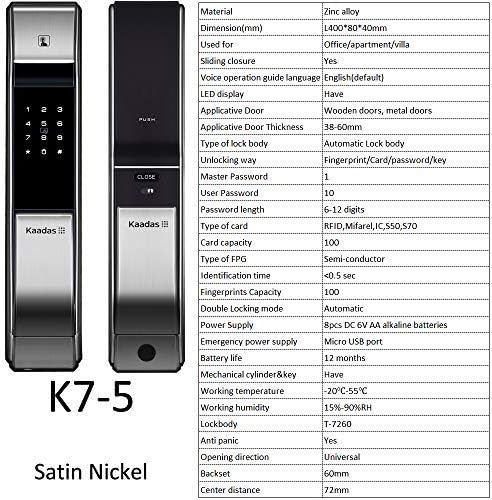
Зураг: Урд ба хойд views of the Kaadas K7-5 Smart Lock, accompanied by a detailed table of specifications including material, dimensions, unlocking methods, and power supply.
| Материал | Цайрын хайлш |
| Хэмжээ (L x W x H) | 400 x 80 x 40 мм (ойролцоогоор 15.75 x 3.15 x 1.57 инч) |
| Холбогдох хаалганы төрөл | Wooden doors, metal doors |
| Холбогдох хаалганы зузаан | 38-60 мм |
| Type of Lock Body | Automatic Lock body |
| Түгжээг тайлах аргууд | Fingerprint, Card, Password, Key |
| Master Password Capacity | 1 |
| User Password Capacity | 10 |
| Нууц үгийн урт | 6-12 оронтой |
| Картын төрөл | RFID, Mifare, IC550, 570 |
| Картын багтаамж | 100 |
| Хурууны хээ төрөл | Semi-conductor (FPC) |
| Таних хугацаа | <0.5 сек |
| Fingerprints Capacity | 100 |
| Double Locking Mode | Автомат |
| Эрчим хүчний хангамж | 8pcs DC 6V AA alkaline batteries |
| Онцгой байдлын үеийн цахилгаан хангамж | Микро USB порт |
| Зайны ашиглалт | Ойролцоогоор 12 сар |
| Mechanical Cylinder & Key | Тиймээ |
| Ажлын температур | -20 хэмээс 55 хэм хүртэл |
| Ажлын чийгшил | 15%-90% RH |
| Lockbody | Т-7260 |
| Үймээн самууны эсрэг | Тиймээ |
| Нээлтийн чиглэл | Бүх нийтийн |
| Бэккет | 60 мм |
| Төвийн зай | 72 мм |

Image: A technical drawing illustrating the dimensions of the Kaadas K7-5 Smart Lock, showing a height of 400mm, width of 80mm, and depth of 40mm. Note: Manual measurements may have slight deviations.
Баталгаат болон дэмжлэг
For information regarding warranty coverage, technical support, or service, please refer to the warranty card included with your product or visit the official Kaadas webсайт. Мөн та худалдан авалтын цэгтэйгээ холбогдож тусламж авах боломжтой.
Үйлдвэрлэгч: Каадас


