1. Танилцуулга
Thank you for choosing the DALI Oberon 7 Floorstanding Speaker. This manual provides essential information for the proper setup, operation, and maintenance of your speaker to ensure optimal audio performance and longevity. The Oberon 7 is designed to deliver a dynamic and powerful audio experience, featuring dual 7-inch wood fiber woofers for deep bass and a precision-coated soft dome tweeter for clear highs.
2. Аюулгүй байдлын мэдээлэл
- Байршил: Position speakers on a stable, level surface to prevent tipping. Ensure adequate ventilation around the speakers.
- Эрчим хүч: Connect speakers only to appropriate audio amplification equipment. Do not exceed the recommended power handling capacity.
- Чийг: Keep speakers away from water, moisture, and high humidity. Do not expose to dripping or splashing.
- Дулаан: Avoid placing speakers near heat sources such as radiators, heat registers, stoves, or other heat-producing apparatus.
- Цэвэрлэгээ: Цэвэрлэхийн өмнө цахилгаанаас салга. Зөөлөн, хуурай даавуу хэрэглээрэй. Шингэн цэвэрлэгч эсвэл аэрозоль цэвэрлэгч хэрэглэж болохгүй.
- Үйлчилгээ: Энэ бүтээгдэхүүнд өөрөө үйлчлэх гэж бүү оролдоорой. Бүх засвар үйлчилгээг мэргэшсэн үйлчилгээний ажилтнуудад хандаарай.
3. Багцын агуулга
Carefully unpack your DALI Oberon 7 speaker and verify that all components are present:
- DALI Oberon 7 Floorstanding Speaker (single unit)
- Сараалжтай
- Резинэн хөл
- Баяжуулалт
- Хэрэглэгчийн гарын авлага (энэ баримт бичиг)

Image: The DALI Oberon 7 Floorstanding Speaker with its protective grille attached, showcasing түүний гоёмсог дизайн.
4. Тохиргоо
4.1 Attaching Feet/Spikes
For optimal stability and vibration isolation, attach the included rubber feet or spikes to the bottom of the speaker. Rubber feet are suitable for hard floors, while spikes are recommended for carpeted surfaces to couple the speaker firmly to the subfloor.
4.2 Илтгэгчийн байршил
Proper speaker placement is crucial for achieving the best sound quality. Consider the following guidelines:
- Стерео тохиргоо: For a stereo pair, place the speakers equidistant from your primary listening position, forming an equilateral triangle.
- Хананаас зай: Experiment with placing the speakers a short distance from the rear and side walls. This can affect bass response and soundstage гүн.
- Хөлийн хуруу: Slightly angle the speakers inward towards the listening position (toe-in) to optimize imaging and soundstage фокус.

Image: A DALI Oberon 7 speaker placed in a typical living room setup, demonstrating ideal positioning next to a media console.
4.3-д холбогдох Amplifier/Хүлээн авагч
The DALI Oberon 7 features gold-plated terminals for secure and reliable connections. Use high-quality speaker cables for the best audio transmission.
- Таныг баталгаажуул amplifier/receiver is turned off and unplugged from the power outlet.
- Чанга яригч дээрх эерэг (+) терминалыг (улаан) таны чанга яригч дээрх эерэг (+) терминалтай холбоно уу. ampнастан.
- Чанга яригч дээрх сөрөг (-) терминалыг (хар) таны чанга яригч дээрх сөрөг (-) терминалтай холбоно уу. ampнастан.
- Дохио алдагдах эсвэл богино холболт үүсэхээс сэргийлж бүх холболтууд нягт, найдвартай байгаа эсэхийг шалгаарай.

Image: The rear panel of the DALI Oberon 7 speaker, highlighting the gold-plated speaker terminals and the bass reflex port.
5. Ажиллаж байгаа
Once your DALI Oberon 7 speakers are properly set up and connected to your amplifier/receiver, you can begin enjoying your audio. The Oberon 7 incorporates DALI's advanced driver technology, including the patented SMC (Soft Magnetic Compound) in the magnet motor system, which reduces distortion for improved clarity and dynamic range.
- Өөрийгөө асаана уу amplifier/receiver and select the appropriate audio source.
- Start playback at a low volume level.
- Gradually increase the volume to your desired listening level.
- Allow for a 'break-in' period: Like many high-fidelity speakers, the Oberon 7 may benefit from a period of use (typically 50-100 hours) to allow the drivers to fully settle and achieve their optimal sound characteristics.

Image: The DALI Oberon 7 speaker with its grille removed, revealing the two 7-inch wood fiber woofers and the soft dome tweeter.
6. Засвар үйлчилгээ
To maintain the aesthetic and acoustic performance of your DALI Oberon 7 speakers, follow these simple maintenance guidelines:
- Cleaning Cabinets: Use a soft, dry, lint-free cloth to gently wipe the cabinet surfaces. For stubborn marks, a slightly damp даавууг хэрэглэж болно, дараа нь хуурай даавуугаар нэн даруй. Зүлгүүрийн цэвэрлэгч эсвэл уусгагчаас зайлсхий.
- Cleaning Grilles: The fabric grilles can be carefully removed and gently vacuumed with a soft brush attachment to remove dust.
- Жолоочийн тусламж үйлчилгээ: Avoid touching the speaker drivers (woofers and tweeter) as this can cause damage. Keep them free from dust and debris.
- Нарны туяа: Prolonged exposure to direct sunlight can cause discoloration of the cabinet finish. Position speakers to minimize direct sun exposure or use curtains/blinds.
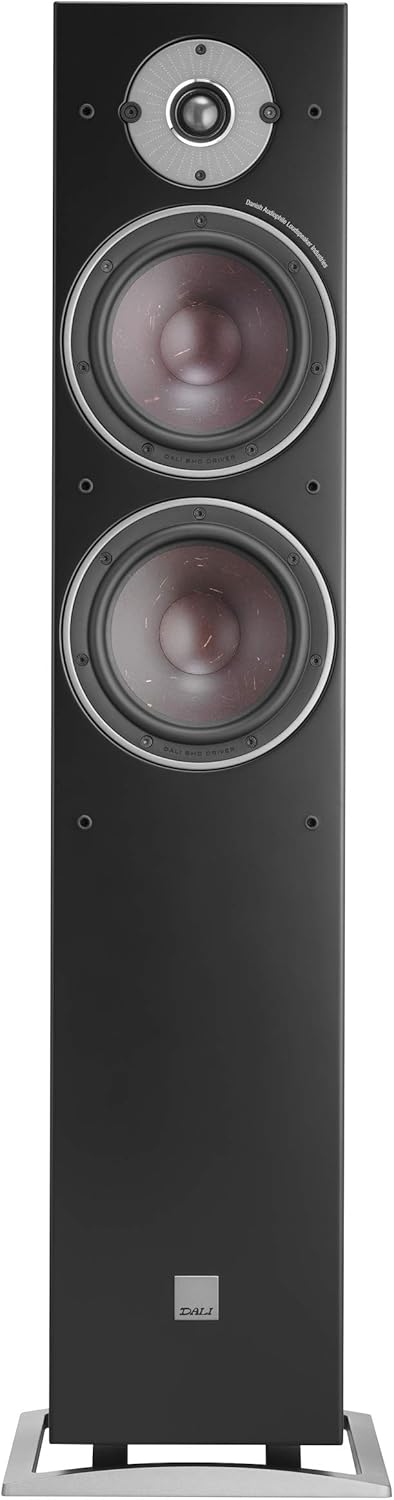
Image: A detailed close-up of the DALI Oberon 7's tweeter and one of its wood fiber woofers, showcasing the driver construction.
7. Алдаа засах
If you encounter issues with your DALI Oberon 7 speakers, refer to the following common troubleshooting steps:
- Дуугүй:
- Чанга яригч болон чанга яригчийн бүх кабелийн холболтыг шалгана уу amplifier ends. Ensure they are secure and correctly connected (positive to positive, negative to negative).
- гэдгийг баталгаажуулна уу ampөргөгч/хүлээн авагч асаалттай бөгөөд зөв оролтын эх үүсвэр сонгогдсон байна.
- Таны дууны түвшинг шалгана уу ampөргөгч/хүлээн авагч.
- Гажуудсан дуу:
- Таны дууны түвшинг бууруулна уу ampөргөгч/хүлээн авагч. Чанга яригчийг хэт ачаалах нь гажуудал үүсгэж болзошгүй.
- Inspect speaker cables for any damage or frayed wires that might be causing a short circuit.
- -ийг баталгаажуулах amplifier's power output matches the speaker's recommended power handling.
- Unbalanced Sound (one speaker louder/softer):
- Өөрийн балансын тохиргоог шалгана уу ampөргөгч/хүлээн авагч.
- Verify that both speakers are connected correctly and securely.
- Ensure both speakers are receiving a signal from the ampнастан.
If these steps do not resolve the issue, please contact your DALI retailer or authorized service center.
8. Техникийн үзүүлэлтүүд
| Онцлог | Тодорхойлолт |
|---|---|
| Загварын нэр | Оберон 7 |
| Загварын дугаар | 230073 |
| Брэнд | ДАЛИ |
| Чанга яригчийн төрөл | Floorstanding, Surround Sound, Woofer |
| Онцлог шинж чанар | Сайн уу Res Audio |
| Зөвлөмж болгож буй хэрэглээ | Хөгжим тоглуулагчдад зориулсан |
| Тохиромжтой төхөөрөмжүүд | Гэрийн театр |
| Woofer диаметр | 7 инч (x2) |
| Хүрээлэн буй орчны дууны сувгийн тохиргоо | 2.0 |
| Өнгө | Хар |
| Бүтээгдэхүүний хэмжээ (D x W x H) | 13"D x 40"W x 8"H |
| Зүйлийн жин | 32.6 фунт (14.8 килограмм) |
| Чанга яригчийн хамгийн их гаралтын чадал | 180 ватт |
| Холболтын технологи | RCA, XLR (via ampилүү амьд) |
| Аудио гаралтын горим | Хүрээлэн |
| Суурилуулах төрөл | Шал зогсож байна |
| Материал | Мод |
| UPC | 680140965492 |
9. Баталгаат хугацаа ба дэмжлэг
The DALI Oberon 7 Floorstanding Speaker comes with a Limited Warranty. Please refer to the warranty documentation provided with your purchase for specific terms and conditions.
For technical support, service, or warranty claims, please contact your authorized DALI retailer or visit the official DALI webсайт. Та мөн талаар дэлгэрэнгүй мэдээлэл авах боломжтой DALI Brand Store on Amazon.


