1. Танилцуулга
This manual provides essential information for the safe and efficient operation of your Motorola Moto E5 Play XT1920-19 smartphone. Please read it thoroughly before using your device.
The Moto E5 Play XT1920-19 features a 5.3-inch HD display, 8MP rear camera, 5MP front camera, and a rear-mounted fingerprint sensor. It is powered by a 1.4 GHz Quad-Core processor with 1GB RAM and runs on Android 8.0 Oreo. The device includes 16GB of internal storage, expandable via microSDXC, and a removable 2800 mAh battery.
2. Төхөөрөмж дууссанview
Familiarize yourself with the physical components of your Moto E5 Play.
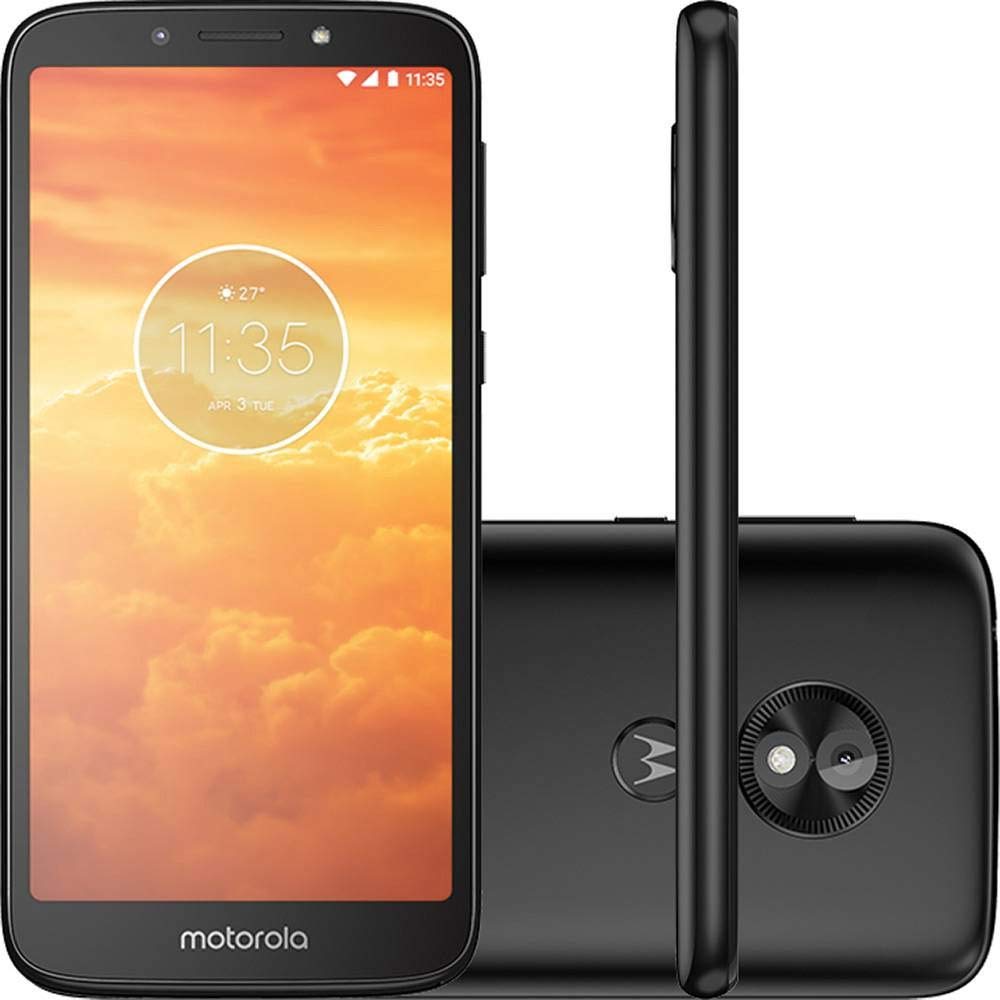
Зураг 2.1: Урд ба хойд view of the Motorola Moto E5 Play XT1920-19. The front shows the display and front camera, while the back features the main camera and fingerprint sensor.

Зураг 2.2: Close-up of the rear of the Moto E5 Play, highlighting the 8MP main camera with flash and the circular fingerprint sensor below it, integrated with the Motorola logo.

Зураг 2.3: Хажуу тал view of the Moto E5 Play, showing the volume rocker and power button located on the right edge of the device.

Зураг 2.4: Доод талд view of the Moto E5 Play, featuring the Micro-USB charging port and a microphone opening.

Зураг 2.5: Топ view of the Moto E5 Play, showing the 3.5mm headphone jack and a secondary microphone opening.
3. Тохируулах гарын авлага
3.1. SIM болон microSD карт оруулах
The Moto E5 Play XT1920-19 supports Dual SIM (Nano-SIM) and a dedicated microSDXC card slot for expandable storage up to 128 GB.
- Арын тагийг ав: Carefully pry open the back cover of the phone. A small notch is usually provided for this purpose.
- SIM картыг оруулах: Locate the SIM card slot(s). Insert your Nano-SIM card(s) into the designated slot(s) with the gold contacts facing down and the cut corner aligned correctly.
- microSD карт оруулах: Locate the microSD card slot. Insert your microSDXC card into the slot until it clicks into place.
- Батерейг суулгах: Place the removable Li-Ion 2800 mAh battery into its compartment, ensuring the contacts align.
- Арын тагийг солих: Align the back cover and press firmly around the edges until it snaps securely into place.
3.2. Анхдагч асаалт ба тохиргоо
- Асаах: Motorola лого гарч ирэх хүртэл Power товчийг (баруун талд байрлах) дарж барина уу.
- Хэлний сонголт: Дэлгэц дээрх зааврыг дагаж дуртай хэлээ сонгоно уу.
- Wi-Fi-д холбогдох: Select a Wi-Fi network and enter the password to connect to the internet. This is recommended for initial setup and software updates.
- Google Бүртгэлийн тохиргоо: Sign in with your Google account or create a new one. This is necessary to download apps from the Google Play Store and access Google services.
- Аюулгүй байдлын тохиргоо: Set up a screen lock (PIN, pattern, password) and configure the fingerprint sensor for quick and secure unlocking.
- Бүрэн тохиргоо: Continue following the on-screen instructions to finalize the setup process.
4. Төхөөрөмжөө ажиллуулах
4.1. Үндсэн навигаци
- Үндсэн дэлгэц: Төрөл бүрийн үндсэн дэлгэцийн самбарт хандахын тулд зүүн эсвэл баруун тийш шударна уу.
- Апп шүүгээ: Swipe up from the bottom of the screen to open the app drawer and view бүх суулгасан програмууд.
- Мэдэгдлийн самбар: Мэдэгдэл болон хурдан тохиргоонд хандахын тулд дэлгэцийн дээд хэсгээс доош шударна уу.
- Сүүлийн үеийн програмууд: Tap the square navigation button (or swipe up and hold if using gesture navigation) to view саяхан ашигласан програмууд.
4.2. Дуудлага хийх, мессеж илгээх
- Дуудлага: Утасны програмыг нээж, дугаараа оруулаад дуудлагын дүрс дээр товшино уу.
- Мессежүүд: Мессеж аппликейшнийг нээгээд, шинэ мессежийн дүрс дээр товшоод, хүлээн авагчийн дугаарыг оруулна уу эсвэл харилцагчдаас сонгоод мессежээ бичнэ үү.
4.3. Камерын хэрэглээ
Your Moto E5 Play features an 8MP main camera with flash and a 5MP front camera with flash.
- Камер нээх: Tap the Camera app icon on your home screen or app drawer.
- Камер солих: Урд болон хойд камеруудын хооронд шилжихийн тулд камерын шилжүүлэгчийн дүрс дээр товшино уу.
- Зураг авах: Tap the Shutter button to capture a photo.
- Видео бичлэг хийх: Switch to video mode and tap the Record button to start/stop recording.
5. Засвар үйлчилгээ, арчилгаа
- Цэвэрлэгээ: Утасны дэлгэц болон их биеийг цэвэрлэхийн тулд зөөлөн, хөвөнгүй даавуугаар цэвэрлээрэй. Химийн хүчтэй бодисоос зайлсхий.
- Батерейны арчилгаа: The removable 2800 mAh battery is designed for all-day use. To prolong battery life, avoid extreme temperatures and fully discharging the battery frequently.
- Програм хангамжийн шинэчлэлтүүд: Тохиромжтой гүйцэтгэл, аюулгүй байдлыг хангахын тулд програм хангамжийн шинэчлэлтийг тогтмол шалгаж, суулгаарай. руу оч Тохиргоо> Систем> Системийн шинэчлэлтүүд.
- Хадгалах менежмент: Үе үе тодорхой шаардлагагүй files and apps to free up storage space. Utilize the microSD card slot for additional storage.
- Хамгаалалт: Бие махбодийн гэмтлээс хамгаалахын тулд хамгаалалтын хайрцаг болон дэлгэц хамгаалагч ашиглах талаар бодож үзээрэй.
6. Алдаа засах
6.1. Нийтлэг асуудал ба шийдэл
- Утас асахгүй байна: Ensure the battery is charged. Connect the phone to the charger and wait a few minutes before attempting to power on again. If the battery is removable, ensure it is properly seated.
- Батерейны хугацаа муу: Reduce screen brightness, disable unused features like Wi-Fi or Bluetooth, close background apps, and limit location services.
- Аппликешн гацаж/хөлдөж байна: Close and restart the app. If the issue persists, clear the app's cache (Тохиргоо > Апп болон мэдэгдэл > Апп мэдээлэл > [Аппын нэр] > Санах ой болон кэш > Кэшийг цэвэрлэх). As a last resort, uninstall and reinstall the app.
- Сүлжээний холболтын асуудлууд: Check if Airplane mode is off. Restart the phone. Verify SIM card is correctly inserted. Contact your carrier if problems persist.
- Хурууны хээ мэдрэгч ажиллахгүй байна: Ensure your finger is clean and dry. Re-register your fingerprint in Settings > Security & Location > Fingerprint.
6.2. Үйлдвэрийн тохиргоонд дахин тохируулах
A factory reset will erase all data from your phone's internal storage, including apps, photos, and settings. Back up important data before proceeding.
- руу оч Тохиргоо > Систем > Дахин тохируулах сонголтууд.
- Товш Бүх өгөгдлийг устгах (үйлдвэрийн тохиргоонд дахин оруулах).
- Confirm your decision by tapping Утсаа дахин тохируулах тэгээд дараа нь Бүгдийг арилга.
7. Техникийн үзүүлэлтүүд
| Онцлог | Дэлгэрэнгүй |
|---|---|
| Загварын нэр | Moto E5 Play (XT1920) |
| Дэлгэц | 5.3 инчийн LCD, 480x960 нягтралтай |
| Процессор | 1.4 GHz Snapdragon Quad-Core CPU |
| RAM | 1 ГБ |
| Дотоод санах ой | 16 ГБ |
| Өргөтгөх боломжтой хадгалах сан | microSDXC, up to 128 GB |
| Үйлдлийн систем | Android 8.0 Oreo |
| Арын камер | Флэштэй 8 мегапиксел |
| Урд камер | Флэштэй 5 мегапиксел |
| Батерей | Зөөврийн Li-Ion 2800 мАч |
| Холболт | Wi-Fi, Bluetooth 4.2, Micro-USB, 3.5 mm headphone jack |
| SIM төрөл | Хос нано SIM |
| Сүлжээний нийцтэй байдал | GSM, 3G UMTS/HSPA+ (B1, 2, 4, 5, 8), 4G LTE (B1, 2, 3, 4, 5, 7, 28) |
| Хэмжээ | 6 x 2 x 3.5 инч |
| Жин | 8 унц (0.5 фунт) |
8. Баталгаат хугацаа ба дэмжлэг
This is an International Model and may not include a US warranty. For warranty information specific to your region, please refer to the documentation provided with your device or visit the official Motorola support webсайт.
For further assistance, troubleshooting, or to access additional support resources, please visit the official Motorola support webсайт эсвэл харилцагчийн үйлчилгээтэй холбогдоно уу.
Motorola Support: www.motorola.com/us/support