Танилцуулга
The SteelSeries Rival 650 Quantum Wireless Gaming Mouse is designed for competitive gaming, offering lag-free performance and advanced customization. It features a dual sensor system, long battery life with rapid charging, and extensive weight configuration options to suit individual preferences.
Хайрцагт юу байна
- Хулгана
- Цэнэглэх кабель
- USB дамжуулагч
- Адаптер

Image: The SteelSeries Rival 650 Quantum Wireless Gaming Mouse, showcasing its sleek black design and RGB lighting.
Бүтээгдэхүүн дууссанview
Гол онцлогууд
- Quantum Wireless Technology: Provides accurate, reliable, and lag-free performance comparable to wired mice.
- TrueMove3+ Dual Sensor System: Features SteelSeries' most advanced optical sensor for true 1-to-1 tracking, plus a secondary depth sensor for adjustable lift-off distance.
- 256 Weight Configurations: Allows for custom center of gravity tuning to perfectly fit your preferences.
- Хурдан цэнэглэх: Offers 10 hours of battery life from just a 15-minute charge, with over 24 hours on a full charge.
- Ultra-Durable Switches: Guaranteed for 60 million clicks, ensuring long-lasting performance.
- 8-Zone RGB Lighting: Customizable lighting zones for personalized aesthetics.

Зураг: дэлбэрсэн view of the Rival 650 mouse, highlighting its 7 programmable buttons, adjustable weight system, TrueMove3 Dual Optical Sensor, Secondary Lift-off Sensor, Quantum Wireless with Fast Charge, and 24+ Hour Battery Life.
Тохируулах гарын авлага
Эхний холболт
- Locate the USB wireless transmitter. It may be stored in a compartment on the underside of the mouse.
- Plug the USB transmitter into an available USB port on your computer.
- Turn on the mouse using the power switch located on the underside. The mouse should automatically connect to the transmitter.
- For optimal performance, download and install the SteelSeries Engine software from the official SteelSeries website. This software allows for advanced customization and driver updates.

Image: The SteelSeries Rival 650 mouse positioned next to its compact USB wireless dongle, ready for connection.
Цэнэглэж байна
The Rival 650 features a long-lasting battery and rapid charging capabilities:
- Connect the included charging cable to the mouse and a USB power source (e.g., computer USB port, USB wall adapter).
- A 15-minute charge can provide over 10 hours of gameplay.
- A full charge provides 24+ hours of battery life.

Image: The SteelSeries Rival 650 mouse shown connected to its charging cable, illustrating the charging port location.
Хулганаа ажиллуулж байна
Customizing Weight
The Rival 650 allows for extensive weight customization to achieve your preferred balance and feel. The mouse comes with eight 4-gram weights that can be placed in various configurations within the side panels.
- Gently remove the magnetic side panels of the mouse.
- Insert the desired number of 4-gram weights into the designated slots.
- Experiment with different weight placements to find your optimal center of gravity. There are 256 unique configurations possible.
- Reattach the magnetic side panels securely.

Image: The SteelSeries Rival 650 mouse with its magnetic side panels detached, revealing the slots for the customizable weights.
Software Customization (SteelSeries Engine)
The SteelSeries Engine software is essential for unlocking the full potential of your Rival 650 mouse. It allows you to:
- Program all 7 buttons with custom macros, keybinds, or media controls.
- Adjust CPI (counts per inch) sensitivity settings.
- Customize the 8-zone RGB lighting with various effects and colors.
- Fine-tune the lift-off distance of the secondary depth sensor.
- Олон мэргэжлийн хүн үүсгэх, хадгалахfileянз бүрийн тоглоом эсвэл програмуудад зориулагдсан.
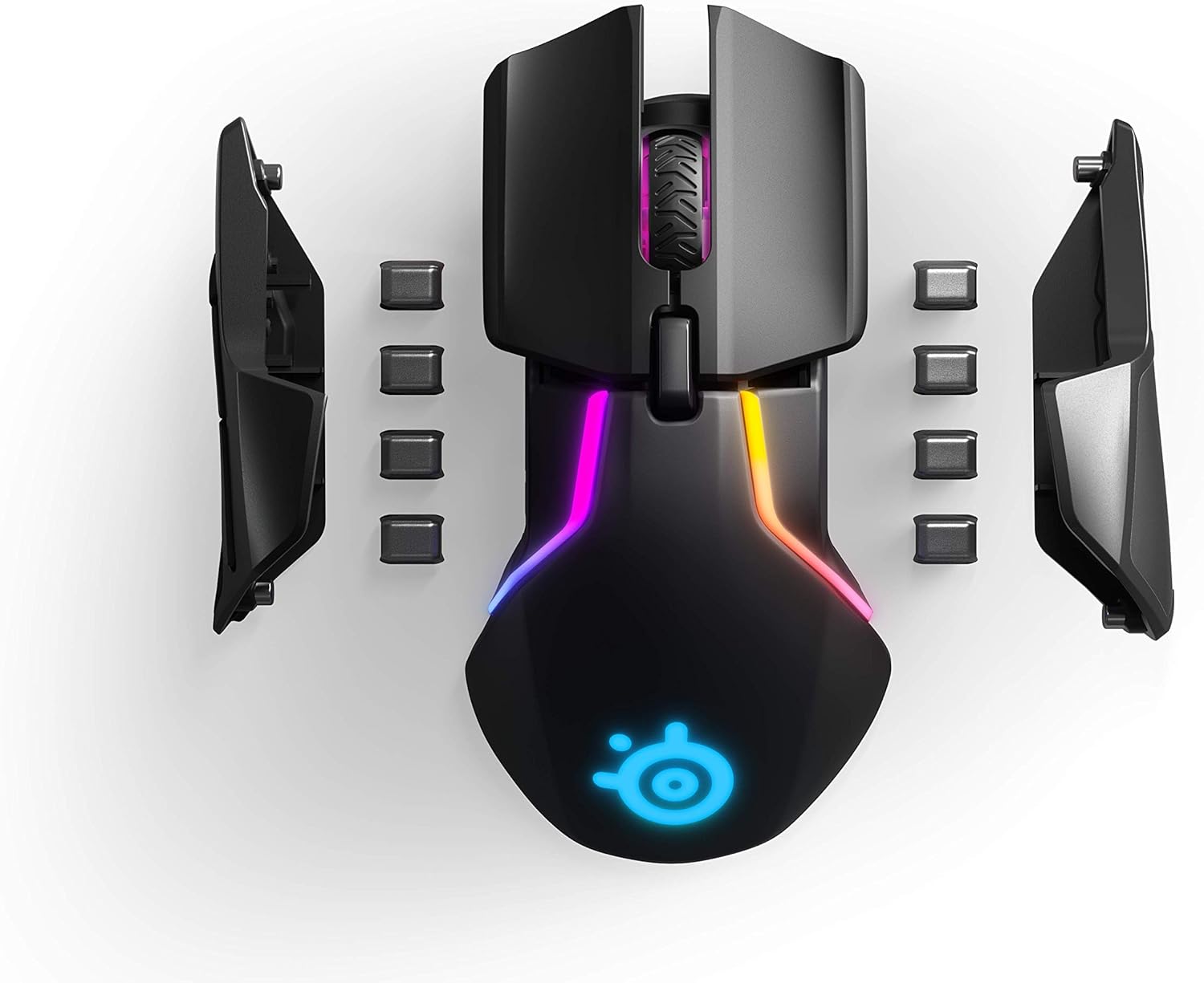
Image: The SteelSeries Rival 650 mouse illuminated with dynamic multi-color RGB lighting, showcasing its customizable zones.
Мэдрэгч технологи
The TrueMove3+ dual sensor system provides unparalleled precision:
- The primary optical sensor delivers true 1-to-1 tracking, ensuring your mouse movements are accurately translated on-screen.
- The secondary depth sensor allows you to adjust the lift-off distance (0.5–2 millimeters), preventing unwanted cursor movement when lifting the mouse.
Засвар үйлчилгээ
Цэвэрлэгээ
Тохиромжтой гүйцэтгэл, эрүүл ахуйг хангахын тулд хулганаа тогтмол цэвэрлэж байгаарай.
- Зөөлөн, хөвөнгүй даавууг бага зэрэг хэрэглээрэй dampened with water or a mild cleaning solution to wipe down the surface of the mouse.
- Хүчтэй химийн бодис, зүлгүүрийн цэвэрлэгч, хэт их чийгийг хэрэглэхээс зайлсхий.
- Use a cotton swab or compressed air to clean around buttons, scroll wheel, and sensor area to remove dust and debris.
Батерейны арчилгаа
To prolong the life of your mouse's battery:
- Байнга зайгаа бүрэн цэнэглэхээс зайлсхий.
- Удаан хугацаагаар ашиглахгүй бол хулганыг сэрүүн, хуурай газар хадгална.
- If storing for a long time, ensure the battery is charged to around 50%.
Алдааг олж засварлах
Нийтлэг асуудал ба шийдэл
| Асуудал | Боломжит шийдэл |
|---|---|
| Mouse not connecting/responding | Ensure the USB transmitter is securely plugged in. Check if the mouse is powered on. Try a different USB port. Re-pair the mouse with the transmitter if necessary (refer to SteelSeries Engine software). |
| Inconsistent tracking or cursor jumps | Clean the optical sensor on the underside of the mouse. Ensure you are using a suitable mouse pad. Adjust the lift-off distance settings in SteelSeries Engine. |
| Батерей хурдан дуусдаг | Reduce RGB lighting brightness or disable it in SteelSeries Engine. Ensure the mouse is turned off when not in use. Check for background processes consuming power. |
| Товчлуур хариу өгөхгүй байна | Check button assignments in SteelSeries Engine. Ensure no software conflicts are present. Try resetting the mouse to factory defaults via SteelSeries Engine. |
If you encounter persistent issues, ensure your SteelSeries Engine software and mouse firmware are up to date. You can check for updates within the SteelSeries Engine application.
Техникийн үзүүлэлтүүд
| Онцлог | Үнэ цэнэ |
|---|---|
| Брэнд | SteelSeries |
| Загвар | Rival 650 (62456) |
| Холболтын технологи | Утасгүй |
| Хөдөлгөөнийг илрүүлэх технологи | Optical (TrueMove3+) |
| ХҮИ | 12,000 хүртэлх CPI |
| Өргөх зай | Customizable, 0.5–2 millimeters |
| Шилжүүлэгч | 60 million click mechanical switches |
| Зайны ашиглалт | 24+ hours (full charge), 10 hours (15-min rapid charge) |
| Жин | 5.8 ounces (approx. 164g) without weights |
| Бүтээгдэхүүний хэмжээ (LxWxH) | 5.16 x 2.69 x 1.7 инч (131 x 69 x 43 мм) |
| Үйлдлийн системийн нийцтэй байдал | Windows, Mac, Linux |
| Өнгө | Хар |

Image: A technical diagram illustrating the precise dimensions of the SteelSeries Rival 650 mouse, including length, width, and height measurements.
Баталгаат болон дэмжлэг
Баталгаат хугацааны мэдээлэл
SteelSeries products are covered by a limited warranty. Please refer to the official SteelSeries website for the most current and detailed warranty terms and conditions applicable to your region.
Хэрэглэгчийн дэмжлэг
For technical assistance, product inquiries, or warranty claims, please visit the official SteelSeries support page:
Хэрэглэгчийн гарын авлага (PDF)
A comprehensive user guide in PDF format is available for download:


