1. Танилцуулга
Thank you for choosing the NEDIS Automatic Lead Acid Battery Charger, model BACCH02. This charger is designed for safe and efficient charging and maintenance of 2V, 6V, and 12V lead-acid batteries. Please read this manual thoroughly before use to ensure proper operation and to prevent damage to the charger or battery.
2. Аюулгүй ажиллагааны заавар
Батерей цэнэглэгч ашиглахдаа дараах аюулгүй байдлын урьдчилан сэргийлэх арга хэмжээг үргэлж дагаж мөрдөөрэй.
- This charger is for indoor use only. Do not expose to rain or moisture.
- Хүүхдийн гар хүрэхгүй газар хадгална.
- Ensure adequate ventilation during charging to prevent gas accumulation.
- Avoid sparks, flames, or smoking near the battery during charging. Batteries can produce explosive gases.
- Батерейтай ажиллахдаа нүдний хамгаалалт, хамгаалалтын хувцас өмс.
- Always disconnect the AC power supply before connecting or disconnecting the battery clamps.
- Улаан (+) cl-г холбоно ууamp эерэг батерейны терминал болон хар (-) cl рууamp зайны сөрөг терминал руу.
- Хөлдөөсөн, гэмтсэн эсвэл дахин цэнэглэх боломжгүй батерейг цэнэглэхийг бүү оролд.
- Цэнэглэгчийг нээж болохгүй casing. Бүх үйлчилгээг мэргэшсэн боловсон хүчинд шилжүүлээрэй.
- Хэрэв тэжээлийн утас гэмтсэн бол аюулаас зайлсхийхийн тулд түүнийг үйлдвэрлэгч, түүний үйлчилгээний төлөөлөгч эсвэл ижил төстэй мэргэшсэн хүмүүс солих ёстой.
3. Бүтээгдэхүүн дууссанview
The NEDIS BACCH02 is a compact and automatic battery charger. It features a main unit with LED indicators and a voltage selection switch, connected to an AC power cable and DC output cables with battery clamps.

Image: The main unit of the NEDIS BACCH02 charger, showing the LED indicators for polarity and charge status, and the voltage сонгох шилжүүлэгч.
Бүрэлдэхүүн хэсгүүд:
- Цэнэглэгчийн нэгж: Main body containing the electronics.
- Ботьtage Сонгох шилжүүлэгч: Allows selection between 2V, 6V, and 12V charging modes.
- Polarity LED (Red): Indicates incorrect battery connection.
- Charge LED (Green): Indicates charging status (blinking for charging, solid for fully charged).
- Зай Clamps: Red (+) and Black (-) for connecting to the battery terminals.
- Хувьсах гүйдлийн цахилгаан кабель: For connecting to a wall outlet.
4. Тохиргоо
Батерей цэнэглэгчээ тохируулахын тулд дараах алхмуудыг дагана уу:
- Ensure Charger is Unplugged: Before making any connections, ensure the charger's AC power cable is disconnected from the wall outlet.
- Батерейны хэмжээг тодорхойлохtage: Эзлэхүүнийг тодорхойлохtage of the battery you intend to charge (2V, 6V, or 12V).
- Select Correct Voltage: боть ашиглана ууtage selection switch on the charger unit to set the appropriate voltage (2V, 6V, or 12V) for your battery.
- Батерейг холбоно ууamps:
- -г холбоно уу улаан (+) зай clamp зайны эерэг (+) терминал руу.
- -г холбоно уу хар (-) зай clamp зайны сөрөг (-) терминал руу.
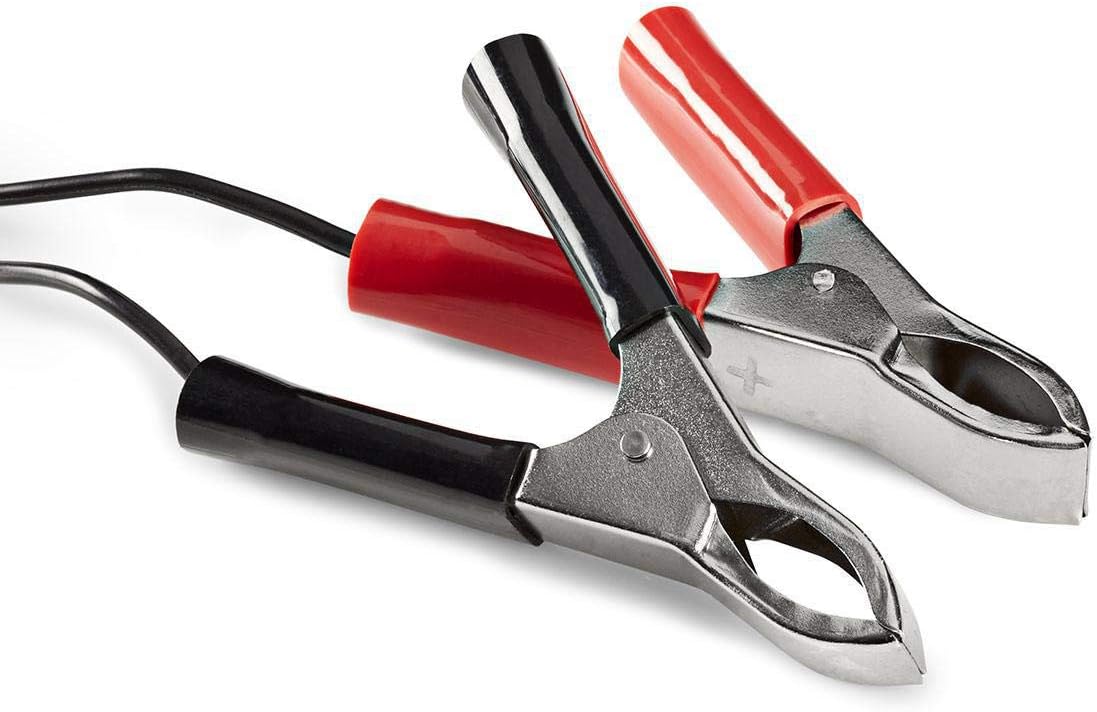
Image: Close-up of the red (positive) and black (negative) battery clamps.
- Цахилгаанд холбогдох: Нэг удаа зай clamps are securely connected, plug the charger's AC power cable into a standard 220V wall outlet.
5. Ашиглалтын заавар
The NEDIS BACCH02 is a fully automatic charger. Once connected to the battery and power, it will automatically begin the charging process.
Цэнэглэх үйл явц:
- Туйлшрал шалгах: If the red 'Polarity' LED illuminates, it indicates that the battery clamps are connected incorrectly. Immediately unplug the charger from the AC outlet and correct the connections before plugging it back in.
- Цэнэглэх заалт: The green 'Charge' LED will blink when the battery is actively charging.
- Бүрэн цэнэглэх заалт: When the battery is fully charged, the green 'Charge' LED will stop blinking and remain solid. The charger will then automatically switch to a maintenance (float) charge mode to keep the battery at optimal capacity without overcharging.
Цэнэглэгчийг салгах:
To disconnect the charger after use:
- Unplug the charger's AC power cable from the wall outlet first.
- Disconnect the black (-) battery clamp from the negative terminal of the battery.
- Disconnect the red (+) battery clamp зайны эерэг терминалаас.
6. Засвар үйлчилгээ
Зөв арчилгаа нь таны цэнэглэгчийг удаан эдэлгээтэй болгодог.
- Keep the charger clean and dry. Wipe with a soft, dry cloth. Do not use abrasive cleaners or solvents.
- Цэнэглэгчийг ашиглаагүй үед сэрүүн, хуурай газар хадгална.
- Regularly inspect the AC power cable, DC output cables, and battery clamps эвдрэл, элэгдэл, зэврэлтийн шинж тэмдгийг арилгах. Шаардлагатай бол солино уу.
7. Алдаа засах
If you encounter issues with your charger, refer to the following table:
| Асуудал | Боломжит шалтгаан | Шийдэл |
|---|---|---|
| Charger not turning on / No LEDs lit | No power supply; Faulty outlet; Damaged cable. | Check AC power connection; Try a different outlet; Inspect cable for damage. |
| Red 'Polarity' LED is lit | Урвуу туйлшралын холболт. | Unplug charger, correct battery clamp connections (red to +, black to -), then plug back in. |
| Green 'Charge' LED not blinking / Battery not charging | Battery too deeply discharged; Incorrect voltage selected; Damaged battery. | Боть зөв бичсэн эсэхийг шалгаарайtage is selected; Battery may be beyond recovery; Have battery tested by a professional. |
| Charger unit feels excessively hot | Normal operation (some warmth is expected); Overload; Internal fault. | Ensure adequate ventilation; Disconnect immediately if excessively hot and contact support. |
8. Техникийн үзүүлэлтүүд
| Онцлог | Тодорхойлолт |
|---|---|
| Загвар | BACCH02 |
| Загварын дугаар | 5412810284245 |
| Оролтын хэмжээtage | 220V хувьсах гүйдэл |
| Гаралтын ботьtage | 2V / 6V / 12V DC (selectable) |
| Suitable Battery Capacity | 2.2 Ah-аас 10 Ah хүртэл |
| Хамгаалалтын онцлог | Reverse Polarity, Short Circuit |
| Бүтээгдэхүүний хэмжээ (L x W x H) | 7 x 10 x 6 см |
| Зүйлийн жин | 680 грамм |
| Дагаж мөрдөх | CE |
| Өнгө | Хар |
9. Баталгаат хугацаа ба дэмжлэг
This product is covered by the standard warranty terms provided by the retailer at the time of purchase. For specific warranty details, please refer to your purchase documentation or contact the retailer directly.
For technical support, troubleshooting assistance beyond what is provided in this manual, or inquiries regarding parts and service, please contact your point of purchase or the manufacturer's customer service department.


