1. Танилцуулга
Худалдан авалт хийсэнд баярлалааasing the auna V-20 Vertical Stereo System. This manual provides essential information for the safe and efficient operation of your device. Please read it thoroughly before use and keep it for future reference.
2. Аюулгүй ажиллагааны заавар
- Төхөөрөмжийг ажиллуулахын өмнө бүх зааврыг анхааралтай уншина уу.
- Төхөөрөмжийг ус, чийг, хэт өндөр температураас хол байлга.
- Агааржуулалтын нүхийг хааж болохгүй.
- Зөвхөн үйлдвэрлэгчээс заасан хавсралт/дагалдах хэрэгслийг ашиглана уу.
- Аянга шуургатай үед эсвэл удаан хугацаагаар ашиглаагүй үед төхөөрөмжийг цахилгаанаас салга.
- Бүх үйлчилгээг мэргэшсэн үйлчилгээний ажилтнуудад шилжүүлээрэй.
- c-г нээж болохгүйasing; дотор нь хэрэглэгчийн засвар үйлчилгээ хийх хэсэг байхгүй.
3. Багцын агуулга
Бүх зүйл байгаа эсэхийг шалгана уу:
- 1 x auna V-20 Vertical Stereo System
- 1 x Remote Control (including 2 x 1.5V AAA batteries)
- 1 x тэжээлийн адаптер
- 1 x Removable Stand Base
- 1 x Wire Antenna
- User Manual (English and German)
4. Бүтээгдэхүүн дууссанview
The auna V-20 is a versatile micro stereo system featuring a vertical design. It includes a CD player, DAB+ and FM radio, Bluetooth, NFC, USB, and AUX connectivity. The system can be used with its stand or mounted on a wall.

Figure 4.1: The auna V-20 Vertical Stereo System shown with its remote control in a modern living room environment.
Урд самбарын удирдлага ба дэлгэц
The front panel features a sleek design with a motorized CD drive cover and an LED display that shows time and operational information. Control buttons are located on the top edge of the unit.
Арын самбарын холболтууд
The rear panel provides various connection ports for external devices and power.
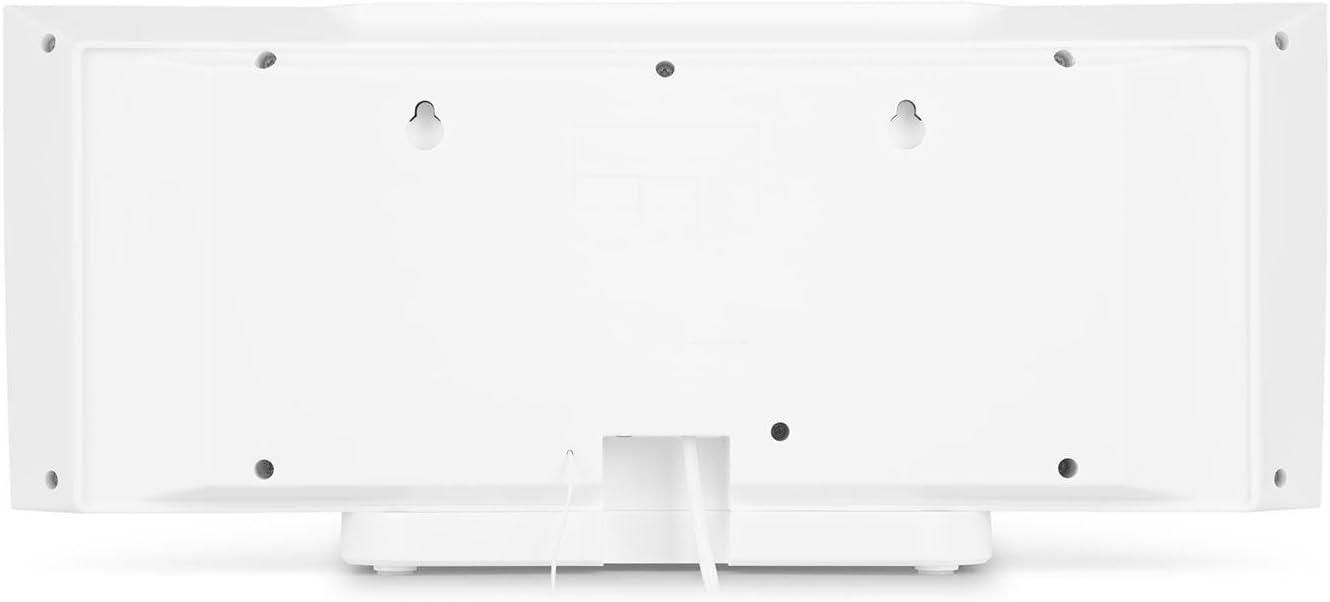
Зураг 4.2: Ар талд view of the auna V-20, highlighting the USB port and AUX input.
Алсын удирдлага
The included remote control allows for convenient operation of all functions from a distance.

Зураг 4.3: Нарийвчилсан view of the remote control for the auna V-20 stereo system.
5. Тохиргоо
5.1 Байршуулах сонголтууд
The auna V-20 offers flexible placement:
- Тавиур суурилуулах: Attach the removable stand base for desktop or shelf placement. Ensure the unit is stable on a flat surface.
- Хананд суурилуулах: The unit can be mounted on a wall to save space. Use appropriate wall mounting hardware (not included) and ensure the wall can support the unit's weight.

Зураг 5.1: Ар талд view illustrating the wall mounting points and the stand attachment area.
5.2 Эрчим хүчний холболт
Connect the provided power adapter to the DC IN port on the rear of the unit, then plug it into a standard wall outlet (AC 230V, 50 Hz).
5.3 Антенны холболт
Extend the wire antenna for optimal DAB+ and FM radio reception. Adjust its position for the best signal quality.
6. Ашиглалтын заавар
6.1 Асаах/Унтраах ба Хүлээлгийн горим
дээр дарна уу АСААЛТТАЙ/БҮТЭЭГДЭХҮҮН button on the unit or remote control to switch the system on or put it into standby mode.
6.2 горимын сонголт
дээр дарна уу ФУНКЦИЯ button on the unit or the dedicated mode buttons (FM/DAB, USB, CD, AUDIO IN, BLUETOOTH) on the remote control to switch between different audio sources.
6.3 Дууны хяналт
Ашиглан дууны хэмжээг тохируулна уу VOL+ болон VOL- buttons on the unit or remote control. The LED display will show the current volume level.
6.4 Тэнцвэржүүлэгчийн тохиргоо
The system features a 2-band equalizer and equalizer presets. Use the EQ button on the remote control to cycle through presets or adjust bass/treble. The X-BASS function can be activated for enhanced bass.
7. Bluetooth and NFC Connectivity
7.1 Bluetooth холболт
To stream music wirelessly from your smartphone, tablet, or laptop:
- Switch the stereo system to Bluetooth mode. The LED display will indicate pairing mode.
- Мобайл төхөөрөмж дээрээ Bluetooth-г идэвхжүүлж, боломжтой төхөөрөмжүүдийг хайж олоорой.
- Select "auna V-20" from the list to pair. Once connected, you can play audio from your device.

Figure 7.1: A smartphone being used to connect to the auna V-20 via Bluetooth.
7.2 NFC холболт
For intuitive pairing with NFC-enabled devices:
- Таны гар утасны төхөөрөмж дээр NFC идэвхжсэн эсэхийг шалгаарай.
- Gently swipe your NFC-enabled device over the NFC sensor on the auna V-20.
- The devices will automatically pair via Bluetooth.

Зураг 7.2: Ойрын зураг view of the NFC sensor for quick device pairing.
8. CD тоглуулагчийн ажиллагаа
The auna V-20 features an MP3-compatible CD player with a motorized drive.

Figure 8.1: The motorized CD player mechanism with a disc inserted.
8.1 CD ачаалж байна
- дээр дарна уу НЭЭХ/ХААХ button to open the motorized CD cover.
- Carefully place a CD (CD, CD-R/RW, MP3-CD) onto the spindle with the label side facing you.
- дарна уу НЭЭХ/ХААХ again to close the cover. The system will automatically switch to CD mode and begin playback.
8.2 Тоглуулах удирдлага
- Тоглуулах/түр зогсоох: дарна уу ТОГЛОХ/ЗОГСООХ тоглуулахыг эхлүүлэх эсвэл түр зогсоох.
- Дууг алгасах: -г ашиглана уу УРАГДАХ or БУЦАХ замуудын хооронд шилжих товчлуурууд.
- Зогс: дээр дарна уу ЗОГС тоглуулахыг дуусгах товчийг дарна уу.
- Давтах/Санамсаргүй: -г ашиглана уу ДАВТАХ болон Санамсаргүй buttons on the remote for playback options.
- Programmable Playback: The system supports programmable title display for custom playlists.
9. Радио ажиллагаа (DAB+/FM)
The auna V-20 features both DAB+ digital radio and analog FM radio with RDS function.
9.1 Радио горимыг сонгох
дээр дарна уу FM/DAB button on the remote control to switch between FM and DAB+ modes.
9.2 Automatic Station Scan
In either FM or DAB+ mode, press the SCAN button on the remote control to automatically scan and store available stations. The system can store up to 20 presets per reception type.
9.3 Manual Tuning and Presets
- Гараар тааруулах: -г ашиглана уу ТААРУУЛАХ +/- buttons on the remote control for fine-tuning.
- Урьдчилсан тохиргоог хадгалах: Once a station is found, press the УРЬДЧИЛСАН button, then use the number buttons (0-9, 10+) to assign a preset number. Press ENTER баталгаажуулах.
- Урьдчилан тохируулсан зүйлийг эргэн санах: Press the corresponding number button on the remote control to quickly access a saved station.
- Мэдээллийн товчлуур: DAB+ горимд товчлуурыг дарна уу МЭДЭЭЛЭЛ button to display additional information such as artist, title, album, or news.
10. USB тоглуулах
The auna V-20 allows playback of MP3 audio fileUSB зөөгчөөс шууд.
10.1 USB төхөөрөмжийг холбох
- Insert your USB stick into the USB port on the rear of the unit.
- Switch the stereo system to USB mode using the USB алсын удирдлага дээрх товчлуур.
- Систем автоматаар MP3-г илрүүлж, тоглуулж эхэлнэ files.
10.2 USB Playback Controls
Playback controls (Play/Pause, Skip, Stop, Repeat, Random) are similar to CD player operation. Use the FOLDER button on the remote to navigate through folders on the USB device.
11. AUX оролт
Connect external audio devices such as MP3 players, CD players, or computers using the AUX input.
11.1 Гадаад төхөөрөмжийг холбох
- Connect a 3.5mm audio cable (not included) from the headphone jack or audio output of your external device to the AUX ДАХЬ port on the rear of the auna V-20.
- Switch the stereo system to AUDIO IN mode using the Аудио нэвтрэх алсын удирдлага дээрх товчлуур.
- Play audio from your external device. The sound will be output through the auna V-20 speakers.
12. Засвар үйлчилгээ
12.1 Цэвэрлэгээ
- Цэвэрлэхийн өмнө төхөөрөмжийг цахилгааны залгуураас үргэлж салга.
- Гаднах гадаргууг цэвэрлэхийн тулд зөөлөн, хуурай даавуу ашиглана уу.
- Өнгөлгөөг гэмтээж болзошгүй тул зүлгүүрийн цэвэрлэгч, лав, уусгагчийг бүү ашигла.
- CD линзний хувьд шаардлагатай бол тусгай CD линз цэвэрлэгч ашиглаарай.
12.2 Ерөнхий арчилгаа
- Төхөөрөмж дээр хүнд зүйл байрлуулахаас зайлсхий.
- Төхөөрөмжийг нарны шууд тусгал, дулааны эх үүсвэрээс хол байлга.
- Хэт халалтаас урьдчилан сэргийлэхийн тулд төхөөрөмжийн эргэн тойронд агааржуулалтыг сайтар хангана.
13. Алдаа засах
| Асуудал | Боломжит шалтгаан | Шийдэл |
|---|---|---|
| Хүч чадалгүй | Цахилгааны кабель холбогдоогүй байна; цахилгааны залгуур эвдэрсэн | Цахилгааны кабелийн холболтыг шалгана уу; өөр залгуурыг туршаад үзээрэй |
| Дуу алга | Volume too low; incorrect source selected; mute activated | Increase volume; select correct source; deactivate mute |
| CD тоглуулахгүй байна | CD inserted incorrectly; CD dirty/scratched; unsupported format | Reinsert CD correctly; clean or replace CD; ensure CD is compatible (CD, CD-R/RW, MP3-CD) |
| Радио хүлээн авалт муу | Antenna not extended; weak signal | Extend and adjust antenna position; try moving the unit to a different location |
| Bluetooth холболт амжилтгүй боллоо | Device too far; Bluetooth not enabled; incorrect pairing procedure | Ensure devices are close; enable Bluetooth on mobile device; follow pairing instructions (Section 7.1) |
14. Техникийн үзүүлэлтүүд
| Онцлог | Дэлгэрэнгүй |
|---|---|
| Брэнд | ауна |
| Загвар | V-20 |
| Хэсгийн дугаар | AUVZ-1100-ghfr |
| Бүтээгдэхүүний хэмжээс | 51 x 25 x 16 см |
| Жин | 2.6 кг |
| Эрчим хүчний эх үүсвэр | Цахилгаан |
| Ватtage | 27 ватт |
| Аудио гаралтын горим | Стерео |
| Чанга яригчийн тохиргоо | 2.0 |
| Дэмжигдсэн аудио форматууд | MP3 |
| Хэвлэл мэдээллийн төрөл | CD, MP3 |
| Холбогч төрлүүд | Bluetooth, NFC, USB, AUX |
| Bluetooth нийцтэй | Тиймээ |
| Bluetooth хувилбар | 2.1+EDR |
| Bluetooth Profile | A2DP |
| Тохиромжтой төхөөрөмжүүд | Smartphone, tablet, MP3 player |
| Онцлог шинж чанарууд | Хэрэглэхэд хялбар |
| Алсын удирдлагын батерей | 2 x 1.5V AAA (оруулсан) |
| DAB+ давтамжийн хүрээ | 174 - 240 MHz (Band III) |
15. Баталгаат хугацаа ба дэмжлэг
This product is covered by a manufacturer's warranty. For detailed warranty information, please refer to the documentation provided at the time of purchase or contact auna customer support.
If you encounter any issues not covered in the troubleshooting section, or require further assistance, please contact auna customer service through their official webсайт эсвэл таны борлуулагч.


