1. Аюулгүй байдлын чухал мэдээлэл
Please read all instructions and safety warnings carefully before using the DOMAS TENS EMS Unit. Failure to follow these instructions may result in injury or device malfunction.
- Keep the device dry and away from water. Do not use while bathing or near water sources.
- Consult a healthcare professional before use, especially if you have pre-existing medical conditions, are pregnant, have a pacemaker, or any other implanted electronic device.
- Do not apply electrode pads over open wounds, rashes, swollen, red, infected, or inflamed skin areas.
- Do not apply electrode pads over the carotid sinus nerves (front of the neck), on the head, or directly over the heart.
- Хүүхдийн гар хүрэхгүй газар хадгална.
- Арьс цочрох, таагүй мэдрэмж төрөх, толгой эргэх зэрэг сөрөг хариу урвал илэрвэл хэрэглэхээ зогсооно уу.
- Энэ төхөөрөмжтэй холбоотой мэдэгдлийг FDA үнэлээгүй бөгөөд ямар нэгэн өвчин, эрүүл мэндийн байдлыг оношлох, эмчлэх, эдгээх, урьдчилан сэргийлэх зорилгогүй болно.
2. Бүтээгдэхүүн дууссанview
The DOMAS Touch Screen TENS EMS Unit is a dual-channel muscle stimulator designed for temporary relief of pain associated with sore and aching muscles due to strain from exercise or normal household and work activities. It features a touch screen interface, 24 modes, and adjustable intensity levels.

Figure 2.1: The DOMAS Touch Screen TENS EMS Unit, showing the main device, electrode pads, and charging adapter.
2.1 Гол онцлогууд
- Мэдрэгчтэй дэлгэц: Intuitive interface for easy navigation and selection.
- 24 төрлийн массаж: A variety of pre-programmed modes for different types of stimulation.
- 20 эрчимжилтийн түвшин: Customizable intensity to suit individual comfort and needs.
- Хос сувгийн гаралт: Allows for simultaneous treatment of two different body areas or two people.
- Тохируулах цаг хэмжигч: Хичээлийн үргэлжлэх хугацааг 10-аас 60 минут хүртэл тохируулж болно.
- USB цэнэглэдэг: Built-in lithium battery for convenient charging.
- Зөөврийн дизайн: Compact and lightweight for use at home or on the go.
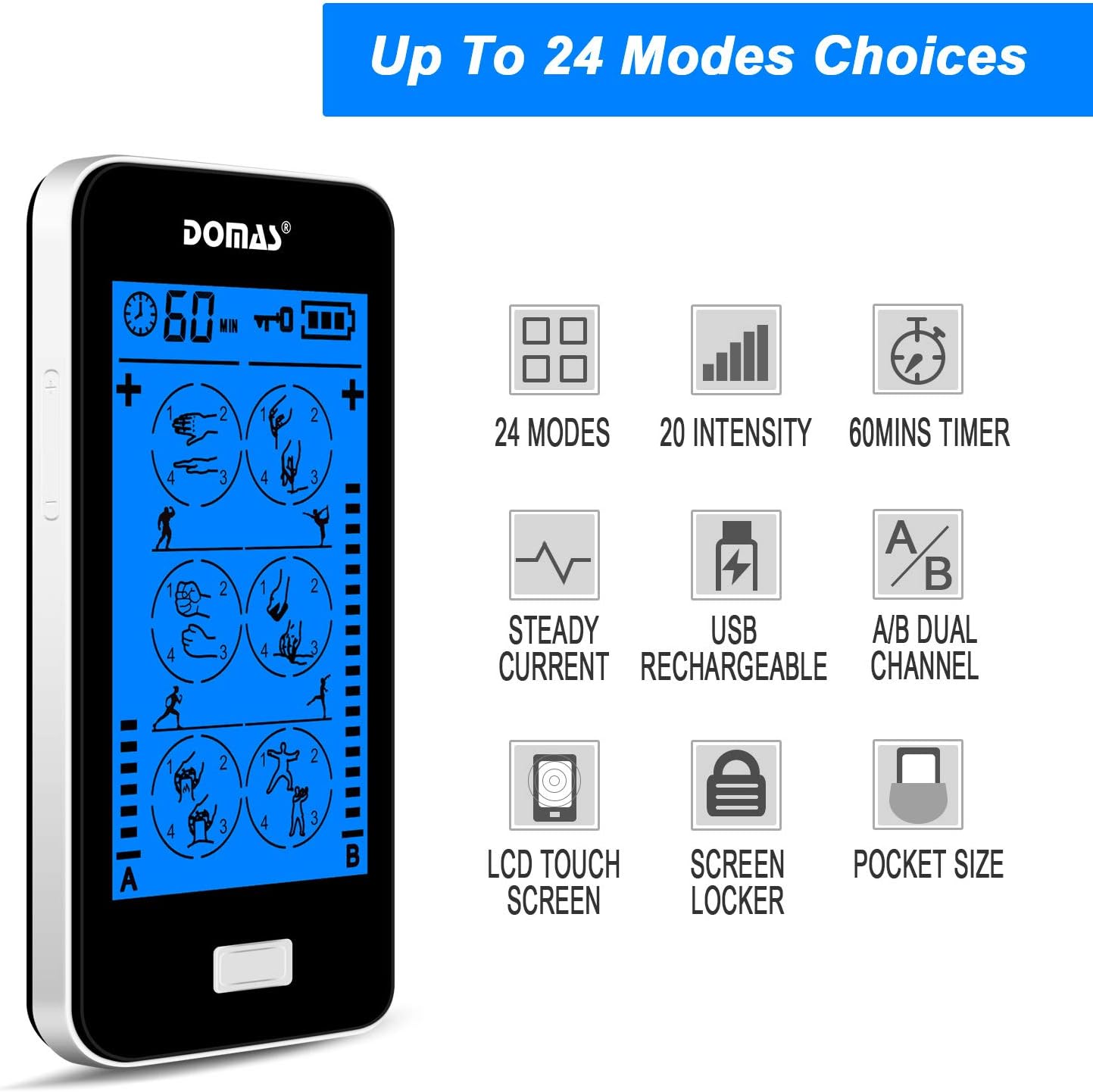
Figure 2.2: Visual representation of the unit's key features, including mode count, intensity levels, and portability.
2.2 Багцын агуулга
Upon opening your DOMAS TENS EMS Unit package, please ensure all the following items are present:
- DOMAS Touch Screen TENS EMS Unit
- Electrode Pads (various sizes)
- Хар тугалга
- USB цэнэглэгч кабель
- Хувьсах гүйдлийн адаптер
- Pad Holder/Storage Pouch
- Зааварчилгааны гарын авлага

Figure 2.3: All components included in the DOMAS TENS EMS Unit package.
2.3 Төхөөрөмжийн бүрэлдэхүүн хэсгүүд
Familiarize yourself with the different parts of your TENS EMS unit:

Figure 2.4: Labeled diagram of the DOMAS TENS EMS Unit's external features.
- A & B Dual-output Channel: Ports for connecting lead wires to electrode pads.
- Цаг хэмжигч дэлгэц: Shows remaining treatment time.
- Асаах/унтраах товчлуур: Төхөөрөмжийг асаах, унтраахын тулд.
- Intensity Adjustment Buttons (+/-): To increase or decrease stimulation intensity for each channel.
- Түгжих товчлуур: To prevent accidental changes during use.
- Rechargeable USB Port: Төхөөрөмжийг цэнэглэхэд зориулагдсан.
- Мэдрэгчтэй дэлгэц: Main interface for mode selection and settings.
3. Тохиргоо
Follow these steps to prepare your DOMAS TENS EMS Unit for use:
3.1 Төхөөрөмжийг цэнэглэх
- Connect the USB charging cable to the device's USB port.
- USB кабелийн нөгөө үзүүрийг AC адаптерт холбоно уу.
- Insert the AC adapter into a standard wall outlet.
- The battery indicator on the screen will show charging status. Charge fully before first use.

Figure 3.1: Connecting the USB charging cable to the device.
3.2 Connecting Electrode Pads
- Төхөөрөмж унтарсан эсэхийг шалгана уу.
- Connect the lead wires to the electrode pads by snapping them onto the metal studs.
- Plug the lead wires into the A and/or B output ports on the top of the device.

Figure 3.2: Attaching the lead wire to an electrode pad.
3.3 Электродын дэвсгэр түрхэх
- Clean and dry the skin area where you intend to place the pads.
- Carefully peel the transparent protective film from the adhesive side of the electrode pads. Retain the film for storage.
- Place the pads firmly on the desired treatment area. Ensure good skin contact.

Figure 3.3: Visual guide for connecting pads and applying them to the skin.
4. Ашиглалтын заавар
Once the device is set up, follow these steps to begin your therapy session:
- Асаах: Press and hold the Power ON/OFF button located on the top of the device until the screen illuminates.
- Сонгох горим: The touch screen will display various massage modes. Tap on your desired mode icon to select it. The device offers 24 different modes, each providing a unique stimulation pattern.
- Эрчим хүчийг тохируулах: Use the '+' and '-' buttons on the sides of the device to adjust the intensity level for Channel A and Channel B independently. Start with the lowest intensity and gradually increase until you feel a comfortable, yet effective, sensation. Avoid increasing эрчимийг эвгүй түвшинд хүргэнэ.
- Цаг хэмжигчийг тохируулах: The default session time is usually 20 minutes. You can adjust the timer by tapping the timer icon on the screen and selecting your preferred duration (e.g., 10, 20, 30, 40, 50, 60 minutes).
- Lock Screen (Optional): To prevent accidental changes during a session, press the Lock button. The screen will lock, and a lock icon will appear. Press it again to unlock.
- Сеанс дуусгах: The device will automatically turn off once the timer expires. To manually end a session, press and hold the Power ON/OFF button.

Figure 4.1: The touch screen interface showing available massage modes and settings.
4.1 Mode Selection Guide
The unit offers 24 distinct modes. Experiment with different modes to find what works best for your specific needs and comfort. Common mode categories include:
- Массаж: Gentle, rhythmic pulses for relaxation.
- Зуурах: Deeper, more intense pressure simulation.
- Acupuncture: Sharp, tapping sensations.
- Буух: Suction-like sensation.
- Хусах: Gliding, scraping sensation.
- Товшино уу: Quick, light pulses.

Зураг 4.2: Жишээ ньamples of body areas suitable for TENS EMS therapy and the variety of modes available.
5. Засвар үйлчилгээ
Proper care and maintenance will extend the life of your DOMAS TENS EMS Unit and its accessories.
5.1 Төхөөрөмжийг цэвэрлэх
- Turn off the device and disconnect all wires before cleaning.
- Төхөөрөмжийг зөөлөн арчиж, damp даавуу. Зүлгүүрийн цэвэрлэгч хэрэглэж болохгүй, төхөөрөмжийг усанд дүрж болохгүй.
- Хадгалах эсвэл дараагийн хэрэглээний өмнө төхөөрөмжийг бүрэн хатааж байгаа эсэхийг шалгаарай.
5.2 Электродын дэвсгэрийн арчилгаа
- After each use, gently remove the pads from your skin.
- Place the adhesive side of the pads back onto the transparent protective film.
- Store the pads in the provided storage pouch to keep them clean and prevent drying out.
- Хэрэв дэвсгэрүүд наалдамхай чанараа алдвал наалдамхай гадаргууг зөөлөн арчинаamp cloth and let air dry. Replace pads when they no longer adhere well to the skin.
5.3 Хадгалалт
- Төхөөрөмж болон дагалдах хэрэгслийг сэрүүн, хуурай газар, нарны шууд тусгал болон хэт өндөр температураас хол хадгална уу.
- Keep the device and pads in the provided storage pouch or a clean, dry container.
6. Алдаа засах
If you encounter issues with your DOMAS TENS EMS Unit, refer to the following common troubleshooting tips:
| Асуудал | Боломжит шалтгаан | Шийдэл |
|---|---|---|
| Төхөөрөмж асахгүй байна. | Low battery or device not charged. | Charge the device fully using the provided USB cable and AC adapter. |
| Мэдрэмж байхгүй эсвэл сул мэдрэмж төрдөггүй. |
|
|
| Pads lose stickiness quickly. | Skin is oily or dirty; pads are drying out. | Clean skin thoroughly before application. After use, place pads back on the protective film and store in the pouch. Gently wipe adhesive with a damp cloth if needed. Replace pads when necessary. |
| Дэлгэц хариу өгөхгүй эсвэл царцсан байна. | Програм хангамжийн түр зуурын алдаа. | Press and hold the Power ON/OFF button for 10-15 seconds to perform a hard reset. If the issue persists, contact customer support. |
| Discomfort or skin irritation. | Intensity too high; allergic reaction to pads; improper pad placement. | Decrease intensity immediately. Discontinue use if irritation persists. Ensure pads are not placed over sensitive or broken skin. Try different pad placement. |
7. Техникийн үзүүлэлтүүд
Technical details for the DOMAS Touch Screen TENS EMS Unit:
- Загварын дугаар: 898a53b9-6ac2-4d6b-9e0a-edbe601818f0
- Эрчим хүчний эх үүсвэр: Батерейгаар ажилладаг (USB цэнэглэдэг)
- Материал: Хуванцар
- Сувгууд: Dual Output (A & B)
- Горимууд: 24
- Эрчим хүчний түвшин: 20
- Цаг хэмжигч: Adjustable (e.g., 10-60 minutes)
- Хэмжээ: Ойролцоогоор 6.06 x 3.54 x 3.07 инч
- Жин: Ойролцоогоор 15.2 унц
- Үйлдвэрлэгч: ДОМАС
8. Баталгаат хугацаа ба дэмжлэг
DOMAS is committed to providing high-quality products. For specific warranty information, please refer to the warranty card included in your product packaging or contact DOMAS customer support directly.
8.1 Хэрэглэгчийн дэмжлэг
If you have any questions, require assistance, or experience issues not covered in this manual, please contact DOMAS customer support. Contact details can typically be found on the product packaging, the official DOMAS webсайт эсвэл таны худалдан авалтын платформоор дамжуулан.
