1. Танилцуулга
Thank you for choosing the LECLSTAR Motion Sensor Closet Light. This manual provides essential information for the safe and effective use of your new lighting product. Please read these instructions carefully before installation and operation, and retain them for future reference.
This wireless, battery-operated light features 51 LEDs, motion sensing capabilities, and is designed for various indoor applications such as closets, cabinets, kitchens, and stairs.
2. Аюулгүй байдлын мэдээлэл
- Төхөөрөмжийг ус эсвэл хэт их чийгэнд бүү тавь.
- Do not attempt to disassemble, repair, or modify the light. This will void the warranty and may cause damage or injury.
- Цэнэглэхийн тулд зөвхөн өгсөн USB кабелийг ашиглана уу.
- LED гэрэл маш тод байж болох тул нүдэнд шууд тусахаас зайлсхий.
- Хүүхдийн гар хүрэхгүй газар хадгална.
3. Багцын агуулга
Бүх зүйл байгаа эсэхийг шалгахын тулд багцыг шалгана уу:
- 1 x LECLSTAR Motion Sensor Closet Light
- 1 x Magnetic Plastic Bracket
- 2 x 3M Adhesive Pads
- 4 х холбох эрэг
- 1 x USB цэнэглэгч кабель
- 1 х хэрэглэгчийн гарын авлага
4. Бүтээгдэхүүн дууссанview
Familiarize yourself with the components of your LECLSTAR Motion Sensor Closet Light.

Зураг 1: Product Components. This diagram illustrates the various parts of the light, including the USB charging port, magnetic strip for mounting, LED light board, durable aluminum alloy casing, ON/OFF switch, infrared motion sensor receiver, and protective ABS cover.
- USB порт: Дотоод зайг цэнэглэхэд зориулагдсан.
- Соронзон тууз: Allows for easy attachment to magnetic surfaces or the included bracket.
- LED Light Board: Contains 51 bright LEDs for illumination.
- Aluminum Alloy Material: Provides a durable and lightweight housing.
- ON/OFF товч: Controls the power and operating modes.
- Хэт улаан туяаны хүлээн авагч: Detects signals from the remote control (if applicable).
- ABS бүрхүүл: Protects the LEDs and diffuses light.
5. Тохиргоо ба суурилуулалт
The LECLSTAR Motion Sensor Closet Light offers flexible installation options.
5.1 Charging Before First Use
Before installation, fully charge the light. Refer to Section 6 for detailed charging instructions.
5.2 Суурилуулах сонголтууд
You can install the light using the magnetic plastic bracket with 3M adhesive or screws.
- Magnetic Adhesion: Peel off the protective film from the 3M adhesive pads and attach them to the magnetic plastic bracket. Press the bracket firmly onto a clean, dry surface where you wish to install the light. The light can then be magnetically attached to the bracket.
- Шураг бэхэлгээ: Use the provided screws to secure the magnetic plastic bracket to a desired surface. Once the bracket is securely mounted, attach the light magnetically.

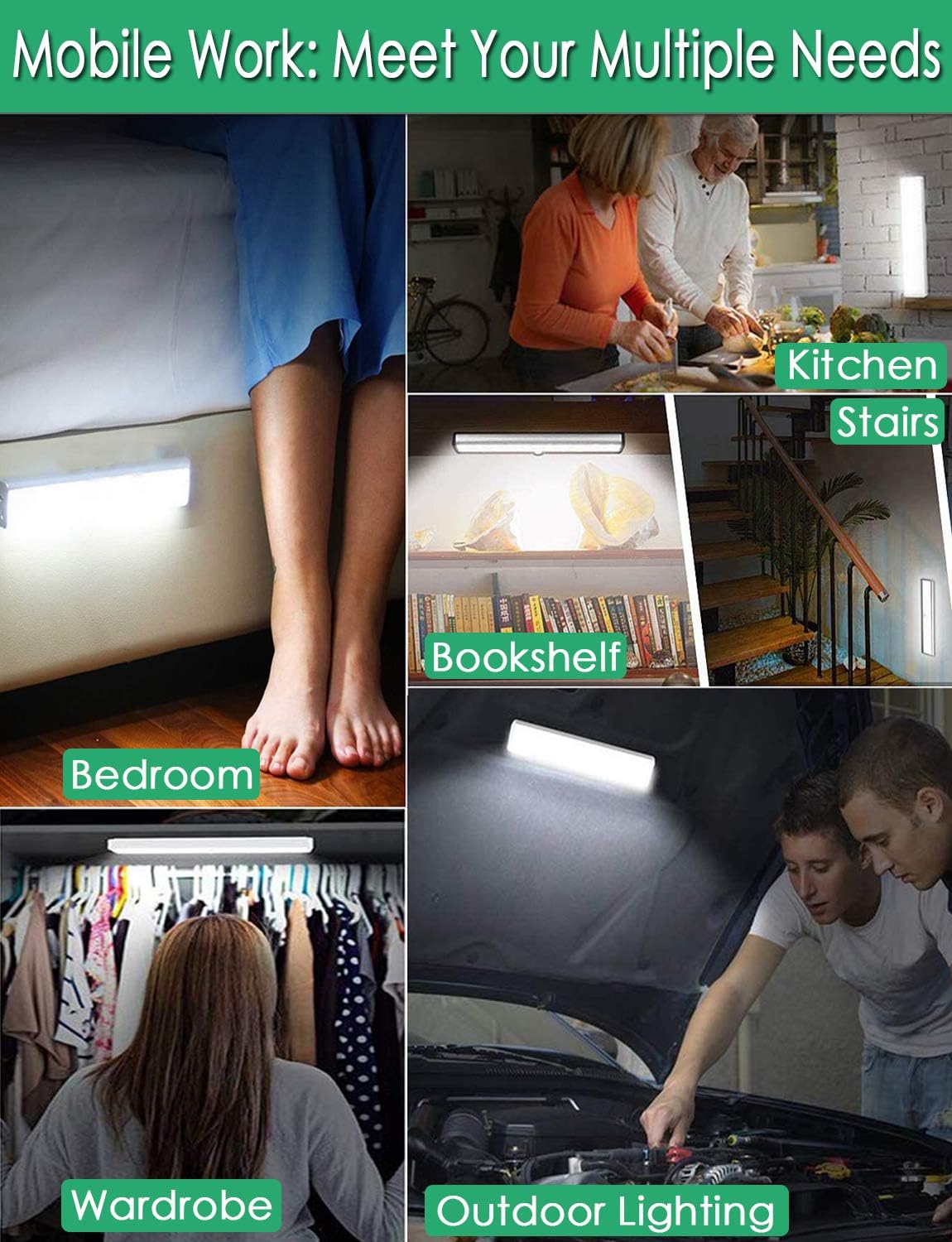
Зураг 2: Versatile Installation. This image illustrates the light's adaptability, showing it mounted under a bed, in a kitchen, on a bookshelf, along stairs, inside a wardrobe, and providing illumination for outdoor tasks, highlighting its ease of placement in diverse environments.
5.3 Байршуулах талаар анхаарах зүйлс
- For optimal motion detection, position the sensor ball to face the direction of expected movement.
- When using multiple motion sensor lights, avoid placing them too close together in motion-sensing mode, as they may interfere with each other's sensitivity.
- Ensure the installation surface is clean and dry for secure adhesion.
6. Цэнэглэх заавар
The LECLSTAR Motion Sensor Closet Light is equipped with a built-in 2400mAh lithium battery.
- Connect the provided USB charging cable to the light's USB port.
- USB кабелийн нөгөө үзүүрийг стандарт USB тэжээлийн адаптер (дагаагүй) эсвэл компьютерийн USB порт руу холбоно уу.
- During charging, the indicator light on the device will be цэнхэр.
- Once fully charged, the indicator light will turn улаан.
- Бүрэн цэнэглэхэд ихэвчлэн 4 цаг зарцуулдаг.
Зураг 3: Charging Status. This image demonstrates the charging process, showing the light connected to a power source. The indicator light is red when charging and turns blue when the battery is fully charged, indicating its status clearly.
7. Ашиглалтын заавар
The light features multiple operating modes and can be controlled via its ON/OFF button or an optional remote control.
7.1 Mode Selection (ON/OFF Button)
Locate the ON/OFF button on the side of the light. Toggle the switch to select the desired mode:
- Унтрааж байна: The light is completely off.
- АСААЛТ: Гэрэл тасралтгүй асаалттай байна.
- AUTO (Motion Sensor Mode): The light will automatically turn on when motion is detected in a dark environment. It will turn off approximately 30 seconds after no motion is detected.

Зураг 4: Motion Sensor Operation. This image demonstrates how the motion sensor works: the light remains off in bright environments, automatically turns on when movement is detected in the dark within a 3-meter, 120-degree range, and then automatically turns off after 30 seconds of inactivity.
7.2 Motion Sensor Details
- Илрүүлэх өнцөг: 120 градус.
- Зайг илрүүлэх: 3 метр хүртэл (ойролцоогоор 10 фут).
- The sensor is designed to activate only in low-light conditions to conserve battery life.
7.3 Remote Control Functions (Optional)
If your model includes a remote control, you can access additional features:

Зураг 5: Remote Control Functions. This image displays the remote control, highlighting its various buttons: ON/OFF for power, 'S' for sensor mode, '1', '2', '3' for different light modes or brightness levels, '+' and '-' for adjusting brightness, and '15', '30', '60', '120' for setting a timer.
- ON/OFF: Гэрлийг асаах эсвэл унтраана.
- S (Sensor Mode): Activates the motion sensor mode.
- 1, 2, 3 (Light Modes): Selects different light modes or brightness levels.
- 50%, 100%, +, - (Adjustable Brightness): Гэрлийн эрчмийг тохируулна.
- 15, 30, 60, 120 (Timer Function): Sets the light to turn off automatically after a specified duration.
8. Засвар үйлчилгээ
- Цэвэрлэгээ: Гэрлийг зөөлөн, хуурай даавуугаар арчина. Зүлгүүрийн цэвэрлэгч эсвэл уусгагч хэрэглэж болохгүй.
- Батерейны арчилгаа: To prolong battery life, avoid fully discharging the battery frequently. Charge the light regularly, especially if it will not be used for an extended period.
9. Алдаа засах
- Гэрэл асахгүй байна:
- Батерейг цэнэглэсэн эсэхийг шалгаарай.
- Check that the light is switched to the 'ON' or 'AUTO' mode.
- Motion sensor not working:
- Ensure the light is in 'AUTO' mode.
- Verify that the ambient light is dark enough for the sensor to activate.
- Check that the sensor is not obstructed and is facing the area of expected movement.
- If multiple motion sensor lights are nearby, they might interfere with each other. Try repositioning them.
- Гэрэл гэнэт анивчих эсвэл бүдэгрэх:
- The battery level may be low. Recharge the light.
10. Техникийн үзүүлэлтүүд
| Загвар | B07JRBSJDR |
| Цайвар өнгө | Цэвэр цагаан (6000K) |
| LED тоо хэмжээ | 51 LED |
| Люмен гаралт | 240 лм |
| Motion Detecting Angle | 120 градус |
| Motion Detecting Distance | 3 метр (10 фут) хүртэл |
| LED амьдралын цаг | 80,000 гаруй цаг |
| Зайны төрөл | 2400 мАч лити батерей |
| USB цэнэглэх хугацаа | Ойролцоогоор 4 цаг |
| Үйл ажиллагааны ботьtage | 4.2 В |
| Ватtage | 3W |
| Хэмжээ | 15.3 x 0.8 x 0.8 инч |
| Материал | Металл, хуванцар |
| Эрчим хүчний эх үүсвэр | Батерейгаар ажилладаг |
| Онцлог шинж чанарууд | Шууд асаалттай |
11. Баталгаат хугацаа ба дэмжлэг
LECLSTAR provides a lifetime warranty for this product. If you encounter any issues or have questions regarding your Motion Sensor Closet Light, please contact the LECLSTAR service team for assistance. Our dedicated support team is ready to help you.
For warranty claims or technical support, please refer to the contact information provided on the product packaging or the official LECLSTAR webсайт.

