1. Танилцуулга
This manual provides detailed instructions for the setup, operation, maintenance, and troubleshooting of your Mad Catz R.A.T. Pro X3 Gaming Mouse. Designed for precision and customization, the R.A.T. Pro X3 offers advanced features to enhance your computing and gaming experience.
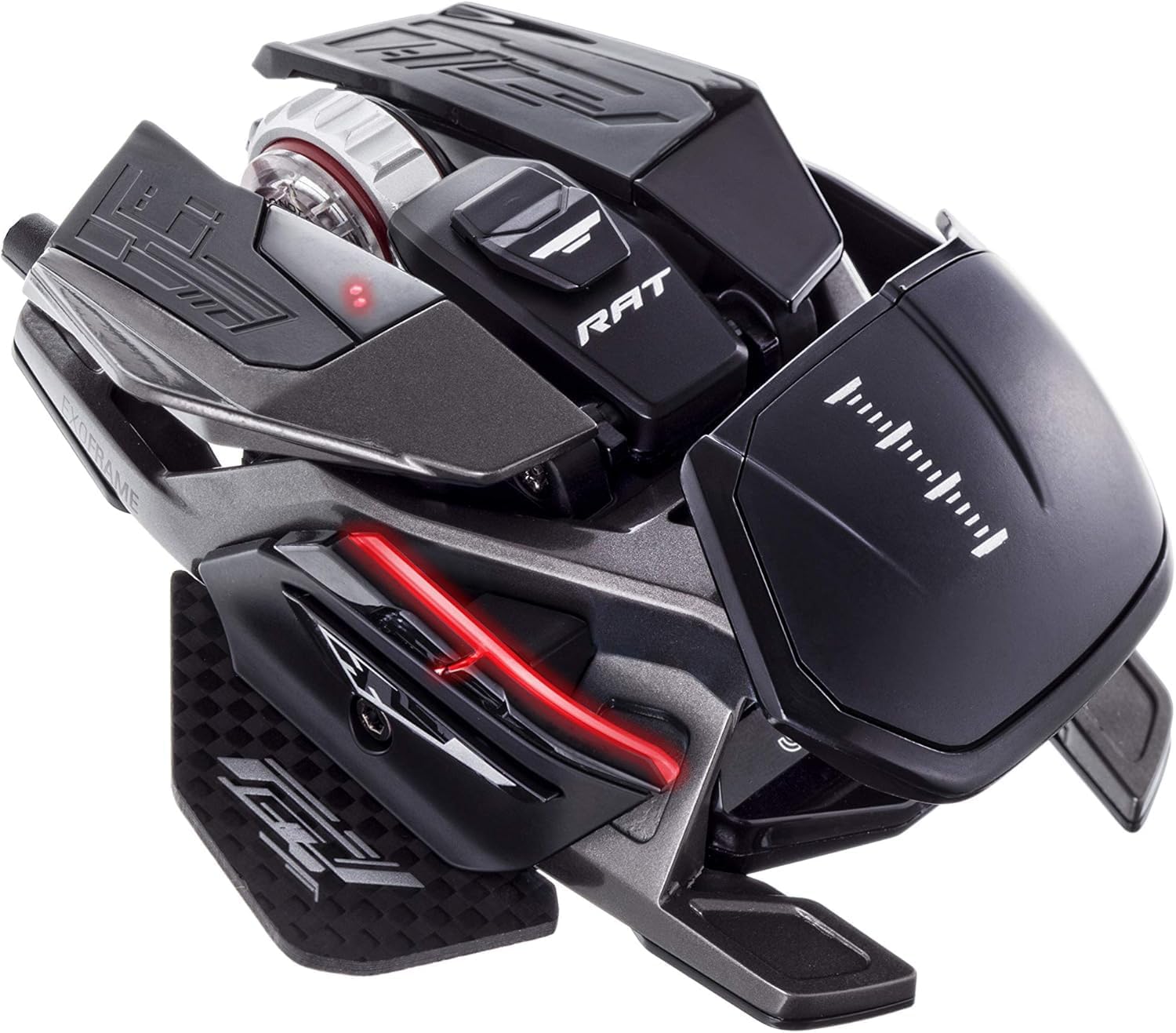
Figure 1: Mad Catz R.A.T. Pro X3 Gaming Mouse
2. Бүтээгдэхүүн дууссанview
2.1 Гол онцлогууд
- Dynamic Ergonomics: Adjustable components to fit various grip styles and hand sizes.
- Revolution Res Scroll Wheel: Optical technology with analog axis movements for redefined scroll wheel function.
- Pro Slide Technology: Allows adjustment of mouse glide over surfaces.
- Changeable Sensor Modules: Offers flexibility for different performance needs.
- Optical 16,000 DPI Sensor: Provides high precision and tracking accuracy.
- Ultra-Durable OMRON Switches: Rated for 50 million clicks, ensuring longevity and reliable actuation.
2.2 Бүрэлдэхүүн хэсэг ба дизайн
The R.A.T. Pro X3 features a lightweight and strong magnesium alloy chassis, reinforced with titanium screw fittings and a carbon fiber thumb-plate. Super-hydrophobic coatings help maintain grip during intense use.

Figure 2: Key features of the R.A.T. Pro X3
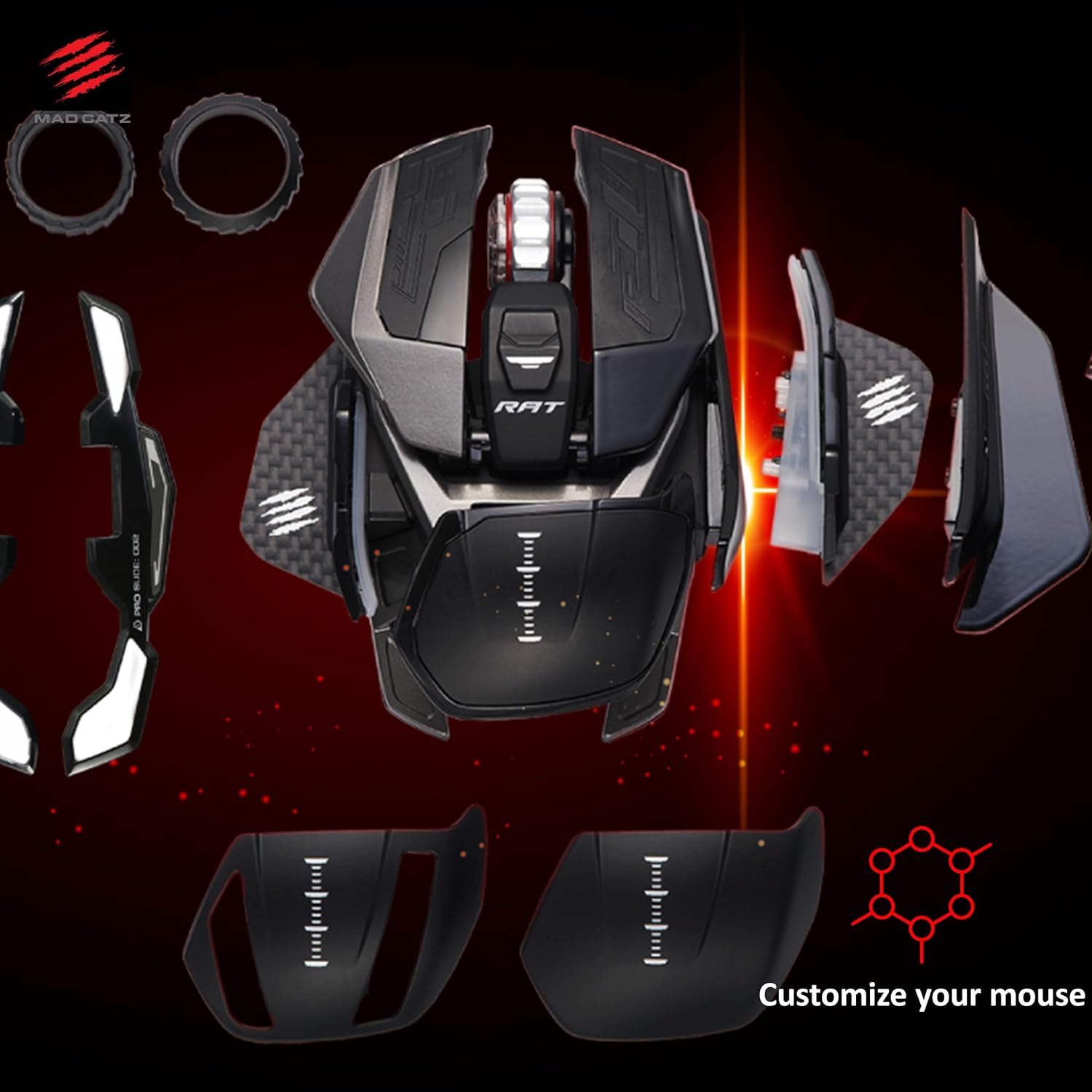
Figure 3: Customizable components of the R.A.T. Pro X3
3. Тохиргоо
- Хулгана холбоно уу: Plug the USB connector of the R.A.T. Pro X3 into an available USB port on your computer.
- Драйвер суурилуулах: Таны үйлдлийн систем автоматаар шаардлагатай драйверуудыг илрүүлж суулгах ёстой.
- Програм хангамж суурилуулах: For full customization of buttons, DPI settings, and profiles, download and install the official Mad Catz software from the Mad Catz support webсайт.
4. Тохируулга
4.1 Эргономик
The R.A.T. Pro X3 is designed with dynamic ergonomics, allowing users to adjust various parts of the mouse to achieve a personalized fit. This includes adjustable palm rests and thumb-plates, which can be swapped or repositioned to suit different grip styles (palm, claw, fingertip) and hand sizes.
4.2 програмчлах товчлуур
The mouse features 10 programmable buttons. These buttons can be assigned various functions, macros, or shortcuts using the Mad Catz software to optimize your workflow or gaming performance.
4.3 DPI тохиргоо
Equipped with an optical 16,000 DPI sensor, the R.A.T. Pro X3 allows for precise control over cursor speed and sensitivity. DPI settings can be adjusted on-the-fly using dedicated buttons on the mouse or fine-tuned through the software to match your preferences and game requirements.

Figure 4: Optical 16,000 DPI sensor for precise tracking
4.4 Revolution Res Scroll Wheel
The Revolution Res scroll wheel utilizes optical technology and analog axis movements, offering enhanced control and functionality beyond traditional scroll wheels. Its tactile feedback can be adjusted for different applications, from precise weapon switching in games to rapid document scrolling.

Figure 5: The Revolution Res scroll wheel
5. Програм хангамж
The Mad Catz R.A.T. Pro X3 is fully supported by the Mad Catz software suite. This software allows you to:
- Program all 10 buttons with custom macros and shortcuts.
- Adjust DPI settings and create multiple DPI profileөөр өөр хувилбаруудад зориулсан.
- Fine-tune the Revolution Res scroll wheel's response.
- Manage and save multiple profiles for various games and applications.
Ensure you download the latest version of the software from the official Mad Catz website for optimal performance and access to all features.
6. Засвар үйлчилгээ
To ensure the longevity and optimal performance of your R.A.T. Pro X3 mouse, follow these maintenance guidelines:
- Цэвэрлэгээ: Use a soft, dry cloth to wipe down the mouse regularly. For stubborn dirt, a slightly damp даавуу хэрэглэж болох ч дотор талын эд ангиудад чийг орохгүй байхыг анхаарна уу. Хүчтэй химийн бодис эсвэл зүлгүүрийн материалаас зайлсхий.
- Мэдрэгчийн арчилгаа: Keep the optical sensor area on the underside of the mouse clean and free from dust or debris to prevent tracking issues.
- Кабелийн менежмент: USB кабелийг гэмтээхгүйн тулд хурц гулзайлгах эсвэл хэт их татахаас зайлсхий.
- Хадгалах: When not in use, store the mouse in a clean, dry environment, ideally in its original packaging or a protective case to prevent dust accumulation and physical damage.

Figure 6: Carrying case and customization parts for safe storage and transport
7. Алдаа засах
If you encounter any issues with your R.A.T. Pro X3 mouse, refer to the following common troubleshooting steps:
- Хулгана хариу өгөхгүй байна: Try plugging the mouse into a different USB port. Ensure the USB cable is securely connected. Test the mouse on another computer to rule out a system-specific issue.
- Хяналтын асуудлууд: Clean the optical sensor on the underside of the mouse. Ensure you are using the mouse on a suitable surface (e.g., a mouse pad). Update or reinstall the mouse drivers and software.
- Товчлуур ажиллахгүй байна: Verify button assignments in the Mad Catz software. Ensure the software is running correctly and profiles ачаалагдсан байна.
- Програм хангамж хулганыг илрүүлэхгүй байна: Reinstall the Mad Catz software. Ensure your operating system is up to date. Temporarily disable any antivirus or firewall software that might be interfering.
If problems persist, consult the Mad Catz support webсайт эсвэл нэмэлт тусламж авахын тулд харилцагчийн үйлчилгээтэй холбогдоно уу.
8. Техникийн үзүүлэлтүүд
| Онцлог | Дэлгэрэнгүй |
|---|---|
| Брэнд | Галзуу Катз |
| Цуврал | R.A.T. X3 Black |
| Загварын дугаар | MR05DCINBL001-0 |
| Техник хангамжийн платформ | PC |
| Үйлдлийн систем | Линукс, Windows 7, Windows XP |
| Зүйлийн жин | 4.3 унц |
| Бүтээгдэхүүний хэмжээс | 4.31 x 3.44 x 0.1 инч |
| Өнгө | Хар |
| Эрчим хүчний эх үүсвэр | USB |
| Ботьtage | 1.5 вольт |
| Холболтын технологи | USB |
| Хөдөлгөөнийг илрүүлэх технологи | Оптик |
9. Баталгаат хугацаа ба дэмжлэг
Mad Catz products are designed for durability and performance. For information regarding warranty coverage, product registration, and technical support, please visit the official Mad Catz webсайт. Та тэндээс Түгээмэл асуултууд, драйвер татаж авах болон харилцагчийн үйлчилгээний холбоо барих мэдээллийг олж болно.