Танилцуулга
This manual provides essential information for the installation, operation, and maintenance of your SilverStone SST-ST65F-GS 650W 80 Plus Gold Fully Modular ATX Power Supply. The SST-ST65F-GS is designed to meet the demands of modern desktop computers, offering a compact, fully modular design with 80 PLUS Gold level efficiency. It features a 650W maximum DC output, strict voltage regulation, low ripple and noise, and a silent 120mm fan for continuous 24/7 operation at 40°C.
Аюулгүй байдлын мэдээлэл
- Always disconnect the AC power cord from the wall outlet before installing, removing, or cleaning the power supply unit (PSU).
- Цахилгаан хангамжийн систем нь өндөр вольт агуулдагtage бүрэлдэхүүн хэсгүүд. Цахилгаан тэжээлийн хэсгийг бүү нээasing. Дотор нь хэрэглэгчийн засвар үйлчилгээ хийх хэсэг байхгүй.
- Ensure the PSU is installed in a well-ventilated area. Do not block the fan or ventilation openings.
- Use only the modular cables provided with this power supply. Using third-party cables may cause damage to the PSU or connected components.
- Connect the correct cables to the appropriate ports on the PSU and your system components. Incorrect connections can cause severe damage.
- This product is designed for use in personal computer systems. Do not use it for any other purpose.
- Keep the PSU away from water, moisture, and extreme temperatures.
Багцын агуулга
Суулгахаасаа өмнө бүх зүйл багцад байгаа эсэхийг шалгаарай.
- SilverStone SST-ST65F-GS 650W Power Supply Unit
- Modular Cable Set (including ATX 24-pin, EPS/ATX 8-pin, PCIe 6+2-pin, SATA, Peripheral 4-pin cables)
- Хувьсах гүйдлийн цахилгааны утас
- Суурилуулах эрэг
- Cable Ties / Velcro Straps
- Хэрэглэгчийн гарын авлага / Баталгаат хугацааны мэдээлэл

Image: The SilverStone SST-ST65F-GS power supply unit shown with its full set of modular cables, mounting screws, and documentation.
Бүтээгдэхүүн дууссанview
The SilverStone SST-ST65F-GS is a high-performance, fully modular power supply designed for reliability and efficiency. Key features include:
- 650 Watt Maximum DC Output: хангадаг ample power for most gaming and workstation systems.
- Компакт дизайн: With a depth of 140mm, it allows for easy integration into various PC cases.
- 100% Modular Cables: Enables users to connect only the necessary cables, reducing clutter and improving airflow.
- 80 PLUS Алтан гэрчилгээ: Ensures high power efficiency, reducing heat generation and operating costs.
- Class-Leading Single +12V Rail: Delivers stable and reliable power to demanding components.
- Strict Voltage Дүрэм: Maintains output voltages within 3% of the nominal value.
- Бага долгион ба дуу чимээ: Ensures clean power delivery to sensitive components.
- 24/7 Continuous Power Output: Capable of sustained operation at 40°C ambient temperature.
- Silent Running 120mm Fan: Operates with a minimum noise level of 18dBA for quiet performance.
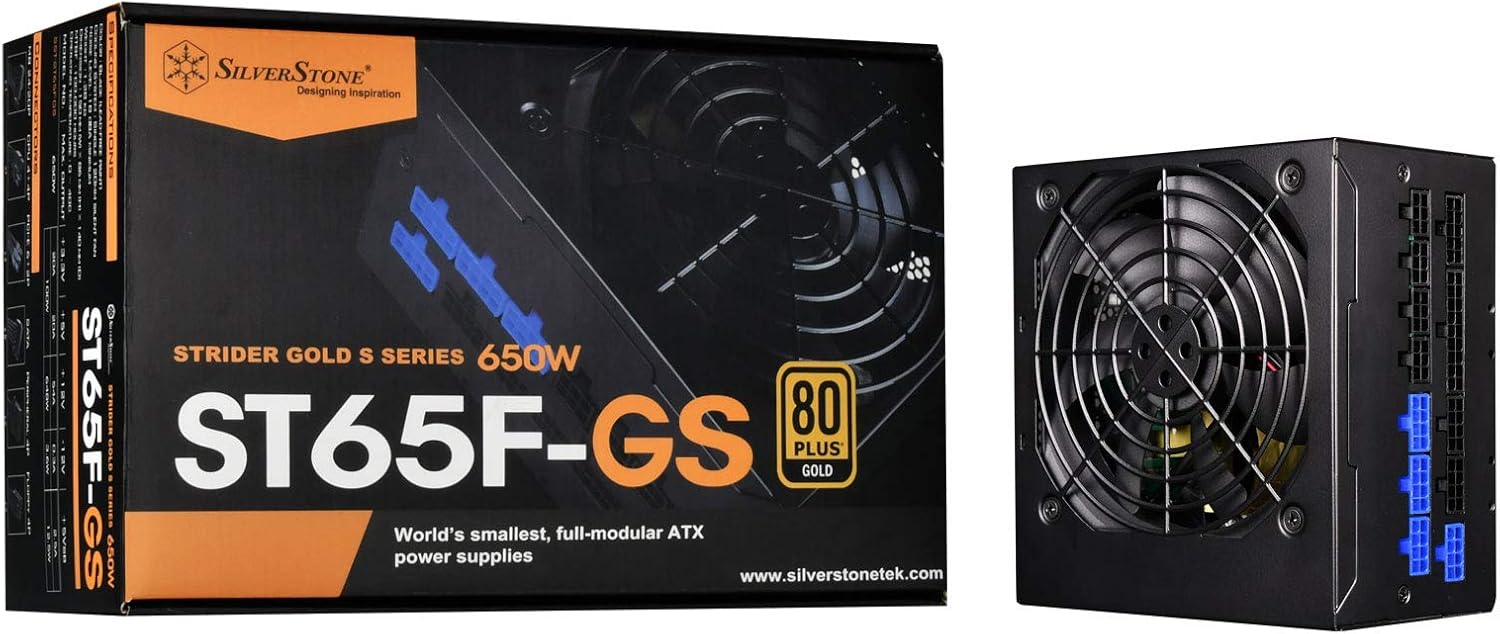
Image: The SilverStone SST-ST65F-GS power supply unit alongside its retail packaging, highlighting its compact size and 80 PLUS Gold certification.

Зураг: өнцөгт view of the SilverStone SST-ST65F-GS power supply, showing the fan grill and modular cable connectors.

Зураг: Ойролцоогоор view of the fully modular cable connection panel on the SilverStone SST-ST65F-GS, with blue connectors for main power and black for peripherals.

Зураг: дээрээс доош view of the 120mm cooling fan and grill on the SilverStone SST-ST65F-GS power supply.

Зураг: Ар талд view of the SilverStone SST-ST65F-GS power supply, showing the AC power inlet, ventilation grille, and the main power switch.
Тохиргоо ба суурилуулалт
- Системээ бэлтгэ: Ensure your computer is completely powered off and unplugged from the wall outlet. Open your computer case to access the PSU mounting area.
- Хуучин PSU-г арилгах (хэрэв байгаа бол): Disconnect all cables from your old power supply and remove its mounting screws. Carefully slide the old PSU out of the case.
- Шинэ цахилгаан тэжээлийн блокийг суурилуулах: Slide the SilverStone SST-ST65F-GS into the designated PSU bay in your computer case. Align the screw holes and secure the PSU with the provided mounting screws. Ensure the fan is facing the correct direction for optimal airflow (typically facing down if there's a bottom vent, or up if there isn't).
- Модульчлагдсан кабелийг холбох:
- Main ATX Power (20+4 pin): Connect the 24-pin cable to the corresponding port on the PSU and the motherboard.
- CPU Power (4+4 pin EPS/ATX): Connect the 8-pin (or 4+4 pin) CPU power cable to the PSU and the motherboard's CPU power connector.
- PCIe Power (6+2 pin): Connect the necessary PCIe cables to the PSU and your graphics card(s). Each 6+2 pin connector can be used for either 6-pin or 8-pin PCIe power.
- SATA эрчим хүч: SATA тэжээлийн кабелийг SSD, HDD болон оптик хөтчүүддээ холбоно уу.
- Peripheral (Molex) Power: Connect peripheral cables for case fans, older drives, or other accessories as needed.
Чухал: Ensure all cable connections are firm and correctly oriented. Do not force connectors.
- Кабелийн менежмент: Route cables neatly to improve airflow and aesthetics within your case. Use the provided cable ties or Velcro straps.
- Кейсийг хааж, хувьсах гүйдлийг холбоно уу: Once all internal connections are made, close your computer case. Connect the AC power cord to the PSU's inlet and then to a wall outlet or surge protector.
- Асаах: Flip the power switch on the back of the PSU to the "I" (On) position. Then, power on your computer.
Ашиглалтын заавар
The SilverStone SST-ST65F-GS power supply operates automatically once installed and powered on. It is designed for continuous operation under normal computing loads.
- Асаах/унтраах: Use the main power switch on the back of the PSU to completely cut power to the unit. For daily use, power your computer on and off via the operating system or case power button.
- Сэнсний ажиллагаа: The integrated 120mm fan will automatically adjust its speed based on the PSU's internal temperature and load to maintain optimal cooling and quiet operation.
- Үр ашиг: The 80 PLUS Gold certification indicates high efficiency, meaning less power is wasted as heat, contributing to lower energy consumption and a cooler system.
Засвар үйлчилгээ
Тохиромжтой засвар үйлчилгээ нь таны цахилгаан хангамжийн урт наслалт, оновчтой гүйцэтгэлийг баталгаажуулдаг.
- Тоос цэвэрлэх: Periodically (e.g., every 6-12 months), disconnect the PSU from AC power and use compressed air to gently clean dust from the fan grille and ventilation openings. Do not open the PSU casing.
- Агаарын урсгалыг хангах: Make sure that the PSU's intake and exhaust vents are not obstructed by cables, dust, or other components within the PC case. Good airflow is crucial for cooling.
- Кабелийн үзлэг: Occasionally check that all modular cables are securely connected to both the PSU and your components.
Алдааг олж засварлах
Хэрэв танд цахилгаан хангамжид асуудал тулгарвал дараах нийтлэг алдааг олж засварлах алхмуудыг үзнэ үү.
- Эрчим хүчгүй:
- Хувьсах гүйдлийн тэжээлийн утас нь цахилгаан тэжээлийн хэсэг болон ханын залгуурт найдвартай холбогдсон эсэхийг шалгаарай.
- Check that the power switch on the back of the PSU is in the "I" (On) position.
- Verify all modular cables are correctly and firmly seated in the PSU and connected components (motherboard, CPU, GPU).
- Ханын залгуурт тэжээл байгаа эсэхийг өөр төхөөрөмжөөр шалгана уу.
- Системийн тогтворгүй байдал/гацалт:
- Системийнхээ тэжээлийн хэрэгцээ нь цахилгаан тэжээлийн төхөөрөмжийн 650Вт-ын хүчин чадлаас хэтрэхгүй байгаа эсэхийг шалгаарай.
- Сул кабелийн холболт байгаа эсэхийг шалгана уу.
- Monitor system temperatures to ensure components are not overheating, which can be exacerbated by poor PSU performance or airflow.
- Чанга сэнсний чимээ:
- Цахилгаан хангамжийн сэнс болон агааржуулалтын нүхнээс хуримтлагдсан тоосыг цэвэрлэ.
- Ensure adequate airflow within the PC case.
- If the noise is excessive and persistent even under low load, contact SilverStone support.
If these steps do not resolve your issue, please contact SilverStone customer support for further assistance.
Үзүүлэлтүүд
| Онцлог | Тодорхойлолт |
|---|---|
| Брэнд | Мөнгөн чулуу |
| Загварын дугаар | SST-ST65F-GS |
| Цуврал | Strider Gold S |
| Maximum DC Output | 650 Вт |
| 80 PLUS гэрчилгээ | алт |
| Form Factor | ATX |
| Модульчлагдсан төрөл | Бүрэн модульчлагдсан |
| Хөргөх арга | 120mm Fan (Silent running, 18dBA minimum) |
| Ботьtage зохицуулалт | Хатуу 3% |
| Долгион ба шуугиан | Бага 3% |
| Continuous Output Temperature | 40°C (24/7 operation) |
| Хэмжээ (LxWxH) | 5.91 x 5.51 x 3.39 инч (150 x 140 x 86 мм) |
| Зүйлийн жин | 2.83 фунт (1.28 кг) |
| Тохиромжтой төхөөрөмжүүд | Хувийн компьютер |
| Холбогч төрөл | ATX |
Баталгаат болон дэмжлэг
SilverStone Technology provides a limited warranty for its power supply units. Please refer to the warranty information included in your product package for specific terms and conditions, including warranty duration and coverage details. You can also visit the official SilverStone Technology website for the most up-to-date warranty policy and to access customer support resources.
For technical support, troubleshooting assistance beyond this manual, or warranty claims, please contact SilverStone Technology customer service through their official webсайт:


