Танилцуулга
This manual provides instructions for the ZdalaMit GJ221-U replacement remote control. This remote is designed to function as a direct replacement for the original remote controls of compatible Sharp Aquos 4K LCD TV models. No programming or pairing is required for its operation.
Тохиргоо: Батерей суурилуулах
To begin using your ZdalaMit GJ221-U replacement remote control, you must first install the batteries.
- Зайны тасалгааг олоорой: Turn the remote control over. The battery compartment cover is typically located on the back of the remote, usually at the bottom section.
- Тасалгааг нээх: Slide the battery compartment cover downwards or press the release tab (if present) and lift the cover off.
- Батерейг оруулах: Insert two (2) AAA batteries into the compartment. Ensure that the positive (+) and negative (-) terminals of the batteries align correctly with the markings inside the compartment. Incorrect insertion can prevent the remote from functioning.
- Тасалгааг хаах: Батерейны тасалгааны тагийг найдвартай товших хүртэл шургуулж орлуулаарай.
Once the batteries are installed, the remote control is ready for immediate use with compatible Sharp Aquos 4K LCD TVs. No additional programming or pairing steps are necessary.
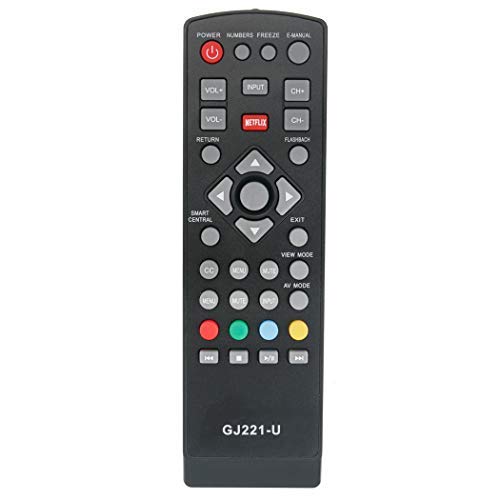
Зураг: Урд view of the ZdalaMit GJ221-U Replacement Remote Control. The remote is black with standard TV control buttons. The battery compartment is located on the reverse side.
Ашиглалтын заавар
The ZdalaMit GJ221-U remote control is designed to replicate the functionality of your original Sharp Aquos 4K LCD TV remote. After battery installation, simply point the remote at your television and press the desired buttons to control functions such as power, volume, channel selection, input source, and menu navigation.
- Цахилгаан товч: ТВ-г асаах эсвэл унтраана.
- Дууны хэмжээг нэмэгдүүлэх/доошруулах: Дууны түвшинг тохируулна.
- Суваг дээш/доошоо: Телевизийн сувгийг өөрчилдөг.
- Оролт/эх сурвалж: Өөр өөр оролтын эх үүсвэрүүдийг (HDMI, AV гэх мэт) сонгоно.
- Навигацийн товчлуурууд: Used to move through on-screen menus.
- Тооны дэвсгэр: For direct channel entry.
Refer to your Sharp Aquos TV's original user manual for specific functions of each button if you are unfamiliar with them.
Тохиромжтой ТВ загварууд
This replacement remote control is compatible with the following Sharp Aquos 4K LCD TV models:
- LC-43UB30U
- LC-50UB30U
- LC-55UB30U
- LC-65UB30U
- LC43UB30U
- LC50UB30U
- LC55UB30U
- LC65UB30U
Засвар үйлчилгээ
- Цэвэрлэгээ: Алсын удирдлагыг цэвэрлэхийн тулд зөөлөн, хуурай даавуу ашиглаарай. Шингэн цэвэрлэгч эсвэл зүлгүүрийн материал бүү ашиглаарай, учир нь эдгээр нь алсын удирдлагын гадаргуу эсвэл дотор эд ангиудыг гэмтээж болзошгүй.
- Зай солих: Алсын удирдлага удаан хариу үйлдэл үзүүлэх эсвэл ажиллахаа больсон үед батерейг солино уу. Хоёр батерейг нэгэн зэрэг ижил төрлийн (AAA) шинэ батерейгаар солино уу.
- Хадгалах: If the remote control will not be used for an extended period, it is recommended to remove the batteries to prevent leakage and potential damage.
Алдааг олж засварлах
- Алсын удирдлага хариу өгөхгүй байна:
- Батерейг зөв туйлшралтай (+/-) зөв оруулсан эсэхийг шалгаарай.
- Хуучин батерейг шинэ AAA батерейгаар солино.
- Алсын удирдлага болон телевизийн хэт улаан туяаны мэдрэгчийн хооронд ямар нэгэн саад байгаа эсэхийг шалгана уу.
- Та телевизийн IR хүлээн авагчийн үр дүнтэй хүрээнд байгаа эсэхээ шалгаарай.
- Тусгай товчлуурууд ажиллахгүй байна:
- This remote is pre-programmed to match the original functionality. If a specific button does not work, ensure your TV model is listed in the "Compatible TV Models" section.
- Товчлуур дарахад ямар ч хог хаягдал саад болохгүй байгаа эсэхийг шалгахын тулд алсын удирдлагын гадаргууг, ялангуяа товчлууруудын эргэн тойрныг цэвэрлэ.
Үзүүлэлтүүд
| Загварын дугаар: | GJ221-U |
| Брэнд: | ЗдалаМит |
| Тохиромжтой төхөөрөмжүүд: | Television (Sharp Aquos 4K LCD TVs) |
| Эрчим хүчний эх үүсвэр: | 2 x AAA батерей (оруулаагүй) |
| Бүтээгдэхүүний хэмжээ: | 6 x 2 x 0.5 инч |
| Барааны жин: | 1.41 унц |
| Онцлог шинж чанар: | Урьдчилан програмчлагдсан |
Баталгаат болон дэмжлэг
This product is a replacement remote control. For any issues or support inquiries regarding the ZdalaMit GJ221-U remote control, please contact the seller or manufacturer directly through your purchase platform. Specific warranty details may vary by retailer or region.


