1. Танилцуулга
This user manual provides comprehensive instructions for the setup, operation, and maintenance of your Reloop RP-1000 MK2 Professional Belt Drive Turntable System. Please read this manual thoroughly before using the product to ensure proper function and to prevent damage.
The Reloop RP-1000 MK2 is designed for both aspiring DJs and HiFi enthusiasts, offering high-quality audio reproduction through its belt-driven mechanism. This design effectively isolates the platter from motor vibrations, ensuring clear, distortion-free sound. The MK2 version features an enhanced top panel construction, improved metallic buttons, and a pre-fitted Ortofon OM Black pick-up system for immediate playback.
2. Аюулгүй ажиллагааны заавар
To ensure safe operation and prolong the life of your turntable, please observe the following safety guidelines:
- Эрчим хүчний хангамж: Connect the unit only to an AC outlet with the correct voltage as indicated on the product. Ensure the power cord is not pinched or walked on.
- Чийг: Төхөөрөмжийг бороо, чийг эсвэл хэт чийгшилд бүү оруул. Ваар гэх мэт шингэнээр дүүргэсэн зүйлсийг төхөөрөмж дээр бүү тавь.
- Агааржуулалт: Төхөөрөмжийн эргэн тойронд хангалттай агааржуулалт байгаа эсэхийг шалгаарай. Агааржуулалтын нүхийг бүү бөглөөрэй.
- Дулааны эх үүсвэрүүд: Төхөөрөмжийг радиатор, халаалтын төхөөрөмж, зуух эсвэл бусад төхөөрөмж (үүнд орно) гэх мэт дулааны эх үүсвэрээс хол байлга. ampөргөгч) дулаан үүсгэдэг.
- Цэвэрлэгээ: Зөвхөн хуурай даавуугаар цэвэрлэ. Шингэн цэвэрлэгч эсвэл аэрозоль хэрэглэхээс зайлсхий.
- Үйлчилгээ: Do not attempt to service the unit yourself. Refer all servicing to qualified service personnel. Servicing is required when the apparatus has been damaged in any way, such as power-supply cord or plug is damaged, liquid has been spilled or objects have fallen into the apparatus, the apparatus has been exposed to rain or moisture, does not operate normally, or has been dropped.
- Байршил: Place the turntable on a stable, level surface to prevent vibrations and ensure proper tracking.
3. Багцын агуулга
Доор жагсаасан бүх зүйл таны багцад байгаа эсэхийг шалгана уу.
- Эргэлтийн тавцан
- OM Black pick-up system (by Ortofon)
- Толгой
- Слипмат
- Эсрэг жин
- Цахилгааны утас
- Operating Instruction Manual (this document)
If any items are missing or damaged, please contact your retailer or Reloop customer support immediately.
4. Бүтээгдэхүүн дууссанview
Familiarize yourself with the main components of your Reloop RP-1000 MK2 turntable.

Зураг 4.1: Өнцөг view of the Reloop RP-1000 MK2 turntable, showcasing the platter, tonearm, and control panel.
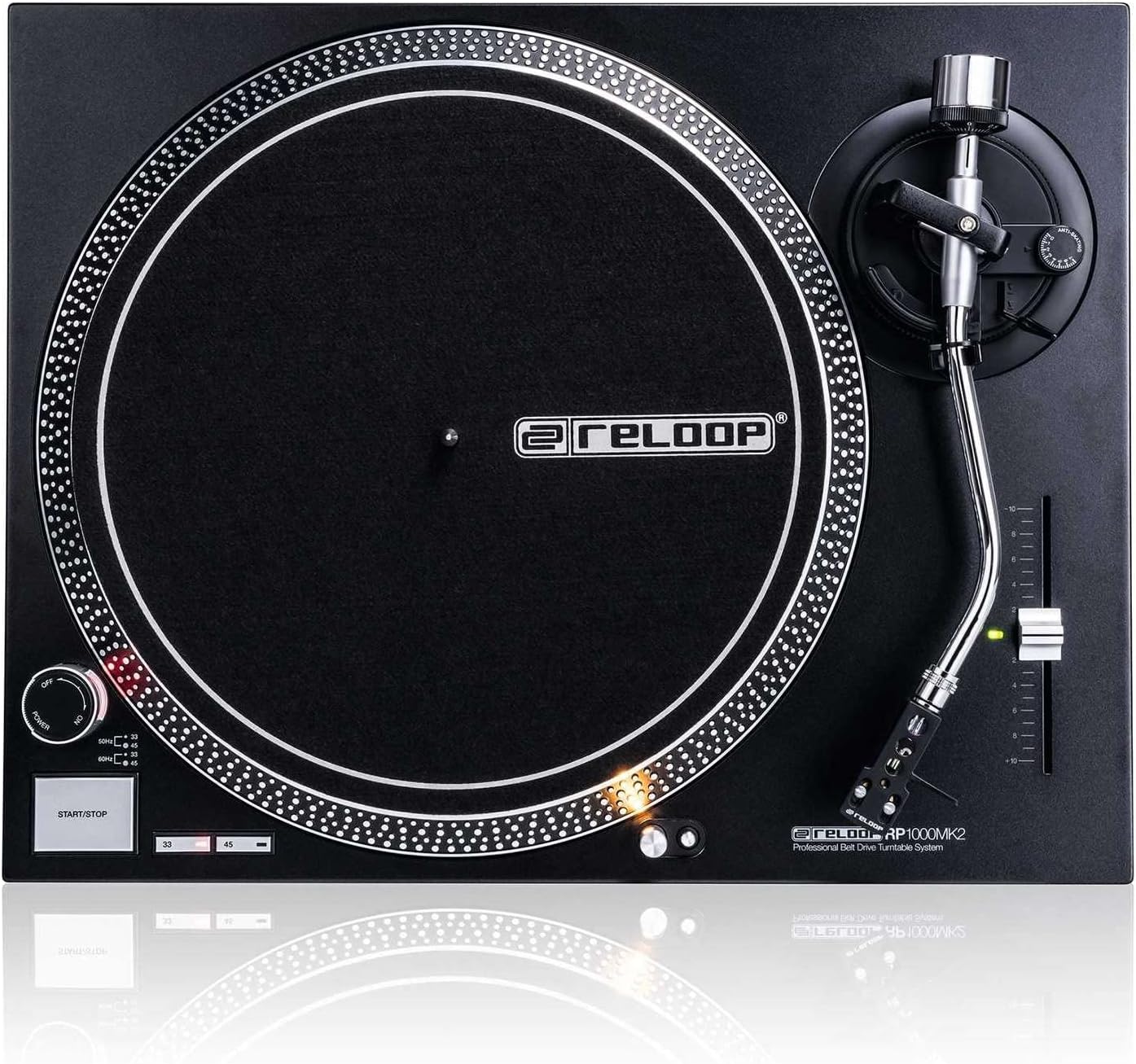
Зураг 4.2: Дээрээс доош view highlighting the platter, slipmat with Reloop logo, S-shaped tonearm, and pitch control slider.

Зураг 4.3: Нарийвчилсан view of the S-shaped tonearm, headshell, and the pre-fitted Ortofon OM Black pick-up system.
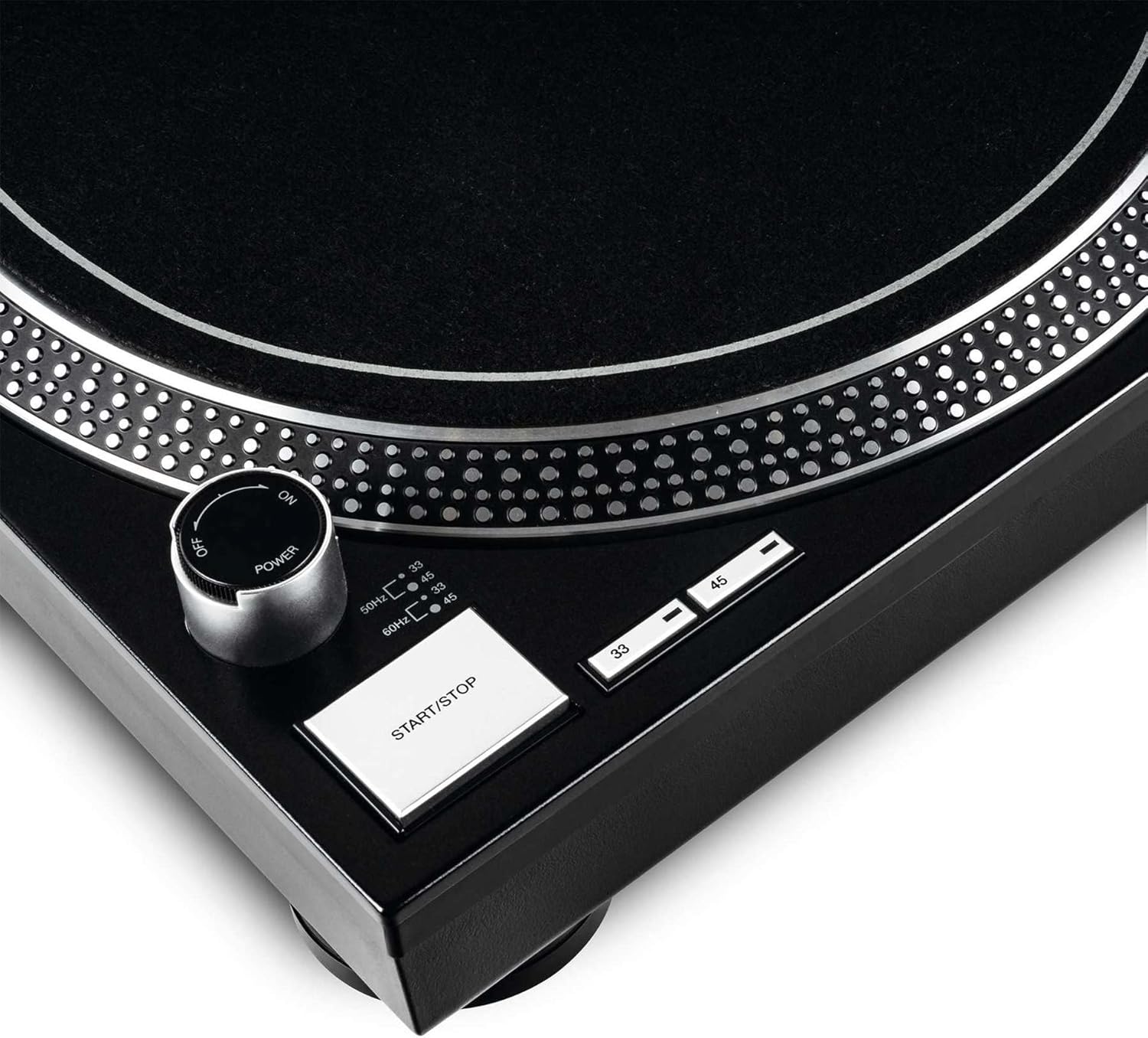
Figure 4.4: Close-up of the power knob, start/stop button, and speed selection buttons (33/45 RPM).
Гол бүрэлдэхүүн хэсгүүд:
- Таваг: Precision-engineered, die-cast aluminum platter for stable rotation.
- Тоник зэвсэг: Statically balanced S-shaped tonearm with hydraulic lift and anti-skating mechanism.
- Хайрцаг: High-quality OM Black pick-up system by Ortofon, pre-fitted to a headshell.
- Дууны давтамжийн хяналт: Adjustable slider with a range of +/-10% for fine speed adjustments.
- Speed Select Buttons: Buttons for selecting 33 1/3 RPM and 45 RPM playback speeds.
- Эхлэх/зогсоох товч: Тавагны эргэлтийг хянадаг.
- Target Light: Extendable aluminum target light to illuminate the needle position in dark environments.
- Shock-absorbing Feet: Improve isolation from unwanted vibrations.
5. Тохиргоо
5.1 Савлах ба байрлуулах
- Carefully remove all components from the packaging. Retain the packaging for future transport or storage.
- Place the turntable on a flat, stable, and level surface, away from direct sunlight, heat sources, and strong magnetic fields.
- Ensure there is sufficient space around the unit for ventilation.
5.2 Таваг ба бүс суурилуулах
- Place the platter onto the center spindle. Ensure it sits securely.
- Locate the drive belt. Carefully stretch the belt around the inner rim of the platter and hook it onto the motor pulley, which is visible through one of the platter's openings.
- Place the felt slipmat on top of the platter.
5.3 Tonearm Setup
The OM Black pick-up system is pre-fitted to the headshell. Follow these steps to balance the tonearm:
- Attach the headshell with the pre-fitted cartridge to the front end of the tonearm. Secure it by turning the locking ring clockwise.
- Place the counterweight onto the rear of the tonearm and rotate it until it is approximately centered.
- Тоник зэвсгийг суллаamp and lower the tonearm lift.
- Carefully adjust the counterweight by rotating it forwards or backwards until the tonearm is perfectly balanced and floats horizontally.
- Once balanced, hold the counterweight steady and rotate only the numbered ring on the front of the counterweight to '0' (zero).
- Rotate the entire counterweight (including the numbered ring) counter-clockwise to set the recommended tracking force for the Ortofon OM Black cartridge, typically between 1.5 to 2.0 grams. Refer to the cartridge manufacturer's specifications for the precise recommended tracking force.
- Set the anti-skating dial to the same value as your tracking force.
- Return the tonearm to its rest and secure it with the clamp.
5.4 Аудио болон цахилгаан холболт
- Connect the RCA audio cables from the turntable's output to the PHONO input of your ampөргөгч эсвэл холигч. Зүүн (цагаан) болон баруун (улаан) сувгийн зөв холболтыг шалгана уу.
- Эргүүлэгч тавцангаас газардуулгын утсыг таны төхөөрөмж дээрх газардуулгын терминалтай холбоно уу ampдуу чимээг багасгахын тулд өргөгч эсвэл холигч.
- Plug the power cord into the turntable's power input and then into a suitable AC power outlet.
6. Ашиглалтын заавар
6.1 Үндсэн үйл ажиллагаа
- Асаах: Turn the power knob clockwise to the "ON" position. The platter will not start spinning until the START/STOP button is pressed.
- Хурд сонгох: Press the "33" or "45" button to select the desired playback speed according to the record you are playing. The corresponding LED will illuminate.
- Байрны бичлэг: Carefully place a vinyl record onto the platter.
- Эхлэх таваг: Press the START/STOP button. The platter will begin to rotate.
- Гарны байрлал: Тоник зэвсгийг суллаamp. Use the tonearm lift lever to raise the tonearm. Carefully move the tonearm over the desired track on the record.
- Доод гар: Gently lower the tonearm lift lever to allow the stylus to descend onto the record groove.
- Тоглож байна: The audio will now play through your connected audio system.
- Дахин тоглуулахыг зогсоох: At the end of the record, or when you wish to stop, use the tonearm lift lever to raise the tonearm, return it to its rest, and secure it with the clamp. Press the START/STOP button to stop the platter rotation.
- Унтраах: Turn the power knob counter-clockwise to the "OFF" position when not in use.
6.2 Using Pitch Control
The pitch control slider allows you to finely adjust the playback speed by +/-10%. Move the slider up or down to increase or decrease the speed. The center detent indicates 0% pitch adjustment (nominal speed).
6.3 Target Light
Press the aluminum target light button to extend the light, illuminating the needle position. This is particularly useful in low-light environments. Press it again to retract the light.
7. Засвар үйлчилгээ
7.1 Төхөөрөмжийг цэвэрлэх
- Цэвэрлэхийн өмнө цахилгааны утсыг үргэлж салгаж байгаарай.
- Use a soft, dry, lint-free cloth to wipe the surface of the turntable.
- Зөрүүд тэмдгийн хувьд бага зэрэг damp даавууг хэрэглэж болно, дараа нь хуурай даавуугаар нэн даруй. Зүлгүүрийн цэвэрлэгч эсвэл уусгагчаас зайлсхий.
7.2 Зүүг арчилгаа
- Зүү (зүү) нь эмзэг эд анги юм. Үүнийг маш болгоомжтой харьцана уу.
- Үзгийг цэвэрлэх зориулалттай зөөлөн сойз ашиглан ар талаас нь урагш зөөлөн үрж тогтмол цэвэрлээрэй.
- A worn or dirty stylus can damage your records and degrade sound quality. Replace the stylus when signs of wear are apparent (e.g., distorted sound, skipping).
7.3 Бүс солих
The belt is a wear-and-tear part. If you notice inconsistent speed or the platter not spinning, the belt may need replacement. Contact Reloop support or an authorized service center for replacement belts and instructions.
7.4 Dust Cover Care (if applicable)
If your turntable includes a dust cover, clean it with a soft, damp cloth. Avoid using dry cloths as they can scratch the acrylic surface. Do not use harsh chemicals.
8. Алдаа засах
Before contacting support, please refer to the following common issues and their solutions:
| Асуудал | Боломжит шалтгаан | Шийдэл |
|---|---|---|
| No power / Platter not spinning | Power cord not connected; Power switch off; Belt not installed or broken. | Ensure power cord is securely plugged in. Turn power switch ON. Check if the drive belt is correctly installed around the platter and motor pulley. Replace belt if broken. |
| Дуу чимээгүй эсвэл маш сул дуу чимээтэй | RCA cables not connected correctly; Amplifier/mixer input incorrect; Stylus damaged or dirty; Cartridge not properly seated. | Check RCA connections to amplifier/mixer (PHONO input). Ensure ground wire is connected. Clean stylus. Re-seat cartridge in headshell. |
| Distorted sound / Skipping | Stylus dirty or worn; Tracking force incorrect; Anti-skating incorrect; Turntable not level; Record dirty or damaged. | Clean or replace stylus. Re-adjust tracking force and anti-skating. Ensure turntable is on a level surface. Clean record. |
| Тогтворгүй хурд | Worn or stretched belt; Motor issue. | Inspect the drive belt for wear and replace if necessary. If the issue persists, contact service. |
9. Техникийн үзүүлэлтүүд
| Онцлог | Тодорхойлолт |
|---|---|
| Загварын нэр | RP-1000 MK2 Professional Belt Drive Turntable System |
| Драйвын төрөл | Туузан хөтөч |
| Мотор систем | Powerful belt-drive motor system absorbs unwanted vibration and noise |
| Плиттер | Precision-engineered, die-cast aluminum platter with stable rotation |
| Хурд | 2 selectable speeds (33 1/3 & 45 RPM) |
| Давирхайн хяналт | Adjustable range of +/-10% |
| Тоног зэвсэг | Statically balanced S-shaped tonearm with hydraulic lift and anti-skate |
| Барилга | Redesigned metal top panel, tactile buttons, reinforced housing construction, optimized damping features, shock-absorbing feet |
| Хэмжээ (W x D x H) | 17.72 x 13.86 x 5.67 инч (ойролцоогоор 45 x 35.2 x 14.4 см) |
| Жин | 16.06 фунт (ойролцоогоор 7.3 кг) |
| Холболт | Analog RCA output, Ground terminal |
| Эрчим хүчний эх үүсвэр | Corded Electric, 220 Volts (check local voltage шаардлага) |
10. Баталгаат хугацаа ба дэмжлэг
10.1 Баталгаат хугацааны мэдээлэл
Reloop products are manufactured to the highest quality standards. This product comes with a manufacturer's warranty. Please refer to the warranty card included in your package or visit the official Reloop webТанай бүс нутагт хамаарах дэлгэрэнгүй баталгаат нөхцөлийг сайтаас авна уу.
Худалдан авсан баримтаа (баримт эсвэл нэхэмжлэх) хадгалаарай, учир нь энэ нь аливаа баталгаат нэхэмжлэлд шаардлагатай болно.
10.2 Хэрэглэгчийн дэмжлэг
Should you encounter any issues not covered in the troubleshooting section, or require further assistance, please contact Reloop customer support or your authorized dealer. Contact information can typically be found on the official Reloop webсайт эсвэл таны бүтээгдэхүүний сав баглаа боодол дээр.
For the latest information, FAQs, and support resources, please visit the official Reloop webсайт: www.reloop.com


