1. Танилцуулга
This user manual provides comprehensive instructions for the Waveshare 4.3-inch Capacitive Touch Screen LCD. This display is designed for versatility, offering compatibility with various devices including Raspberry Pi, Jetson Nano, and Windows PCs. It features an 800x480 resolution IPS panel with capacitive touch functionality, making it suitable for a wide range of applications from embedded systems to desktop extensions.

Image: The Waveshare 4.3-inch Capacitive Touch Screen LCD, showcasing its compact size and touch interface.
2. Багцын агуулга
Verify that all items listed below are included in your package. If any items are missing or damaged, please contact Waveshare support.

Image: Contents of the Waveshare 4.3-inch LCD package, including the display, HDMI cable, USB cable, and adapters.
- 4.3inch HDMI LCD (B)
- HDMI кабель
- USB Type A to Micro B Cable
- HDMI to Micro HDMI Adapter
- HDMI-аас HDMI адаптер
- Screws pack (for mounting)
3. Үзүүлэлт ба онцлог
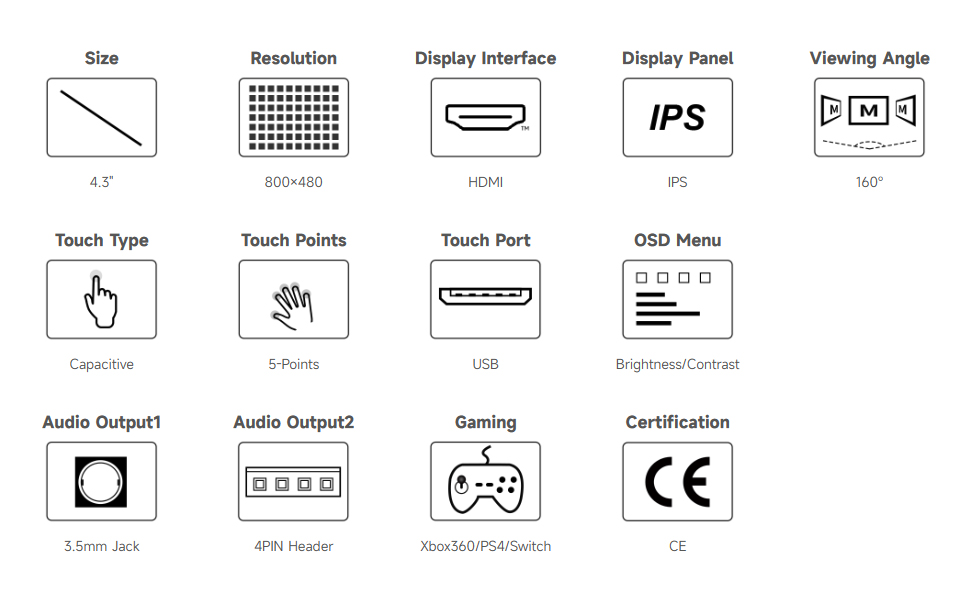
Image: Detailed specifications and features of the 4.3-inch HDMI Touch Display.
| Онцлог | Тодорхойлолт |
|---|---|
| Дэлгэцийн хэмжээ | 4.3 инч |
| Шийдвэр | 800 × 480 hardware resolution |
| Дэлгэцийн самбар | IPS |
| Viewing өнцөг | 160° |
| Төрөл дээр хүрнэ үү | Capacitive, 5-points touch (depending on OS) |
| Порт хүрнэ үү | USB |
| Дэлгэцийн интерфэйс | HDMI |
| Аудио гаралт | 3.5mm Jack, 4PIN Header (for speaker connection) |
| OSD цэс | Multi-language, for power management, brightness/contrast adjustment, etc. |
| Эрчим хүчний оролт | 5V DC |
4. Device and System Support
The display offers broad compatibility with various computing platforms:

Зураг: Дууслааview of compatible devices and operating systems, including Raspberry Pi, Jetson Nano, and Windows PCs.
- Raspberry Pi: Supports all versions of Raspberry Pi.
- Supports Raspberry Pi OS, 5-points touch, driver free.
- Supports Ubuntu / Kali / WIN10 IoT, single point touch, driver free.
- Supports Retropie, driver free.
- Жетсон Нано: Supports Ubuntu, single point touch, driver free.
- PC: Supports Windows 11 / 10 / 8.1 / 8 / 7, 5-points touch, driver free.
- Тоглоомын консол: Supports Xbox360, PS4, Switch (Display and Sound Only).
5. Тохиргоо ба холболт
Follow these steps to connect your Waveshare 4.3-inch LCD to your device. Connection methods may vary slightly depending on your host device.
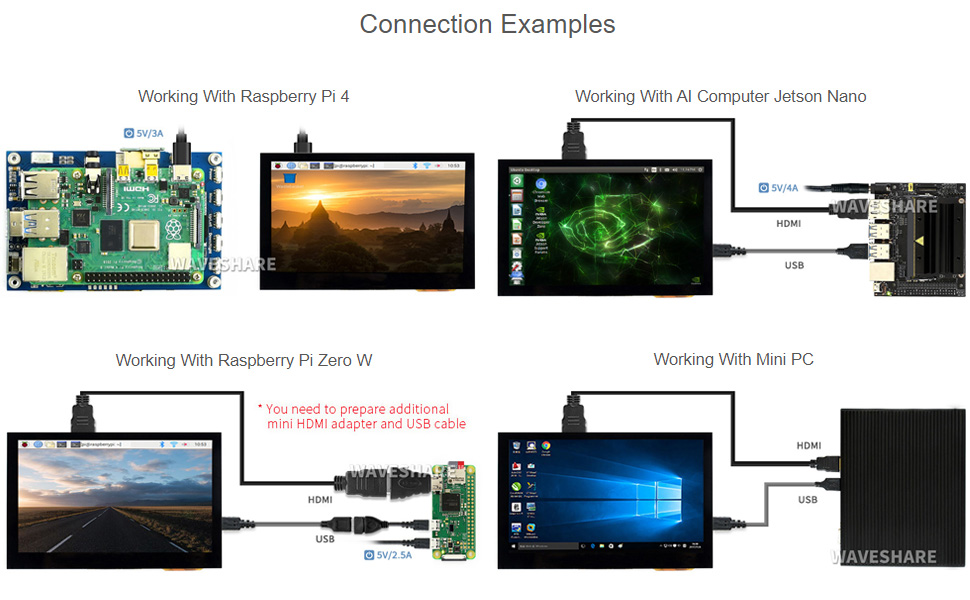
Зураг: Visual examples of connecting the display to Raspberry Pi 4, Raspberry Pi Zero W, Jetson Nano, and a Mini PC.
5.1. General Connection Steps
- Connect the HDMI port of the display to the HDMI output of your host device using the provided HDMI cable or adapter.
- Connect the USB touch port of the display to a USB port on your host device using the provided USB cable. This provides power to the display and enables touch functionality.
- Ensure your host device is powered on. The display should automatically detect the video signal and power on.
5.2. Specific Connection Notes
- Raspberry Pi 4-ын хувьд: Use the provided HDMI to HDMI cable and USB cable. The display can be powered directly from the Raspberry Pi's USB port.
- For Raspberry Pi Zero W: An additional Mini HDMI to HDMI adapter and USB cable may be required (not included in standard package).
- For Jetson Nano / Mini PC: Connect via HDMI for video and USB for touch and power. Ensure adequate power supply for the Jetson Nano (e.g., 5V/4A).
6. Ашиглалтын заавар
6.1. Хяналтад хүрнэ үү
The display features a capacitive touch screen supporting up to 5-points touch, depending on the operating system. No additional drivers are typically required for touch functionality on supported systems.
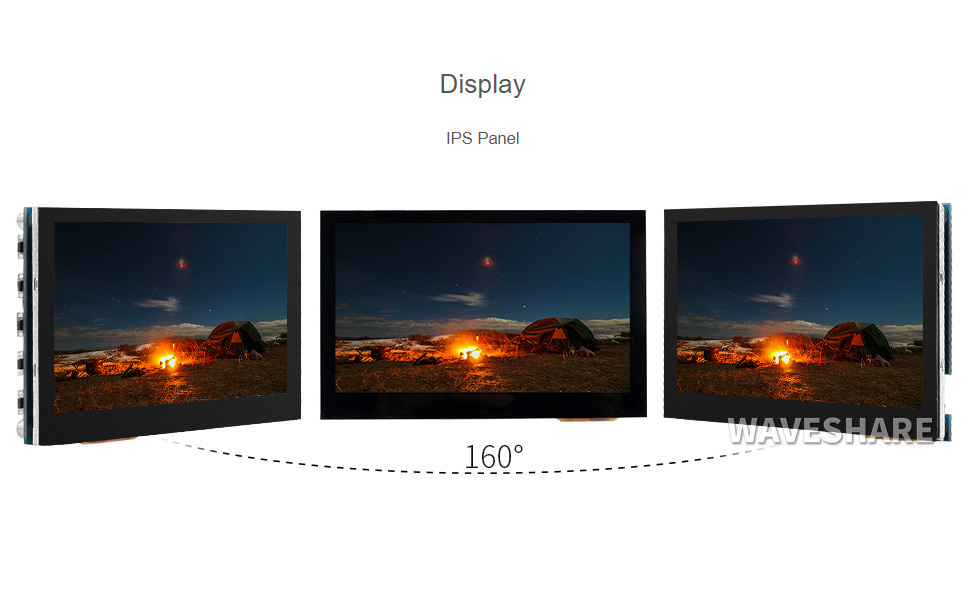
Image: Demonstration of touch control on the display, showing interaction with a graphical user interface.
6.2. OSD цэсийн навигаци
The On-Screen Display (OSD) menu allows for various adjustments to the display settings. Use the physical buttons on the side of the display to navigate the OSD menu.
- Цэсийн товчлуур: Enters the OSD menu or confirms a selection.
- Up/Left Button: Navigates up or left in the menu, or increases a value.
- Down/Right Button: Navigates down or right in the menu, or decreases a value.
- Return/Exit Button: Goes back to the previous menu or exits the OSD menu.
- Цахилгаан товч: Дэлгэцийг асаах/унтраах.
Common OSD settings include brightness, contrast, color temperature, aspect ratio, and input source selection.
6.3. Тоглоом
The display can be used with game consoles like Xbox360, PS4, and Nintendo Switch for display and sound output. Connect the console via HDMI.
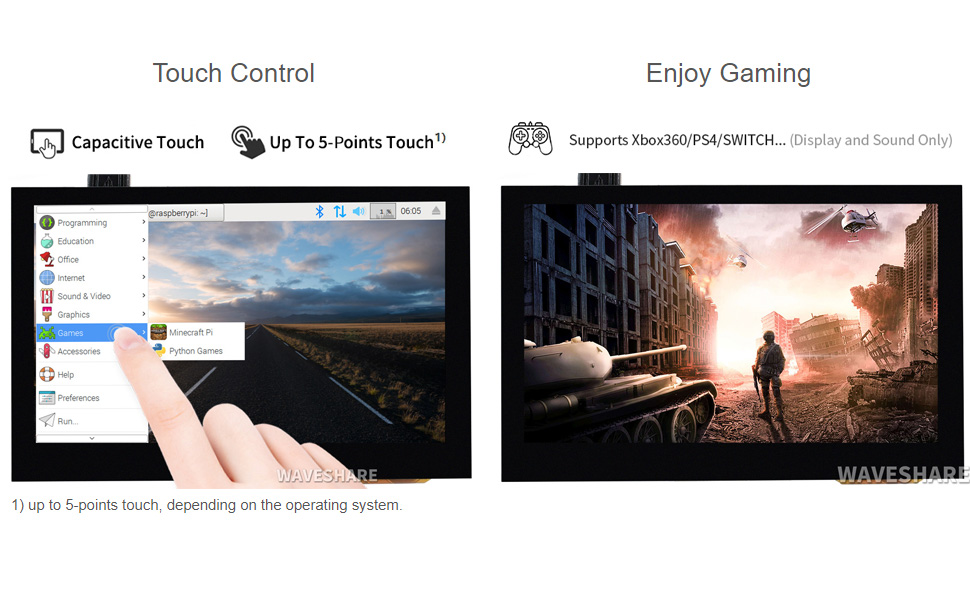
Image: The display showing a game, demonstrating its capability for gaming applications.
7. Гадаад төрх ба хэмжээс
Refer to the diagram below for the physical layout and dimensions of the display board, including port locations and button functions.

Image: Technical diagram showing the dimensions (in mm) and labeled components of the 4.3-inch HDMI LCD (B) board.
| Үгүй | Бүрэлдэхүүн хэсэг |
|---|---|
| 1 | Мэдрэгч порт |
| 2 | Чанга яригчийн толгой хэсэг |
| 3 | Audio jack (HP) |
| 4 | HDMI порт |
| 5 | Эрчим хүчний оролт |
| 6 | Цахилгаан товч |
| 7 | Цэсний товчлуур |
| 8 | Up/Left button |
| 9 | Down/Right button |
| 10 | Буцах/Гарах товч |
Dimensions: Approximately 106.1mm (width) x 67.8mm (height).
8. Алдаа засах
- Дэлгэц байхгүй / Хар дэлгэц:
- Ensure the HDMI cable is securely connected to both the display and the host device.
- Verify the host device is powered on and outputting video.
- Check the power connection to the display. The display requires 5V power, typically supplied via the USB connection.
- If using Raspberry Pi, ensure the
config.txtfile is correctly configured for the display resolution (800x480). Refer to Waveshare's online user manual for specificconfig.txtтохиргоо.
- Touch Not Working:
- Ensure the USB cable is connected from the display's touch port to a USB port on your host device.
- For some Linux distributions (e.g., older versions of Ubuntu/Kali), specific drivers or calibration might be needed, though it's generally driver-free. Refer to Waveshare's online resources.
- On Windows, ensure touch screen drivers are correctly installed (usually automatic).
- Flickering / Unstable Display:
- Ensure the power supply to the host device and the display is stable and sufficient.
- Өөр HDMI кабель ашиглаж үзнэ үү.
- Аудио байхгүй:
- Ensure the 3.5mm audio jack or speaker header is correctly connected.
- Verify that the audio output is selected correctly on your host device (e.g., HDMI audio output).
- Note that the display's built-in audio output quality may be basic; external speakers are recommended for better sound.
For more detailed troubleshooting and specific software configurations, please refer to the official Waveshare online user manual: Хэрэглэгчийн гарын авлага (PDF).
9. Баталгаат хугацаа ба дэмжлэг
Waveshare products are designed for reliability and performance. For warranty information and technical support, please visit the official Waveshare webсайт эсвэл харилцагчийн үйлчилгээтэй шууд холбогдоно уу.
- Official Waveshare Store: Visit Waveshare Store on Amazon
- Онлайн хэрэглэгчийн гарын авлага: PDF хэрэглэгчийн гарын авлагыг татаж авах
- Холбоо барих: Refer to the Waveshare website for contact details for technical support and customer service.
10. Product Certification
This product is HDMI Certified, ensuring compliance with HDMI standards for high-definition multimedia interfacing.

Image: Certificate indicating HDMI certification for the adapter, issued to Shenzhen Weixue Electronics Co. Ltd.
For verification of the HDMI certification, please visit the official HDMI Licensing Administrator website and use the provided QR code or link: HDMI Certification Verification.


