1. Танилцуулга
Thank you for choosing the NUBWO N12 Gaming Headset. This manual provides essential information for setting up, operating, and maintaining your headset to ensure an optimal gaming and audio experience. The NUBWO N12 is designed for multi-platform compatibility, offering immersive sound and clear communication.

Image 1.1: NUBWO N12 Gaming Headset
2. Багцын агуулга
Доор жагсаасан бүх зүйл таны багцад байгаа эсэхийг шалгана уу.
- NUBWO N12 Gaming Headset
- Хэрэглэгчийн гарын авлага (энэ баримт бичиг)
- Компьютерийн өргөтгөлийн кабель
3. Бүтээгдэхүүн дууссанview
The NUBWO N12 Gaming Headset features advanced audio technology and ergonomic design for extended comfort and superior performance.
3.1 Гол онцлогууд
- 50 мм-ийн аудио драйверууд: Delivers clear highs, deep bass, and simulated surround sound for an immersive experience.
- Тав тухтай чихний дэвсгэр: Equipped with soft protein leather and memory foam for reduced pressure during long gaming sessions. Features a 25-degree built-in ear-tilt design to conform to the human ear shape.
- Тохируулах боломжтой толгойн тууз: Allows for a customized fit for various head sizes.
- Дуу чимээг арилгах микрофон: Rotatable microphone captures your voice clearly while minimizing background noise.
- In-line Controls: Convenient access to volume adjustment and microphone mute switch.

Image 3.1: Immersive Sound Quality with 50mm Speaker Drivers
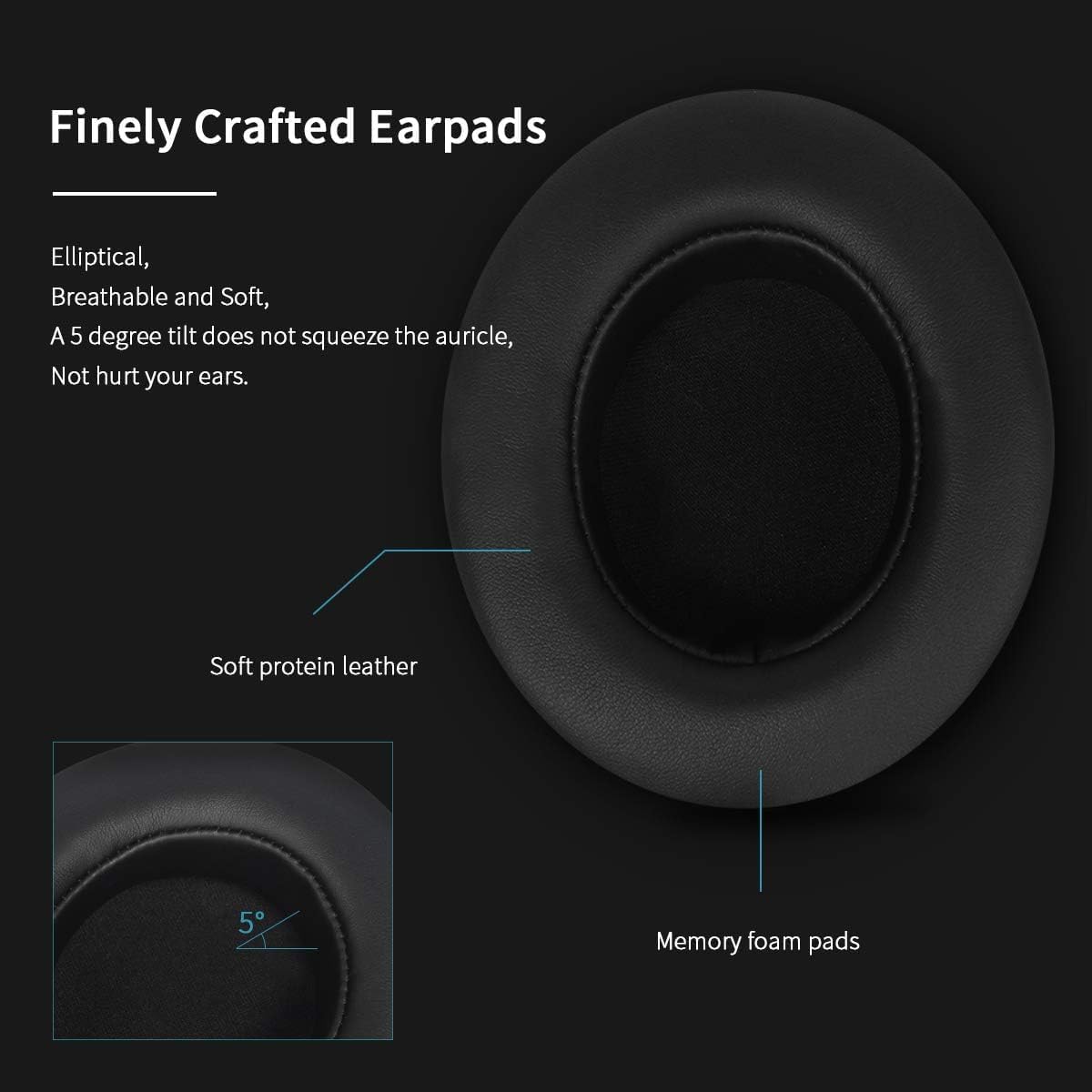
Image 3.2: Finely Crafted Earpads with Soft Protein Leather and Memory Foam

Image 3.3: Earcup Design with 25-degree Ear-Tilt

Image 3.4: Enhanced Stereo Sound with 50mm High Definition Speakers

Image 3.5: Microphone Noise-Canceling Performance

Image 3.6: In-line Control and Noise-Canceling Microphone
4. Тохиргоо ба холболт
The NUBWO N12 Gaming Headset connects via a standard 3.5mm audio jack. Specific connection methods vary by platform:
4.1 Тоглоомын консол руу холбогдох
- PlayStation 4 (PS4): Plug the 3.5mm line directly into the PS4 console's controller.
- New Version Xbox One: Connect the 3.5mm port directly to the Xbox One console's controller.
- Older Xbox One: An Xbox One headset adapter (not included) is required to connect the 3.5mm port to the controller.
- Nintendo Switch: Connect the 3.5mm line into the Nintendo Switch console for audio output.
4.2 Connecting to PC, Laptop, and Mac
For PC, Laptop, and Mac systems, use the included PC extension cable to split the audio and microphone signals if your device has separate ports for each. If your device has a single combined 3.5mm port, the headset can be plugged in directly.
4.3 Гар утасны төхөөрөмжид холбогдох
The headset can be connected to iOS and Android devices with a 3.5mm audio jack. It is recommended to test the headset with your mobile phone first to ensure proper functionality.
5. Ашиглалтын заавар
5.1 Дууны хяналт
Adjust the audio volume using the volume wheel located on the in-line control unit of the headset cable. Rotate the wheel up to increase volume and down to decrease it.
5.2 Микрофоны дууг хаах
To mute or unmute the microphone, use the switch located on the in-line control unit. Slide the switch to the 'OFF' position to mute the microphone and to the 'ON' position to activate it.
5.3 Микрофоны тохируулга
The microphone is flexible and rotatable. Position it appropriately near your mouth for optimal voice capture and clarity. Ensure it is not obstructed.
6. Засвар үйлчилгээ, арчилгаа
Proper care will extend the lifespan of your NUBWO N12 Gaming Headset:
- Цэвэрлэгээ: Чихэвчийг цэвэрлэхдээ зөөлөн, хуурай даавуу ашиглаарай. Хүчтэй химийн бодис эсвэл зүлгүүрийн материал хэрэглэхээс зайлсхий.
- Хадгалах: Чихэвчийг нарны шууд тусгал, хэт температураас хол, сэрүүн, хуурай газар хадгална.
- Кабелийн менежмент: Гэмтлээс сэргийлэхийн тулд кабелийг огцом нугалах эсвэл хэт их татахаас зайлсхий.
- Эрүүл мэндийн сануулга: For healthy gaming habits, take off the headset every 1-2 hours to allow your ears and eyes to rest.
7. Алдаа засах
If you encounter issues with your NUBWO N12 Gaming Headset, please refer to the following common solutions:
7.1 Дуугүй эсвэл дуу багатай
- Check Device Functionality: Ensure your audio source device (console, PC, phone) is working correctly and its volume is turned up.
- Чихэвчний холболтыг баталгаажуулах: Confirm that the 3.5mm plug is fully and correctly inserted into the audio source port.
- Adjust In-line Volume: Rotate the volume wheel on the headset's in-line control unit to increase the volume.
- Check Mute Switch: Ensure the microphone mute switch on the in-line control is not activated if you are experiencing microphone issues.
- PC/Laptop Users: If using a PC or laptop, ensure the PC extension cable is correctly connected and that your computer's audio settings are configured to use the headset as the input/output device.
8. Техникийн үзүүлэлтүүд
| Онцлог | Тодорхойлолт |
|---|---|
| Загварын нэр | NUBWO N12 |
| Холболтын технологи | Утастай (3.5 мм залгуур) |
| Аудио драйверын хэмжээ | 50 миллиметр |
| Давтамжийн хүрээ | 20 Гц - 20,000 Гц |
| Хяналтын төрөл | Дууны хяналт |
| Микрофон | Noise-Canceling, Rotatable |
| Чихэвчний хэлбэр | Чихний дээгүүр |
| Материал | Soft Protein Leather, Memory Foam |
| Зүйлийн жин | 15.7 унц (0.98 фунт) |
| Бүтээгдэхүүний хэмжээс | 7 x 4.1 x 8.5 инч |
| Кабелийн онцлог | Тогтсон |
9. Баталгаат хугацаа ба дэмжлэг
NUBWO is committed to providing high-quality products and customer satisfaction. The NUBWO N12 Gaming Headset comes with a 12-month NUBWO Service Commitment худалдан авсан өдрөөс.
This commitment ensures that every NUBWO Gaming Headset undergoes a strict quality test process. Should you encounter any issues or require support within the warranty period, please refer to your purchase documentation for contact information or visit the official NUBWO support webсайт.


