1. Танилцуулга
This manual provides essential information for the safe and efficient operation of your Hoover 2-in-1 Steam Mop and Handheld Steam Cleaner, model HS86-SFC-M. This versatile appliance is designed for comprehensive cleaning of various surfaces using steam and, when desired, a cleaning solution. Please read all instructions carefully before first use and retain this manual for future reference.
2. Аюулгүй байдлын мэдээлэл
АНХААРУУЛГА: Гал түймэр, цахилгаанд цохиулах, гэмтэх эрсдлийг бууруулахын тулд цахилгаан хэрэгсэл ашиглахдаа аюулгүй байдлын үндсэн арга хэмжээг үргэлж дагаж мөрдөөрэй.
- Боть байгаа эсэхийг баталгаажуулна ууtage indicated on the product corresponds to your mains supply voltage.
- Төхөөрөмжийг ус болон бусад шингэнд дүрж болохгүй.
- Never leave the appliance unattended when plugged in. Unplug from the outlet when not in use and before servicing.
- Гэмтсэн утас, залгууртай хамт хэрэглэж болохгүй. Хэрэв төхөөрөмж хэвийн ажиллахгүй, унасан, гэмтсэн, гадаа орхисон, усанд унасан бол үйлчилгээний төвд буцааж өгнө үү.
- Do not direct steam at people, animals, or electrical outlets. Steam is hot and can cause burns.
- Use only manufacturer-recommended accessories and cleaning solutions.
- Үс, сул хувцас, хуруу, биеийн бүх хэсгийг нүх, хөдлөх хэсгүүдээс хол байлга.
- Do not use on unsealed hardwood floors or surfaces that are sensitive to heat and moisture. Test on an inconspicuous area first.
3. Багцын агуулга
Carefully unpack your Hoover HS86-SFC-M and ensure all items are present:
- Hoover 2-in-1 Steam Mop and Handheld Steam Cleaner Unit
- 10-piece accessory kit (various brushes, nozzles, and tools)
- Цахилгааны утас
- 2 Microfiber cleaning pads
- Small bottle of cleaning solution

Зураг 3.1: Үндсэн төхөөрөмж болон дагалдах хэрэгслүүд.
4. Тохиргоо
4.1 Уурын шүүрийг угсрах
- Attach the handle to the main body of the steam mop until it clicks securely into place.
- Place a microfiber cleaning pad onto the floor head. Ensure it is centered and securely attached.
- Connect the floor head to the main unit by aligning the connection points and pushing firmly until it locks.

Image 4.1: Attaching the microfiber cleaning pad to the floor head.
4.2 Filling the Water and Detergent Tanks
- Locate the water tank and detergent tank on the main unit.
- Remove the water tank by pulling it upwards. Fill it with clean tap water. Do not overfill.
- Reinsert the water tank until it clicks into place.
- Open the cap of the detergent tank and fill with the recommended cleaning solution. Close the cap securely.
Video 4.2: Demonstrates assembly, attaching pads, and filling tanks for the Hoover Steam Mop.
5. Ашиглалтын заавар
5.1 Steam Mop Mode
- Plug the power cord into a suitable electrical outlet. The power indicator light will illuminate.
- Wait approximately 30 seconds for the unit to heat up and produce steam.
- Press the steam trigger on the handle to release steam.
- For detergent use, turn the detergent dial to the 'On' position. Adjust the steam output using the variable steam control dial to suit your floor type and cleaning needs.
- Move the steam mop slowly and steadily over the floor surface.
- When finished, turn the detergent dial to 'Off' (if used), release the steam trigger, and unplug the unit.
5.2 Handheld Steam Cleaner Mode
- To detach the handheld unit, press the release button and lift the main body from the floor head.
- Attach the flexible hose to the handheld unit.
- Select the appropriate accessory from the 10-piece kit for the task (e.g., small brush for grout, nozzle for tight spaces). Attach it to the end of the hose or directly to the handheld unit if preferred.
- Plug in the unit and wait for it to heat up.
- Press the steam trigger to release steam and clean the desired surface.
- After use, release the steam trigger and unplug the unit. Allow it to cool before detaching accessories.
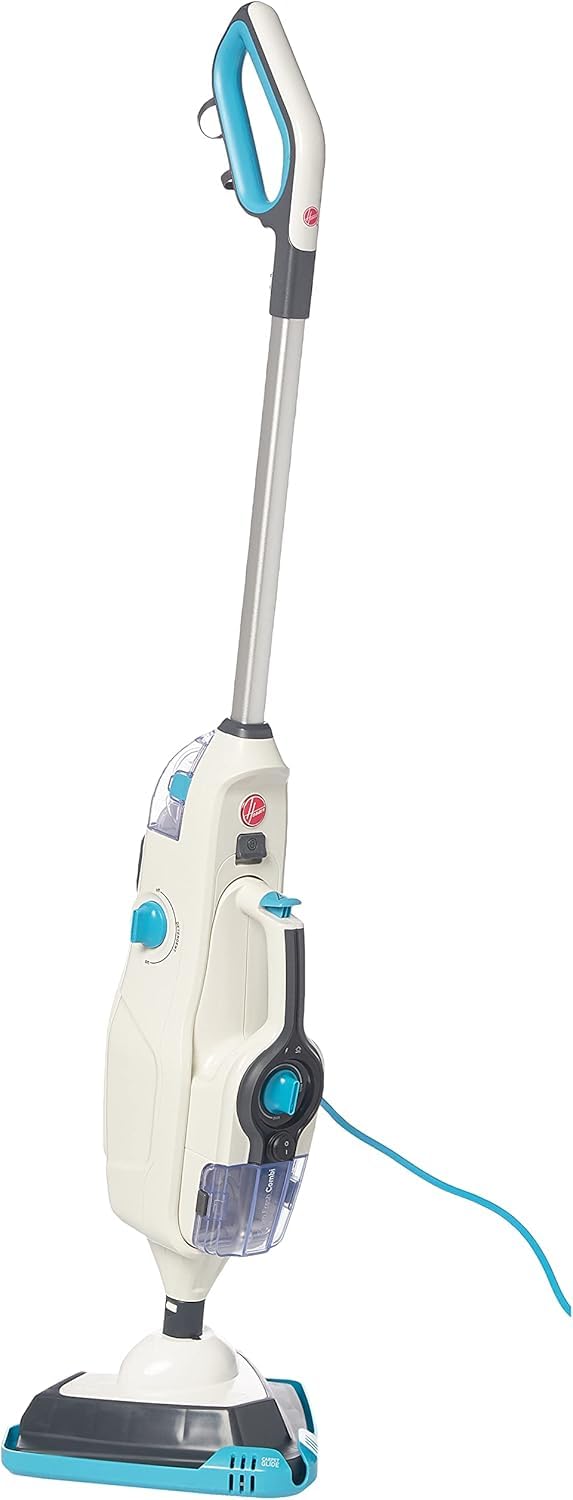
Image 5.1: The Hoover 2-in-1 Steam Mop ready for use.
6. Засвар үйлчилгээ
6.1 цэвэрлэх дэвсгэр
The microfiber cleaning pads are machine washable. Remove them from the floor head after each use and wash according to the care instructions on the label. Do not use bleach or fabric softeners.
6.2 Emptying Tanks
After each use, ensure the unit is unplugged and cooled. Remove and empty any remaining water from the water tank and detergent from the detergent tank. Rinse the tanks with clean water and allow them to air dry before storing.
6.3 Ерөнхий цэвэрлэгээ ба хадгалалт
Төхөөрөмжийн гадна талыг зөөлөн арчиж, damp cloth. Do not use abrasive cleaners. Store the steam cleaner in a cool, dry place, out of reach of children.
7. Алдаа засах
If you encounter issues with your steam cleaner, refer to the following common problems and solutions:
| Асуудал | Боломжит шалтгаан | Шийдэл |
|---|---|---|
| Уур гаргаагүй | Unit not plugged in; Water tank empty; Not heated up; Steam trigger not pressed. | Plug in the unit; Fill water tank; Wait 30 seconds for heat-up; Press steam trigger. |
| Цэвэрлэгээний үр дүн муу | Dirty cleaning pad; Incorrect steam setting; Detergent tank empty (if using detergent). | Replace or wash cleaning pad; Adjust steam control; Refill detergent tank. |
| Ус гоожиж байна | Усны сав зөв суурилуулаагүй; Сав хэт дүүрсэн. | Ensure water tank is securely in place; Do not overfill tanks. |
Эдгээр шийдлүүдийг туршиж үзсэний дараа асуудал хэвээр байвал хэрэглэгчийн дэмжлэгтэй холбоо барина уу.
8. Техникийн үзүүлэлтүүд
- Брэнд: Гувер
- Загварын дугаар: HS86-SFC-M
- Өнгө: Мөнгө
- Бүтээгдэхүүний хэмжээ: 22.4 x 65.4 x 28.6 см
- Барааны жин: 5.5 кг
- Эрчим хүч/Втtage: 1600 ватт
- Эрчим хүчний эх үүсвэр: Утастай цахилгаан
- Усны савны багтаамж: 0.26 литр
- Уусмалын савны багтаамж: 200 мл
- Халаах цаг: 30 секундээс бага
- Steam Cleaning Time: 12 минут хүртэл
- Уурын урсгалын хурд: Минутанд 15 грамм
- Онцлог шинж чанарууд: 2-in-1 design (Steam Mop & Handheld), 10 accessories, small cleaning brush, variable steam control.
- Гадаргуугийн зөвлөмж: Floors (suitable for various sealed hard floor types)
9. Баталгаат хугацаа ба дэмжлэг
Your Hoover HS86-SFC-M Steam Mop and Handheld Steam Cleaner comes with a standard manufacturer's warranty. Please refer to the warranty card included in your package for specific terms and conditions. For technical support, spare parts, or warranty claims, please contact Hoover customer service through their official webсайт эсвэл таны худалдан авалтад өгсөн холбоо барих мэдээлэл.


