Танилцуулга
This manual provides detailed instructions for the installation, operation, and maintenance of the Hanwha Techwin HCV-6070R 2MP Outdoor Vandal-Resistant Dome Camera. This camera is designed for outdoor security surveillance, offering 2-megapixel resolution, a 2.8-12mm manual varifocal lens, and night vision capabilities with a BNC connection.
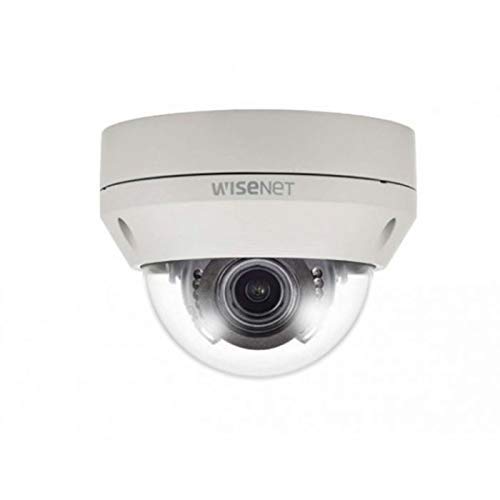
Figure 1: Hanwha Techwin HCV-6070R 2MP Outdoor Vandal-Resistant Dome Camera.
Аюулгүй байдлын мэдээлэл
Please read all safety instructions carefully before installing or operating the camera. Keep this manual for future reference.
- Ensure the power supply matches the camera's requirements to prevent electrical shock or fire.
- Камерыг хэт өндөр температур, чийгшил эсвэл идэмхий орчинд бүү байлга.
- Суурилуулалтыг орон нутгийн цахилгааны дүрмийн дагуу мэргэшсэн ажилтан гүйцэтгэнэ.
- Линзийг хүчтэй гэрлийн эх үүсвэрт удаан хугацаагаар шууд өртөхөөс зайлсхий.
- Камерыг задлах эсвэл өөрчлөх гэж бүү оролдоорой. Энэ нь баталгааг хүчингүй болгоно.
Багцын агуулга
Бүх зүйл багцад байгаа эсэхийг шалгана уу:
- Hanwha Techwin HCV-6070R Dome Camera (1 unit)
- Суурилуулах эрэг ба зангуу
- Суулгах загвар
- Түргэн эхлүүлэх гарын авлага
- Waterproof Cap (if applicable)
Тохиргоо
1. Камер суурилуулах
The HCV-6070R is designed for wall mounting. Choose a suitable outdoor location that provides the desired surveillance coverage and is protected from direct impact.
- Use the provided installation template to mark the drilling holes on the wall.
- Drill holes according to the template and insert the wall anchors.
- Secure the camera base to the wall using the mounting screws.
- Камерыг тохируулна уу viewing angle as needed before tightening all screws.
2. Утас ба холболтууд
The camera utilizes a BNC connection for video output and requires a separate power supply. Ensure all connections are secure and weatherproof for outdoor use.
- Видео холболт: Connect a BNC cable from the camera's BNC port to the video input of your DVR (Digital Video Recorder).
- Эрчим хүчний холболт: Connect a 12V DC power adapter (not included) to the camera's power input. The camera operates at 8 watts.
- Утасгүй холболт: The camera supports Wi-Fi for remote control and monitoring. Refer to the operating section for initial Wi-Fi setup.

Зураг 2: Жишээ ньample of a BNC coaxial cable for video connection. Ensure a secure connection to the camera and DVR.
3. Анхны тохиргоо
After physical installation and power-up, access the camera settings via your connected DVR or a compatible mobile application (Android controller type specified).
- Огноо, цагийг тохируулна уу.
- Configure network settings for Wi-Fi connectivity.
- Adjust video quality and recording preferences.
Камер ажиллуулах
1. Видео хяналт ба бичлэг
The camera provides 2MP effective video resolution, capturing video at 1080p and a frame rate of 30 fps. Video is typically recorded in MPEG-4 format.
- Шууд нэвтрэх view мөн бичлэг хийсэн хоолtage through your connected DVR or the remote control application.
- Ensure your DVR is configured to record from the correct channel.
2. Adjusting Focus and Zoom
The HCV-6070R features a 2.8-12mm manual varifocal lens with optical zoom. Adjustments are made manually on the camera body.
- Loosen the focus and zoom locking screws on the camera lens assembly.
- Adjust the zoom ring to achieve the desired field of view.
- Adjust the focus ring until the image is clear and sharp.
- Tighten the locking screws to secure the settings.
3. Night Vision and Low Light Performance
Equipped with night vision and "Night Color" low light technology, the camera automatically switches to infrared mode in low light conditions to provide clear surveillance footage. The light source type is LED.
- Ensure no obstructions block the infrared LEDs on the camera.
- The camera will automatically activate its infrared illuminators when ambient light levels drop.
4. Хөдөлгөөн илрүүлэх
The camera supports motion-only alerts. Configure motion detection zones and sensitivity settings through your DVR or the remote control application.
- Камерын доторх тодорхой хэсгийг тодорхойл view хөдөлгөөн илрүүлэх зориулалттай.
- Set the sensitivity level to minimize false alarms.
- Configure alert notifications (e.g., email, push notifications) via your DVR or application.
5. Алсын удирдлага
The camera can be controlled remotely using a compatible Android application. Ensure the camera is connected to your Wi-Fi network.
- Download and install the Hanwha Techwin mobile application on your Android device.
- Follow the in-app instructions to add and connect to your HCV-6070R camera.
- Аппликейшнээр дамжуулан та боломжтой view амьд footage, access recordings, and adjust certain camera settings.
Засвар үйлчилгээ
Тогтмол засвар үйлчилгээ нь таны камерын оновчтой гүйцэтгэл, удаан эдэлгээтэй байдлыг баталгаажуулдаг.
- Линз цэвэрлэх: Gently wipe the camera lens with a soft, clean, lint-free cloth. For stubborn dirt, use a lens cleaning solution specifically designed for optical surfaces.
- Орон сууц цэвэрлэх: Камерын гадна талыг зар сурталчилгаагаар цэвэрлэнэ үүamp даавуу. Хүчтэй химийн бодис, зүлгүүрийн цэвэрлэгч хэрэглэж болохгүй.
- Кабелийн үзлэг: Periodically check all cables and connections for signs of wear, damage, or corrosion, especially for outdoor installations.
- Програм хангамжийн шинэчлэлтүүд: Hanwha Techwin-г шалгана уу website for any available firmware updates to ensure your camera has the latest features and security patches.
Алдааг олж засварлах
| Асуудал | Боломжит шалтгаан | Шийдэл |
|---|---|---|
| Видео гаралт байхгүй | No power; Loose BNC connection; Incorrect DVR input selected. | Check power supply; Secure BNC cable; Select correct channel on DVR. |
| Бүдэг эсвэл бүдэг зураг | Lens out of focus; Dirty lens. | Manually adjust focus (refer to Operating section); Clean the lens. |
| Шөнийн хараа ажиллахгүй байна | IR LEDs blocked; Insufficient power; Camera stuck in day mode. | Clear obstructions; Verify power supply; Restart camera. |
| Хөдөлгөөн илрүүлэлт идэвхжихгүй байна | Incorrect sensitivity settings; Motion detection zone not configured. | Adjust sensitivity; Configure motion detection zones in DVR/app. |
| Wi-Fi-аар холбогдож чадахгүй байна | Incorrect Wi-Fi password; Camera out of range; Network issues. | Verify Wi-Fi credentials; Move camera closer to router; Check network status. |
Үзүүлэлтүүд
| Загвар | HCV-6070R |
| Брэнд | HANWHA Techwin |
| Үр дүнтэй видео нягтрал | 2 MP (1080p) |
| Frame Rate | 30 fps |
| Линзний төрөл | 2.8-12mm Manual Varifocal Lens |
| Фокусын төрөл | Гараар фокус |
| Томруулах төрөл | Оптик томруулалт |
| Холболтын технологи | Wireless (Wi-Fi), BNC Connection |
| Эрчим хүчний эх үүсвэр | Manual (requires external 12V DC power adapter) |
| Ватtage | 8 ватт |
| Дотор/гадаа ашиглах | Гадаа |
| Онцлог шинж чанар | Night Vision (Night Color low light technology) |
| Form Factor | Дом |
| Суурилуулах төрөл | Ханын бэхэлгээ |
| Тохиромжтой төхөөрөмжүүд | DVR |
| Хяналтын арга | Remote (Android Controller Type) |
| Олон улсын хамгаалалтын зэрэглэл | IP54 |
| Фото мэдрэгчийн технологи | CMOS |
| Видео бичлэгийн формат | MPEG-4 |
| Сэрэмжлүүлгийн төрөл | Зөвхөн хөдөлгөөн |
Баталгаат болон дэмжлэг
Баталгаат хугацаа болон техникийн дэмжлэг авахыг хүсвэл албан ёсны Hanwha Techwin-ээс лавлана уу webсайт эсвэл харилцагчийн үйлчилгээтэй шууд холбогдоно уу. Худалдан авалтын баримтаа баталгаат нэхэмжлэлд зориулж худалдан авалтын баталгаа болгон хадгална уу.
Үйлдвэрлэгч: Ханва
Эхний боломжтой огноо: 19 оны хоёрдугаар сарын 2019