Танилцуулга
This manual provides comprehensive instructions for the Hoco ES20 Original Series Wireless V5.0 Earphones. Please read this manual carefully before using the product to ensure proper operation and to maximize your user experience. Keep this manual for future reference.
Бүтээгдэхүүн дууссанview
The Hoco ES20 earphones are designed for wireless audio playback and hands-free communication. The package includes two wireless earphones and a portable charging case.

Зураг 1: Hoco ES20 Wireless Earphones. This image displays both the left and right earphones, highlighting their in-ear design and compact form factor.
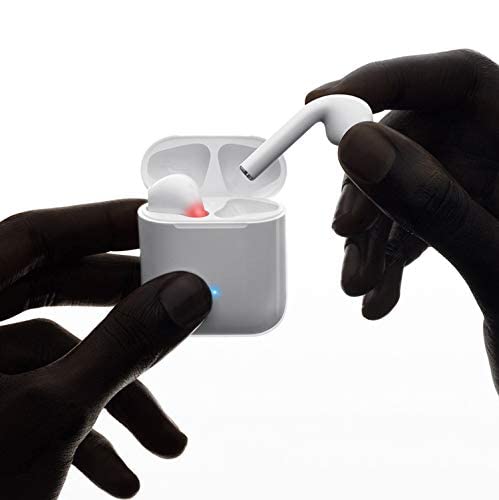
Зураг 2: Hoco ES20 Earphones in Charging Case. The earphones are shown placed inside their charging case, indicating the charging status with an illuminated LED.
Үзүүлэлтүүд
| Онцлог | Дэлгэрэнгүй |
|---|---|
| Утасгүй хувилбар | V5.0 |
| Дэмжигдсэн протоколууд | Headset, Hands-free, A2DP, Avrcp |
| Дамжуулах давтамж | 2.4 ГГц |
| Дамжуулах хүрээ | 10 метр |
| Цэнэглэх ботьtage | DC5V |
| Цэнэглэх хугацаа (чихэвч) | Ойролцоогоор 1 цаг |
| Ярилцах цаг | 2 цаг |
| Хөгжим тоглуулах цаг | 2 цаг |
| Цэнэглэх хайрцагны батерейны багтаамж | 400 мАч |
| Earphone Battery Capacity (Each) | 40 мАч |
| Зогсоолын цаг | 200 цаг |
| Total Weight (with case) | 44.8 гр |
| Нэг чихэвчний жин | 3.8 гр |
| Оруулсан бүрэлдэхүүн хэсгүүд | Bluetooth Headphones, 1 Charging Cable |
Тохиргоо
1. Чихэвч болон гэрийг цэнэглэж байна
- Хоёр чихэвчийг цэнэглэх хайрцагт хийнэ. Тэднийг зөв суулгасан эсэхийг шалгаарай.
- Connect the charging cable to the charging port on the case and to a DC5V power source (e.g., USB wall adapter, computer USB port).
- The indicator light on the charging case will show charging status. A full charge for the earphones takes approximately 1 hour. The charging case itself has a 400mAh battery capacity.
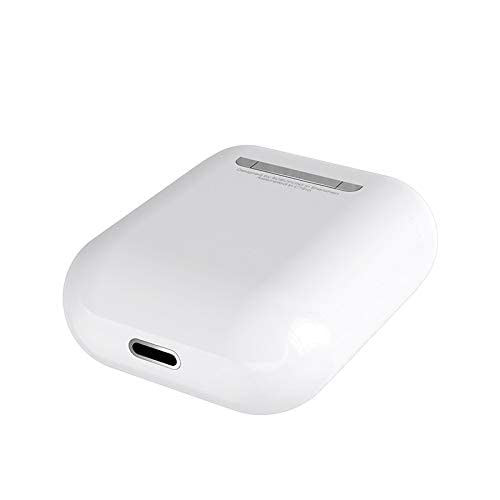
Зураг 3: Hoco ES20 Charging Case Port. This image shows the charging port located at the bottom of the charging case, where the charging cable is connected.
2. Төхөөрөмжтэй хослуулах
- Чихэвч цэнэглэгдсэн эсэхийг шалгаарай.
- Цэнэглэх хайрцгийг нээнэ үү. Чихэвч автоматаар хослуулах горимд орно.
- Ухаалаг утас эсвэл бусад Bluetooth идэвхжүүлсэн төхөөрөмж дээрээ Bluetooth тохиргоо руу очно уу.
- хайх available devices and select "Hoco ES20" (or similar name) from the list.
- Once connected, the earphones will indicate successful pairing (e.g., an audio prompt or LED change).
- For Apple phones and some Android phones, the battery level of the earphones may be displayed on your device.
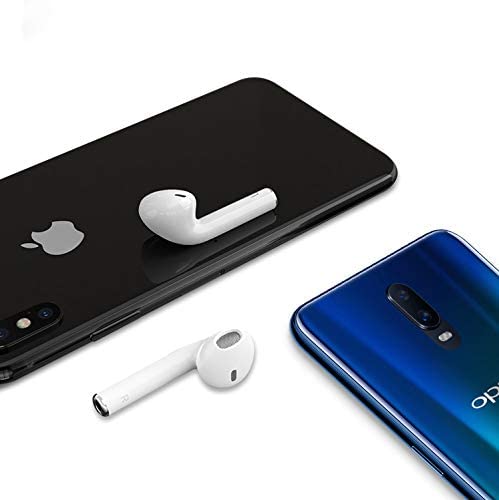
Зураг 4: Hoco ES20 Earphones with Smartphones. This image illustrates the earphones positioned near two different smartphones, demonstrating their compatibility with various mobile devices.
Ашиглалтын заавар
Basic Functions (Touch Control)
- Асаах: Earphones power on automatically when removed from the charging case.
- Унтраах: Earphones power off automatically when placed back into the charging case.
- Тоглуулах/түр зогсоох: Tap the touch area on either earphone once.
- Дуудлагад хариулах/дуусах: Tap the touch area on either earphone once during an incoming call or an active call.
- Дуудлагаас татгалзах: Press and hold the touch area on either earphone for approximately 2 seconds during an incoming call.
- Дараагийн дуу: Баруун чихэвчний мэдрэгчтэй хэсгийг давхар товш.
- Өмнөх бичлэг: Зүүн чихэвчний мэдрэгчтэй хэсгийг давхар товш.
- Дуут туслахыг идэвхжүүлэх: Triple-tap the touch area on either earphone.
Засвар үйлчилгээ
- Чихэвч болон цэнэглэгчийн хайрцгийг цэвэр, хуурай байлга.
- Avoid exposing the product to extreme temperatures, humidity, or corrosive substances.
- Чихэвч эсвэл цэнэглэгч хайрцгийг задлах, өөрчлөхийг бүү оролдоорой, учир нь энэ нь баталгааг хүчингүй болгож, гэмтэл учруулж болзошгүй юм.
- Use a soft, dry cloth to clean the earphones and charging contacts.
- Чихэвчийг хамгаалж, цэнэгтэй байлгахын тулд ашиглаагүй үедээ цэнэглэх хайрцагтаа хадгалаарай.
Алдааг олж засварлах
Нийтлэг асуудал ба шийдэл
- Чихэвчийг хослуулахгүй байна:
- Хоёр чихэвч цэнэглэгдсэн эсэхийг шалгаарай.
- Place earphones back in the case, close it, then open it again.
- Төхөөрөмж дээрээ Bluetooth-ийг унтрааж, асаана уу.
- Delete "Hoco ES20" from your device's Bluetooth list and try pairing again.
- Зөвхөн нэг чихэвч ажиллаж байна:
- Хоёр чихэвч цэнэглэгдсэн эсэхийг шалгаарай.
- Place both earphones back in the charging case, close the lid, wait a few seconds, then open the lid and remove them together.
- If the issue persists, try resetting the earphones (refer to manufacturer's webхэрэв энэ гарын авлагад тодорхой дахин тохируулах процедур байхгүй бол сайтыг дахин тохируулна уу).
- Дуу байхгүй эсвэл дуу багатай:
- Төхөөрөмж болон чихэвчнийхээ дууны түвшинг шалгана уу.
- Чихэвч таны төхөөрөмжид зөв холбогдсон эсэхийг шалгаарай.
- Өөр програм эсвэл эх сурвалжаас аудио тоглуулж үзнэ үү.
- Цэнэглэх асуудал:
- Цэнэглэх кабель нь хайрцаг болон тэжээлийн эх үүсвэрт найдвартай холбогдсон эсэхийг шалгаарай.
- Хайрцаг дээрх цэнэглэх порт цэвэрхэн, хог хаягдалгүй эсэхийг шалгана уу.
- Өөр цэнэглэгч кабель эсвэл тэжээлийн адаптер ашиглаж үзнэ үү.
- Poor connection/intermittent audio:
- Ensure your device is within the 10-meter transmission range.
- Төхөөрөмж болон чихэвчний хоорондох саад бэрхшээлээс зайлсхий.
- Бусад утасгүй төхөөрөмжүүдийн хөндлөнгийн оролцоог багасгах.
Баталгаат болон дэмжлэг
The Hoco ES20 Wireless Earphones come with a 6 сарын баталгаат хугацаа худалдан авсан өдрөөс. Энэхүү баталгаа нь үйлдвэрлэлийн согогийг хамарна. Баталгаат заргад зориулж худалдан авалтаа нотлох баримтаа үлдээнэ үү.
For technical support or warranty inquiries, please contact your retailer or the official Hoco support channels. Refer to the product packaging or Hoco's official webхолбоо барих мэдээлэл авах сайт.