Танилцуулга
Welcome to the Ipega PG-9033 Bluetooth Gamepad user manual. This guide provides detailed instructions for setting up, operating, maintaining, and troubleshooting your new wireless controller. Please read this manual carefully before use to ensure optimal performance and longevity of your device.
Бүтээгдэхүүн дууссанview
The Ipega PG-9033 is a versatile Bluetooth gamepad designed for an enhanced gaming experience across multiple platforms, including Android, iOS, and PC. It features an adjustable phone holder, dual analog sticks, a D-pad, and action buttons.

Figure 1: The Ipega PG-9033 Bluetooth Gamepad with a smartphone securely mounted in its adjustable holder, actively displaying a racing game. This illustrates the controller's primary use for mobile gaming.
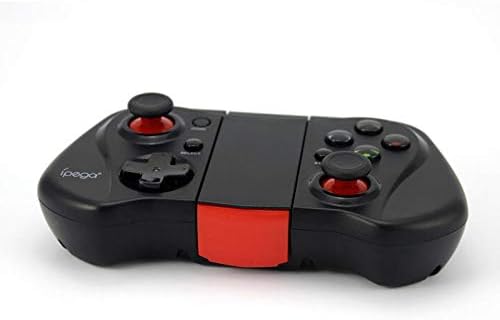
Зураг 2: Нэг тал view of the Ipega PG-9033 Bluetooth Gamepad, showcasing its ergonomic design and compact form factor when not in use. The red accent on the central hinge is visible.
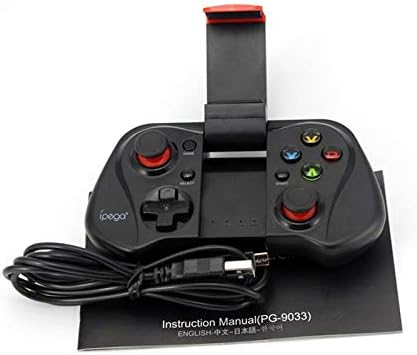
Figure 3: The Ipega PG-9033 Bluetooth Gamepad displayed alongside its USB charging cable and the included instruction manual, which clearly indicates the model number PG-9033.

Зураг 4: Ар талд view of the Ipega PG-9033 Bluetooth Gamepad, featuring a label with technical details such as "BLUETOOTH CONTROLLER," working voltage, working current, and input specifications.
Тохиргоо
Тоглоомын самбарыг цэнэглэж байна
Before first use, fully charge the gamepad using the provided USB cable.
- Connect the micro-USB end of the charging cable to the gamepad's charging port.
- Connect the USB-A end to a USB power source (e.g., computer, USB wall adapter).
- The charging indicator light will illuminate. It will typically turn off or change color when fully charged.
Төхөөрөмжтэй хослуулж байна
The PG-9033 supports different pairing modes for various operating systems.
Android хослуулах
- Тоглоомын самбар унтарсан эсэхийг шалгаарай.
- -г удаан дар ГЭР товчлуур болон X button simultaneously until the indicator light flashes rapidly. This puts the gamepad into Android pairing mode.
- Андройд төхөөрөмж дээрээ Bluetooth тохиргоо руу очоод боломжтой төхөөрөмжүүдийг хайна уу.
- Select "PG-9033" from the list to pair. The indicator light will become solid when connected.
iOS Pairing (iCade Mode)
- Тоглоомын самбар унтарсан эсэхийг шалгаарай.
- -г удаан дар ГЭР товчлуур болон B button simultaneously until the indicator light flashes rapidly. This puts the gamepad into iOS iCade pairing mode.
- On your iOS device, go to Bluetooth settings and search for available devices.
- Select "PG-9033" from the list to pair. The indicator light will become solid when connected.
Note: iCade mode has limited game compatibility. For broader iOS compatibility, check specific game requirements.
Компьютерийн хослол
- Тоглоомын самбар унтарсан эсэхийг шалгаарай.
- -г удаан дар ГЭР товчлуур болон A button simultaneously until the indicator light flashes rapidly. This puts the gamepad into PC pairing mode.
- On your PC, go to Bluetooth settings and search for available devices.
- Select "PG-9033" from the list to pair. The indicator light will become solid when connected.
Note: A Bluetooth adapter may be required for PCs without built-in Bluetooth.
Ашиглалтын заавар
Attaching Your Smartphone
- Gently extend the adjustable phone holder located on the top of the gamepad.
- Carefully place your smartphone into the holder, ensuring it is securely gripped and centered.
- Өнцгийг оновчтой болгохын тулд тохируулна уу viewing.
Game Mode Selection
The gamepad automatically enters the last used mode upon reconnection. To switch modes, disconnect the gamepad and re-pair using the desired mode's button combination (HOME + X for Android, HOME + B for iOS, HOME + A for PC).
Асаах/унтраах
Асаахын тулд товчийг дарна уу ГЭР товч. Унтраахын тулд товчийг удаан дарна уу ГЭР button for approximately 5 seconds until the indicator light turns off. The gamepad will automatically power off after a period of inactivity.
Засвар үйлчилгээ
To ensure the longevity and proper functioning of your Ipega PG-9033 gamepad, follow these maintenance guidelines:
- Төхөөрөмжийг хуурай байлга. Чийг эсвэл шингэн зүйлд өртөхөөс зайлсхий.
- Gamepad-г зөөлөн, хуурай даавуугаар цэвэрлээрэй. Хүчтэй химийн бодис эсвэл зүлгүүрийн цэвэрлэгч бүү хэрэглээрэй.
- Тоглоомын самбарыг нарны шууд тусгал, хэт температураас хол, сэрүүн, хуурай газар хадгална уу.
- Тоглоомын самбарыг унагаах эсвэл хүчтэй цохилтод өртөхөөс зайлсхий.
- Зайны эрүүл мэндийг хадгалахын тулд ашиглаагүй байсан ч батерейг тогтмол цэнэглээрэй.
Do not attempt to disassemble the gamepad. This will void the warranty and may cause damage.
Алдааг олж засварлах
Gamepad not connecting or pairing:
- Тоглоомын самбар бүрэн цэнэглэгдсэн эсэхийг шалгаарай.
- Таны төхөөрөмж дээр Bluetooth идэвхжсэн эсэхийг шалгана уу.
- Make sure the gamepad is in the correct pairing mode for your device (Android, iOS, or PC).
- Блютүүт тохиргоондоо төхөөрөмжийг мартаж, дахин холбож үзнэ үү.
- Тоглоомын самбар болон төхөөрөмжөө хоёуланг нь дахин ачаална уу.
Товчлуур эсвэл joystick хариу өгөхгүй байна:
- Gamepad зөв холбогдсон эсэхийг шалгана уу.
- Ensure the game you are playing supports external controllers.
- Some games may require specific controller mapping or settings adjustments within the game.
- If the issue persists, try resetting the gamepad (if a reset button is available, typically a small pinhole).
Хоцрогдол эсвэл оролтын саатал:
- Ensure your device is not too far from the gamepad. Maintain a clear line of sight.
- Бусад утасгүй төхөөрөмжүүдийн хөндлөнгийн оролцоог багасгах.
- Төхөөрөмж дээрх шаардлагагүй арын програмуудыг хаа.
Утас нь эзэмшигчид багтахгүй байна:
- The holder is designed for most smartphones. Ensure your phone's dimensions are within the supported range.
- Remove any bulky phone cases that might prevent a secure fit.
Үзүүлэлтүүд
| Онцлог | Дэлгэрэнгүй |
|---|---|
| Загвар | PG-9033 |
| Брэнд | Ипега |
| Холболт | Bluetooth |
| Тохиромжтой байдал | Android, iOS (iCade), PC |
| Ажлын ботьtage | DC 3.7V |
| Ажиллаж буй гүйдэл | 30мА |
| Оролтын хэмжээtage | DC 5V 500мА |
| ASIN | B07P52YH7M |
Баталгаат болон дэмжлэг
For warranty information and technical support, please refer to the official Ipega webсайт эсвэл худалдагчтайгаа холбогдоно уу. Худалдан авалтын баримтаа худалдан авалтын баталгаа болгон хадгалаарай.
Энэхүү гарын авлага нь зөвхөн мэдээллийн зорилгоор зориулагдсан болно. Тодорхойлолтыг мэдэгдэлгүйгээр өөрчлөх боломжтой.