1. Танилцуулга
The myTouchSmart In-Wall Push-Button Countdown Timer Switch (Model 40953) is designed to simplify your routine by providing convenient automation for indoor or outdoor lighting and various appliances. This timer replaces any standard single-pole light switch and offers preset countdown times to automatically turn off connected devices. It is compatible with LED, CFL, incandescent, and halogen bulbs.

The product packaging displays the in-wall digital countdown timer switch, highlighting its key features such as preset countdown times and compatibility with various bulb types.
2. Аюулгүй байдлын мэдээлэл
Before beginning installation, read all instructions carefully. Improper installation can result in electrical shock or fire. Always consult a qualified electrician if you are unsure about any part of the installation process.
- ЭРЧИМ ХҮЧНИЙГ УНТРААХ at the circuit breaker or fuse box before wiring.
- Энэхүү төхөөрөмж нь Үндэсний цахилгааны дүрэм болон орон нутгийн дүрэм журмын дагуу суурилуулах зориулалттай.
- Зөвхөн зэс утсыг ашигла.
- NEUTRAL WIRE REQUIRED үйл ажиллагааны хувьд.
3. Суурилуулалт
3.1 Шаардлагатай хэрэгслүүд
- Халив (Филипс ба Хавтгай толгой)
- Утас тайлагч
- Цахилгаан соронзон хальс
- Ботьtage Тестер (санал болгож байна)
3.2 Утас тавих заавар
- Цахилгааныг унтраа to the switch location at the circuit breaker or fuse box. Verify power is off using a voltage шалгагч.
- Remove the existing wall plate and switch from the wall box.
- Carefully disconnect the wires from the old switch. Identify and label the LINE (hot), LOAD, NEUTRAL, and GROUND wires. The timer requires a neutral wire for proper operation.
- Connect the wires to the myTouchSmart timer using the screw terminals:
- -г холбоно уу ШУГАМ (hot) wire to the terminal labeled 'LINE'.
- -г холбоно уу Ачаалах wire (to the light/appliance) to the terminal labeled 'LOAD'.
- -г холбоно уу саармаг wire (typically white) to the terminal labeled 'NEUTRAL'.
- -г холбоно уу ГАЗАР wire (typically bare copper or green) to the terminal labeled 'GROUND'.
- Бүх утсан холболт найдвартай эсэхийг шалгаарай.
- Carefully push the wired timer into the wall box.
- Mount the timer to the wall box using the provided screws.
- Attach the desired color faceplate (White or Light Almond included, wallplate not included).
- Хэлхээ таслагчийн хүчийг сэргээнэ.

арын view of the timer, displaying the screw terminals for Line, Load, Neutral, and Ground connections, essential for proper installation.

Хажуу талын мэргэжилтэнfile of the timer, showing its depth and how it fits into a standard electrical wall box, with wiring connections visible.
4. Ашиглалтын заавар
The myTouchSmart timer features an ON/OFF door panel that conceals preset buttons and LEDs when closed. Opening the door provides access to all countdown options.
4.1 Activating a Countdown
- Open the front door panel to reveal the preset buttons.
- Press the desired countdown button: 5 Min, 10 Min, 30 Min, 60 Min, 2 Hour, or 4 цаг.
- A blue LED indicator light next to the selected button will illuminate, confirming the countdown is active. The connected device will turn on and remain on for the selected duration, then automatically turn off.
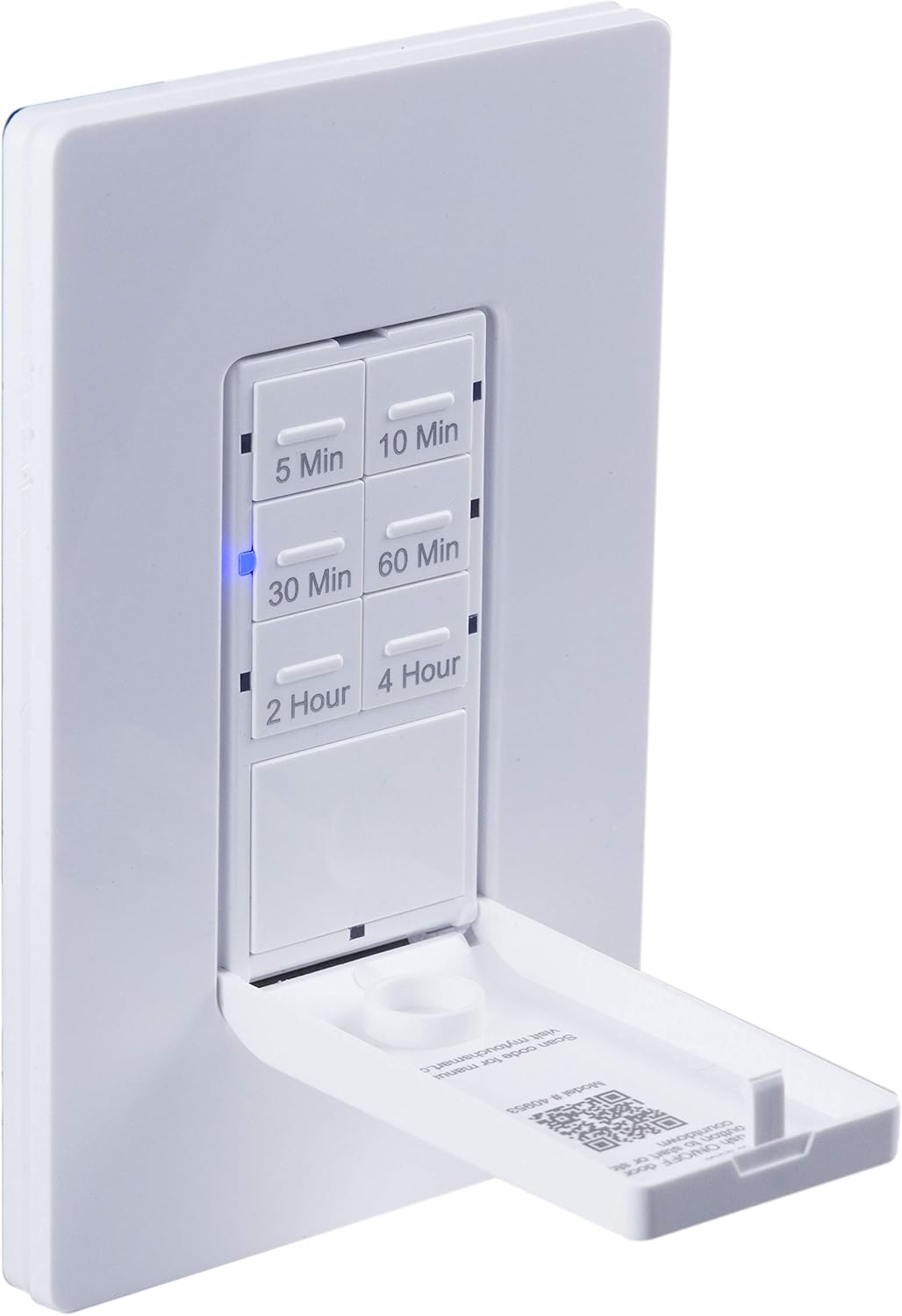
Ойрын зураг view of the timer with its front door panel open, exposing the six preset countdown buttons (5, 10, 30, 60 minutes, 2, and 4 hours) and the manual ON/OFF button.

The in-wall timer with its door open, showing the preset buttons and a blue LED illuminated next to the '30 Min' button, indicating an active countdown.

A hand pressing one of the preset countdown buttons on the timer, demonstrating user interaction.
4.2 Manual ON/OFF Override
- To manually turn the connected device ON or OFF at any time, press the large ON/OFF button located at the bottom of the timer (this button is also the door panel when closed).
- Pressing this button will override any active countdown. If no countdown is active, it functions as a standard ON/OFF switch.
4.3 Хэрэглээ
This timer is suitable for a variety of applications, including:
- Дотор болон гадна гэрэлтүүлэг
- Яндангийн фенүүд
- Халаагч
- Other compatible appliances

An image illustrating various applications for the timer, including controlling indoor/outdoor lights, ceiling fans, and exhaust fans.
5. Засвар үйлчилгээ
The myTouchSmart timer requires minimal maintenance. Follow these guidelines:
- Цэвэрлэгээ: Disconnect power at the circuit breaker before cleaning. Wipe the surface with a soft, damp даавуу. Хүчтэй химийн бодис, зүлгүүрийн цэвэрлэгч хэрэглэж болохгүй.
- Шалгалт: Periodically check for any loose connections or damage to the switch. If any damage is observed, discontinue use and consult a qualified electrician.
6. Алдаа засах
If you experience issues with your myTouchSmart timer, refer to the following common problems and solutions:
| Асуудал | Боломжит шалтгаан | Шийдэл |
|---|---|---|
| Таймер асахгүй/унтрахгүй. | No power to the switch; Incorrect wiring (Line/Load reversed); Loose connections. | Check circuit breaker. Verify wiring connections (Line to Line, Load to Load, Neutral, Ground). Ensure all wires are securely fastened. |
| Countdown does not activate. | Button not fully pressed; Faulty unit. | Ensure the desired countdown button is pressed firmly until the blue LED illuminates. If issue persists, contact customer support. |
| LED үзүүлэлтүүд ажиллахгүй байна. | No power; Unit malfunction. | Check power supply. If the timer functions but LEDs do not, contact customer support. |
| Завсарлагатай ажиллагаа. | Loose wiring; Overload. | Check all wiring connections for tightness. Ensure the connected load does not exceed the timer's electrical ratings. |
Хэрэв алдааг олж засварлах алхмууд нь асуудлыг шийдэж чадахгүй бол хэрэглэгчийн дэмжлэгтэй холбогдоно уу.
7. Техникийн үзүүлэлтүүд
| Онцлог | Тодорхойлолт |
|---|---|
| Загварын дугаар | 40953 |
| Үйлдлийн горим | Automatically, Off, Push Button |
| Одоогийн үнэлгээ | 15 Amps |
| Үйл ажиллагааны ботьtage | 120 VAC, 60 Гц |
| Эсэргүүцэх ачаалал | 15 А |
| Вольфрамын ачаалал | 1200 Вт |
| Мотор үнэлгээ | 1 / 2 HP |
| Тохиромжтой чийдэн | LED, CFL, улайсдаг, галоген |
| Суурилуулах төрөл | Ханын бэхэлгээ |
| Хэмжээ (L x W x H) | 2.75 x 4.85 x 6.85 инч |
| Зүйлийн жин | 5.9 унц |
| Төвийг сахисан утас | Шаардлагатай |
| Оруулсан бүрэлдэхүүн хэсгүүд | In-Wall Timer, White/Light Almond Door Panels |
8. Баталгаат хугацаа ба дэмжлэг
Баталгаат мэдээлэл болон техникийн дэмжлэг авахыг хүсвэл үйлдвэрлэгчийн албан тушаалтнаас лавлана уу webсайт эсвэл харилцагчийн үйлчилгээний хэлтэстэй холбогдоно уу. Худалдан авалтын баримтаа худалдан авалтын баталгаа болгон хадгалаарай.
Үйлдвэрлэгч: myTouchSmart
UPC: 030878409537
Webсайт: www.mytouchsmart.com (Албан тушаалтныг шалгана уу website for the most current support information.)


