Танилцуулга
This manual provides instructions for the Calvas USARMT LTV-914 Universal Remote Control, designed for use with various LG TV models, including AKB73715634, AKB73715679, and 3D Smart TV LN577S. This remote operates via infrared (IR) technology and is intended as a direct replacement, requiring no programming for most compatible LG televisions.
Багцын агуулга
- 1 x USARMT LTV-914 Universal Remote Control
Үзүүлэлтүүд
- Загварын дугаар: LTV-914
- Брэнд: халзан толбо
- Төрөл: ТВ-ийн алсын удирдлага
- Харилцаа холбоо: Хэт улаан туяаны (IR)
- Давтамж: 433 МГц
- Сувгууд: 1
- Эрчим хүчний эх үүсвэр: 2 x AAA шүлтлэг батерей (оруулаагүй)
- Материал: ABS
- Тохиромжтой төхөөрөмжүүд: LG Televisions (e.g., AKB73715634, AKB73715679, 3D Smart TV LN577S)
- Онцлог шинж чанар: Бүх нийтийн нийцтэй байдал
Тохиргоо
Батерейг суурилуулах
- Алсын удирдлагын ар талд байгаа зайны тасалгааг ол.
- Батерейны тасалгааны тагийг доош гулсуулах эсвэл түгжээг дарж өргөж онгойлгоно уу.
- Хоёр (2) AAA шүлтлэг батерейг хийж, эерэг (+) болон сөрөг (-) терминалууд нь тасалгааны доторх тэмдэглэгээтэй зөв тохирч байгаа эсэхийг шалгаарай.
- Батерейны тасалгааны тагийг найдвартай товших хүртэл шургуулж орлуулаарай.

Image: Back of the remote control with the battery compartment open, illustrating battery insertion.
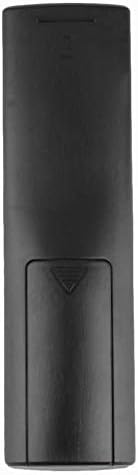
Зураг: Ар талд view зайны тагийг хаалттай байлгасан алсын удирдлагын
Ашиглалтын заавар
Анхны хэрэглээ
The Calvas USARMT LTV-914 remote control is designed to work directly with most compatible LG TV models without requiring any programming. Simply insert the batteries and point the remote towards your television.
Direct Use and Basic Functions
Most functions, such as power on/off, volume control, channel selection, and navigation, should operate immediately upon pointing the remote at your LG TV.

Зураг: Урд view of the remote control, displaying the button layout.
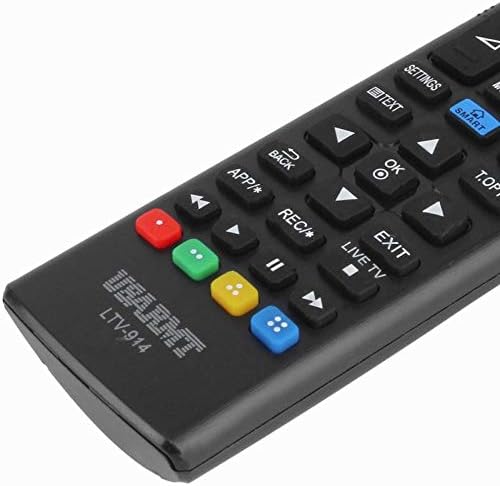
Image: Close-up of the remote's buttons, showing details of the control interface.
Factory Reset / Reconfiguration (If direct use fails)
In rare cases, if the remote does not operate your TV directly, you may need to perform a factory reset or attempt a reconfiguration.
- To reset to factory settings: Press and hold the ХҮЧ button and the number 0 товчийг хэдэн секундын турш нэгэн зэрэг дар.
- To attempt re-pairing (if applicable, though typically not required for this universal remote): Press and hold the ХҮЧ button and the number 1 товчийг хэдэн секундын турш нэгэн зэрэг дар.
After performing either of these steps, release the buttons and test the remote's functionality with your TV.
Алдааг олж засварлах
- Алсын удирдлага хариу өгөхгүй байна:
- Батерейг зөв туйлшралтайгаар зөв оруулсан эсэхийг шалгана уу.
- Replace old or depleted batteries with new AAA alkaline batteries.
- Алсын удирдлага болон ТВ-ийн IR хүлээн авагчийн хооронд ямар ч саад бэрхшээл байгаа эсэхийг шалгаарай.
- Та ТВ-ийн IR хүлээн авагчийн үр дүнтэй хязгаарт байгаа эсэхээ шалгаарай.
- Зарим функц ажиллахгүй байна:
- While this is a universal remote, some advanced or specific smart TV functions might not be fully supported on all LG models.
- Try the factory reset/reconfiguration steps mentioned in the "Operating Instructions" section.
- Remote LED indicator not lighting up:
- This usually indicates dead batteries or incorrect battery insertion. Replace batteries.
Засвар үйлчилгээ
- Алсын удирдлагыг хуурай байлга. Шингэн зүйлд өртөхөөс зайлсхий.
- Алсын удирдлагыг унагаж эсвэл хүчтэй цохилтонд бүү оруул.
- Алсын удирдлагыг зөөлөн, хуурай даавуугаар цэвэрлэ. Зүлгүүрийн цэвэрлэгч, уусгагчийг бүү ашигла.
- Хэрэв алсын удирдлагыг удаан хугацаагаар ашиглахгүй бол гоожихоос сэргийлж батерейг нь салга.
Баталгаат болон дэмжлэг
Specific warranty information for this product is not provided in the available data. For support or warranty inquiries, please contact your retailer or the manufacturer, Calvas.


