1. Танилцуулга
This manual provides detailed instructions for the installation, operation, and maintenance of your Anlapus FULL HD 1080P H.265+ Surveillance Kit. This system includes an 8-channel DVR with a pre-installed 1TB hard drive, 4 bullet cameras, and 4 dome cameras, designed to provide comprehensive security monitoring for your property.

Figure 1.1: Anlapus 8-channel DVR surveillance system components.
2. Багцын агуулга
Доор жагсаасан бүх зүйл таны багцад байгаа эсэхийг шалгаарай. Хэрэв ямар нэгэн зүйл дутуу эсвэл эвдэрсэн бол хэрэглэгчийн дэмжлэгтэй холбоо барина уу.
- 1x 8-Channel DVR (with 1TB HDD pre-installed)
- 4x 1080P Bullet Surveillance Cameras
- 4x 1080P Dome Surveillance Cameras
- 8x 60ft BNC Video Cables
- 3x Power Adapters (12V 2A)
- 2x 1-to-4 Power Splitters
- 1x USB хулгана
- 1х зааварчилгааны гарын авлага (энэ баримт бичиг)
- 8x Mounting Screw Bags
- 8x Warning Stickers

Figure 2.1: Contents of the Anlapus surveillance kit package.
3. Бүтээгдэхүүний онцлог
- Full HD 1080P нягтрал: Captures clear and detailed images with 2.0-megapixel quality.
- Дэвшилтэт H.265+ видео шахалт: Багасгана file sizes by up to 50% compared to H.264, allowing for longer recording times and more efficient storage.
- Сайжруулсан шөнийн хараа: Equipped with 24 IR LEDs and an IR-CUT filter, providing clear black and white night vision up to 24 meters (80 feet).
- IP66 Цаг агаарын хамгаалалтын үнэлгээ: Cameras are designed for both indoor and outdoor use, capable of withstanding various extreme weather conditions.
- Хөдөлгөөн илрүүлэх ба дохиолол: Configurable motion detection zones with instant email alerts and push notifications to your smartphone.
- Олон бичлэг хийх горим: Supports 24/7 continuous recording, motion-activated recording, scheduled recording, and manual recording.
- Алсын хандалт: View амьд тэжээл болон бичлэг хийсэн хоол хүнсtage from anywhere using the free mobile application on your smartphone or tablet.
- Pre-installed 1TB Hard Drive: Ready for immediate use, eliminating the need to purchase and install a separate hard drive.

Figure 3.1: Day and Night Vision.
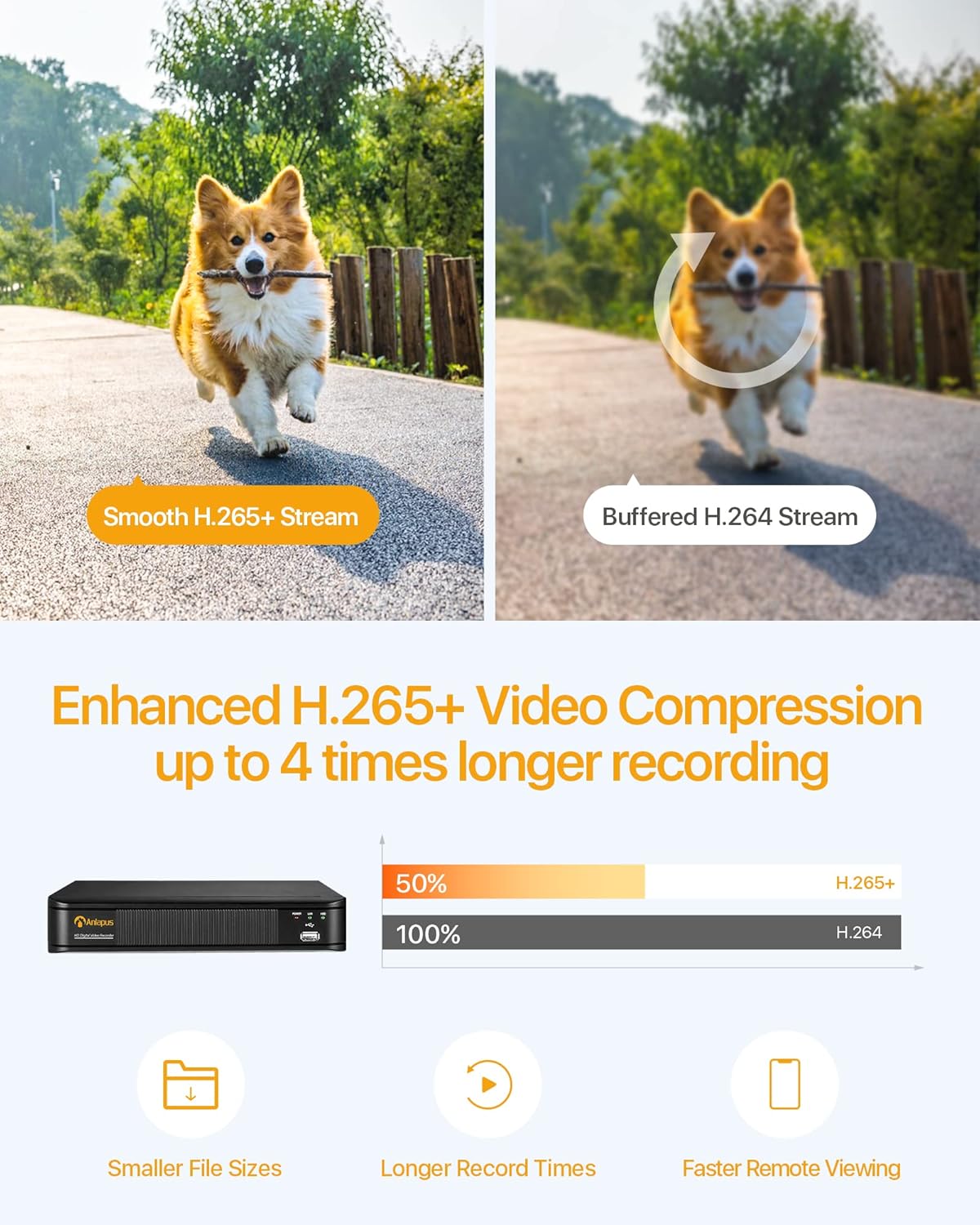
Figure 3.2: H.265+ Video Compression Benefits.

Figure 3.3: Day and Night Surveillance Example.

Figure 3.4: All-Weather Protection and Applications.
4. Системийн бүрэлдэхүүн хэсгүүдview
4.1 DVR (Digital Video Recorder)
DVR нь видео бичлэг хийх, хадгалах, удирдах төв төхөөрөмж юм.tage from all connected cameras. It features multiple video input ports, audio input/output, VGA and HDMI outputs for display, and USB ports for mouse control and data backup.
4.2 Surveillance Cameras
The kit includes both bullet and dome cameras. Both types offer 1080P resolution, night vision capabilities, and IP66 weatherproof housing. Bullet cameras are typically used for directional surveillance, while dome cameras offer a more discreet appearance and are often vandal-resistant.

Figure 4.1: Camera and DVR Connection Diagram.
5. Тохируулах гарын авлага
5.1 Анхны холболт
- Камеруудыг холбох: Use the provided BNC video cables to connect each camera to the 'VIDEO IN' ports on the back of the DVR.
- Power Cameras: Use the power adapters and 1-to-4 power splitters to provide power to all cameras.
- Connect DVR to Display: Connect the DVR to a monitor or TV using either an HDMI or VGA cable.
- Connect DVR to Network: Connect the DVR's 'NETWORK' port to your router using an Ethernet cable for remote access.
- USB хулганыг холбоно уу: Plug the USB mouse into one of the DVR's USB ports for navigation.
- Power On DVR: Connect the DVR to its power adapter and plug it into an electrical outlet. The system will boot up.

Figure 5.1: Simple Connection for Mobile Access.
5.2 Гар утасны програмын тохиргоо
- Апп татаж авах: хайх the official Anlapus security app on Google Play Store or Apple App Store and install it on your smartphone.
- Бүртгэл бүртгүүлэх: Шинэ хэрэглэгчийн бүртгэл үүсгэхийн тулд аппликейшнийг нээгээд дэлгэцэн дээрх зааврыг дагана уу.
- Төхөөрөмж нэмэх: Scan the QR code displayed on your DVR's monitor or manually enter the device ID to add your DVR to the app.
- View Камерууд: Нэгэнт нэмсэн бол та чадна view live feeds from your cameras and access recorded footage алсаас.
6. Ашиглалтын заавар
6.1 Бичлэг хийх горимууд
Your DVR supports several recording modes:
- Continuous Recording (24/7): Records continuously, overwriting the oldest footagхатуу диск дүүрсэн үед.
- Хөдөлгөөн илрүүлэх бичлэг: Хөдөлгөөн илэрсэн үед л бичиж, хадгалах зайг хэмнэдэг.
- Хуваарьт бичлэг: Бичлэг хийх тодорхой цагийг тохируулна уу.
- Гараар бичлэг хийх: Гараар бичлэг эхлүүлэх болон зогсоох.
Configure these settings via the DVR's main menu using the USB mouse.

Figure 6.1: 24/7 Recording View.
6.2 Хөдөлгөөн илрүүлэх ба сэрэмжлүүлэг
The system can be configured to detect motion and send alerts:
- Илрүүлэх бүсүүдийг тохируулах: In the DVR settings, define specific areas within the camera's view хөдөлгөөн илрүүлэх зориулалттай.
- Мэдрэмжийг тохируулах: Хуурамч дохиоллыг багасгахын тулд хөдөлгөөн илрүүлэх мэдрэмжийг тохируулна уу.
- Анхааруулга идэвхжүүлэх: Activate email alerts and push notifications through the DVR settings and mobile app. When motion is detected, you will receive an alert on your smartphone.

Figure 6.2: Motion Detection and Smartphone Alert.

Figure 6.3: Smart Motion Detection Features.
6.3 Remote Access & Playback
Access your surveillance system from anywhere:
- Амьд View: Open the mobile app to view live video streams from all connected cameras.
- Тоглуулах: Use the app's playback function to review foo бүртгэгдсэнtage stored on the DVR's hard drive. You can select specific dates and times.
- Олон төхөөрөмж Viewing: The system supports simultaneous viewing on multiple devices, including smartphones, tablets, and desktop computers.

Figure 6.4: Mobile App Playback Interface.

Figure 6.5: Multi-Device Remote Viewing.
7. Засвар үйлчилгээ
- Цэвэр камерууд: Камерын линзийг үе үе зөөлөн, d аргаар цэвэрлэж байгаарайamp тодорхой зургийн чанарыг хангах даавуу. Зүлгүүрийн цэвэрлэгчээс зайлсхий.
- Кабель шалгах: Ensure all cables are securely connected and free from damage. Replace any damaged cables immediately.
- DVR агааржуулалт: Хэт халалтаас сэргийлэхийн тулд DVR-г агааржуулалт сайтай газар байрлуулсан эсэхээ шалгаарай. Агааржуулалтын нүхийг бөглөрөлгүй байлгаарай.
- Програм хангамжийн шинэчлэлтүүд: Үйлдвэрлэгчийг шалгана уу webТохиромжтой гүйцэтгэл, аюулгүй байдлыг хангах үүднээс програм хангамжийн шинэчлэлтүүдийг тогтмол хийх сайт.
- Өгөгдлийн нөөцлөлт: Чухал хүнсний зүйлсээ тогтмол нөөцлөхtage from the DVR's hard drive to an external USB device.

Figure 7.1: USB Data Backup.
8. Алдаа засах
- Видео дохио байхгүй: Check all cable connections between cameras and DVR, and between DVR and display. Ensure cameras and DVR are powered on.
- Зургийн чанар муу: Clean camera lenses. Ensure cameras are properly focused (if adjustable). Check cable integrity.
- Алсын зайнаас хандах боломжгүй: Verify the DVR is connected to the internet. Check network settings on the DVR and ensure your router is functioning correctly. Confirm the mobile app is properly configured and the device is added.
- Хөдөлгөөн мэдрэгч ажиллахгүй байна: Review motion detection settings in the DVR menu. Adjust sensitivity and detection zones. Ensure alerts are enabled in both DVR and mobile app settings.
- DVR бичлэг хийхгүй байна: Check hard drive status in DVR settings. Ensure recording schedules or motion detection settings are correctly configured.
Нэмэлт тусламж авах бол тусламжийн хэсэг рүү хандах эсвэл харилцагчийн үйлчилгээтэй холбогдоно уу.
9. Техникийн үзүүлэлтүүд
| Брэнд | Анлапус |
| Загварын дугаар | AJ-AM8A4B-4W441E-106202S |
| Видеоны нягтрал | 1080p бүрэн HD |
| Видео шахалт | H.265 + дээр |
| DVR Channels | 8 суваг |
| Хадгалах багтаамж | 1 ТБ хатуу диск (урьдчилан суулгасан) |
| Камерын төрөл | Bullet and Dome Cameras |
| Шөнийн харааны хүрээ | 24 метр (80 фут) хүртэл |
| Цаг агаарын хамгаалалттай үнэлгээ | IP66 |
| Холболтын технологи | Утастай |
| Эрчим хүчний эх үүсвэр | Cable Electric (12 Volts DC) |
| Бүтээгдэхүүний хэмжээ (L x W x H) | 19.99 x 19.99 x 19.99 cm (DVR) |
| Зүйлийн жин | 7.36 kilograms (total package) |
| Үйлдвэрлэгч | Анлапус |
10. Баталгаат хугацаа ба дэмжлэг
The manufacturer, ZOSI (parent company of Anlapus), provides the following support and warranty:
- 30 хоногийн сэтгэл ханамжийн баталгаа: If you are not satisfied, you may be eligible for a refund or exchange within 30 days.
- Насан туршийн техникийн туслалцаа: Comprehensive technical support is available for the lifetime of the product.
- 2 жилийн баталгаа: The product is covered by a 2-year warranty against manufacturing defects.
For technical support or warranty claims, please refer to the contact information provided with your product packaging or visit the official Anlapus/ZOSI webсайт.


