1. Танилцуулга
Thank you for choosing the Hoco E30 Wireless Earphone. This manual provides essential information for setting up, operating, and maintaining your earphone. Please read it carefully before use to ensure optimal performance and longevity of your device.
2. Аюулгүй байдлын мэдээлэл
To prevent damage to your device or injury to yourself and others, please observe the following safety precautions:
- Сонсголыг гэмтээхгүйн тулд өндөр дууны түвшинд удаан хугацаагаар өртөхөөс зайлсхий.
- Do not use the earphone while driving or in situations where you need to be aware of your surroundings.
- Төхөөрөмжийг ус, чийг, хэт өндөр температураас хол байлга.
- Do not attempt to disassemble, repair, or modify the earphone. This will void the warranty.
- Зөвхөн нийлүүлсэн эсвэл баталгаажсан цэнэглэгч кабель, адаптерийг ашиглана уу.
- Хүүхэд, тэжээвэр амьтдын гар хүрэхгүй газар хадгална уу.
3. Багцын агуулга
Дараах зүйлсийн нүдийг шалгана уу.
- Hoco E30 Wireless Earphone
- USB цэнэглэгч кабель
- Хэрэглэгчийн гарын авлага
4. Бүтээгдэхүүн дууссанview
Familiarize yourself with the components of your Hoco E30 Wireless Earphone:

Зураг 4.1: Хажуу тал view of the Hoco E30 Wireless Earphone, highlighting its sleek design and ear hook.

Зураг 4.2: The Hoco E30 Wireless Earphone positioned next to a smartphone, illustrating its compact size and wireless connectivity.
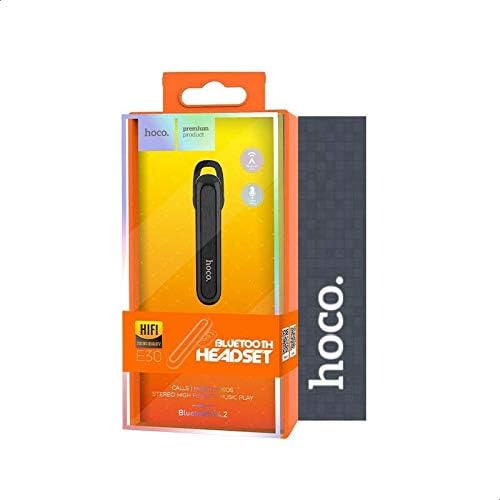
Зураг 4.3: The retail packaging for the Hoco E30 Wireless Earphone, displaying branding and key features.
5. Тохиргоо
5.1 Чихэвчийг цэнэглэх
Before first use, fully charge your Hoco E30 earphone.
- Connect the provided USB charging cable to the charging port on the earphone.
- Connect the other end of the USB cable to a DC 5V power source (e.g., a USB wall adapter or computer USB port).
- Цэнэглэх заагч гэрэл асна.
- Charging typically takes approximately 2 hours. The indicator light will change or turn off once charging is complete.
5.2 Төхөөрөмжтэй хослуулах
To connect your Hoco E30 earphone to your smartphone or other Bluetooth-enabled device:
- Ensure the earphone is fully charged and turned off.
- Press and hold the multi-function button on the earphone until the indicator light flashes red and blue alternately, indicating it is in pairing mode.
- Төхөөрөмж дээрээ Bluetooth-г идэвхжүүлж, боломжтой төхөөрөмжүүдийг хайж олоорой.
- Select "Hoco E30" from the list of found devices.
- Once paired, the indicator light on the earphone will flash blue slowly, and you will hear a confirmation tone.
- The earphone has a transmission range of up to 10 meters (33 feet).
6. Ашиглалтын заавар
6.1 Асаах/унтраах
- Асаах: Press and hold the multi-function button for approximately 3 seconds until the blue indicator light flashes and you hear a power-on tone.
- Унтраах: Press and hold the multi-function button for approximately 5 seconds until the red indicator light flashes and you hear a power-off tone.
6.2 Дуудлагын удирдлага
- Дуудлагад хариулах: Briefly press the multi-function button when an incoming call rings.
- Дуудлага дуусгах: Дуудлага хийх үед олон үйлдэлт товчлуурыг богино хугацаанд дарна уу.
- Дуудлагаас татгалзах: Ирж буй дуудлага дуугарах үед олон үйлдэлт товчийг 2 секундын турш дарна уу.
- Сүүлийн дугаарыг дахин залгах: Дуудлагагүй үед олон үйлдэлт товчлуурыг хоёр удаа дар.
6.3 Хөгжим тоглуулах
- Тоглуулах/түр зогсоох: Briefly press the multi-function button to play or pause music.
- Дараагийн дуу: Press and hold the multi-function button for 2 seconds to skip to the next track.
- Өмнөх бичлэг: Press and hold the multi-function button for 2 seconds (during playback) to go to the previous track.
Note: The Hoco E30 supports A2DP and AVRCP protocols for high-quality audio streaming and remote control. Volume control is typically managed via the connected device.
6.4 Battery Status Display
The Hoco E30 earphone supports battery level display on compatible Apple iOS devices and some Android smartphones. Check your device's notification bar or Bluetooth settings for this feature.
7. Засвар үйлчилгээ
- Цэвэрлэгээ: Use a soft, dry cloth to clean the earphone. Do not use harsh chemicals or abrasive materials.
- Хадгалах: Чихэвчийг сэрүүн, хуурай газар, нарны шууд тусгал болон хэт өндөр температураас хол хадгална уу.
- Батерейны арчилгаа: To prolong battery life, avoid fully discharging the earphone frequently. Charge it regularly, even if not in use for extended periods.
8. Алдаа засах
If you encounter issues with your Hoco E30 earphone, try the following solutions:
| Асуудал | Шийдэл |
|---|---|
| Чихэвч асахгүй байна. | Ensure the earphone is fully charged. Connect it to a power source and try again. |
| Төхөөрөмжтэй хослуулах боломжгүй. |
|
| Дуу байхгүй эсвэл дууны чанар муу. |
|
| Цэнэглэх нь ажиллахгүй байна. |
|
9. Техникийн үзүүлэлтүүд
| Онцлог | Дэлгэрэнгүй |
|---|---|
| Загвар | E30 |
| Bluetooth хувилбар | V4.2 WT |
| Дэмжигдсэн протоколууд | Чихэвч, Hands-free, A2DP, AVRCP |
| Дамжуулах хүрээ | 10 метр (33 фут) |
| Дамжуулах давтамж | 2.4 GHz |
| Цэнэглэх ботьtage | DC 5V |
| Цэнэглэх хугацаа | Ойролцоогоор 2 цаг |
| Зайны багтаамж | 60 мАч |
| Ярилцах цаг | Ойролцоогоор 3.5 цаг |
| Хөгжим тоглуулах цаг | Ойролцоогоор 3.5 цаг |
| Зогсоолын цаг | Ойролцоогоор 110 цаг |
| Бүтээгдэхүүний цэвэр жин | 6 грамм |
| Хэмжээ (L x W x H) | 58 мм x 14 мм x 25 мм |
| Материал | Хуванцар |
| Хяналтын арга | Хүрэх |
| Өнгө | Хар ба мөнгө |
10. Баталгаат хугацаа ба дэмжлэг
Hoco products are designed and manufactured to the highest quality standards. This product is covered by a limited warranty from the date of purchase. Please refer to the warranty card included in your package for specific terms and conditions.
For technical support or warranty claims, please contact your local Hoco distributor or visit the official Hoco webдэлгэрэнгүй мэдээллийг авах сайт.