ASUS ROG Strix XG49VQ 49-inch Curved Gaming Monitor User Manual
1. Танилцуулга
The ASUS ROG Strix XG49VQ is a super ultra-wide 49-inch Dual Full HD (3840 x 1080) 1800R curved gaming monitor designed to provide an immersive and smooth gaming experience. It features a 144Hz refresh rate, Radeon FreeSync 2 HDR technology, DCI-P3 90% professional color gamut coverage, and DisplayHDR 400 certification. This manual provides essential information for setting up, operating, maintaining, and troubleshooting your monitor.
2. Хайрцагт юу байна
Дараах бүх зүйлс таны багцад байгаа эсэхийг шалгаарай.
- ASUS ROG Strix XG49VQ Monitor
- DisplayPort кабель
- HDMI кабель
- Цахилгаан адаптер
- Түргэн эхлүүлэх гарын авлага
- VESA холбох хэрэгсэл
3. Тохиргоо
3.1 Мониторын угсралт
Carefully remove the monitor and its components from the packaging. Attach the stand base to the monitor arm, then secure the assembled stand to the monitor. Ensure all connections are firm.
3.2 Холбох кабель
Connect the power adapter to the monitor and a power outlet. Use the provided DisplayPort or HDMI cable to connect your computer or gaming console to the monitor. The monitor features multiple input ports for versatile connectivity.
Зураг: Ар талд view of the monitor highlighting accessible I/O ports and smart cable management for a tidy setup.
3.3 Физик тохируулга
Хяналт нь оновчтой болгохын тулд эргономик тохируулга хийдэг. viewтав тухтай байдал:
- Хазайлт: Дэлгэцийн өнцгийг +20°-аас -5° хүртэл тохируулна уу.
- Эргэдэг: Дэлгэцийг хэвтээ чиглэлд +16°-аас -16° хүртэл эргүүлнэ.
- Өндөр тохируулга: Adjust the screen height up to 120mm.

Зураг: Мониторын үзүүлэнasing its ergonomic design with arrows indicating available tilt, swivel, and height adjustment ranges.
4. Мониторыг ажиллуулах
4.1 Асаах/унтраах
Дэлгэц дээр байрлах цахилгаан товчийг дарж асаах эсвэл унтраана уу.
4.2 Дэлгэцийн онцлог
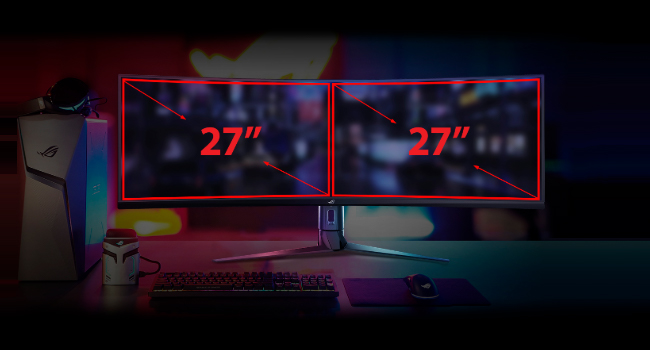
- Super Ultra-wide Display: The 49-inch curved screen provides an expansive view, equivalent to two 27-inch monitors side-by-side.
- 144 Гц сэргээх хурд: Experience smooth, lag-free visuals, crucial for fast-paced gaming.
- Radeon FreeSync 2 HDR: Synchronizes the monitor's refresh rate with your GPU's frame rate to eliminate screen tearing and stuttering, especially with HDR content.
- DisplayHDR 400 & DCI-P3 90%: Ensures high color contrast and cinematic color performance for vibrant and realistic visuals.

Image: Visual representation of the 49-inch super ultra-wide display, showing its equivalence to two 27-inch monitors for an expansive workspace.

Image: A split-screen comparison demonstrating the enhanced visual quality with High Dynamic Range (HDR) enabled, highlighting DCI-P3 90% and DisplayHDR 400 certification.

Image: A split-screen comparison illustrating the difference in gameplay smoothness with Radeon FreeSync 2 HDR turned 'On' versus 'Off'.
4.3 ASUS Eye Care Technology
ASUS Eye Care technology is integrated to minimize eye fatigue during extended use. This includes flicker-free backlighting and blue light filters, certified by TÜV Rheinland, to protect your eyes.
4.4 GamePlus and GameVisual
Utilize exclusive GamePlus and GameVisual overlays and color modes to optimize your gaming experience. These features provide in-game enhancements and display adjustments tailored for various game genres.
4.5 Picture-by-Picture (PBP) Functionality
The ultra-wide display supports Picture-by-Picture (PBP) mode, allowing you to view content from multiple input sources simultaneously, effectively acting as multiple monitors on a single screen.
Video: Official ASUS ROG Strix XG49VQ product overview, demonstrating key features like the ultra-wide display, high refresh rate, HDR, and various gaming enhancements.
Video: A merchant's overview of the ASUS ROG Strix XG49VQ, highlighting its curved design, FreeSync technology, and eye care features.
5. Засвар үйлчилгээ
5.1 Мониторыг цэвэрлэх
Дэлгэцийн дэлгэцийг цэвэрлэхийн тулд зөөлөн, хөвөнгүй даавуугаар зөөлөн арчина. Зөрүүд толботой бол хөнгөн арчина.ampДэлгэцийг гэмтээж болзошгүй хүчтэй химийн бодис эсвэл зүлгүүрийн материал хэрэглэхээс зайлсхий.
5.2 Ерөнхий арчилгаа
Keep the monitor in a well-ventilated area. Avoid exposing it to direct sunlight, high humidity, or extreme temperatures. Do not block the ventilation openings on the monitor casing.
6. Алдаа засах
6.1 Дэлгэц байхгүй / Хар дэлгэц
- Цахилгааны кабелийг дэлгэц болон тэжээлийн залгуурт найдвартай холбосон эсэхийг шалгаарай.
- Verify that the video cable (DisplayPort/HDMI) is firmly connected to both the monitor and your computer/console.
- Check if the correct input source is selected on the monitor's OSD (On-Screen Display) menu.
6.2 Image Quality Issues (e.g., Washed Out, Red Dot)
- If the display appears washed out or has unusual artifacts (like a red dot), try performing a "Reset All" from the monitor's OSD menu.
- Consider disabling HDR in your operating system or monitor settings if you experience poor image quality, as some content or system configurations may not fully support HDR effectively.
- Adjust brightness, contrast, and color settings via the OSD menu to suit your preferences.
6.3 Flickering or Stuttering
- Таны график картны драйверууд шинэчлэгдсэн эсэхийг шалгаарай.
- Verify that Radeon FreeSync 2 HDR is enabled in both your monitor settings and graphics card control panel.
- Видео кабелийг гэмтээсэн эсвэл сул холболт байгаа эсэхийг шалгана уу.
7. Техникийн үзүүлэлтүүд
| Онцлог | Тодорхойлолт |
|---|---|
| Байнгын дэлгэцийн хэмжээ | 49 инч |
| Дэлгэцийн нягтрал | 3840х1080 |
| Хамгийн их дэлгэцийн нягтрал | 3840 x 1080 пиксел |
| Брэнд | ASUS |
| Цуврал | XG49VQ |
| Загварын дугаар | XG49VQ |
| Зүйлийн жин | 21.4 фунт |
| Бүтээгдэхүүний хэмжээс | 46.98 x 20.83 x 13.57 инч |
| Өнгө | Хар |
| Ботьtage | 100-240 вольт |
| USB 2.0 портын тоо | 1 |
| USB 3.0 портын тоо | 2 |
| Харьцаа | 32:9 |
| Дэлгэцийн гадаргуугийн тодорхойлолт | Матт |
8. Баталгаат хугацаа ба дэмжлэг
Баталгаат хугацаа болон техникийн дэмжлэгийн талаар дэлгэрэнгүй мэдээлэл авахыг хүсвэл ASUS-ийн албан ёсны вэбсайтаас лавлана уу. webсайт эсвэл таны бүтээгдэхүүнд багтсан баталгаат карт. Баталгаат зарга авахын тулд худалдан авалтын баримтаа хадгална уу.