1. Танилцуулга
This manual provides essential instructions for the installation, operation, and maintenance of your FSP iFP600 Uninterruptible Power Supply (UPS). Please read this manual thoroughly before installing or operating the unit to ensure proper function and safety. The FSP iFP600 is designed to provide reliable power backup and surge protection for your electronic devices.

Зураг 1.1: Урд view of the FSP iFP600 UPS, showcasing its compact design and integrated LCD display.
2. Аюулгүй ажиллагааны заавар
Please adhere to these important safety guidelines during installation, operation, and maintenance of the UPS:
- UPS-ийг нээж болохгүй casing. Дотор нь хэрэглэгчийн засвар үйлчилгээ хийх хэсэг байхгүй. Бүх үйлчилгээг мэргэшсэн үйлчилгээний ажилтнуудад шилжүүлээрэй.
- Do not connect appliances that could overload the UPS, such as laser printers, vacuum cleaners, or heaters.
- UPS-ийг газардуулсан AC тэжээлийн залгуурт холбосон эсэхийг шалгаарай.
- Avoid placing the UPS in direct sunlight, near heat sources, or in environments with excessive dust, humidity, or corrosive substances.
- Position the UPS in a well-ventilated area to prevent overheating.
- In case of fire, use a dry chemical extinguisher. Water can be hazardous.
- The battery inside the UPS is not user-replaceable. Battery replacement should only be performed by qualified personnel.
3. Бүтээгдэхүүн дууссанview
The FSP iFP600 UPS provides reliable power protection for your critical electronics. It features a compact design and an intuitive LCD display for monitoring status.
3.1 Багцын агуулга
Багцыг нээхдээ бүх бүрэлдэхүүн хэсгүүд байгаа бөгөөд гэмтэлгүй эсэхийг шалгана уу.
- FSP iFP600 UPS Unit
- Хэрэглэгчийн гарын авлага (энэ баримт бичиг)
- Цахилгааны утас
- USB холбооны кабель
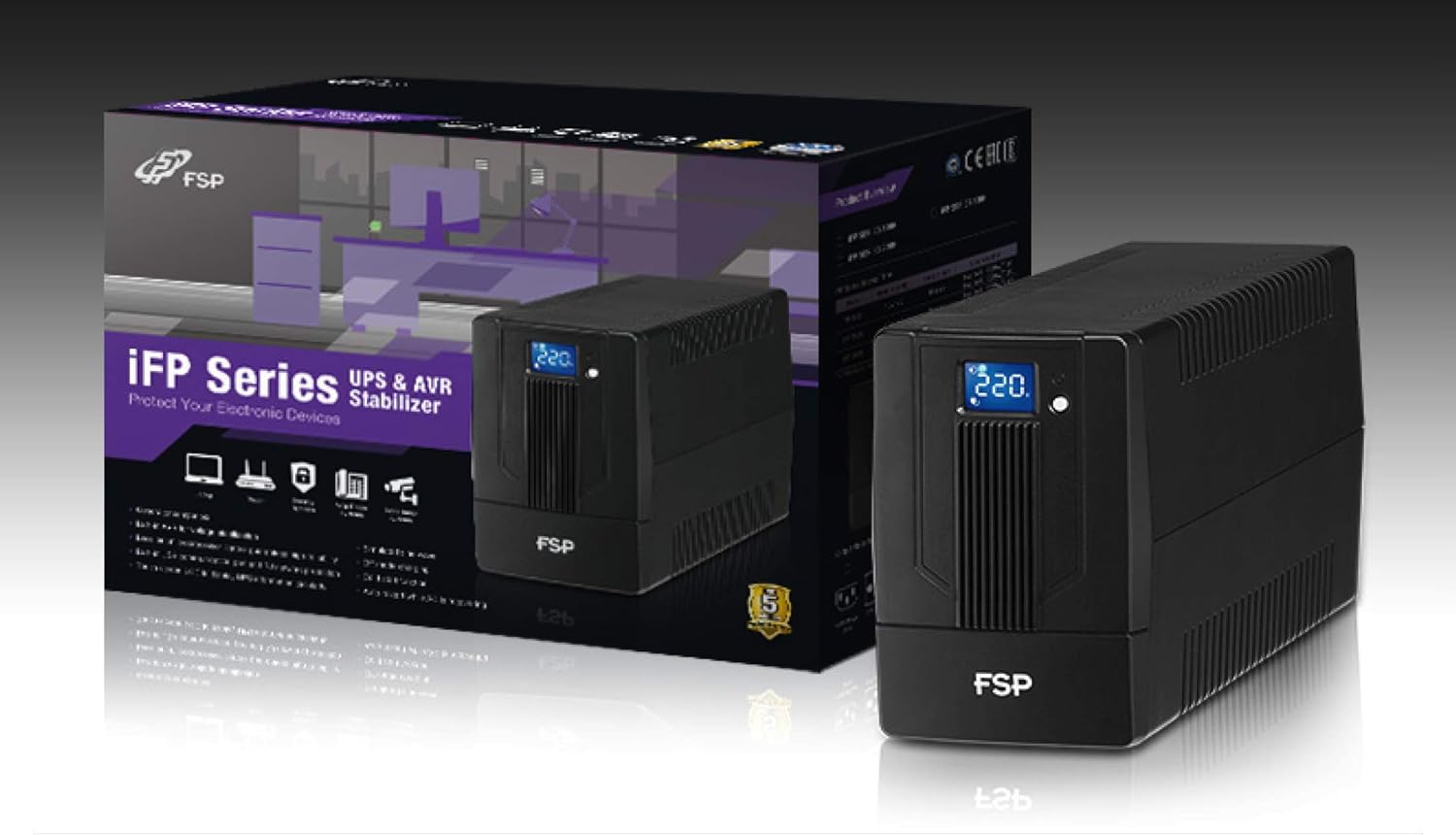
Image 3.1: The FSP iFP600 UPS shown alongside its retail packaging, illustrating the product's presentation.
3.2 Арын самбарын бүрэлдэхүүн хэсгүүд
Familiarize yourself with the connections on the rear panel of the UPS:

Зураг 3.2: Нарийвчилсан view of the FSP iFP600 UPS rear panel, highlighting connection points.
- Гаралтын цэгүүд: Two SCHUKO type outlets for connecting protected equipment.
- Хувьсах гүйдлийн оролт: Connects the UPS to the main utility power.
- Fuse/Breaker: UPS-ийн хэт гүйдлийн хамгаалалт.
- USB холболт: Port for connecting to a computer for monitoring and management.
- Combo RJ11/RJ45 Surge Protection: Утас/сүлжээний шугамд хүчдэлийн хэт халалтаас хамгаална.
4. Тохиргоо ба суурилуулалт
Follow these steps to set up your FSP iFP600 UPS:
- Савлах: UPS-ийг савлагаанаас нь болгоомжтой салга. Тээвэрлэлтийн явцад ямар нэгэн эвдрэл гарсан эсэхийг шалгана уу.
- Байршил: Place the UPS on a flat, stable surface in a clean, cool, and well-ventilated area. Ensure adequate clearance around the unit for airflow.
- Анхны цэнэглэлт: Connect the UPS to a standard grounded AC outlet using the provided power cord. Allow the unit to charge for at least 4-6 hours before initial use to ensure optimal battery performance. The UPS will charge whether it is turned on or off.
- Холбох төхөөрөмж: Plug your computer, monitor, and other critical electronic devices into the UPS outlets (A). Do not connect surge suppressors or power strips to the UPS outlets.
- USB холболт (заавал биш): Connect the USB cable from the UPS USB port (D) to your computer's USB port to enable power management software features (software not included, typically downloaded from manufacturer's webсайт).
- RJ11/RJ45 Protection (Optional): For surge protection of your telephone or network line, connect the incoming line to the 'IN' port of the Combo RJ11/RJ45 (E) and connect the 'OUT' port to your device.
5. Ашиглалтын заавар
5.1 Асаах/унтраах
- Асаахын тулд: Дуу чимээ сонсогдож, LCD дэлгэц гэрэлтэх хүртэл урд самбар дээрх асаах товчийг ойролцоогоор 2 секундын турш дарна уу.
- Унтраахын тулд: Дуу чимээ сонсогдож, LCD дэлгэц унтрах хүртэл асаах товчийг ойролцоогоор 2 секундын турш дарна уу.
5.2 LCD дэлгэцийн мэдээлэл
The FSP iFP600 features an LCD display that provides real-time status information. The display is touch-sensitive for navigating information.

Image 5.1: The LCD display of the FSP iFP600 UPS, indicating voltage output and its touch-screen functionality.
LCD дэлгэц нь ихэвчлэн дараахыг харуулдаг.
- Оролтын хэмжээtage
- Гаралтын ботьtage
- Зайны цэнэгийн түвшин
- Ачааллын түвшин
- Operating Mode (e.g., AC mode, Battery mode)
- Warning/Fault Indicators
5.3 Battery Mode Operation
When the utility power fails or fluctuates outside acceptable limits, the UPS will automatically switch to battery mode. During battery mode, the UPS will provide power to connected equipment from its internal battery. An audible alarm will sound to indicate battery operation.
6. Засвар үйлчилгээ
Зөв засвар үйлчилгээ нь таны UPS-ийн удаан эдэлгээ, найдвартай байдлыг баталгаажуулдаг.
- Цэвэрлэгээ: UPS-ийн гадна талыг зөөлөн, хуурай даавуугаар цэвэрлэ. Шингэн эсвэл аэрозоль цэвэрлэгч бүү хэрэглэ.
- Батерейны арчилгаа: To maximize battery life, ensure the UPS is connected to AC power and fully charged. If the UPS is stored for an extended period, recharge it every three months to prevent battery degradation.
- Зай солих: The internal battery (12V / 7Ah x1) is not user-serviceable. Battery replacement should only be performed by FSP-certified service personnel or a qualified technician. Incorrect battery replacement can pose a risk of explosion or injury.
- Хадгалах: Store the UPS in a cool, dry place with adequate ventilation. Ensure the battery is fully charged before storage.
7. Алдаа засах
Refer to the following table for common issues and their solutions. If the problem persists, contact FSP support.
| Шинж тэмдэг | Дуут дохиолол | Боломжит шалтгаан | Шийдэл |
|---|---|---|---|
| UPS operating on battery power | 10 секунд тутамд дуугарна | Utility power failure or fluctuation | Save work and shut down equipment if power outage is prolonged. UPS will return to AC mode when power is restored. |
| Батарей бага байгааг анхааруулж байна | Секунд тутамд дохио өгдөг | Батерейны цэнэг маш бага байна | Immediately save work and shut down connected equipment. |
| Хэт ачааллын нөхцөл | 0.5 секунд тутамд дохио өгдөг | Connected equipment exceeds UPS capacity | Disconnect non-essential equipment until the alarm stops. Ensure total load is within UPS capacity. |
| UPS-ийн алдаа | Тасралтгүй дуугарах | Дотоод алдаа эсвэл эвдрэл | Turn off the UPS and disconnect it from the AC outlet. Contact FSP technical support. |
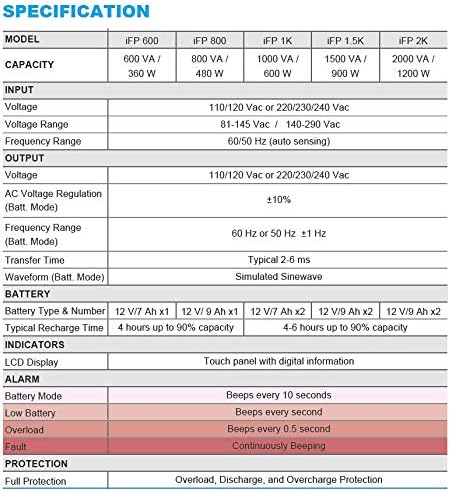
Image 7.1: Excerpt from the FSP iFP series specification table, detailing alarm indicators and their meanings.
8. Техникийн үзүүлэлтүүд
Detailed technical specifications for the FSP iFP600 UPS:
| Онцлог | Тодорхойлолт |
|---|---|
| Загвар | iFP 600 |
| Хүчин чадал | 600 ВА / 360 Вт |
| Оролтын хэмжээtage | 110/120 Vac or 220/230/240 Vac |
| Оролтын хэмжээtage Хамрах хүрээ | 81-145 Vac / 140-290 Vac |
| Оролтын давтамжийн хүрээ | 60/50 Гц (автомат мэдрэгч) |
| Гаралтын ботьtage | 110/120 Vac or 220/230/240 Vac |
| AC ботьtage Зохицуулалт (Батт. Горим) | ±10% |
| Output Frequency Range (Batt. Mode) | 60 Hz or 50 Hz ±1 Hz |
| Дамжуулах хугацаа | Ердийн 2-6 мс |
| Waveform (Batt. Горим) | Симуляцсан синус долгион |
| Батерейны төрөл ба дугаар | 12V / 7Ah x1 |
| Ердийн цэнэглэх хугацаа | 4 цаг 90% хүртэл хүчин чадалтай |
| Үзүүлэлтүүд | LCD Display (Touch panel with digital information) |
| Хамгаалалт | Overload, Discharge, and Overcharge Protection |
| Зүйлийн жин | 9.24 фунт (4.2 кг) |
| Бүтээгдэхүүний хэмжээ (LxWxH) | 11.81 x 3.98 x 5.59 инч |
| Өнгө | Хар |
| Материал | Металл |
9. Баталгаат хугацаа ба дэмжлэг
FSP products are designed for reliability and performance. For warranty information, please refer to the warranty card included with your product or visit the official FSP website. For technical support, troubleshooting assistance, or service inquiries, please contact FSP customer service through their official channels.
Та нэмэлт мэдээлэл, тусламжийн эх сурвалжийг эндээс авах боломжтой FSP Store on Amazon.


