1. Танилцуулга
This manual provides comprehensive instructions for the setup, operation, maintenance, and troubleshooting of your Canyon CNS-SW71SS Smartwatch. Please read this manual carefully before using your device to ensure proper function and longevity.
The Canyon CNS-SW71SS Smartwatch is designed to help you monitor your fitness activities and stay connected. It features a 1.22-inch color screen, multi-sport modes, heart rate monitoring, sleep tracking, and notification alerts. Its IP68 water resistance makes it suitable for various environments.
2. Бүтээгдэхүүн дууссанview
2.1 Гол онцлогууд
- 1.22-inch color touch screen display.
- Multi-sport mode for tracking various activities.
- Daily activity monitoring: calories, steps, heart rate, and sleep.
- Notifications for incoming calls, SMS, emails, calendar events, and social media.
- Music control and remote camera function.
- Smart alarm and weather data display.
- Батерейны ашиглалтын хугацаа 7 хоног хүртэл.
- IP68 water resistance (submersible up to 1 meter for 30 minutes).
- Bluetooth 4.0 холболт.
- Compatible with iOS and Android operating systems.
- Comes with two interchangeable wristbands: metal and TPU.
2.2 Бүрэлдэхүүн хэсэг
The Canyon CNS-SW71SS Smartwatch consists of the main watch unit, interchangeable wristbands, and a charging cable.

Зураг 1: Урд view of the Canyon CNS-SW71SS Smartwatch, showing the display with steps, distance, calories, and heart rate data.

Зураг 2: Өнцөг view of the Canyon CNS-SW71SS Smartwatch, featuring a silver metal mesh strap and a round display.
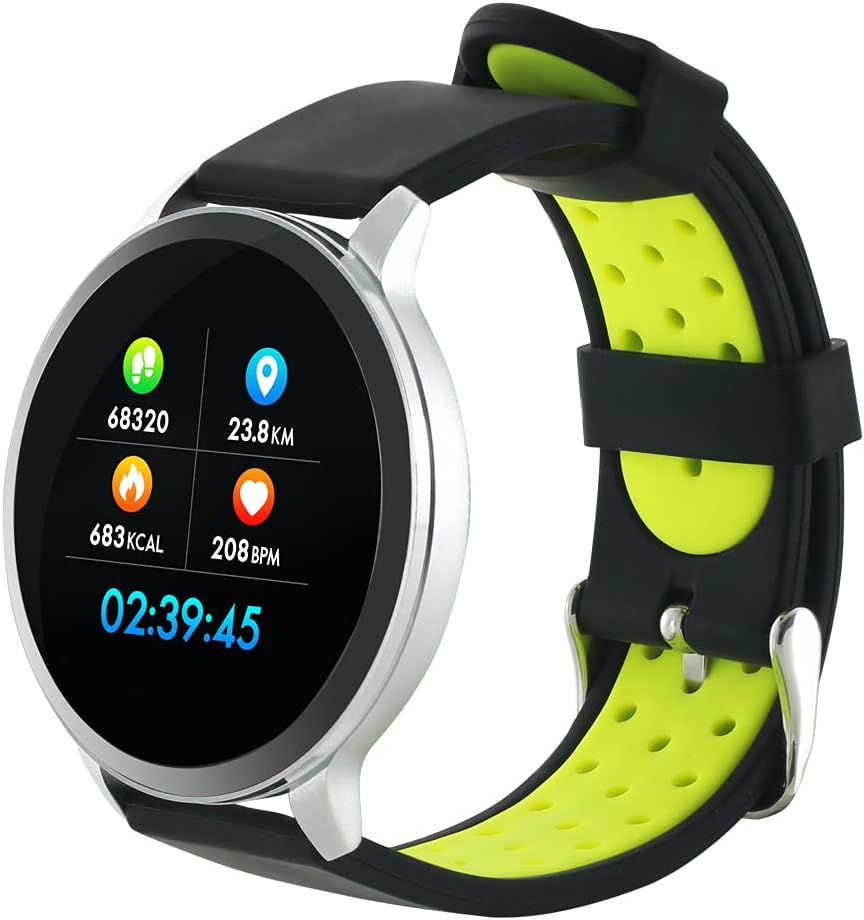
Figure 3: The Canyon CNS-SW71SS Smartwatch shown with an alternative black and lime green TPU strap, highlighting its interchangeable design.

Зураг 4: Ар талд view of the Canyon CNS-SW71SS Smartwatch, displaying the optical heart rate sensor and magnetic charging contacts.

Figure 5: The retail packaging for the Canyon CNS-SW71SS Smartwatch, illustrating key features and the included two straps.
3. Тохиргоо
3.1 Ухаалаг цагийг цэнэглэх
- Connect the charging cable to a USB power adapter (not included) or a computer's USB port.
- Align the magnetic charging pins of the cable with the charging contacts on the back of the smartwatch. The watch will vibrate and display a charging icon.
- Allow approximately 2-3 hours for a full charge. A full charge provides up to 7 days of usage.
3.2 Installing the Canyon Fit Application
- Scan the QR code provided in the packaging or search for "Canyon Fit" in your smartphone's app store (Google Play Store for Android, Apple App Store for iOS).
- Програмыг татаж аваад суулгана уу.
- Open the Canyon Fit app and follow the on-screen instructions to create an account and set up your profile.
3.3 Ухаалаг утастайгаа хослуулах
- Ухаалаг цагаа цэнэглэж, асаалттай байгаа эсэхийг шалгаарай.
- Ухаалаг утсан дээрээ Bluetooth-г идэвхжүүлнэ үү.
- Open the Canyon Fit application.
- Navigate to the device pairing section within the app (usually found under 'Device' or 'Profile').
- Select your smartwatch (e.g., "CNS-SW71SS") from the list of available devices.
- Хэрэв хүсвэл ухаалаг утас болон ухаалаг цаг дээрээ хослуулах хүсэлтийг баталгаажуулна уу.
3.4 Attaching/Changing Wristbands
The smartwatch comes with two wristbands (metal and TPU) that can be interchanged. To attach or change a wristband, locate the quick-release pins on the underside of the strap. Slide the pin to detach the current strap and then align and slide the pin of the new strap into the corresponding holes on the watch body until it clicks into place.
4. Ашиглалтын заавар
4.1 Үндсэн навигаци
- Мэдрэгчтэй дэлгэц: Swipe left/right to navigate through different functions and menus. Swipe up/down to view мэдэгдэл эсвэл хурдан тохиргоо.
- Хажуугийн товчлуур: Press the side button to return to the main watch face or to wake up the screen. A long press may access power options or specific features depending on the context.
4.2 Фитнесс хянах
- Олон спорт горим: Access the 'Workout' or 'Sport' menu on your watch. Select your desired activity (e.g., running, cycling, walking) to start tracking. The watch will record duration, distance, calories burned, and heart rate.
- Өдөр тутмын үйл ажиллагаа: The watch automatically tracks your steps, distance, and calories burned throughout the day. View these statistics on the watch face or in the Canyon Fit app.
- Зүрхний цохилтын хяналт: The watch continuously monitors your heart rate. You can also manually initiate a heart rate measurement from the heart rate interface.
- Унтлагын хяналт: Wear the smartwatch to bed, and it will automatically track your sleep patterns, including deep sleep, light sleep, and wake times. View detailed sleep analysis in the Canyon Fit app.
4.3 Мэдэгдэл
Once paired with your smartphone and with notification permissions granted in the Canyon Fit app, your smartwatch will display alerts for:
- Ирж буй дуудлага
- SMS мессеж
- Имэйлүүд
- Календарийн үйл явдлууд
- Social Media Apps (e.g., WhatsApp, Facebook, Instagхуц)
Цагны нүүрэн дээр дээш шударна уу view recent notifications. You can dismiss notifications from the watch.
4.4 Нэмэлт функцууд
- Хөгжмийн хяналт: While music is playing on your phone, you can use the watch to play/pause, skip tracks, and adjust volume.
- Алсын камер: Open the camera function in the Canyon Fit app. Use your smartwatch as a remote shutter button to take photos on your phone.
- Ухаалаг сэрүүлэг: Set alarms through the Canyon Fit app. The watch will vibrate to wake you up gently.
- Цаг агаарын мэдээлэл: Once connected to your phone, the watch will display current weather conditions and forecasts for your location.
5. Засвар үйлчилгээ
5.1 Цэвэрлэгээ
- Цагны дэлгэц болон их биеийг зөөлөн, d-ээр арчинаamp даавуу.
- For the metal strap, use a soft brush to gently clean any debris. For the TPU strap, wash with mild soap and water.
- Цэнэглэхийн өмнө цэнэглэх контактууд нь цэвэр, хуурай эсэхийг шалгаарай.
- Цэвэрлэхэд химийн хүчтэй бодис, зүлгүүрийн материалыг ашиглахаас зайлсхий.
5.2 Усны эсэргүүцэл (IP68)
The Canyon CNS-SW71SS Smartwatch is IP68 rated, meaning it is resistant to dust and can be immersed in water up to 1 meter deep for a maximum of 30 minutes. While it can withstand splashes, rain, and brief immersion, it is not recommended for hot showers, saunas, or diving, as steam and high water pressure can compromise the seals.
- Do not press any buttons while the watch is submerged.
- Усанд орсны дараа цагийг сайтар хатаана.
5.3 Батерейны арчилгаа
- Байнга зайгаа бүрэн цэнэглэхээс зайлсхий.
- Батерейны эрүүл мэндийг хадгалахын тулд төхөөрөмжийг ашиглаагүй байсан ч тогтмол цэнэглээрэй.
- Цагийг удаан хугацаагаар ашиглаагүй бол сэрүүн, хуурай газар хадгална уу.
6. Алдаа засах
- Цаг асахгүй байна: Цаг бүрэн цэнэглэгдсэн эсэхийг шалгаарай. Үүнийг дор хаяж 30 минутын турш цэнэглэгчтэй холбоно уу.
- Ухаалаг утастай холбох боломжгүй:
- Таны утсан дээр Bluetooth идэвхжсэн эсэхийг шалгаарай.
- Ensure the Canyon Fit app has necessary permissions.
- Утас болон ухаалаг цагаа дахин эхлүүлнэ үү.
- Апп-аар дамжуулан төхөөрөмжийг салгаж, дахин холбож үзнэ үү.
- Мэдэгдэл харагдахгүй байна:
- Check notification settings in the Canyon Fit app and your phone's system settings.
- Цагийг Bluetooth-ээр холбосон эсэхийг шалгаарай.
- Зүрхний цохилт/үйл ажиллагааны мэдээлэл буруу байна:
- Цагийг хэт бариу эсвэл хэт сул биш, бугуйндаа сайн зүүж байгаарай.
- Цагны арын хэсэгт мэдрэгчийг цэвэрлэ.
- Environmental factors or certain movements can affect accuracy.
- Дэлгэц хариу өгөхгүй байна: Хажуугийн товчийг удаан дарж ухаалаг цагаа дахин асааж үзнэ үү. Хэрэв хариу өгөхгүй бол батерейг бүрэн дуустал нь хүлээгээд дараа нь дахин цэнэглэнэ үү.
7. Техникийн үзүүлэлтүүд
| Загварын нэр | CNS-SW71SS |
| Брэнд | Канон |
| Дэлгэцийн хэмжээ | 1.22 инч |
| Үйлдлийн системийн нийцтэй байдал | Android, iOS |
| Холболтын технологи | Bluetooth 4.0 |
| Усны эсэргүүцлийн зэрэглэл | IP68 |
| Онцлог шинж чанарууд | Wireless Charging (implied by product data), Multi-Sport Mode, Heart Rate Monitor, Sleep Tracker, Notifications |
| Тохиромжтой төхөөрөмжүүд | Ухаалаг утас |
| Батерей | Rechargeable (1 included) |
| Өнгөний сонголтууд | Black, Lime Green, Silver |
8. Баталгаат хугацаа ба дэмжлэг
For warranty information and technical support, please refer to the documentation included with your purchase or visit the official Canyon website. You can also contact Canyon customer service for assistance with product issues or inquiries.
Онлайн дэмжлэг: https://canyon.eu/support/ (Жишээ ньampхолбоос, албан ёсны дэмжлэгийн хуудсыг баталгаажуулна уу)


