1. Танилцуулга
This manual provides comprehensive instructions for the operation and maintenance of your Fetcus Universal Remote Control, designed for various Hitachi Air Conditioner models. Please read this manual thoroughly before using the remote control to ensure proper function and longevity.
This remote control is a direct replacement or compatible alternative for original Hitachi air conditioner remote models including RAS-D10EX, RAR-5E1, RAS-10XH1, RAR-5E2, RAR-5E3, RAR-5E4, RAR-5E5, RAR-5E6, and RAS-D14EX2.
2. Бүтээгдэхүүний онцлог
- Нийтэд нийцтэй байдал: Designed to work with a wide range of Hitachi air conditioner models.
- Хэт улаан туяаны холболт: Utilizes standard infrared signals for reliable communication with your AC unit.
- Dedicated AC Functions: Includes specific buttons for common air conditioner operations such as power, mode selection, temperature adjustment, fan speed, and more.
- Компакт дизайн: Эргономик ба зохицуулахад хялбар.
- Аппликейшнийг дэмжихгүй байна: Operates independently without the need for a smartphone application.
- Давтамж: Operates at 433 MHz for signal transmission.
3. Тохиргоо
3.1 Батерей суурилуулах
The remote control requires appropriate batteries for operation. Follow these steps to install or replace batteries:
- Алсын удирдлагын ар талд байгаа зайны тасалгааг ол.
- Батерейны тасалгааны тагийг доош гулсуулж эсвэл түгжээг дарж нээнэ үү.
- Insert new batteries, ensuring the positive (+) and negative (-) terminals align correctly with the markings inside the compartment. Typically, two AAA batteries are required, though specific battery type should be confirmed by checking the compartment markings.
- Зайны тасалгааны тагийг байрандаа орох хүртэл сайтар хаа.

Зураг 3.1: Арын view of the Fetcus remote control with the battery compartment open, revealing the two battery slots and a label with battery safety warnings. This image illustrates the correct orientation for battery insertion.
Чухал: Алсын удирдлагыг удаан хугацаагаар ашиглахгүй бол гоожиж, гэмтэхээс сэргийлж батерейг нь салга.
4. Ашиглалтын заавар
Familiarize yourself with the buttons on your remote control. The remote features a main display and various control buttons for your air conditioner.
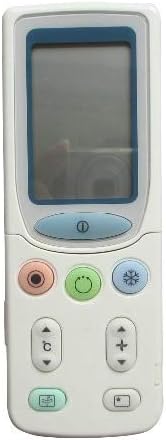
Зураг 4.1: Урд view of the Fetcus remote control, highlighting the LCD screen and the primary control buttons for power, mode, and temperature adjustment.
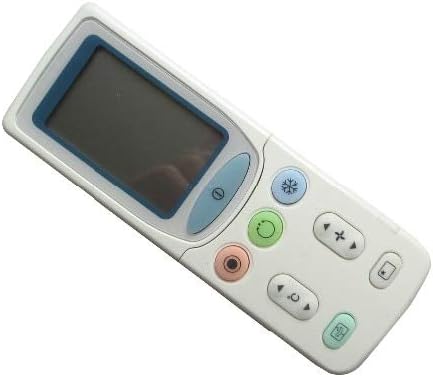
Зураг 4.2: Өнцөгтэй view of the Fetcus remote control, showing the main display and primary function buttons including power, mode, and fan speed controls.
4.1 Үндсэн функцууд
- Асаах товч (①): Агааржуулагчийг асаах эсвэл унтраахын тулд дарна уу.
- Горимын товчлуур (↻): Press repeatedly to cycle through operating modes: Auto, Cool, Dry, Fan, Heat (if applicable to your AC unit).
- Температур тохируулах товчлуурууд (+ / -): Press to increase or decrease the desired temperature setting.
- Сэнсний хурдны товчлуур (❄): Press to adjust the fan speed (e.g., Auto, Low, Medium, High).
4.2 Дэвшилтэт функцууд (Гулсах бүрхүүлийн доор)
Some advanced functions are accessible by sliding down the cover on the remote control. This reveals additional buttons for more specific controls.

Зураг 4.3: Өнцөгтэй view of the Fetcus remote control with the sliding cover open, exposing additional advanced function buttons beneath the main display.
- Савлуур/Хаалтны удирдлага: Adjusts the direction of the airflow (vertical or horizontal swing).
- Timer/Sleep Mode: Sets a timer for the AC unit to turn on or off, or activates a sleep-friendly operating mode.
- C/F Switch (℃): Температурын дэлгэцийг Цельсийн болон Фаренгейтийн хооронд шилжүүлдэг.
- Дахин тохируулах товч: Used to reset the remote control settings or clear certain functions. Consult your AC unit's manual for specific reset procedures if needed.
- Other Specific Buttons: Depending on your specific Hitachi AC model, other buttons may control functions like Quiet mode, Turbo mode, or Health functions. Refer to your AC unit's original manual for detailed explanations of these specific icons.
5. Засвар үйлчилгээ
- Цэвэрлэгээ: Алсын удирдлагыг зөөлөн, хуурай даавуугаар арчина. Шингэн цэвэрлэгч эсвэл зүлгүүрийн материал бүү ашиглаарай, учир нь тэдгээр нь гадаргуу эсвэл дотор эд ангиудыг гэмтээж болзошгүй.
- Зай солих: Replace batteries when the remote's range decreases or the display becomes dim. Always replace all batteries at the same time with new ones of the same type.
- Хадгалах: Алсын удирдлагыг нарны шууд тусгал, хэт температураас хол, сэрүүн, хуурай газар хадгална.
6. Алдаа засах
| Асуудал | Боломжит шалтгаан | Шийдэл |
|---|---|---|
| Алсын удирдлага хариу өгөхгүй байна. | Дууссан эсвэл буруу суурилуулсан батерей. | Батерейг солихдоо зөв туйлшралыг (+/-) хангана уу. |
| Алсын зай муу байна. | Weak batteries; Obstruction between remote and AC unit. | Replace batteries. Ensure a clear line of sight to the AC unit's infrared receiver. |
| AC unit not responding to specific functions. | Remote not fully compatible with all AC unit features; AC unit does not support the function. | Verify the function exists on your specific AC model. This remote is a universal replacement and may not support all obscure functions of every original remote. |
| Дэлгэц бүдэг эсвэл хоосон байна. | Батерейны хүчин чадал бага. | Зайгаа солих. |
7. Техникийн үзүүлэлтүүд
| Онцлог | Дэлгэрэнгүй |
|---|---|
| Брэнд | халзан толбо |
| Загварын дугаар (Дотоод) | CLS-D41D8CD98F00B204E9800998ECF8427E |
| Тохиромжтой төхөөрөмжүүд | Air Conditioner (Hitachi RAS-D10EX, RAR-5E1, RAS-10XH1, RAR-5E2, RAR-5E3, RAR-5E4, RAR-5E5, RAR-5E6, RAS-D14EX2) |
| Холболтын технологи | Хэт улаан туяа |
| Давтамж | 433 МГц |
| Дэмжигдсэн төхөөрөмжүүдийн хамгийн их тоо | 1 |
| Материал | Other (Durable Plastic) |
| Батерейны тодорхойлолт | Lithium (Typically uses AAA batteries, please check compartment) |
| Онцлог шинж чанарууд | Universal, Wireless |
| Барааны багцын тоо | 1 |
| Эхний боломжтой огноо | 8 оны тавдугаар сарын 2019 |
8. Баталгаат хугацаа ба дэмжлэг
This Fetcus Remote Control comes with a 90 хоногийн баталгаат хугацаа худалдан авсан өдрөөс. Энэхүү баталгаа нь үйлдвэрлэлийн согогийг хамарч, бүтээгдэхүүний хэвийн ашиглалтын дагуу хэвийн ажиллагааг хангана.
For warranty claims or technical support, please contact your retailer or the manufacturer with your purchase details. Please retain your proof of purchase for warranty validation.


