1. Оршил ба түүнээс дээшview
Thank you for choosing the Lorex Analog 4K Weatherproof Indoor/Outdoor HD Wired Add-On Security Camera. This manual provides essential information for the proper installation, operation, and maintenance of your new security camera. This camera is designed as an add-on unit and requires a compatible Lorex recorder (DVR/NVR) for full functionality.
This camera features 4K resolution for superior image clarity, robust weatherproof construction for reliable indoor and outdoor use, and advanced deterrence features such as motion-activated lights and remote-triggered sirens. Its long-range night vision ensures comprehensive surveillance even in low-light conditions.
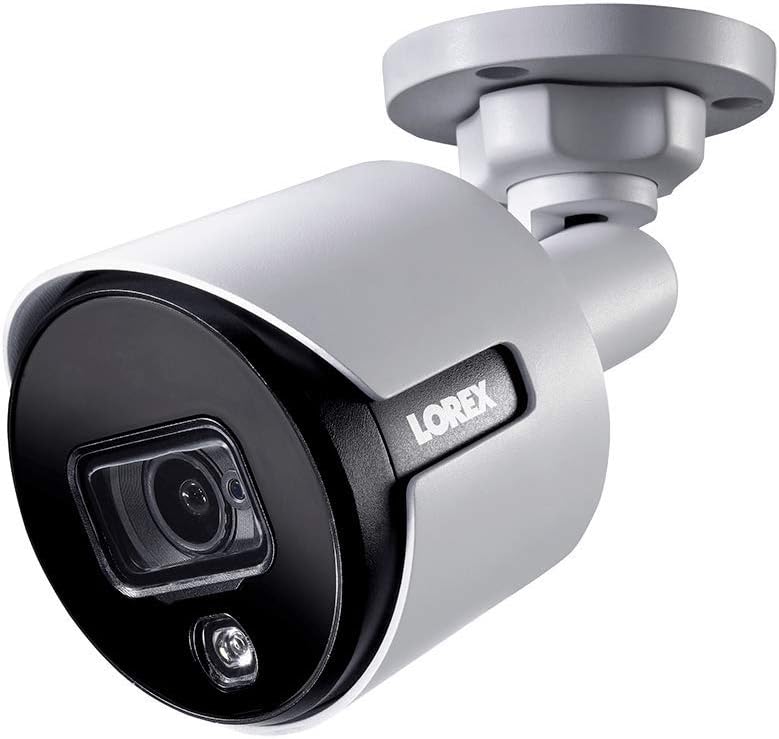
Зураг 1.1: Урд талын өнцөг view of the Lorex 4K Weatherproof Security Camera. This image shows the camera's bullet form factor, lens, and integrated light.
2. Багцын агуулга
The Lorex Analog 4K Weatherproof Indoor/Outdoor HD Wired Add-On Security Camera package includes:
- 1 x Lorex Analog 4K Weatherproof Indoor/Outdoor HD Wired Add-On Security Camera (Model: LBV8543XW)
- Mounting Kit (screws and wall plugs)
- Allen Key (for adjustment)
Note: This is an add-on camera. Video cables, power adapters, and a compatible Lorex recorder are sold separately and are required for operation.
3. Үндсэн шинж чанарууд
- 4K Ultra HD нягтрал: Provides exceptional detail and clarity with an 8MP effective still resolution.
- Цаг агаарын хамгаалалттай дизайн (IP67): Durable metal housing ensures reliable performance in various weather conditions, suitable for both indoor and outdoor installation.
- Алсын зайн шөнийн хараа: See clearly up to 150 feet (45m) in ambient night conditions and up to 98 feet (30m) in total darkness. Features Color Night Vision for enhanced detail in low light.
- Motion-Activated Warning Light: Integrated LED light can be triggered by motion to deter intruders.
- Remote-Triggered Siren: Activate a loud siren directly from your Lorex recorder or connected app to scare away unwanted visitors.
- Wired Connectivity (BNC): Ensures a stable and secure connection to your Lorex DVR/NVR system.
- Өргөн хэрэглээний температур: Functions reliably in temperatures up to 60 degrees Celsius.
4. Тохиргоо ба суурилуулалт
Before installation, ensure you have a compatible Lorex recorder (DVR/NVR) and necessary video/power cables.
4.1 Байршил сонгох
Хүссэн байршлыг сонгох viewing angle and is within reach of your Lorex recorder and a power source. Consider areas prone to intrusion, such as entry points or vulnerable perimeters. The camera is suitable for ceiling mount and wall mount applications.

Зураг 4.1: Хажуу тал view of the Lorex 4K Weatherproof Security Camera, showing its adjustable mounting base.
4.2 Камер суурилуулах
- Өрөмдлөгийн нүхийг тэмдэглэх: Use the mounting template (if provided) or the camera base to mark the positions for drilling.
- Өрөмдлөгийн цооног: Drill pilot holes for the mounting screws. If mounting on drywall or masonry, insert the provided wall plugs.
- Аюулгүй камер: Камерын суурийг өрөмдсөн нүхнүүдтэй зэрэгцүүлж, өгөгдсөн боолт ашиглан бэхлэнэ үү.
- Өнцөг тохируулах: Loosen the adjustment screws on the camera body using the Allen key to position the camera for the optimal viewөнцөг. Тохируулсны дараа боолтыг чангална уу.
4.3 Камерыг холбох
- Видео кабелийг холбох: Connect one end of the BNC video cable (not included) to the camera's BNC port and the other end to an available video input channel on your Lorex recorder.
- Эрчим хүчийг холбох: Connect the camera's power input to a compatible power adapter (not included). Ensure the power adapter is connected to a power outlet.
- Power On Recorder: Ensure your Lorex recorder is powered on and properly configured.
5. Ашиглалтын заавар
Once the camera is physically installed and connected to your Lorex recorder, you can begin operation.
5.1 ViewLive Feed
Access your Lorex recorder's interface (via monitor, Lorex Home app, or client software) to view the live video feed from the camera. Ensure the correct channel is selected.

Зураг 5.1: Ойрын зураг view of the Lorex 4K Weatherproof Security Camera's lens and integrated light.
5.2 Motion Detection and Smart Deterrence
Your Lorex recorder manages motion detection settings. Refer to your recorder's manual for detailed instructions on configuring motion zones and sensitivity.
- Motion-Activated Light: The camera's integrated light can be set to activate automatically upon motion detection. This setting is typically configured within your Lorex recorder's deterrence or alarm settings.
- Remote-Triggered Siren: You can manually activate the camera's siren through your Lorex recorder's interface or the Lorex Home app. This feature is useful for immediate deterrence.

Figure 5.2: The Lorex 4K Weatherproof Security Camera mounted on a brick wall at night, demonstrating its motion-activated light feature.
5.3 Шөнийн хараа
The camera automatically switches to night vision mode in low-light conditions. The infrared (IR) LEDs provide illumination for clear black and white video. Color Night Vision (CNV) may be available if there is sufficient ambient light, providing full-color video in low-light scenarios.
6. Засвар үйлчилгээ
Тогтмол засвар үйлчилгээ нь таны аюулгүй байдлын камерын оновчтой ажиллагаа, удаан эдэлгээг баталгаажуулдаг.
- Цэвэрлэгээ: Камерын линз болон орон сууцыг үе үе зөөлөн, damp cloth. Avoid abrasive cleaners or solvents that could damage the finish or lens.
- Холболтуудыг шалгах: Ensure all cable connections (BNC and power) are secure and free from corrosion, especially for outdoor installations.
- Програм хангамжийн шинэчлэлтүүд: Regularly check the Lorex website or your recorder's settings for available firmware updates for your camera and recorder to ensure the latest features and security enhancements.
- Байгаль орчны нөхцөл: While weatherproof, extreme conditions outside the specified operating temperature range (up to 60°C) may affect performance.
7. Алдаа засах
If you encounter issues with your Lorex camera, refer to the following common troubleshooting steps:
| Асуудал | Боломжит шалтгаан | Шийдэл |
|---|---|---|
| No video feed from camera | Сул кабель холболт Камерт цахилгаан байхгүй Incorrect channel selected on recorder | Check BNC and power connections. Ensure power adapter is working and connected. Verify the correct input channel on your Lorex recorder. |
| Poor image quality / blurry video | Бохир линз Буруу фокус (хэрэв тохируулж болох бол) Cable interference/damage | Камерын линзийг зөөлөн даавуугаар цэвэрлэ. Ensure the camera is properly focused (if applicable). Check video cable for damage or interference. Use high-quality cables. |
| Шөнийн хараа ажиллахгүй байна | Хэт улаан туяаны LED-үүд бөглөрсөн Хүч чадал хангалтгүй Камерын тохиргоо | Ensure nothing is blocking the IR LEDs. Тогтвортой цахилгаан хангамжийг шалгана уу. Check night vision settings on your Lorex recorder. |
| Хөдөлгөөн илрүүлэлт идэвхжихгүй байна | Incorrect motion zone setup Мэдрэмж хэт бага Дотор нь саад тотгор view | Review and adjust motion detection zones on your recorder. Increase motion sensitivity. Clear any obstructions from the camera's field of view. |
For more advanced troubleshooting, consult your Lorex recorder's user manual or visit the Lorex support webсайт.
8. Техникийн үзүүлэлтүүд
| Онцлог | Тодорхойлолт |
|---|---|
| Загварын дугаар | LBV8543XW |
| Видео бичлэгийн нягтрал | 4K (8MP үр дүнтэй хөдөлгөөнгүй нягтралтай) |
| Холболтын технологи | BNC (Wired) |
| Дотор/гадаа ашиглах | Дотор, гадаа |
| Олон улсын хамгаалалтын зэрэглэл | IP67 (цаг агаарын хамгаалалттай) |
| Шөнийн харааны хүрээ | 150 Фут (45м) |
| Онцлог шинж чанарууд | Motion Sensor, Night Vision, Motion Activated Lights, Remote-Triggered Siren |
| Form Factor | Сум |
| Материал | Металл |
| Ашиглалтын температур (дээд) | Цельсийн 60 градус |
| Бүтээгдэхүүний хэмжээ (L x W x H) | 16 x 6 x 6 инч |
| Зүйлийн жин | 0.01 унц |
| UPC | 695529017136 |
| Хяналтын арга | App, Remote (via compatible Lorex recorder) |
9. Баталгаат хугацаа ба дэмжлэг
Lorex products are designed for reliability and performance. For information regarding your product's warranty, please refer to the warranty policy available on the official Lorex website or the documentation included with your Lorex recorder.
For technical support, product registration, or to download the latest software and firmware updates, please visit the official Lorex support page or the Lorex Store:
- Lorex Store: Visit the Lorex Store on Amazon
- Хэрэглэгчийн гарын авлага (PDF): A comprehensive user guide in PDF format is also available for download: Хэрэглэгчийн гарын авлагыг татаж авах
When contacting support, please have your product model number (LBV8543XW) and serial number ready.


