Танилцуулга
This manual provides detailed instructions for the setup, operation, and maintenance of your JENSEN JTA-230R 3-Speed Stereo Turntable with Built-in Speakers. Please read this manual thoroughly before using the product to ensure proper function and longevity.
Гол онцлогууд
- Belt-driven 3-speed stereo turntable: Supports 33-1/3, 45, and 78 RPM records.
- USB port with included cable and software: Enables recording, editing, and converting vinyl records to digital MP3 format.
- Auxiliary input: Allows connection of external audio devices such as iPods, MP3 players, or other digital audio players.
- Stereo headphone output: For private listening.
- RCA line outputs: For connecting the turntable to an external home music system or ampнастан.
- Built-in stereo speakers: Provides integrated audio playback.
- Front-mounted pitch control: For fine-tuning record speed.
- Tone control: For adjusting sound quality.
Тохиргоо
- Савлах: Carefully remove the turntable from its packaging. Retain all packing materials for future transport or storage.
- Байршил: Эргүүлэгч тавиурыг нарны шууд тусгал, дулааны эх үүсвэр, хэт их тоос шороо, чичиргээнээс хол, тогтвортой, тэгш гадаргуу дээр байрлуул.
- Тоосны бүрхэвч: The unit includes a clear dust cover to protect the platter and tonearm when not in use. Ensure it is properly hinged.
- Эрчим хүчний холболт: Connect the AC power adapter to the DC input jack on the rear of the unit, then plug the adapter into a standard wall outlet.
- Зүүг хамгаалах: Remove the clear plastic stylus protector from the needle before first use.

Ашиглалтын заавар
Винил пянз тоглож байна
- Асаах: Turn the POWER/VOLUME knob clockwise to power on the unit. The power indicator light will illuminate.
- Функцийг сонгох: Set the FUNCTION switch to 'PHONO'.
- Байрны бичлэг: Open the dust cover and carefully place a vinyl record on the turntable platter.
- Хурд сонгох: Set the SPEED SELECTOR switch (33/45/78) to match the playback speed of your record. For 45 RPM records, place the included 45 RPM adapter on the center spindle.
- Гараа өргөх: Хөшүүргийг ашиглан хуруугаа зөөлөн өргө.
- Гарны байрлал: Move the tonearm over the desired track of the record.
- Доод гар: Slowly lower the tonearm onto the record using the cueing lever. The record will begin to play.
- Дууны хэмжээг тохируулах: POWER/VOLUME товчлуурыг ашиглан дууны түвшинг тохируулна уу.
- Автомат зогсоох: The AUTO STOP switch can be set to ON or OFF. When ON, the turntable will automatically stop spinning when the record finishes. When OFF, the turntable will continue to spin.
- Тоглуулахыг дуусгах: At the end of the record, lift the tonearm, return it to the tonearm rest, and lower the cueing lever. Turn the POWER/VOLUME knob counter-clockwise to power off the unit.

Радио ашиглах
- Асаах: Turn the POWER/VOLUME knob clockwise.
- Функцийг сонгох: Set the FUNCTION switch to 'AM' or 'FM' for radio playback.
- Хөгжмийн станц: Rotate the TUNING knob to select your desired radio station.
- Дууны хэмжээг тохируулах: POWER/VOLUME товчлуурыг ашиглан дууны түвшинг тохируулна уу.
Connecting External Devices (AUX Input)
- Төхөөрөмжийг холбох: Use an audio cable (not included) to connect your external audio device (e.g., MP3 player, smartphone) to the AUX IN jack on the front of the turntable.
- Функцийг сонгох: Set the FUNCTION switch to 'AUX'.
- Аудио тоглуулах: Start playback on your external device. The audio will play through the turntable's built-in speakers.
- Дууны хэмжээг тохируулах: Adjust the volume using the POWER/VOLUME knob on the turntable and/or the volume control on your external device.
Чихэвч ашиглах
Plug your headphones into the HEADPHONE jack on the front of the unit for private listening. The built-in speakers will be muted when headphones are connected.
Connecting to an External Audio System (RCA Line Out)
Use RCA cables (not included) to connect the RCA LINE OUT jacks on the rear of the turntable to an available audio input on your home stereo system or powered speakers. This allows you to play vinyl records through a larger sound system.
Converting Vinyl to MP3 (USB Recording)
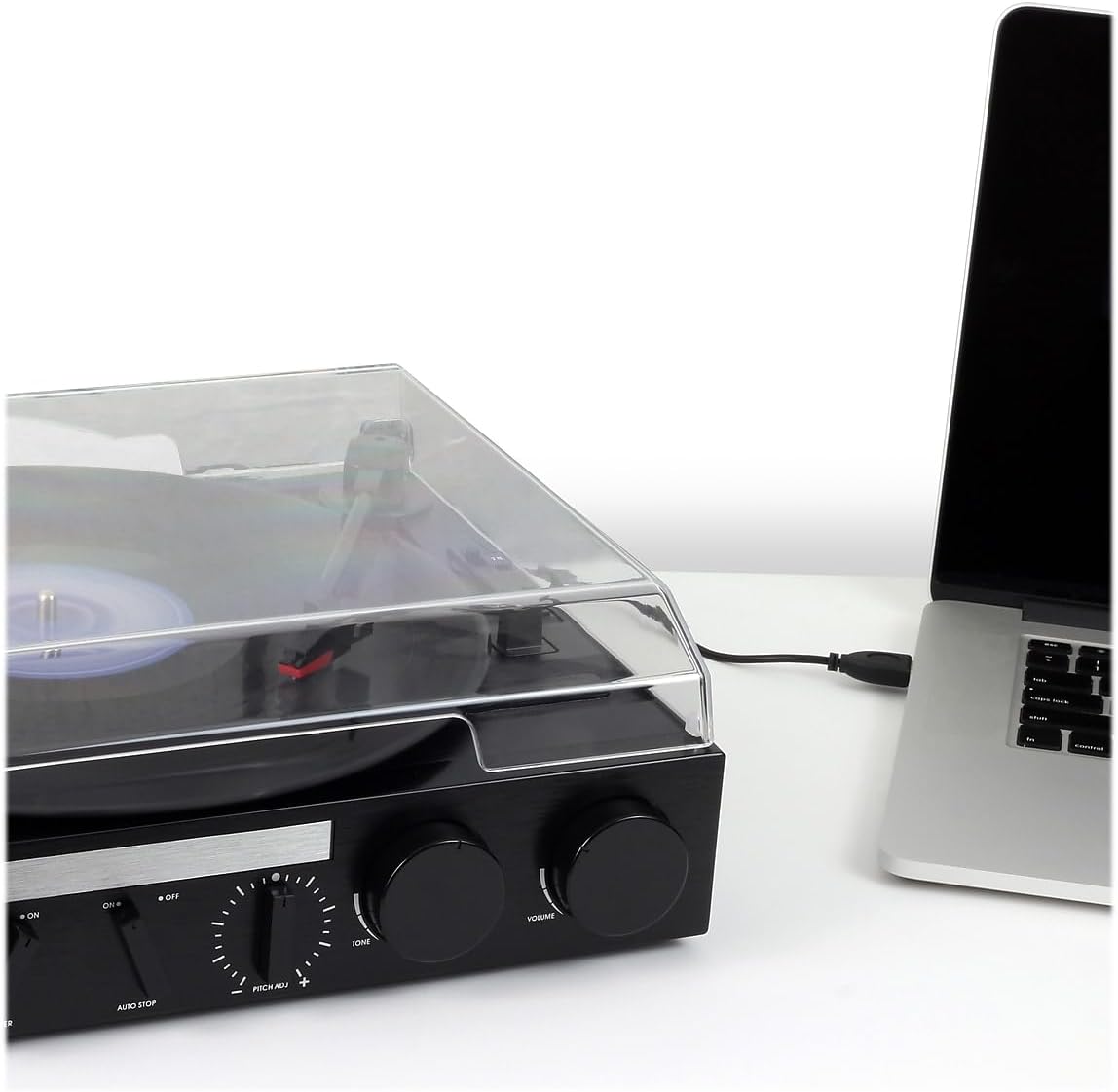
The JTA-230R includes a USB port and software for converting your vinyl records to digital MP3 fileс. Эдгээр алхмуудыг дагана уу:
- Програм хангамж суулгах: Install the provided software (e.g., Audacity) onto your computer.
- USB холбох: Дагалдах USB кабелийг ашиглан эргэлдэгч тавиурыг компьютертээ холбоно уу.
- Бичлэг хийхэд бэлтгэх: Open the software on your computer and follow its instructions to prepare for recording.
- Бичлэг тоглуулах: Start playing your vinyl record on the turntable as described in the 'Playing a Vinyl Record' section.
- Record and Save: Use the software to record the audio. Once recorded, you can edit and save the tracks as MP3 files on your computer for playback on digital devices.
Засвар үйлчилгээ
Нэгжийг цэвэрлэх
- Төхөөрөмжийн гадна талыг зөөлөн арчиж, damp даавуу. Зүлгүүрийн цэвэрлэгч, уусгагчийг бүү ашигла.
- Тавиур болон үзэг дээр тоос хуримтлагдахаас сэргийлж тоосны тагийг ашиглаагүй үедээ хаалттай байлгаарай.
Stylus арчилгаа
- The stylus (needle) is a delicate component. Handle it with care.
- Зүүг үе үе зөөлөн сойз ашиглан ар талаас нь урагшаа зөөлөн арчиж цэвэрлэ.
- A worn or damaged stylus can harm your records and degrade sound quality. Replace the stylus if it appears bent, chipped, or if sound quality diminishes significantly.
Алдааг олж засварлах
| Асуудал | Боломжит шалтгаан | Шийдэл |
|---|---|---|
| Хүч чадалгүй | Power cord not connected; Power outlet not active; Unit not turned on. | Ensure power cord is securely plugged in; Check power outlet; Turn POWER/VOLUME knob clockwise. |
| Чанга яригчаас дуу гарахгүй | Дууны түвшин хэт бага байна; Функцийн унтраалга буруу байна; Чихэвч холбогдсон байна. | Increase volume; Set FUNCTION switch to 'PHONO', 'AM', 'FM', or 'AUX' as appropriate; Disconnect headphones. |
| Гажуудсан дуу чимээ | Dirty record; Worn stylus; Incorrect speed; Tone control setting. | Clean record; Replace stylus; Verify correct speed (33/45/78 RPM); Adjust TONE control. |
| Record speed too fast or too slow | Incorrect speed selector setting; Pitch control adjustment. | Set SPEED SELECTOR to match record (33-1/3, 45, or 78 RPM); Adjust PITCH ADJ. knob for fine-tuning. |
| Бичлэг алгасах | Dirty or scratched record; Turntable not level; Stylus worn or damaged. | Clean record; Ensure turntable is on a stable, level surface; Replace stylus. |
Үзүүлэлтүүд
- Загварын дугаар: JTA-230R
- Бүтээгдэхүүний хэмжээ: 11.34 x 12 x 4.96 инч
- Барааны жин: 1 фунт (454 грамм)
- Брэнд: Женсен
- Хамгийн их эргэлтийн хурд: 78 эргэлт
- Материал: Хуванцар
- Өнгө: Хар
- Онцлог шинж чанар: Зөөврийн
- Тохиромжтой төхөөрөмжүүд: Headphone, MP3 Player, Speaker, Tablet
- Оруулсан бүрэлдэхүүн хэсгүүд: Product, Manual
Баталгаат болон дэмжлэг
Information regarding product warranty and customer support is not available in the provided data. Please refer to the product packaging or manufacturer's webдэлгэрэнгүй мэдээллийг авах сайт.


