Танилцуулга
This user manual provides detailed instructions for the operation and maintenance of your Sunbuck AS-29BU Karaoke Wireless Bluetooth Stereo Amplifier System. Please read this manual thoroughly before using the device to ensure proper functionality and to prevent damage.
The Sunbuck AS-29BU is a compact yet powerful home audio amplifier receiver designed to enhance your listening experience. It features built-in Bluetooth for wireless audio streaming, support for SD cards and USB flash drives, FM radio, and RCA audio inputs. It is compatible with a wide range of devices including smartphones, tablets, PCs, and traditional audio equipment.
Багцын агуулга
Багцыг нээхдээ доор жагсаасан бүх зүйл байгаа бөгөөд сайн нөхцөлд байгаа эсэхийг шалгана уу.
- 1 x Sunbuck AS-29BU Bluetooth Ampөргөгч (110V)
- 1 x Алсын удирдлага
- 1 х хэрэглэгчийн гарын авлага (энэ баримт бичиг)
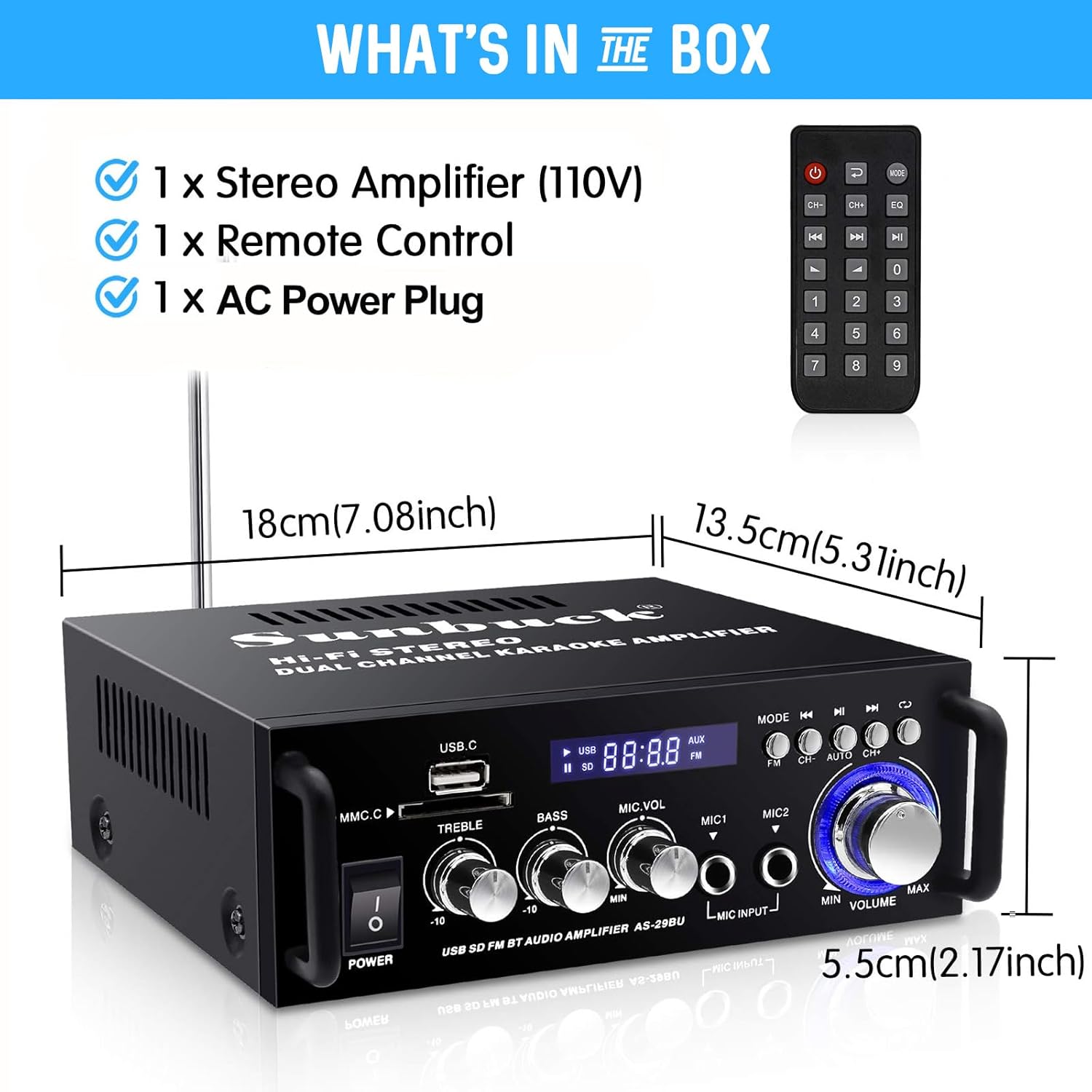
Figure 1: Package Contents and Dimensions. This image displays the amplifier unit, the remote control, and indicates the product dimensions: 18cm (7.08 inches) length, 13.5cm (5.31 inches) width, and 5.5cm (2.17 inches) height.
Бүтээгдэхүүн дууссанview
The Sunbuck AS-29BU amplifier features a user-friendly front panel and comprehensive rear panel connections for versatile audio setups.

Figure 2: Front Panel and Remote Control. This image shows the front of the amplifier with its various controls including power switch, USB and SD card slots, treble, bass, microphone volume controls, microphone inputs, mode selection, and master volume knob. The included remote control is also visible.

Figure 3: Rear Panel Connections. This image illustrates the rear panel of the amplifier, highlighting the RCA audio input (L/R), speaker system outputs (4Ω-16Ω), FM antenna input, and power input (DC12V/5A). It also shows various compatible devices such as TVs, Blu-ray players, outdoor speakers, computer speakers, ceiling speakers, and car/motorcycle speakers.

Figure 4: Compact Desktop Placement. This image shows the amplifier placed on a desk in front of a television, illustrating its compact size and suitability for various home or office environments.
Тохируулах гарын авлага
1. Эрчим хүчний холболт
- -ийг баталгаажуулах ampөргөгчийн цахилгаан унтраалга нь OFF байрлалд байна.
- Connect the provided AC power plug to the "POWER DC INPUT" port on the rear panel of the ampнастан.
- Plug the other end of the power cable into a standard 110V AC power outlet.
2. Чанга яригчийн холболт
The amplifier supports 2.0 channel stereo output. Connect your passive speakers to the "SPEAKER SYSTEM 4Ω-16Ω" terminals on the rear panel.
- Identify the positive (+) and negative (-) terminals on your speakers and on the ampнастан.
- Connect the positive terminal of the left speaker to the "L+" terminal on the amplifier and the negative terminal to the "L-" terminal.
- Repeat the process for the right speaker, connecting to the "R+" and "R-" terminals.
- Ensure all connections are secure to prevent short circuits or poor audio quality.
3. Аудио оролтын холболт
The amplifier offers multiple input methods:

Figure 5: Flexible and Diverse Input Methods. This image visually represents the various audio input options available on the amplifier, including Bluetooth, USB, SD card, CD/DVD players, microphone inputs, and FM radio.
- RCA Audio Input: Connect external audio sources (e.g., CD/DVD players, TVs, computers) to the "AUDIO INPUT (L/R)" RCA ports on the rear panel using an RCA cable.
- USB/SD карт: Insert a USB flash drive or SD memory card into the respective slots on the front panel. The amplifier will automatically detect and play compatible audio files (WMA, WAV).
- Микрофоны оролт: Connect up to two microphones to the "MIC INPUT" jacks on the front panel for karaoke or public address functions.
- FM антен: Connect the FM antenna to the "FM ANT" port on the rear panel for improved radio reception.
Ашиглалтын заавар
1. Асаах/унтраах
Press the "POWER" button on the front panel to turn the amplifier ON or OFF. The display will illuminate when the unit is powered on.
2. Дууны түвшний хяналт
- Мастер боть: Rotate the large "VOLUME" knob on the front panel to adjust the overall output volume.
- Микрофоны дууны хэмжээ: Use the "MIC.VOL" knob to adjust the volume of the connected microphones.
3. Дууны хяналт
Adjust the "TREBLE" and "BASS" knobs on the front panel to fine-tune the audio's high and low frequencies according to your preference.
4. Оруулах горимын сонголт
Press the "MODE" button on the front panel or the remote control to cycle through available input sources: Bluetooth, USB, SD Card, FM Radio, and AUX (RCA input).
5. Bluetooth-ийн ажиллагаа

Figure 6: Excellent Bluetooth Compatibility. This image demonstrates the amplifier's Bluetooth connectivity, showing a smartphone wirelessly streaming music to the unit.
- Select "Bluetooth" mode using the "MODE" button. The display will show "BLUE" or a similar indicator.
- On your Bluetooth-enabled device (smartphone, tablet, PC), search for available Bluetooth devices.
- Select "Sunbuck AS-29BU" or a similar name from the list to pair.
- Хослуулсны дараа та төхөөрөмжөөсөө аудиог утасгүйгээр дамжуулах боломжтой ampнастан.
6. USB/SD картыг тоглуулах
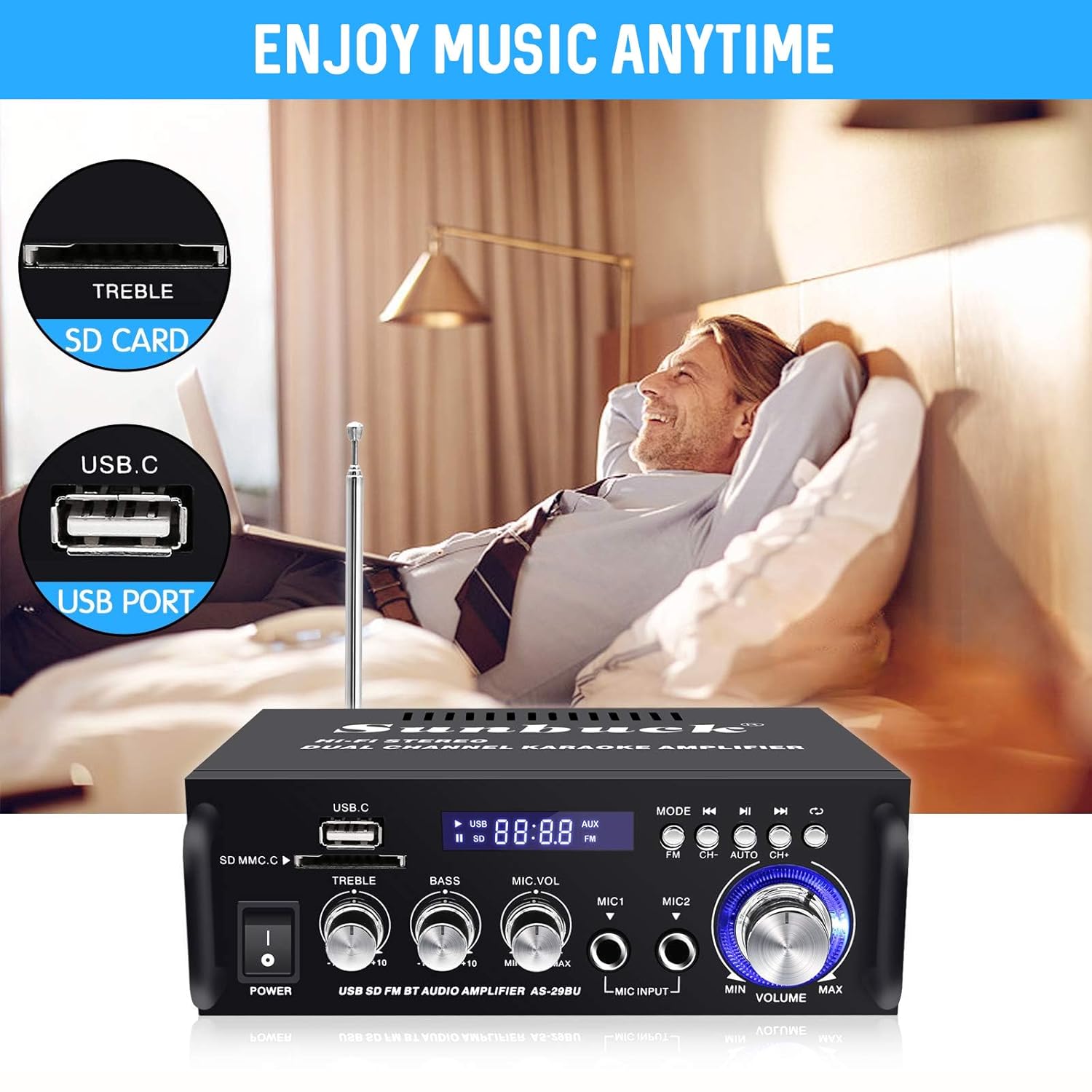
Figure 7: Enjoy Music Anytime with USB/SD Card. This image highlights the convenience of playing music directly from USB drives and SD cards inserted into the amplifier's front panel slots.
- Insert a USB flash drive or SD card containing WMA or WAV audio fileхаргалзах үүр рүү оруулна.
- The ampөргөгч автоматаар USB/SD горимд шилжиж, тоглуулж эхэлнэ.
- Use the playback controls (Play/Pause, Next/Previous Track) on the front panel or remote control.
7. FM радиогийн ажиллагаа
- Select "FM" mode using the "MODE" button.
- Press the "AUTO" button (or "CH+" / "CH-" for manual tuning) to scan and save available FM stations.
- Use the "CH+" and "CH-" buttons to navigate through saved stations.
8. Алсын удирдлага
Багцад багтсан алсын удирдлага нь бүх төхөөрөмжид хялбархан нэвтрэх боломжийг олгодог amplifier functions from a distance. Ensure line of sight to the amplifier's IR receiver for optimal performance.
Засвар үйлчилгээ, арчилгаа
- Цэвэрлэгээ: Цэвэрлэхийн тулд зөөлөн, хуурай даавуу ашиглана уу amplifier's exterior. Do not use liquid cleaners or abrasive materials, as they may damage the finish or internal components.
- Агааржуулалт: Ойролцоох хангалттай агааржуулалтыг хангах amplifier. Do not block the ventilation openings, as this can lead to overheating.
- Байршил: -ийг байрлуул amplifier on a stable, flat surface away from direct sunlight, heat sources, and excessive moisture.
- Унтраах: -г үргэлж унтраа amplifier and unplug it from the power outlet before performing any cleaning or maintenance.
Алдааг олж засварлах
| Асуудал | Боломжит шалтгаан | Шийдэл |
|---|---|---|
| Хүч чадалгүй | Цахилгааны кабель холбогдоогүй байна; Цахилгааны залгуур эвдэрсэн байна; Ampөргөгч унтраах. | Ensure power cable is securely connected. Test power outlet with another device. Turn amplifier power switch ON. |
| Дууны гаралт байхгүй | Speakers not connected correctly; Volume too low; Incorrect input mode selected; Audio source issue. | Check speaker wire connections (positive/negative). Increase master volume. Select correct input mode. Verify audio source is playing and connected properly. |
| Bluetooth холболт амжилтгүй боллоо | Amplifier not in Bluetooth mode; Device too far; Bluetooth interference; Device already paired. | Баталгаажуулах ampөргөгч Bluetooth горимд байна. Төхөөрөмжийг ойртуулна уу amplifier. Reduce interference from other wireless devices. Disconnect from previously paired devices. |
| USB/SD карт тоглохгүй байна | Дэмжигдээгүй file формат; Карт/драйвыг буруу оруулаагүй; Эвдэрсэн files. | Баталгаажуулах files are WMA or WAV format. Reinsert card/drive. Try a different USB/SD card. |
| FM радио хүлээн авах чадвар муу | Антен холбогдоогүй байна; Дохио сул байна. | Connect the FM antenna. Adjust antenna position for better reception. |
Үзүүлэлтүүд
| Брэнд | Sunbuck |
| Загварын дугаар | AS-29BU |
| Өнгө | Хар ба мөнгө |
| Гаралтын ватtage | 180 ватт |
| Сувгууд | 2.0 Стерео |
| Холболтын технологи | Bluetooth, USB |
| Онцлог шинж чанарууд | Built-In Bluetooth, FM Tuner, SD Card Input |
| Тохиромжтой төхөөрөмжүүд | Илтгэгчид |
| Дижитал медиа формат | WMA, WAV |
| Зүйлийн жин | 1.2 кг (2.65 фунт) |
| Бүтээгдэхүүний хэмжээ (LxWxH) | 18.01 x 13.49 x 5.51 см (7.09 x 5.31 x 2.17 инч) |
| Ботьtage | 12 Volts (DC Input) |
| Хянагчийн төрөл | Алсын удирдлага |
Баталгаат болон дэмжлэг
For warranty information and technical support, please refer to the documentation provided at the time of purchase or contact Sunbuck customer service. Keep your purchase receipt as proof of purchase for warranty claims.
For further assistance, please visit the official Sunbuck webсайт эсвэл тэдний тусламжийн сувгаар холбогдоно уу.


