Танилцуулга
The Amazon Echo Show 8 (1st Gen, 2019 release) is a smart display designed to enhance your daily life with Alexa. Featuring an 8-inch HD screen and stereo sound, it allows you to manage your day, connect with loved ones through video calls, enjoy entertainment, control smart home devices, and personalize your experience. This manual provides detailed instructions to help you get the most out of your device.
Хайрцагт юу байна
Upon unboxing your Echo Show 8, ensure all components are present:
- Echo Show 8 төхөөрөмж
- Цахилгаан адаптер (30Вт) кабельтай (4.9 фут)
- Түргэн эхлүүлэх гарын авлага
Тохиргоо
Setting up your Echo Show 8 is a straightforward process, often simplified by Amazon Wi-Fi simple setup technology.
- Асаах: Connect the power adapter to your Echo Show 8 and plug it into a wall outlet. The device will power on automatically.
- Хэлний сонголт: Дэлгэц дээрх зааврыг дагаж дуртай хэлээ сонгоно уу.
- Wi-Fi холболт: Select your Wi-Fi network from the list and enter the password. The Echo Show 8 supports dual-band Wi-Fi (802.11a/b/g/n/ac).
- Амазон дансанд нэвтрэх: Log in with your Amazon account credentials. If you don't have one, you will be prompted to create one.
- Төхөөрөмжийн бүртгэл: Your device will register to your Amazon account.
- Цагийн бүс ба байршил: Confirm your time zone and location settings.
- Заавар: The device may offer a brief tutorial on how to navigate and use its features.
Alexa аппликейшн нь Fire OS, Android, iOS төхөөрөмжүүдтэй нийцтэй бөгөөд мөн таны тусламжтайгаар хандах боломжтой web browser for further management and customization.
Цуурай шоугаа ажиллуулах нь 8
The Echo Show 8 can be operated using voice commands with Alexa or through its touch screen interface.
Voice Commands (Alexa)
Simply say "Alexa" followed by your command. ExampҮүнд:
- "Алекса, цаг агаар ямар байна?"
- "Алекса, хөгжим тогло."
- "Алекса, [холбоо барих хүний нэр] рүү залгаарай."
- "Alexa, show me my photos."
- "Alexa, turn off the lights."

Image: Echo Show 8 displaying current weather conditions, demonstrating its ability to provide glanceable information.
Мэдрэгчтэй дэлгэцийн навигаци
Swipe down from the top of the screen to access quick settings and the home menu. Swipe left from the right edge to view cards with suggestions and information. Tap on icons and options to interact with the device.
Онцлогууд
The Echo Show 8 offers a wide range of features to simplify and enrich your daily routines:
- Video Calling & Messaging: Connect with friends and family who have the Alexa app or an Echo device with a screen. Make announcements to other devices in your home.

Image: A user making a video call on the Echo Show 8, highlighting its communication capabilities.
- Үзвэр үйлчилгээ: Ask Alexa to show you movie trailers, TV shows, movies, or the news. Listen to radio stations, podcasts, and audiobooks.
- Ухаалаг гэрийн удирдлага: Voice control compatible devices or manage them on the easy-to-use display. Ask Alexa to show you security cameras, control lights, and adjust thermostats.

Image: The Echo Show 8 displaying a live feed from a nursery camera, illustrating its smart home monitoring feature.
- Хувийн тохиргоо: Show off your albums from Amazon Photos. Customize your home screen. Create morning routines to start your day.
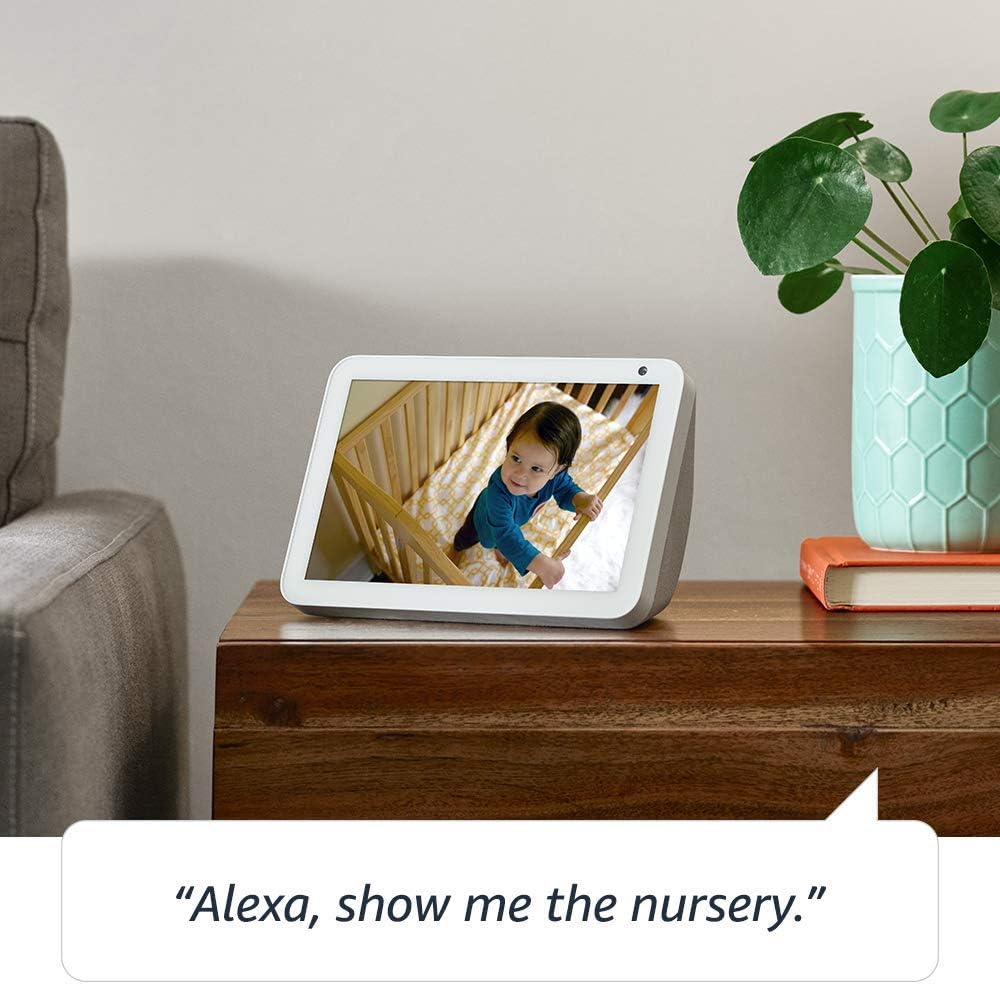
Image: The Echo Show 8 displaying a scenic photo from a user's Amazon Photos album, demonstrating its personalization options.
- Өдөр тутмын тусламж: Cook along to step-by-step recipes. Easily update to-do lists and calendars. Glance at weather and traffic on your way out.
Нууцлалын онцлогууд
The Echo Show 8 is designed with privacy in mind, offering several controls:
- Микрофон/Камерыг унтраах товчлуур: Electronically disconnect the microphones and camera with one press of a button.
- Баригдсан камерын хаалт: Slide the built-in shutter to physically cover the camera lens.

Image: A finger activating the physical camera shutter on the Echo Show 8, demonstrating a privacy control feature.
- Wake Word технологи: Alexa devices are designed to detect only your chosen wake word (e.g., "Alexa").
- Дамжуулалтын үзүүлэлтүүд: Visual indicators show when Alexa is streaming your request to the cloud.
- Дуу бичлэгийн удирдлага: Чадвар view and delete your voice recordings through the Alexa app or Alexa Privacy Hub.
Дэлгэрэнгүй мэдээллийг Alexa Нууцлалын Төвөөс авна уу.
Засвар үйлчилгээ
Echo Show 8-ийн урт наслалт, оновчтой ажиллагааг хангахын тулд дараах засвар үйлчилгээний удирдамжийг дагаж мөрдөнө үү.
- Цэвэрлэгээ: Use a soft, lint-free cloth to clean the screen and exterior. Avoid abrasive cleaners or sprays directly on the device.
- Байршил: Place the device on a stable, flat surface away from direct sunlight, heat sources, and moisture. Ensure proper ventilation.
- Програм хангамжийн шинэчлэлтүүд: The device automatically receives software updates. Ensure it is connected to Wi-Fi to receive these updates, which improve performance and add new features.
Алдааг олж засварлах
If you encounter issues with your Echo Show 8, try the following steps:
- Эрчим хүчгүй:
- Цахилгаан адаптер нь төхөөрөмж болон ажиллаж байгаа цахилгаан залгуурт найдвартай холбогдсон эсэхийг шалгаарай.
- Өөр цахилгаан залгуураар оролдоно уу.
- Wi-Fi холболтын асуудал:
- Wi-Fi нууц үгээ зөв эсэхийг шалгана уу.
- Wi-Fi чиглүүлэгч болон модемоо дахин эхлүүлнэ үү.
- Move the Echo Show 8 closer to your Wi-Fi router.
- Alexa хариу өгөхгүй байна:
- Микрофоныг дуугүй болгоогүй эсэхийг шалгаарай (микрофон/камерыг унтраах товчийг шалгана уу).
- Тодорхой, хэвийн дуугаар ярь.
- Төхөөрөмжийг хэдэн секундын турш салгаад дахин залгаад дахин асааж үзнэ үү.
- Дэлгэцийн асуудлууд:
- Хэрэв дэлгэц хариу өгөхгүй байвал төхөөрөмжийг дахин эхлүүлнэ үү.
- Ensure the screen is clean and free of smudges.
- Үйлдвэрийн анхны байдал: As a last resort, you can perform a factory reset. This will erase all your personal data and settings. To do this, go to Settings > Device Options > Reset to Factory Defaults.
Үзүүлэлтүүд
| Онцлог | Дэлгэрэнгүй |
|---|---|
| Хэмжээ | 7.9”x 5.4”x 3.9” (200mm x 135mm x 99mm) |
| Жин | 36.6 унц (1037 грамм) |
| Дэлгэц | 8.0 инчийн мэдрэгчтэй дэлгэц |
| Камер | 1MP camera with built-in shutter |
| Wi-Fi холболт | Dual-band Wi-Fi supports 802.11a/b/g/n/ac Wi-Fi networks. Does not support connecting to ad-hoc (or peer-to-peer) Wi-Fi networks. |
| Bluetooth холболт | Advanced Audio Distribution Profile (A2DP) support for audio streaming from your mobile device to Echo Show 8 or from Echo Show 8 to your Bluetooth speaker. Audio/Video Remote Control Profile (AVRCP) нь холбогдсон гар утасны төхөөрөмжүүдийг дуут удирдлагад зориулагдсан. Mac OS X төхөөрөмжүүдэд гар ашиглахгүй дуут удирдлага дэмжигдээгүй. ПИН код шаарддаг Bluetooth чанга яригчийг дэмжихгүй. |
| Аудио | 2.0” (52 mm) neodymium speakers with passive bass radiator |
| Системийн шаардлага | Echo Show 8 comes ready to connect to your WiFi. The Alexa app is compatible with Fire OS, Android, and iOS devices and also accessible via your web browser. Supported operating systems. Certain skills and services may require subscription or other fees. |
| Процессор | MediaTek MT 8163 |
| Хэл | Alexa англи, испани хэлээр ярьдаг |
Хүртээмжтэй байдлын онцлогууд
Echo Show 8 нь Alexa-г таны чадварт тохируулах янз бүрийн хүртээмжийн функцуудыг агуулдаг:
- Alexa руу товшино уу: Дэлгэцэн дээрх хавтангууд эсвэл гар ашиглан мэдрэгчтэй горимоор Alexa руу нэвтрэх.
- Дасан зохицох сонсох: Alexa хариу өгөхөөс өмнө ярьж дуусгахад илүү их цаг өгдөг.
- Сонгосон ярианы түвшин: Alexa хэр хурдан эсвэл удаан ярьж байгааг хянах.
- Alexa тайлбар, дуудлагын тайлбар, хаалттай тайлбар: Дэмжигдсэн контентын текст тайлбарыг оруулна уу.
- Үзүүлж, хэлэх: Helps customers who are blind or visually impaired identify products by saying “Alexa, what am I holding.”
- Дуу хоолойView Дэлгэц уншигч: Хараагүй эсвэл харааны бэрхшээлтэй үйлчлүүлэгчдэд нэвтрэх боломжийг олгодог.
- Дэлгэц томруулагч: Enables zooming in/out and panning around the screen.
- Ойролцоох үед мэдэгдэх: Plays notification sounds when you’re detected near your Echo device.
- Kindle чанга унших: Alexa таны Kindle номыг чангаар унших боломжтой.
- Бодит цагийн текст: Enables typing live text in a video call.
- Нэмэлт тохиргоонд Өнгөний хувиргалт, Өнгөний засвар, Дууны хүсэлт гэх мэт орно.
To enable these features, go to Settings → Accessibility on your Echo Show 8.
Баталгаат болон дэмжлэг
Your Certified Refurbished Echo Show 8 comes with a 1-year limited warranty and service, similar to a new device. Use of Echo Show 8 is subject to Amazon's terms and conditions.
For further assistance, visit the Amazon Device Support page or contact Amazon Customer Service.


