Танилцуулга
This manual provides comprehensive instructions for the installation, operation, maintenance, and troubleshooting of your Netgear C6900-100NAR Nighthawk AC1900 Cable Modem Router. This device combines a high-speed cable modem with a powerful AC1900 Wi-Fi router, designed to deliver fast internet and reliable wireless connectivity. Please read these instructions carefully before using the device.
Тохиргоо
1. Багцын агуулга
Эхлэхээсээ өмнө таны багц дараах зүйлсийг агуулж байгаа эсэхийг шалгаарай.
- Netgear C6900-100NAR Nighthawk AC1900 Cable Modem Router
- Ethernet кабель
- Эрчим хүчний адаптер
- Quick Start Guide (this document serves as a detailed guide)

Image: Retail packaging for the Netgear C6900-100NAR Nighthawk AC1900 Cable Modem Router, showing the device and branding.
2. Физик холболт
- Коаксиаль кабелийг холбох: Connect a coaxial cable from your cable wall outlet to the Cable In port on the back of the modem router. Ensure the connection is finger-tight.
- Цахилгаан адаптерийг холбоно уу: Connect the power adapter to the modem router's power port and then plug it into an electrical outlet. The Power LED on the front of the modem router should light up.
- Wait for Online LED: Wait for the Online LED (usually a globe or internet icon) on the front of the modem router to light solid white or green. This indicates that the modem is connected to the internet. This process can take several minutes.
- Компьютер холбох (заавал биш): For initial setup or wired connection, connect one end of the Ethernet cable to an Ethernet port on the modem router and the other end to your computer's Ethernet port.

Зураг: Ар талд view of the Netgear C6900-100NAR, highlighting the coaxial cable input, Ethernet ports, and power input.
3. ISP Activation
After connecting the hardware, you need to activate your modem router with your Internet Service Provider (ISP). You will typically need your account information and the modem's MAC address (found on a label on the device).
- Call your ISP: Contact your ISP's customer support and inform them you are installing a new cable modem. Provide them with the MAC address when requested.
- Онлайн идэвхжүүлэлт: Some ISPs offer an online activation portal. Open a web browser on a connected computer, and you may be redirected to the ISP's activation page. Follow the on-screen instructions.
4. Initial Wi-Fi Setup
Once activated, your modem router will broadcast Wi-Fi networks. The default Wi-Fi network name (SSID) and password (network key) are usually printed on a label on the device.
- Wi-Fi идэвхжүүлсэн төхөөрөмж дээрээ (зөөврийн компьютер, ухаалаг утас, таблет) боломжтой Wi-Fi сүлжээг хайж олоорой.
- Select the Netgear C6900-100NAR's default SSID.
- Сануулахад өгөгдмөл Wi-Fi нууц үгээ оруулна уу.
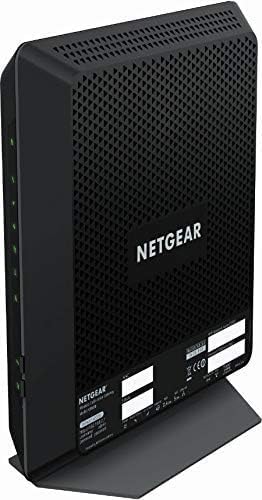
Зураг: урд ба хажуу view of the Netgear C6900-100NAR Nighthawk AC1900 Cable Modem Router, showing its vertical design and ventilation.
Ажиллаж байна
1. LED индикаторуудыг ойлгох нь
The LEDs on the front panel provide information about the modem router's status:
- Эрчим хүчний LED: Solid green indicates power is on. Blinking indicates a startup sequence.
- Урсгал доош/дээш урсгалын LED гэрэл: Solid green indicates a successful connection to the cable network. Blinking indicates scanning for a connection.
- Онлайн LED: Solid green indicates successful internet connection. Blinking indicates connection in progress.
- 2.4 GHz Wi-Fi LED: Solid green indicates the 2.4 GHz Wi-Fi radio is on. Blinking indicates activity.
- 5 GHz Wi-Fi LED: Solid green indicates the 5 GHz Wi-Fi radio is on. Blinking indicates activity.
- Ethernet LED (1-4): Solid green indicates a device is connected to that port. Blinking indicates data activity.
2. Accessing Router Settings
To customize your network settings, access the modem router's web интерфэйс:
- Нээлттэй a web browser (e.g., Chrome, Firefox, Edge) on a computer or device connected to the modem router (either wired or wirelessly).
- Төрөл
routerlogin.netor192.168.0.1хаягийн мөрөнд оруулаад Enter дарна уу. - Асуухад анхдагч хэрэглэгчийн нэрийг оруулна уу (ихэвчлэн
admin) болон нууц үг (ихэвчлэнpassword). These are also typically found on the device label. - You will now be in the Netgear Genie interface, where you can manage your network settings.
3. Wi-Fi тохиргоо
Within the router settings, you can modify your Wi-Fi network:
- SSID-г өөрчлөх: Navigate to the Wireless section to change your Wi-Fi network names (SSIDs) for both 2.4 GHz and 5 GHz bands.
- Нууц үг солих: Update your Wi-Fi security key (password) for stronger security. WPA2-PSK [AES] is recommended.
- Зочин сүлжээ: Зочдод зориулсан тусдаа зочны сүлжээг идэвхжүүлж, үндсэн сүлжээгээ аюулгүй байлгаарай.
The C6900-100NAR features a 1.6GHz combined processor speed, enhancing performance for demanding tasks like streaming and gaming across its dual-band AC1900 Wi-Fi.
Засвар үйлчилгээ
1. Програм хангамжийн шинэчлэлтүүд
Regularly updating the firmware ensures optimal performance, security, and access to new features. You can usually check for and install updates through the router's web interface under the 'Advanced' or 'Administration' section.
2. Төхөөрөмжийг дахин эхлүүлж байна
If you experience connectivity issues or slow performance, a simple restart can often resolve the problem:
- Unplug the power adapter from the modem router.
- Wait for at least 10-15 seconds.
- Тэжээлийн адаптерийг дахин залгаарай.
- Wait for the modem router to fully boot up and reconnect to the internet (Online LED solid).
3. Цэвэрлэгээ
Keep the modem router in a well-ventilated area. Periodically clean the exterior with a soft, dry cloth. Avoid using liquid cleaners or aerosols directly on the device.
Алдааг олж засварлах
1. Нийтлэг асуудлууд
- Интернет холболт байхгүй:
- Бүх кабелийн холболтыг шалгана уу (коаксиаль, Ethernet, цахилгаан).
- Verify LED indicators: Power, Downstream, Upstream, and Online LEDs should be solid. If the Online LED is blinking or off, contact your ISP.
- Restart the modem router (see Maintenance section).
- Confirm ISP activation is complete.
- Удаан Wi-Fi хурд эсвэл байнга салгах:
- Ensure the modem router is centrally located and not obstructed by large objects or other electronics.
- Try connecting to the 5 GHz Wi-Fi band for faster speeds, if your device supports it and is close to the router.
- Програм хангамжийн шинэчлэлт байгаа эсэхийг шалгана уу.
- Reduce interference by changing Wi-Fi channels in the router settings.
- Чиглүүлэгчийн тохиргоонд хандах боломжгүй:
- Ensure your device is connected to the modem router's network.
- Та зөв IP хаяг ашиглаж байгаа эсэхээ шалгана уу (
routerlogin.netor192.168.0.1) and credentials. - Хөтөчийнхөө кэшийг цэвэрлэх эсвэл өөр хөтөч ашиглаж үзнэ үү.
2. Үйлдвэрийн тохиргоонд дахин тохируулах
If issues persist, a factory reset can restore the modem router to its original settings. Warning: This will erase all custom configurations, including Wi-Fi names and passwords.
- With the modem router powered on, locate the Reset button (often a small pinhole) on the back panel.
- Use a paperclip or similar pointed object to press and hold the Reset button for about 7-10 seconds.
- Release the button when the LEDs start to flash.
- Allow the modem router to restart. You will need to reconfigure your settings or use the default Wi-Fi credentials.
Үзүүлэлтүүд
| Онцлог | Тодорхойлолт |
|---|---|
| Брэнд | NETGEAR |
| Загварын нэр | C6900-100NAR |
| Утасгүй төрөл | 802.11ac |
| Давтамжийн зурвасын ангилал | Хос зурвас (2.4 GHz & 5 GHz) |
| Холболтын технологи | Wi-Fi, Ethernet, Coaxial |
| Тохиромжтой төхөөрөмжүүд | Personal Computer, Gaming Consoles, Mobile Devices |
| Зөвлөмж болгож буй хэрэглээ | Gaming, Streaming, General Internet Use |
| Зүйлийн жин | 4.07 фунт |
| Багцын хэмжээ | 16.06 x 12.52 x 4.76 инч |
| Ботьtage | 100-240 вольт (AC) |
| Антенны төрөл | Дотоод |
| Онцлог шинж чанар | DOCSIS 3.0 Cable Modem, WiFi Cable Modem Router |
Баталгаат болон дэмжлэг
For warranty information, please refer to the documentation provided with your product at the time of purchase or visit the official NETGEAR support website. NETGEAR provides technical support and resources for their products.
If you encounter issues that cannot be resolved using this manual, please visit the NETGEAR дэмжлэг webсайт or contact their customer service for assistance. Ensure you have your model number (C6900-100NAR) and serial number ready when contacting support.


