Танилцуулга
This manual provides detailed instructions for the setup, operation, and maintenance of your Sunbuck TAV-339BT Wireless Karaoke Bluetooth Power Amplifier System. This 2-channel stereo amplifier is designed for home audio and karaoke applications, featuring Bluetooth connectivity, USB/SD card playback, FM radio, and dual microphone inputs. Please read this manual thoroughly before using the product to ensure proper operation and to prevent damage.

Зураг 1: Урд view of the Sunbuck TAV-339BT amplifier. This image displays the main unit with its various controls and inputs on the front panel, including the power switch, microphone inputs, volume knobs, and digital display.
Аюулгүй байдлын мэдээлэл
- Эрчим хүчний эх үүсвэр: -г холбоно уу amplifier only to the specified power supply (AC 110V or DC 12V 5A). Ensure the voltage matches the requirements before plugging in.
- Агааржуулалт: Агааржуулалтын нүхийг хааж болохгүй. Хэт халалтаас урьдчилан сэргийлэхийн тулд төхөөрөмжийн эргэн тойронд хангалттай агаарын урсгалыг хангана.
- Ус ба чийг: Төхөөрөмжийг бороо, чийг, дусаах/цацах шингэнд бүү тавь. Ваар зэрэг шингэнээр дүүрсэн зүйлийг төхөөрөмж дээр тавьж болохгүй.
- Дулааны эх үүсвэрүүд: Төхөөрөмжийг радиатор, халаалтын төхөөрөмж, зуух эсвэл бусад төхөөрөмж (үүнд орно) гэх мэт дулааны эх үүсвэрээс хол байлга. ampөргөгч) дулаан үүсгэдэг.
- Цэвэрлэгээ: Unplug the unit from the power outlet before cleaning. Use a dry cloth for cleaning.
- Үйлчилгээ: Энэ бүтээгдэхүүнд өөрөө үйлчлэх гэж бүү оролдоорой. Бүх засвар үйлчилгээг мэргэшсэн үйлчилгээний ажилтнуудад хандаарай.
- Хүүхдүүд: Keep the unit and its accessories out of reach of children.
Багцын агуулга
Дараах зүйлсийн багцад байгаа эсэхийг шалгана уу.
- 1 x Sunbuck TAV-339BT Ampөргөгч (110V)
- 1 x Алсын удирдлага
- 1 х хэрэглэгчийн гарын авлага
Бүтээгдэхүүний онцлог
- Compact and powerful 2-channel stereo ampөргөх систем.
- Integrated Bluetooth for wireless audio streaming from compatible devices (smartphones, tablets, PCs).
- Supports USB flash drive and SD memory card playback.
- Суурилуулсан FM радио тааруулагч.
- Dual 1/4-inch microphone input jacks for karaoke functions.
- RCA (L/R) audio input for external devices.
- Front panel controls for master volume, bass, treble, microphone volume, echo, and microphone bass/treble.
- Traditional VU meter display.
- Тохиромжтой ажиллуулахын тулд алсын удирдлага багтсан болно.
Урд талын самбар дээрview
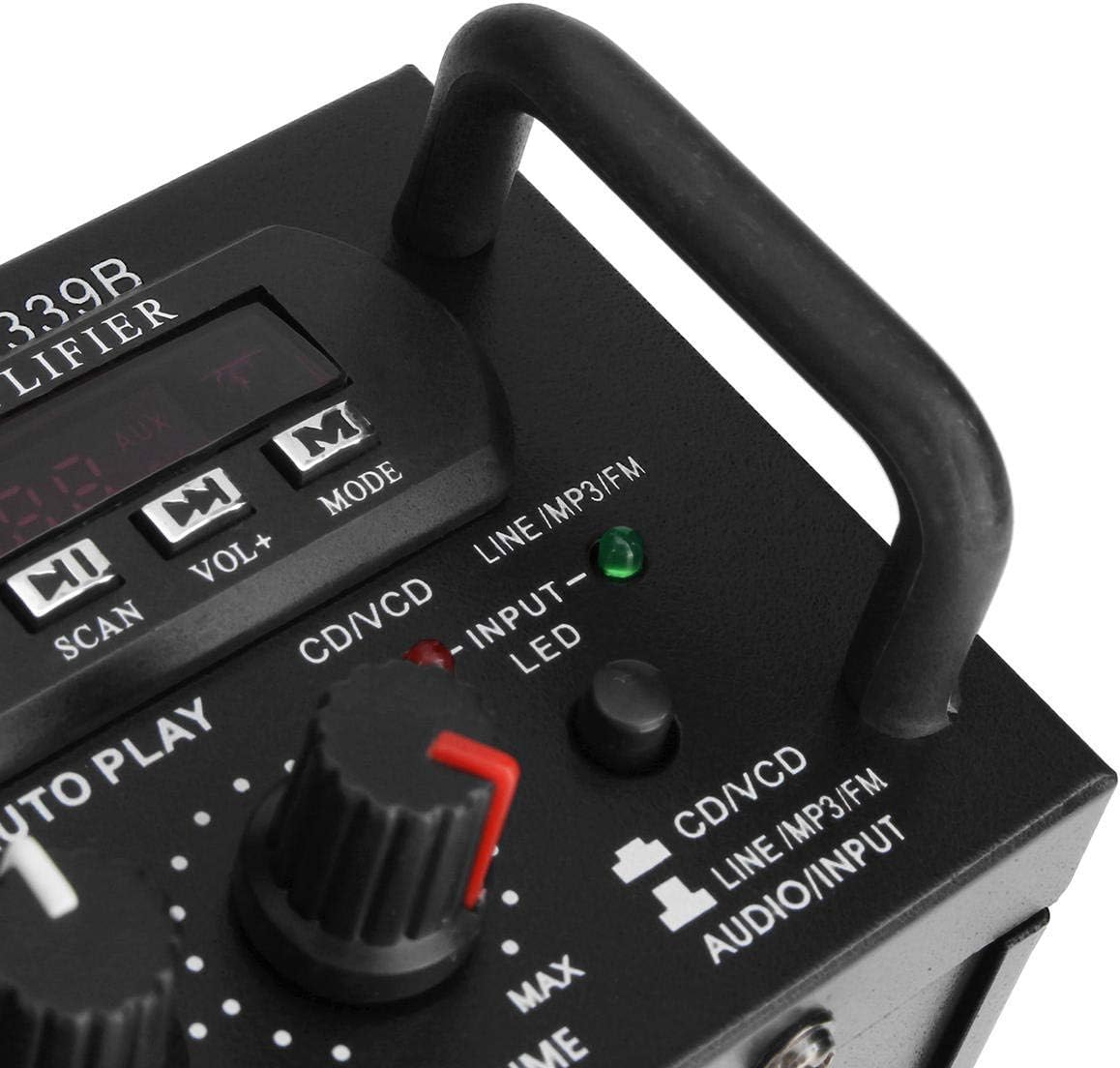
Зураг 2: Нарийвчилсан view -ийн amplifier's front panel, highlighting the various knobs, buttons, and input ports.
- POWER унтраалга: эргүүлнэ ampилүү амьд асаах эсвэл унтраах.
- ECHO Control: Микрофоны цуурай эффектийг тохируулна.
- MIC1/MIC2 Input: 1/4-inch jacks for connecting microphones.
- M.BASS/M.TREBLE: Adjusts bass and treble for microphone input.
- MIC/VOL: Adjusts the volume level for microphones.
- VU тоолуур: Displays audio output level.
- USB/SD картны үүр: For connecting USB flash drives or SD memory cards.
- Дижитал дэлгэц: Одоогийн горим, дууны дугаар эсвэл FM давтамжийг харуулна.
- Control Buttons (SCAN, VOL-, VOL+, MODE): For navigating USB/SD/FM functions.
- БАС/ТРебль: Adjusts the main audio bass and treble levels.
- ДУУТГАЛ: Бүх аудио эх үүсвэрийн мастер дууны хяналт.
- INPUT Сонгогч: Cycles through input sources (CD/VCD, LINE, MP3/FM, Bluetooth).
- INPUT LED Indicators: Lights up to show the currently selected input source.
Арын самбар дээрview

Зураг 3: Ар талд view -ийн amplifier, showing the various input and output terminals for connecting speakers and audio sources.
- INPUT (CD/VCD, LINE): RCA (L/R) audio input jacks for connecting external audio sources like CD/DVD players, TVs, or other line-level devices.
- ЯРИГЧИЙН СИСТЕМ: Spring clip terminals for connecting passive speakers. Ensure correct polarity (+ to + and - to -).
- POWER DC 12V INPUT: DC power input for 12V power supply (e.g., car battery, not included).
- AC 110V 60Hz: AC power input for standard household power.
- FM антен: Connector for the included FM antenna.
Алсын удирдлага дууссанview
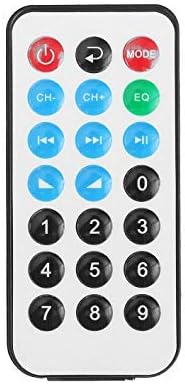
Figure 4: Layout of the remote control buttons.
The remote control allows for convenient operation of the amplifier's functions from a distance. It typically includes buttons for power, mode selection, volume adjustment, track navigation (for USB/SD), and FM radio controls.
Алсын удирдлагад зориулсан батерей суурилуулах

Figure 5: Step-by-step guide for installing the CR2025 lithium battery into the remote control.
The remote control requires a CR2025 lithium battery (3V). To install or replace the battery:
- Алсын удирдлагын ар талд байгаа зайны тасалгааг ол.
- Push the small tab to release the battery tray.
- Батерейны тавиурыг шургуул.
- CR2025 батерейг эерэг (+) талыг дээш харуулан оруулна.
- Slide the battery tray back into the remote until it clicks into place.
Тохиргоо
1. Чанга яригчийн холболт
Connect your passive speakers to the "SPEAKER SYSTEM" terminals on the rear panel. Ensure that the positive (+) terminal of the amplifier connects to the positive (+) terminal of the speaker, and the negative (-) terminal of the amplifier connects to the negative (-) terminal of the speaker. Incorrect polarity can affect sound quality.
2. Аудио оролтын холболт
- RCA Inputs (CD/VCD, LINE): Use RCA cables to connect external audio sources (e.g., CD player, DVD player, TV audio output) to the corresponding "INPUT" jacks on the rear panel.
- USB/SD карт: Insert a USB flash drive or SD memory card into the respective slot on the front panel.
- Bluetooth: No physical connection is needed for Bluetooth. Refer to the "Operating Instructions" section for pairing.
3. Микрофон холболт
Connect up to two 1/4-inch microphones to the "MIC1" and "MIC2" input jacks on the front panel for karaoke use.
4. FM антенны холболт
Connect the included FM antenna to the FM antenna terminal on the rear panel for improved radio reception.
5. Эрчим хүчний холболт
Connect the power cord to the AC 110V 60Hz input on the rear panel and then plug it into a standard wall outlet. Alternatively, for DC operation, connect a 12V DC power source (not included) to the "POWER DC 12V INPUT" terminals.
Ашиглалтын заавар
1. Асаах/унтраах
Press the "POWER" switch on the front panel to turn the amplifier on or off. The digital display will illuminate when the unit is powered on.
2. Эх сурвалжийн сонголт
Press the "INPUT" button on the front panel or the "MODE" button on the remote control to cycle through available input sources: CD/VCD, LINE, MP3/FM, and Bluetooth. The corresponding LED indicator on the front panel will light up.
3. Bluetooth-ийн ажиллагаа
- Select "Bluetooth" as the input source using the "INPUT" or "MODE" button. The digital display will show "BLUE" or a similar indicator.
- Enable Bluetooth on your mobile device (smartphone, tablet, PC).
- хайх available Bluetooth devices and select "TAV-339BT" or "Sunbuck" from the list.
- Хослуулсны дараа та төхөөрөмжөөсөө аудиог утасгүйгээр дамжуулах боломжтой ampнастан.
4. USB/SD картыг тоглуулах
- Insert a USB flash drive or SD card containing MP3 audio files into the respective slot on the front panel.
- Select "MP3/FM" as the input source. The amplifier will automatically detect and begin playing audio files.
- Use the "SCAN", "VOL-", "VOL+" buttons on the front panel or the corresponding buttons on the remote control to navigate tracks (play/pause, next/previous).
5. FM радиогийн ажиллагаа
- FM антенн холбогдсон эсэхийг шалгана уу.
- Select "MP3/FM" as the input source.
- Press the "SCAN" button to automatically scan and store available FM radio stations.
- Use the "VOL-" and "VOL+" buttons (or remote control) to manually tune or select stored stations.
6. Караоке функц
- Connect microphones to the "MIC1" and "MIC2" jacks.
- Adjust the "MIC/VOL" knob to control the microphone volume.
- Use the "ECHO" knob to add an echo effect to the vocals.
- Adjust "M.BASS" and "M.TREBLE" to fine-tune the microphone's tone.
7. Дууны түвшин болон аяыг хянах
- ДУУТГАЛ: Use the large "VOLUME" knob on the front panel to adjust the overall output volume.
- БАС/ТРебль: Use the "BASS" and "TREBLE" knobs to adjust the low and high frequencies of the main audio output.
Засвар үйлчилгээ
- Цэвэрлэгээ: Disconnect the power before cleaning. Use a soft, dry cloth to wipe the exterior of the unit. Do not use liquid cleaners or aerosol cleaners.
- Агааржуулалт: Ensure that the ventilation openings are clear of dust and debris to maintain proper cooling.
- Хадгалах: Хэрэв төхөөрөмжийг удаан хугацаагаар хадгалах бол цахилгаан тэжээлээс салгаж, сэрүүн, хуурай газар хадгална уу.
Алдааг олж засварлах
| Асуудал | Боломжит шалтгаан | Шийдэл |
|---|---|---|
| Хүч чадалгүй | Цахилгааны утас холбогдоогүй байна; Цахилгаан унтраалга унтарсан; Залгаас цахилгаан байхгүй байна. | Ensure power cord is securely connected. Turn the POWER switch on. Check the power outlet with another device. |
| Дууны гаралт байхгүй | Incorrect input source selected; Speaker wires loose or incorrectly connected; Volume too low; Mute activated (if applicable). | Select the correct input source. Check speaker connections and polarity. Increase the VOLUME. Ensure no mute function is active. |
| Bluetooth холбогдоогүй байна | Amplifier not in Bluetooth mode; Device too far; Device already connected to another amplifier; Bluetooth on device is off. | Select Bluetooth input on the amplifier. Move device closer. Disconnect from other devices. Enable Bluetooth on your device. |
| USB/SD карт тоглохгүй байна | Incorrect input source; Files not in supported format (MP3); USB/SD card corrupted or empty. | Select MP3/FM input. Ensure files are MP3 format. Try another USB/SD card. |
| Алсын удирдлага ажиллахгүй байна | Battery depleted or incorrectly installed; Obstruction between remote and ampөргөгч; Алсын мэдрэгч хаагдсан. | Replace battery (CR2025) and ensure correct polarity. Remove any obstructions. Ensure the remote sensor on the ampөргөгч нь тунгалаг байна. |
Үзүүлэлтүүд
| Онцлог | Дэлгэрэнгүй |
|---|---|
| Загвар | TAV-339BT |
| Нэрлэсэн эсэргүүцэл | 4-8 Ом |
| RMS цахилгаан гаралт | 200W + 200W (Recommended for speaker boxes with speakers less than 8") |
| Peak Music Power Output (P.M.P.O) | 300W + 300W (Нийт 600W) |
| Эрчим хүчний хангамж | AC: 110V 60Hz or DC: 12V 5A |
| Сувгууд | 2 суваг |
| Аудио оролт | Multi-channel signal input (RCA L/R), USB, SD, Bluetooth |
| Микрофоны оролт | Dual 1/4-inch Jack |
| Холболтын технологи | Bluetooth, USB, RCA |
| Утасгүй төрөл | Bluetooth, Infrared (for remote) |
| Бүтээгдэхүүний хэмжээ (L x W x H) | 25.4 x 20.32 x 7.01 см (10 x 8 x 2.76 инч) |
| Бүтээгдэхүүний жин | 2.72 кг (6 фунт) |
| Тохиромжтой төхөөрөмжүүд | Headphones, Laptops, Smartphones |
Баталгаат болон дэмжлэг
Баталгаат хугацааны мэдээлэл эсвэл техникийн дэмжлэг авахыг хүсвэл худалдан авалт хийх үед өгсөн баримт бичгийг үзнэ үү эсвэл жижиглэн худалдаа эрхлэгчтэйгээ холбогдоно уу. Баталгаат хугацааны нэхэмжлэл гаргахын тулд худалдан авалтын баримтаа хадгална уу.


