Бүтээгдэхүүн дууссанview
The Marantz SR5014 7.2 channel 4K Ultra HD AV receiver is designed to deliver a refined surround sound home theater experience. It supports advanced object-based audio formats and offers high-definition video processing with superior connectivity. Tuned by world-renowned acousticians, the SR5014 produces musical sound from various sources, including vinyl and digital streaming. It provides immersive audio with Dolby Atmos, Dolby Atmos Height Virtualization Technology, DTS:X, and DTS Virtual:X. The receiver also supports voice control via Amazon Alexa, Google Assistant, and Apple Siri, and allows music streaming from popular services through Bluetooth, AirPlay 2, or the HEOS app.
Гол онцлогууд
- 7.2 сувгийн салангид хүч Ampамь нас: Refine your surround sound home theater experience with advanced object-based audio formats, high definition video processing, and superior connectivity.
- Make the Most of Your 4K Ultra HD TV Investment: Drive exceptional visual clarity with full-rate pass-through, SD/HD video upscaling to UHD, 4:4:4 Pure Color sub-sampling, HDR10, BT.2020, 3D, 21:9 video, Dolby Vision, and HLG.
- Complement Premium Video with the Ultimate Cinematic Audio Experience: 100W per channel high power and latest audio formats including Dolby Atmos, DTS:X, DTS Virtual:X, and Dolby Atmos Height Virtualization Technology for a virtually heightened realism effect.
- Versatile HDMI eARC Connectivity: All 8 HDMI inputs support HDCP 2.3 Digital Content Protection, including 1 front-panel input for quick connections. Includes 2 HDMI outputs with 1 offering full eARC support.
- Effortless Voice Control with Leading Voice Agents: Use your voice to play, pause and stop music, switch inputs, turn the volume up & more with all major voice agents like Alexa, Siri and including, including the top smart home automation systems.
- Stream Unlimited Music or Videos: Using popular services like Spotify, TuneIn, Deezer, Tidal, Netflix, Amazon Prime & others via Bluetooth, AirPlay 2, or HEOS app across one room, or multiple rooms with built-in WIRELESS HEOS MULTI-ROOM AUDIO TECHNOLOGY.
- Easy-to-Understand and User-Friendly Setup Assistant: Comes with an advanced graphical user interface that guides you through the step-by-step process and connects all your audio sources to this stereo receiver.
Багцын агуулга
Багцыг нээхдээ доор жагсаасан бүх зүйл байгаа бөгөөд сайн нөхцөлд байгаа эсэхийг шалгана уу.
- Marantz SR5014 AV Receiver
- Алсын удирдлага
- 2 AA Batteries (for remote controller)
- Түргэн эхлүүлэх гарын авлага
Тохируулах гарын авлага
Энэ хэсэгт ерөнхий мэдээлэл өгдөгview of the setup process. For detailed, step-by-step instructions, please refer to the comprehensive User Manual PDF linked in the "Warranty and Support" section.
- Савлах: Хүлээн авагч болон бүх дагалдах хэрэгслийг савлагаанаас болгоомжтой авч хая.
- Байршил: Place the receiver on a stable, flat surface with adequate ventilation. Ensure there is enough space around the unit for proper airflow.
- Чанга яригчийн холболт: Connect your speakers to the appropriate speaker terminals on the rear of the receiver. Pay attention to polarity (+/-) for each speaker. The SR5014 supports 7.2 channels.
- Эх сурвалж төхөөрөмжийн холболт: Connect your audio/video source devices (e.g., Blu-ray player, game console, cable/satellite box) to the HDMI input ports. Use high-quality HDMI cables for optimal performance.
- ТВ холболт: Connect the HDMI OUT (ARC/eARC) port on the receiver to the corresponding HDMI input on your television.
- Эрчим хүчний холболт: Цахилгааны утсыг хүлээн авагч руу, дараа нь ханын залгуурт залгаарай.
- Анхны тохиргооны туслах: Turn on the receiver and follow the on-screen instructions provided by the Marantz Setup Assistant. This guide will help you configure network settings, speaker calibration (Audyssey MultEQ XT), and input assignments.
Үйл ажиллагаа
Once the receiver is set up, you can begin enjoying your audio and video content. For detailed operational procedures, refer to the full User Manual PDF.
- Асаах/унтраах: Use the power button on the front panel or the remote control to turn the unit on or off.
- Оролтын сонголт: Select the desired input source (e.g., Blu-ray, Game, CBL/SAT) using the input selector knob on the front panel or the dedicated buttons on the remote control.
- Дууны хяналт: Урд талын самбар дээрх том товчлуур эсвэл алсын удирдлага дээрх VOLUME +/- товчлууруудыг ашиглан үндсэн дууны түвшинг тохируулна уу.
- Дууны горимууд: Explore various sound modes (e.g., Stereo, Multi-Channel Stereo, Dolby Atmos, DTS:X) to optimize your listening experience for different content types.
- Сүлжээний онцлогууд: Access streaming services, internet radio, and HEOS multi-room audio via the network connection. Control these features using the HEOS app on your smartphone or tablet.
- Дуут удирдлага: If configured, use compatible voice assistants (Amazon Alexa, Google Assistant, Apple Siri) to control basic functions of the receiver.
Засвар үйлчилгээ
Proper maintenance ensures the longevity and optimal performance of your Marantz SR5014 AV Receiver.
- Цэвэрлэгээ: Regularly wipe the exterior of the receiver with a soft, dry cloth. Avoid using abrasive cleaners, waxes, or solvents.
- Агааржуулалт: Хүлээн авагчийн дээд ба хажуугийн агааржуулалтын нүхийг бөглөөгүй эсэхийг шалгаарай. Хэт халалтаас урьдчилан сэргийлэхийн тулд агаарын зөв урсгал нь маш чухал юм.
- Тоосжилт: Periodically use a soft brush or a low-power vacuum cleaner to remove dust from the vents and surfaces.
- Кабелийн менежмент: Keep cables neatly organized and ensure they are not kinked or pinched, which can affect signal quality or cause damage.
- Програм хангамжийн шинэчлэлтүүд: Check for and install available firmware updates to ensure your receiver has the latest features and performance enhancements. This can typically be done through the receiver's network settings.
Алдааг олж засварлах
If you encounter issues with your Marantz SR5014, refer to the following common troubleshooting steps. For more complex problems, consult the detailed troubleshooting section in the full User Manual PDF.
- Эрчим хүчгүй:
- Check if the power cord is securely plugged into the receiver and the wall outlet.
- Цахилгааны залгуур ажиллаж байгаа эсэхийг шалгаарай.
- Дуугүй:
- Зөв оролтын эх үүсвэр сонгогдсон эсэхийг шалгана уу.
- Check speaker connections and ensure speaker wires are properly connected to both the receiver and speakers.
- Confirm that the volume is not muted or set too low.
- Check audio output settings on your source device (e.g., TV, Blu-ray player).
- Зураг байхгүй:
- Ensure HDMI cables are securely connected between the source, receiver, and TV.
- Verify that the correct HDMI input on your TV is selected.
- Check the HDMI output settings on the receiver and source device.
- Сүлжээний холболтын асуудлууд:
- Чиглүүлэгч болон модемоо дахин эхлүүлнэ үү.
- Ensure the Ethernet cable is securely connected if using a wired connection, or check Wi-Fi settings if using wireless.
- Perform a network diagnostic test through the receiver's setup menu.
- Алсын удирдлага ажиллахгүй байна:
- Алсын удирдлага дахь батерейг солино уу.
- Алсын удирдлага болон хүлээн авагчийн IR мэдрэгчийн хооронд ямар ч саад бэрхшээл байхгүй эсэхийг шалгаарай.
- Үйлдвэрийн анхны байдал: As a last resort for persistent issues, a factory reset can resolve many problems. Refer to the User Manual for instructions on how to perform a factory reset, as this will erase all custom settings.
Техникийн үзүүлэлтүүд
| Онцлог | Тодорхойлолт |
|---|---|
| Бүтээгдэхүүний хэмжээс | 13.38 x 17.38 x 6.38 инч |
| Зүйлийн жин | 26.1 фунт |
| Үйлдвэрлэгч | Маранц |
| ASIN | B07SW88DXR |
| Загварын дугаар | SR5014 |
| Батерей | 2 АА батерей шаардлагатай (дагсан) |
| Эхний боломжтой огноо | 10 оны долдугаар сарын 2019 |
| Брэнд | Маранц |
| Холболтын технологи | Bluetooth, HDMI |
| Хянагчийн төрөл | Amazon Alexa, Google туслах |
| Онцлог шинж чанар | Амазоны хөгжим |
| Тохиромжтой төхөөрөмжүүд | Телевиз, Илтгэгч |
| Нийт HDMI портууд | 7 |
| Холбогч төрөл | HDMI |
| Аудио кодчилол | Стерео |
| Аудио гаралтын горим | Хүрээлэн |
| Хүрээлэн буй орчны дууны сувгийн тохиргоо | 7.2 |
Бүтээгдэхүүний дүрслэл
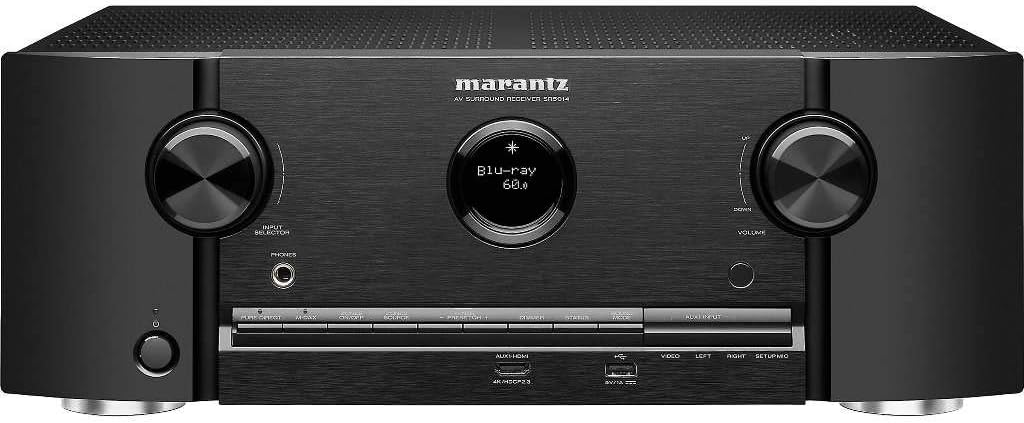
Урд view Marantz SR5014 AV хүлээн авагчийн, showcasing its sleek design with two large control knobs for input selection and volume, a central display, and front-panel inputs.

Rear panel of the Marantz SR5014 AV Receiver, displaying a comprehensive array of input and output ports, including multiple HDMI, analog audio, digital audio, and speaker terminals for a 7.2 channel setup.

Дотоод view of the Marantz SR5014 AV Receiver, showing the meticulously arranged circuit boards and components, highlighting the quality engineering within the unit.

The included remote control for the Marantz SR5014 AV Receiver, featuring clearly labeled buttons for power, input selection, volume, navigation, and sound modes.
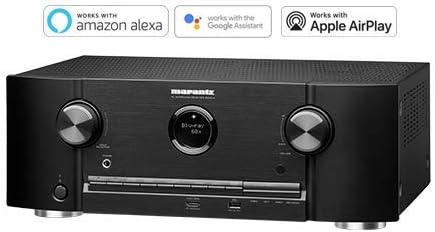
The Marantz SR5014 AV Receiver displayed alongside logos indicating compatibility with Amazon Alexa, Google Assistant, and Apple AirPlay for convenient voice control and streaming.
Баталгаат болон дэмжлэг
Marantz products are designed for reliability and performance. For detailed warranty information, please refer to the warranty card included with your product or contact Marantz customer support.
For comprehensive instructions, detailed setup guides, advanced features, and in-depth troubleshooting, please download the full User Manual PDF:
Хэрэглэгчийн бүрэн гарын авлагыг (PDF) татаж авах
For further assistance, please visit the official Marantz support webсайт эсвэл харилцагчийн үйлчилгээтэй холбогдоно уу.


