1. Танилцуулга
Thank you for choosing the Greadio Retro Bluetooth Speaker and Vintage FM Radio. This manual provides essential information for the safe and efficient operation of your device. Please read it thoroughly before use and retain it for future reference.
2. Аюулгүй байдлын мэдээлэл
- Төхөөрөмжийг ус, чийг, хэт өндөр температурт бүү тавь.
- Төхөөрөмжийг унагах эсвэл хүчтэй нөлөөнд оруулахаас зайлсхий.
- Төхөөрөмжийг өөрөө задлах, засах гэж бүү оролдоорой. Мэргэшсэн үйлчилгээний ажилтантай холбоо барина уу.
- Хүүхдийн гар хүрэхгүй газар хадгална.
- Зөвхөн өгсөн цэнэглэгч кабелийг ашиглана уу.
3. Багцын агуулга
Бүх зүйл багцад байгаа эсэхийг шалгана уу:
- Greadio Retro Bluetooth Speaker (Model GR919P)
- USB цэнэглэгч кабель
- AUX кабель
- Хэрэглэгчийн гарын авлага

Image: Greadio Retro Bluetooth Speaker (Pink) with its charging cable, AUX cable, and user manual.
4. Бүтээгдэхүүн дууссанview
Familiarize yourself with the main components and controls of your Greadio Retro Bluetooth Speaker.

Image: Front panel of the speaker, showing the speaker, frequency scale, tuning knob, volume knob, and ON/OFF & Function knob.

Image: Rear panel of the speaker, showing the Micro USB port, TF card socket, Play/Pause button, and Previous/Next buttons.
Гол онцлогууд:
- Компакт хэмжээ: Measures 4.4 x 2.7 x 2 inches, making it highly portable.
- Чанга дууны түвшин: Equipped with a five-watt amplifier for rich and clear audio.
- Bluetooth 5.0: Advanced wireless connectivity for quick pairing.
- Олон горимын тоглуулах: Supports FM Radio, Bluetooth, TF Card, and AUX input.
- Цэнэглэдэг батерей: Provides up to 9 hours of playtime.
5. Тохиргоо
5.1 Анхны цэнэглэлт
Before first use, fully charge the speaker. Connect the provided USB charging cable to the Micro USB port on the back of the speaker and plug the other end into a USB power adapter (not included) or a computer's USB port. The charging indicator light will illuminate during charging and turn off when fully charged.
5.2 Асаах/унтраах
To power on the speaker, rotate the ON/OFF & Function knob clockwise until you hear a click and the display lights up. To power off, rotate the knob counter-clockwise until it clicks off.
6. Үйлдлийн горимууд
The Greadio Retro Bluetooth Speaker supports multiple playback modes. Rotate the ON/OFF & Function knob to switch between modes.
6.1 Bluetooth горим
In Bluetooth mode, the speaker can connect wirelessly to your smartphone, tablet, or other Bluetooth-enabled devices.
- Turn on the speaker and switch to Bluetooth mode. The display will show a blue light, indicating it's ready for pairing.
- On your device, enable Bluetooth and search for "Greadio" or "R919".
- Хослуулахын тулд жагсаалтаас чанга яригчийг сонгоно уу. Баталгаажуулах дуу нь амжилттай хослуулсаныг илтгэнэ.
- Та одоо чанга яригчаар дамжуулан төхөөрөмжөөсөө аудио тоглуулах боломжтой.

Image: The speaker's dial illuminated in blue, signifying Bluetooth mode is active.
Video: Demonstrates how to connect the Greadio Bluetooth Speaker to a smartphone via Bluetooth, showing the pairing process and audio playback.
6.2 FM радио горим
Enjoy your favorite FM radio stations with the vintage-style tuner.
- Turn on the speaker and switch to FM Radio mode. The display will show an orange light.
- Rotate the Tuning Knob (large central knob) to scan for available FM stations.
- Adjust the Volume Knob (smaller knob) to your desired listening level.

Image: The speaker's dial illuminated in orange, signifying FM radio mode is active.
6.3 TF картын горим
TF (MicroSD) картаас шууд хөгжим тоглуулна.
- MP3 аудиотой TF карт (32GB хүртэлх багтаамжтай, дагалдахгүй) оруулна уу files into the TF card socket on the back of the speaker.
- The speaker will automatically switch to TF Card mode and begin playback.
- Use the Play/Pause button and Previous/Next buttons on the back to control playback.

Image: The TF card slot located on the rear of the speaker for direct music playback.
6.4 AUX горим
AUX кабель ашиглан гадаад аудио төхөөрөмжүүдийг холбоно уу.
- Connect one end of the provided AUX cable to the AUX port on the back of the speaker.
- Connect the other end to the audio output of your external device (e.g., MP3 player, computer).
- The speaker will automatically switch to AUX mode. Play audio from your external device.

Image: The AUX port on the rear of the speaker for wired audio connections.
7. Цэнэглэх
The speaker features a built-in 1100mAh rechargeable Lithium Ion battery. When the battery is low, the speaker will indicate this (e.g., voice prompt). Connect the Micro USB charging cable to a 5V/1A USB power source to recharge. A full charge typically takes 3-4 hours and provides up to 9 hours of playback time, depending on volume and mode.
8. Засвар үйлчилгээ
- Чанга яригчийг зөөлөн, хуурай даавуугаар цэвэрлэ. Зүлгүүрийн цэвэрлэгч, уусгагчийг бүү ашигла.
- Чанга яригчийг нарны шууд тусгал, хэт температураас хол, сэрүүн, хуурай газар хадгална уу.
- If not used for extended periods, charge the battery at least once every three months to prolong its lifespan.
9. Алдаа засах
| Асуудал | Боломжит шалтгаан | Шийдэл |
|---|---|---|
| Чанга яригч асахгүй байна. | Батерей бага. | Чанга яригчийг бүрэн цэнэглэ. |
| Bluetooth горимд дуу гарахгүй. | Not paired or volume too low. | Ensure device is paired and volume is up on both speaker and source device. |
| FM радио хүлээн авах чадвар муу. | Сул дохио эсвэл хөндлөнгийн оролцоо. | Adjust the speaker's position or rotate for better reception. The charging cable can act as an antenna. |
| TF карт тоглогдохгүй байна. | Card not inserted correctly or unsupported file формат. | TF картыг дахин оруулна уу. Баталгаажуулна уу files нь MP3 форматтай байна. |
10. Техникийн үзүүлэлтүүд
- Загварын дугаар: GR919P
- Бүтээгдэхүүний хэмжээ: 4.4 x 2.7 x 2 инч
- Барааны жин: 7.7 унц
- Холболтын технологи: Bluetooth 5.0
- Тохируулагч технологи: FM
- Эрчим хүчний эх үүсвэр: Батерейгаар ажилладаг (1 лити ион батерей багтсан)
- Онцлог шинж чанар: Цэнэглэдэг
- Үйлдвэрлэгч: Гредио
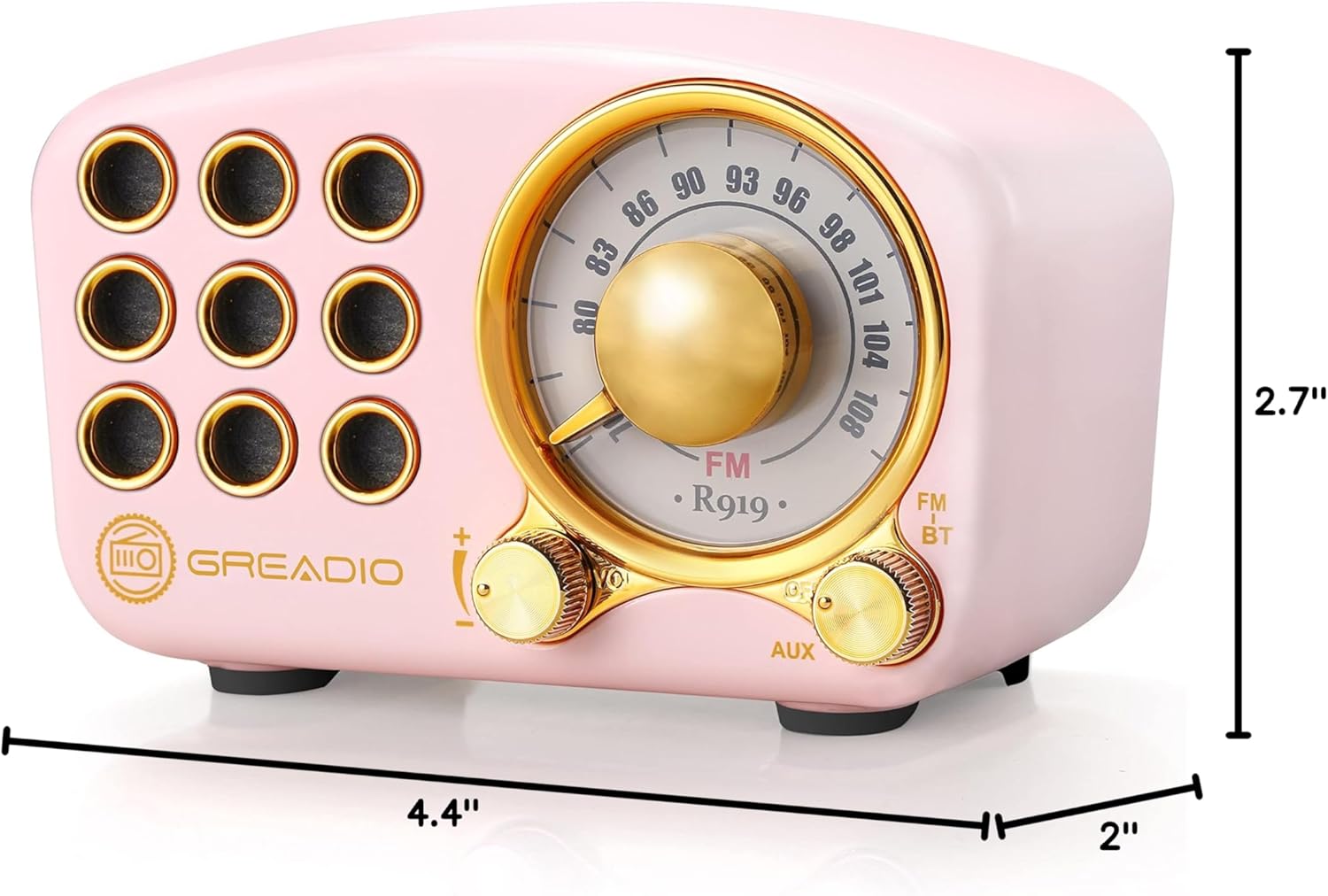
Image: Dimensions of the Greadio Retro Bluetooth Speaker.
11. Баталгаат хугацаа ба дэмжлэг
Greadio products are designed for reliability and performance. For warranty information or technical support, please refer to the contact details provided on the product packaging or visit the official Greadio webсайт. Худалдан авалтын баримтаа худалдан авалтын баталгаа болгон хадгалаарай.


