1. Танилцуулга
The Victron Energy Blue Smart Marine Battery Charger IP67 12V 25A is a professional battery charger designed for various applications including marine, ATV, RV, and automotive. It features a 7-step charging algorithm, Bluetooth connectivity for monitoring and control via the VictronConnect app, and robust IP67 protection against water, dust, and chemicals. This manual provides essential information for the safe and efficient use of your charger.

Figure 1: Victron Energy Blue Smart IP67 12V 25A Battery Charger with Bluetooth connectivity.
2. Аюулгүй байдлын мэдээлэл
АНХААРУУЛГА: Энэ бүтээгдэхүүнийг хэрэглэхийн өмнө бүх аюулгүй байдлын анхааруулга, зааврыг уншина уу. Анхааруулга, зааврыг дагаж мөрдөөгүй тохиолдолд цахилгаанд цохиулах, гал түймэр гарах болон/эсвэл ноцтой гэмтэл бэртэлд хүргэж болзошгүй.
- Always ensure the charger is disconnected from AC power before making or breaking the DC connections to the battery.
- Цэнэглэгчийг агааржуулалт сайтай газар хэрэглээрэй.
- Do not expose the charger to rain or wet conditions if not specifically rated for such environments (this model is IP67 rated, but ensure connections are secure).
- Цэнэглэдэггүй батерейг бүү цэнэглэ.
- Avoid sparks when connecting the battery.
- Хүүхдийн гар хүрэхгүй газар хадгална.
- Энэ бүтээгдэхүүн нь Калифорни мужид хорт хавдар үүсгэх, ургийн гажиг үүсгэх эсвэл нөхөн үржихүйн бусад гэмтэл учруулдаг химийн бодис агуулдаг.
3. Тохиргоо
3.1 Савлах, шалгах
Carefully unpack the charger and inspect it for any damage. Ensure all included components are present.
3.2 Суурилуулалт
The IP67 rating allows for use in harsh environments. Mount the charger securely in a location that allows for adequate cable routing and access to connections. While IP67 rated, avoid submerging the unit unless necessary and ensure all connections are sealed.

Figure 2: The IP67 rated charger is resistant to water, oil, dirt, and chemicals.
3.3 Цахилгааны холболтууд
- DC холболт: Connect the charger's DC output cables (red for positive, black for negative) to your battery terminals. Ensure a secure and tight connection.
- Хувьсах гүйдлийн холболт: Plug the charger's AC input cable into a standard 120VAC NEMA 5-15 outlet. The charger will automatically begin its charging process or enter power supply mode based on its last configuration or default settings.
4. Ашиглалтын заавар
4.1 Charging Algorithm (7-Step)
The charger utilizes an intelligent 7-step charging algorithm to optimize battery health and longevity. This process includes:
- Бөөнөөр: Батерейг шингээх хүртэл хамгийн их гүйдлээр цэнэглэнэtage хүрсэн байна.
- Шингээлт: Тогтмол эзэлхүүнтэй цэнэглэлтtage to fully charge the battery.
- Дахин засварлах: Helps recover deeply discharged or sulfated lead-acid batteries.
- Хөвөгч: Батерейны цэнэг тогтмол түвшинд байлгадагtage to prevent self-discharge.
- Хадгалах: Эзлэхүүнийг бууруулдагtage to minimize gassing and corrosion during long-term storage.
- Additional steps for specific battery types.
4.2 Charging Dead Batteries
The Victron Energy Blue Smart IP67 Charger can attempt to recharge deeply-discharged batteries by applying a low current. Normal charging resumes once sufficient voltage is detected across the battery terminals.

Figure 3: Illustration of the fully discharged battery recovery function for lead-acid and lithium batteries.
4.3 Цахилгаан хангамжийн горим
The charger can also function as a power supply, providing a stable 12V DC output up to 25A without requiring a connected battery. This is useful for powering 12V devices directly from AC power.
4.4 VictronConnect App
The VictronConnect app provides a wireless solution to monitor voltage and current, change settings, and update the charger's firmware. It connects via Bluetooth.
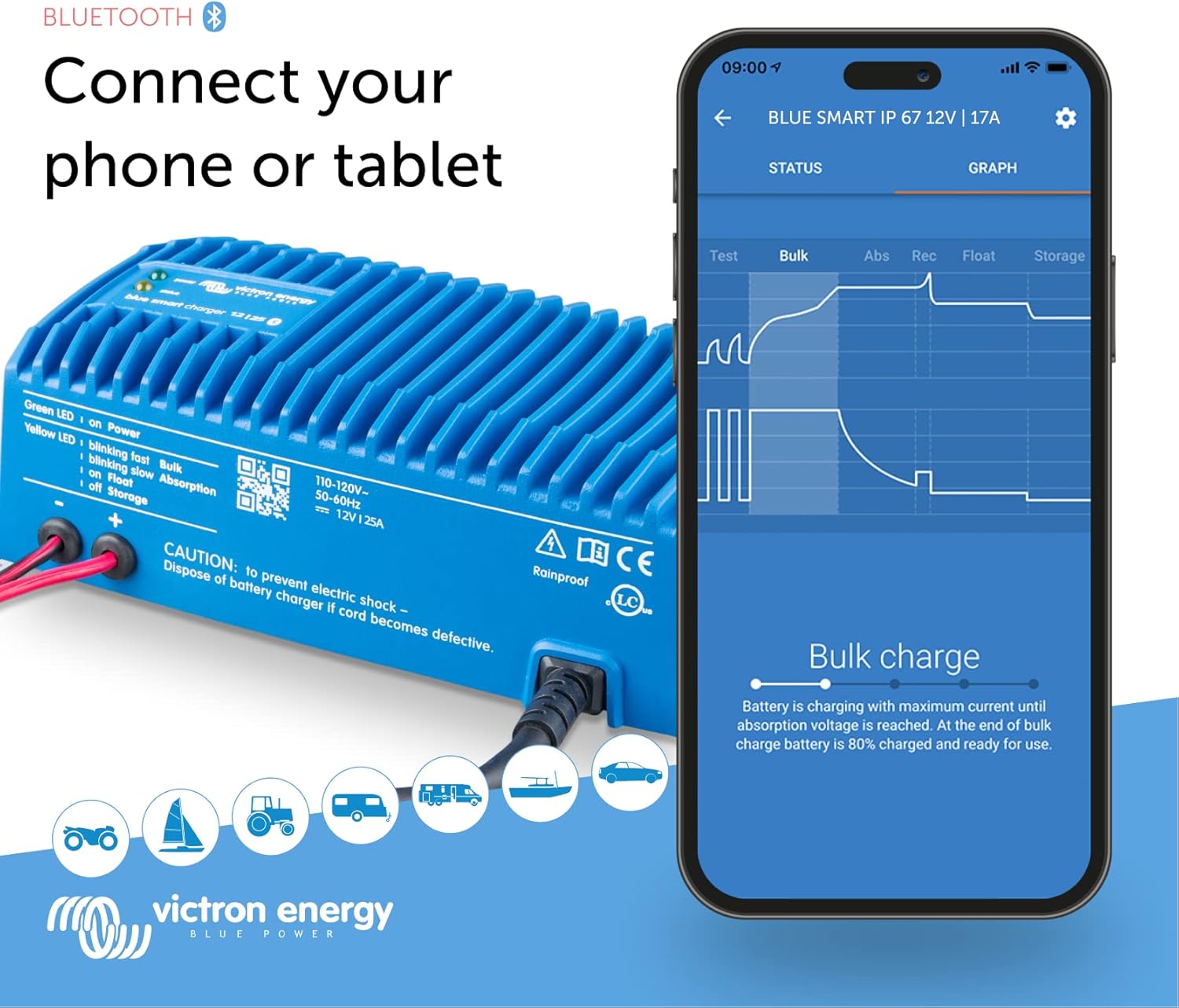
Figure 4: Connecting your phone or tablet to the charger via Bluetooth using the VictronConnect app.

Зураг 5: Илүүview of Blue Smart IP67 features and charging modes accessible via the app.
4.4.1 Monitoring Performance with VictronConnect
The VictronConnect app allows you to monitor the real-time status of your charger and battery. You can view ботьtage, current, and the current charging stage (Bulk, Absorption, Float, Storage).
Video 1: Demonstrates how to monitor charger performance using the VictronConnect App.
4.4.2 Adjusting Settings and History
Within the VictronConnect app, you can access and modify various charging parameters, including battery presets (Normal, High, Li-ion), charge current limits, and advanced settings for specific battery requirements. The app also provides a history of past charge cycles, showing duration, charged Ah, and any interruptions.
Video 2: Explains how to view history and adjust settings for Blue Smart Chargers within the VictronConnect app.
4.5 Victron Remote Management (VRM) Portal
For more extensive remote monitoring and management of multiple Victron Energy systems, the VRM portal can be utilized. This allows for detailed performance tracking and alerts.
Video 3: Introduction to the Victron Remote Management (VRM) portal for system monitoring and management.
5. Засвар үйлчилгээ
The Victron Energy Blue Smart IP67 charger is designed for durability and minimal maintenance. However, regular checks can ensure optimal performance and longevity.
- Цэвэрлэгээ: Periodically wipe the exterior of the charger with a damp Тоос шороог арилгахын тулд даавуугаар арчина. Хүчтэй химийн бодис эсвэл зүлгүүрийн цэвэрлэгч хэрэглэж болохгүй.
- Кабелийн үзлэг: Regularly inspect the AC and DC cables for any signs of wear, damage, or corrosion. Replace damaged cables immediately.
- Холболтын шалгалт: Бүх цахилгааны холболтууд нь нягт, зэврэлтээс хамгаалагдсан эсэхийг шалгаарай.
- Програм хангамжийн шинэчлэлтүүд: Keep the VictronConnect app and charger firmware updated to benefit from the latest features and improvements.
6. Алдаа засах
Хэрэв та цэнэглэгчтэй холбоотой асуудалтай тулгарвал дараах нийтлэг асуудал, шийдлүүдийг үзнэ үү.
| Асуудал | Боломжит шалтгаан | Шийдэл |
|---|---|---|
| Цэнэглэгч асахгүй байна / Гэрэл байхгүй | Хувьсах гүйдлийн цахилгаан байхгүй; Хувьсах гүйдлийн кабель эвдэрсэн; Дотоод гэмтэл. | Check AC outlet and cable. Ensure secure connection. If issue persists, contact support. |
| Батерейг цэнэглэхгүй байна | Incorrect battery type selected in app; Deeply discharged battery; Loose DC connections. | Verify battery type and settings in VictronConnect. Check DC cable connections. Allow time for deep discharge recovery. |
| Charger sparks when connecting to battery | Normal for some battery types; Incorrect connection order. | Ensure AC power is disconnected before connecting DC cables. Connect positive first, then negative. |
| Charger not recognized by VictronConnect app | Bluetooth disabled; App not updated; Charger not powered. | Ensure Bluetooth is enabled on your device. Update VictronConnect app. Verify charger is powered on. |
7. Техникийн үзүүлэлтүүд
| Онцлог | Дэлгэрэнгүй |
|---|---|
| Загварын нэр | Victron Energy Blue Smart IP67 12-Volt 25 amp 120VAC Battery Charger with NEMA 5-15 Plug (Bluetooth) |
| Хэсгийн дугаар | BPC122547106 |
| Гаралтын ботьtage | 12 вольт |
| Гаралтын гүйдэл | 25 Amps |
| Нэвтрэх хамгаалалтын (IP) үнэлгээ | IP67 (Waterproof, shockproof, ignition protected) |
| Холболт | Bluetooth (VictronConnect App) |
| Хэмжээ (LxWxH) | 8.6 x 3.9 x 2.6 инч (219 x 99 x 65 мм) |
| Зүйлийн жин | 5.4 фунт (2.45 кг) |
| Материал | Хуванцар |
| Оруулсан бүрэлдэхүүн хэсгүүд | Victron Energy Blue Smart IP67 12-Volt 25 amp 120VAC Battery Charger with NEMA 5-15 Plug (Bluetooth) |

Figure 6: Physical dimensions of the charger.
8. Баталгаат хугацаа ба дэмжлэг
8.1 Баталгаат хугацаа
This product comes with a manufacturer's warranty. Please refer to the warranty documentation included with your product for specific terms and conditions. For warranty claims, retain your proof of purchase.
8.2 Дэмжлэг
For technical assistance, troubleshooting, or product inquiries, please visit the official Victron Energy website or contact their customer support. You can also find additional resources and FAQs on the Амазон дээрх Victron Energy Store.


